
Set Post Status by Field Value (Advanced)


This tutorial/snippet expands on the Set Post Status by Field Value snippet. Here is a refresher on the issue:
Currently, the post status of a post generated from a Gravity Form submission is set via the Post Title, Post Body or Post Excerpt fields. So what do you do if you want the post status to be based on some form of user input? It’s a form-specific option (as opposed to field specific) which means Gravity Forms’ powerful conditional logic can not help us here.
The original snippet demonstrated the simplest approach and relied on the field values being set as valid post statuses. This snippet allows you to format the field values/labels however you want and then map which field values correspond to which post statuses in the code.
How do I install this snippet?
Use a simple copy and paste spell to copy the snippet above and paste it in your theme’s functions.php file.
Do I need to modify the snippet to work for my form?
Yes. Make note of the comments inline for pointers on where you will need to make your modifications.
- Update the
123in the filter namegform_post_data_123to the ID of your own form. - Update the
4in the two places you see$entry[4]to your field ID. - Update each case statement (ie
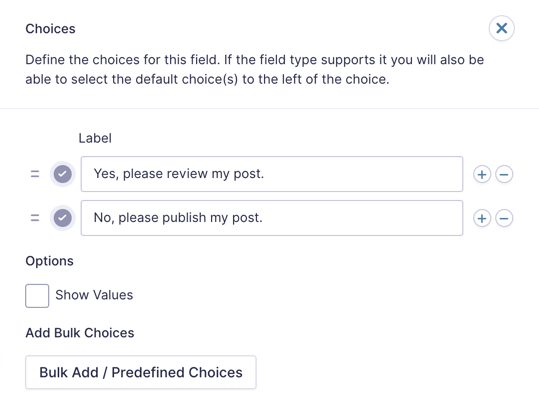
case 'Yes, please review my post.':) to match one of your field value options. - Update each
$post_data['post_status'] = 'your_post_status'assignment to equal the correct post status for the corresponding field value.
With this snippet you can map any field value to any post status. This snippet would work with a field configured like so:
 Set Post Status by Field Value (Advanced)
Even More Advanced
At the risk of exhausting this topic (wizards like to be thorough!), I want to share one more example of setting the post status by field value: setting the post status by a Product field value.
Usage
You can follow the same installation and modification instructions above. The only difference is this little line of code.
$values = explode('|', $entry[4]);A product field value is stored as a pipe (|) delimited list of values. The first value will be the product label or, if values are available and enabled for the Product field type (ie Drop Down Product Fields), the label will be replaced by the value as the first value. The second value will be the price.
| Format template | $entry[4] = 'label/value|price' |
| Format example w/ values enabled | $entry[4] = 'basic|0' |
| Format example w/ values not enabled | $entry[4] = 'Basic Package|0' |
For this example, we just want the label. We use the PHP explode() function to “split” the combined string into separate pieces where ever there is a pipe. This gives us an array of $values.
| Before Explode | $values = 'Basic Package|0' |
| After Explode | |
We know that the product option label will be the first value in our $values array because it was the first value in the combined product value string. An array’s index starts at 0 so we can assume that $values[0] will give us the label of the selected product option.
With that in mind, we can create a switch case (just like we did in the previous snippet) and set the post status dynamically based on which product option was selected.
switch($values[0]) {
	case 'Basic Package':
		$post_data['post_status'] = 'draft';
		break;
	case 'Premium Package':
		$post_data['post_status'] = 'publish';
		break;
}
Here is an example of how the Product field might be configured:
 Set Post Status by Product Field Value
Summary
Whew! That’s a lot to take in. I think I’m going to go have a rest in my tower. If you have any questions, just ask!


Hi David.
Thanks for this amazing solution.
I want to change the post status through the Edit Entry page under Gravity View. The code above doesn’t work in this situation.
Hi Howard,
The code snippet in this tutorial works during the initial form submission and doesn’t work within Gravity View. If you have an active Gravity Perks license, send us a message via our support form, so we can forward this as a snippet feature request.
Best,
David
Will this work with radio or checkbox fields versus dropdowns (I see you use dropdowns in the example).
Also, if I have 3 different forms, is it ok to drop the three instances of the code into functions for the specific form/field or is there a way to combine it into one?
Thanks
Hey Scot, yes, this will work with Radio Button fields. I’m not sure how it would work with Checkbox fields since multiple statuses could be selected? You would need to target each checkbox input individually as well (i.e. $entry[2.3]).
Given the basic nature of these snippets, I could just create 3 different instances of the snippet. You would need to rename the function for each instance.
gform_dynamic_post_status1 gform_dynamic_post_status2 gform_dynamic_post_status3
Hi
This post is so close to my own issue I thought I comment here and hope I’m not taking the conversation off-track.
I’m using GF+CPT with WP Job Manager Resumes and GF User Registration.
New users complete a registration form and are directed to a profile page where they complete a second form with fields mapped to the resume post type (via Title field). I have the second form setup to update the user’s information via the User Registration Update User feed option, so the data remains persistent in the form and also successfully updates the resume display each time it is submitted.
The issue is every time the user updates the form it creates a new resume which still displays fine since by design WPJM Resume always displays the latest resume, but I was hoping to find a way to get around the duplicate posts since they will appear in search results.
Is there some way the Post Status dropdown in the Title field could include a custom “post status” versus “publish”, or perhaps a way to update the post versus publishing a new version each time?
Thanks!
Hi Scot, for updating posts generated by Gravity Forms, I’d check out this plugin: https://wordpress.org/plugins/gravity-forms-post-updates/
Hi,
How can I set the visibility of the “pending/publish” field only to admins and editors? and for an specific user? I have got it with css but it is an unsecure method…
Ca you please help?
I’d hit Gravity Forms support for general questions like this. They’ve got a great support team ready to help. :)
HI, great post!!
I´m using sticky list and I want my forms to have pending status the first time only. When a user edit his own form (after admin accepted it) the state should be published.
I like sticky list but it is not exactly what I want, do you have a better solution to update a post through GF? I´m willing to pay for something like that.
Thanks a lot.
Regards
This might be a better solution: https://wordpress.org/plugins/gravity-forms-post-updates/
Thanks for this code. I was putting a form on a radio station website for churches and schools to submit closings/delays for publication on the website and on the air. The radio station issues a code that must be used so that they don’t get fake submissions.
I needed to have a field for that code and either publish the post if they had the correct code or place it in “Pending Review” if they either put in the wrong code or they don’t put in any code. This worked perfectly. I just set the default on the form to “Pending Review” and then put one case in the code above that noted the code. It worked like a charm.
Awesome! Glad to hear this worked for you. :)
Okey, let’s face it. I will stick to your first solution.
Have a nice day!
Rikard
Exactly was I’m looking for David! A question though, is this working with multisites? I have several sites, all using Gravity forms but only one function file.
All the best,
Hi Rikard, I’m assuming that each site on your network has it’s own Gravity form that is being used to generate posts? The simplest method is to create multiple instances of this snippet and wrap each in a blog ID based condition. You can then check which blog ID you are on via the get_current_blog_id() function. It’d look something like this.
Thanks David for the tip! Is there any way to only use “one” Gravity form for all my network sites? That would be ideal for me.
Once again, thanks for your reply.
Rikard
No simple way that I know of. You could iframe a Gravity Form on a child site but as far as running it from the shortcode, it would get a little tricky.
[…] Gravity Form users get the most out of Gravity Forms.Here are just a few of their recent posts: Set Post Status by Field Value (Advanced), Set Post Status by Field Value, Pro Tip: Skip Pages on Multi-Page Forms, and Custom Field […]