Understanding Gravity Forms Hooks: Wizard’s Guide

Learn what Gravity Forms hooks are and how they work — faster than you can say Quidditch. Simple walkthrough included.
- The lingo
- Gravity Forms hooks in a nutshell
- What are the types of hooks?
- Hook functions
- Seeing a hook in action
- How do I pick which hook to use?
- Hooked yet?
Hooks are like doorways developers add in their code to let your custom code step in at a specific moment.
For this reason, they come up whenever our customers want to do something out of the curve. The thing is, for me — a wizard with zero code experience — hooks were for fishing, filters were for air purifiers, and actions were for figures. They had no place in forms!
If you can relate, this guide will help you:
- Recognize hooks, be them actions or filters
- Understand how they work
- Feel more confident using and adapting snippets to customize Gravity Forms (and the entire WordPress ecosystem)
Key Takeaways
- Hooks let you customize Gravity Forms safely.
They keep your code separate from core plugin files, making customizations portable and update-safe. - Hooks are predefined moments where custom code can run.
Learning them helps you customize not just Gravity Forms, but the broader WordPress ecosystem. - There are two types of hooks: actions and filters.
Actions add functionality when something happens, while filters modify data and return the updated value. - Your custom code connects to hooks through callback functions.
You attach callbacks withadd_action()oradd_filter(), while Gravity Forms fires hooks usingdo_action()orapply_filters(). - Choosing the right hook is primarily about timing.
Start by identifying when in the form lifecycle your code should run, then select the corresponding hook. - Most Gravity Forms customizations begin with a code snippet.
Tools like the Code Snippets plugin provide a simple way to manage and test custom PHP without editing theme files. - Understanding a few core concepts unlocks most hook usage.
Focus on the basics to confidently adapt existing examples and documentation.
The concept of hooks is a general software pattern. For this article, we’ll be focusing on how hooks work in WordPress, and more specifically, Gravity Forms.
The lingo
Here’s a quick reference for the more technical terms in this article. We’ll expand on these terms as we go.
Function
A named block of code you write once and can run whenever you want, just by calling its name. Everything related to hooks is based off of functions.
Example
Makes a value uppercase (wizard → WIZARD)
function make_uppercase( $value ) { return strtoupper( $value ); }Callback
When the name of a function is used to link the function to a hook.
Example
'make_uppercase' in the hook function below.
add_filter( 'gform_save_field_value', 'make_uppercase' )Hook
A named opportunity to run functions at a specific moment.
Example
gform_save_field_value in the hook function below, which fires before a field value is saved to the database.
add_filter( 'gform_save_field_value', 'make_uppercase' )Action
A type of hook for functions that do something extra.
Example
gform_after_submission fires after a form is submitted; can be used to send a Slack message or add a note to the entry
add_action( 'gform_after_submission', 'send_slack_message' )Filter
A type of hook for functions that receive a value, filter it, and return the filtered value.
Example
gform_save_field_value fires before a field value is saved, letting a field value be received by a function, transformed, and returned.
add_filter( 'gform_save_field_value', 'make_uppercase' )Snippet
A piece of code added to customize behavior. Functions aren’t snippets, but snippets can have functions.
Example
The combination of the function example and the callback example. These would be pasted together into a snippet management plugin or a child theme’s functions file.
function make_uppercase( $value ) { return strtoupper( $value ); }

add_filter( 'gform_save_field_value', 'make_uppercase' )
Gravity Forms hooks in a nutshell
Hooks (aka actions and filters) let you customize Gravity Forms without editing core plugin files.
Example: Before a form loads, the gform_pre_render hook gives you a chance to modify the form before the user sees it, like dynamically filling drop down choices or changing field labels.
The beauty of this method is how it’s designed for safety. Your code stays separate from core files, keeping Gravity Forms itself intact and your customizations clean and portable.
What are the types of hooks?
There are two types of hooks: actions and filters.
This part always tripped me up because they are usually described very similarly. What made it click was imagining the plugin saying:
- Action: “When this happens, also do this and don’t give me anything.”
- Filter: “Before this is used, change it like this and return it to me.”
Definition for the road:
- Actions do something extra at a specific moment. That “something” can be anything, except what filters do.
- Filters change data Gravity Forms is already using and return the changed data to Gravity Forms.
| Example | When it happens | Possible usages |
Actiongform_after_submission | After the form is successfully submitted. | – Send a summary email to a manager. – Add the submitter’s email address to a mailing list. |
Filtergform_field_value | When the form is rendered. | – Pre-fill Email field with the current user’s email address. – Pre-fill a “Date Requested” field with today’s date. |
Hook functions
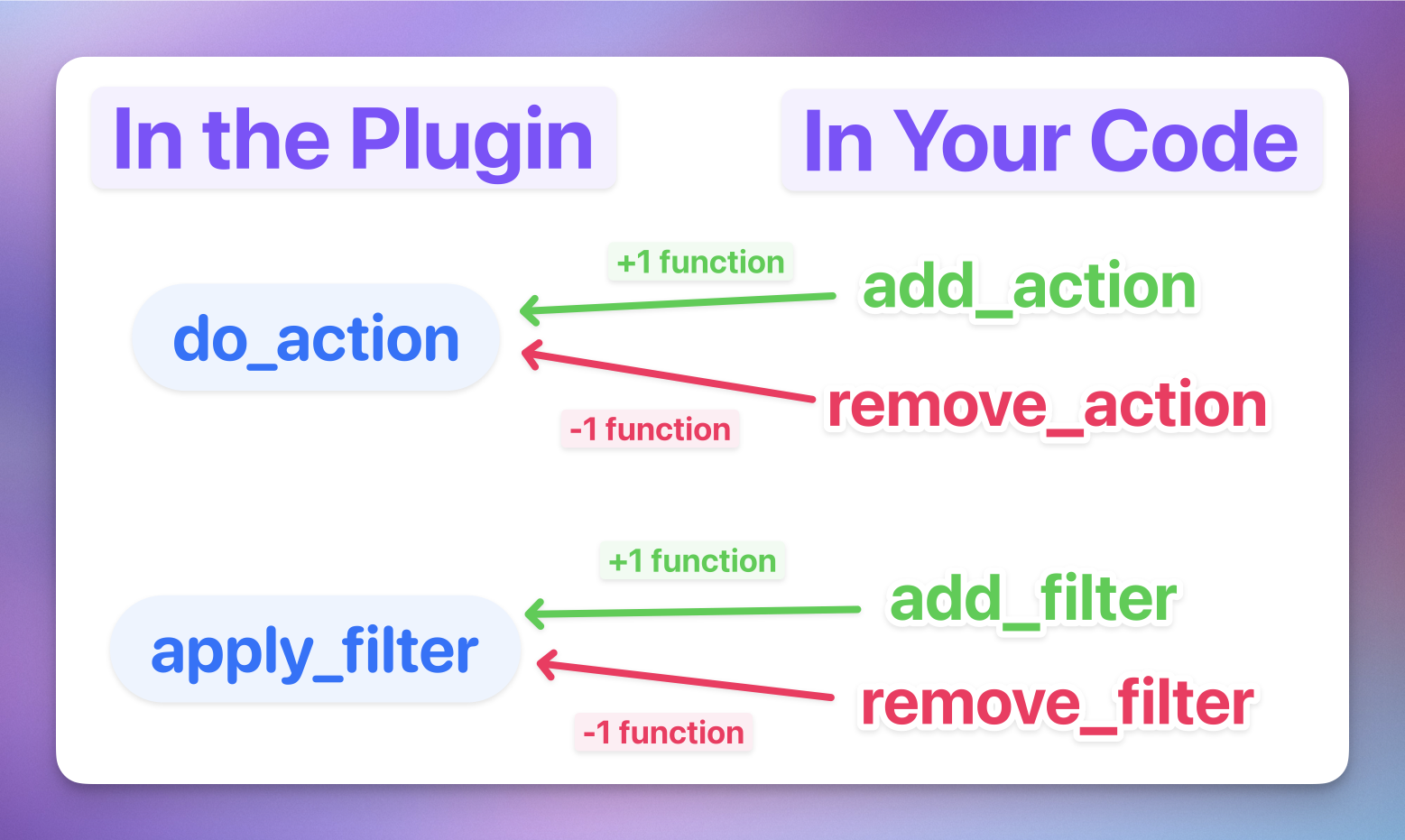
Hooks are used exclusively in hook-specific functions provided by WordPress itself.
How it works:
- Gravity Forms uses certain hook functions to create the hooks
- You use other hook functions to add your own code to the mix
| Hook Function | What it does | Who uses it | Example |
do_action() | Creates/fires an action hook | Gravity Forms | Gravity Forms fires do_action( 'gform_after_submission', $entry, $form ) at the moment a submission is complete, giving you the opportunity to run your own functions |
add_action() | Attaches a function to a do_action() hook | You | add_action( 'gform_after_submission', 'send_slack_message' ) tells WordPress to run your send_slack_message function every time gform_after_submission fires |
remove_action() | Detaches a function from a do_action() hook | You | Before a bulk data import, you call remove_action to detach the send_slack_message function so the Slack thread doesn’t get hundreds of messages |
apply_filters() | Creates/runs a filter hook | Gravity Forms | Gravity Forms passes the field value through apply_filters( 'gform_save_field_value', $value, $entry, $field, $form ) before saving, allowing any attached functions to modify it |
add_filter() | Attaches a function to a filter hook | You | add_filter( 'gform_save_field_value', 'make_uppercase' ) tells WordPress to run your make_uppercase function on the value before it’s saved |
remove_filter() | Detaches a function from a filter hook | You | A plugin has hooked a function to gform_save_field_value that reformats phone numbers before they’re saved. You can’t edit the plugin’s code directly, so you use remove_filter to detach it instead. |
Here’s a visual aid:
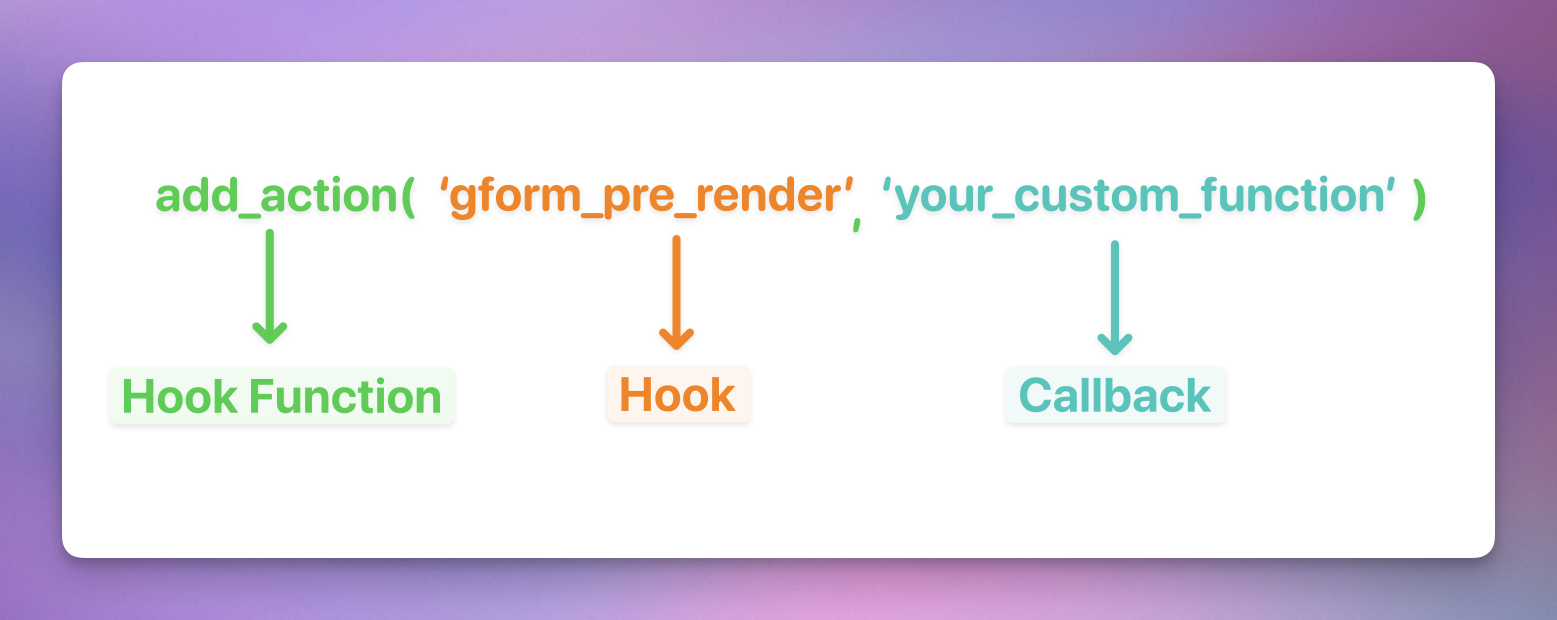
For the hook functions you’ll be using, the full function includes the function itself, the hook, and a callback. A callback is just a function’s name, working like a calling card inside of the hook function.
Seeing a hook in action
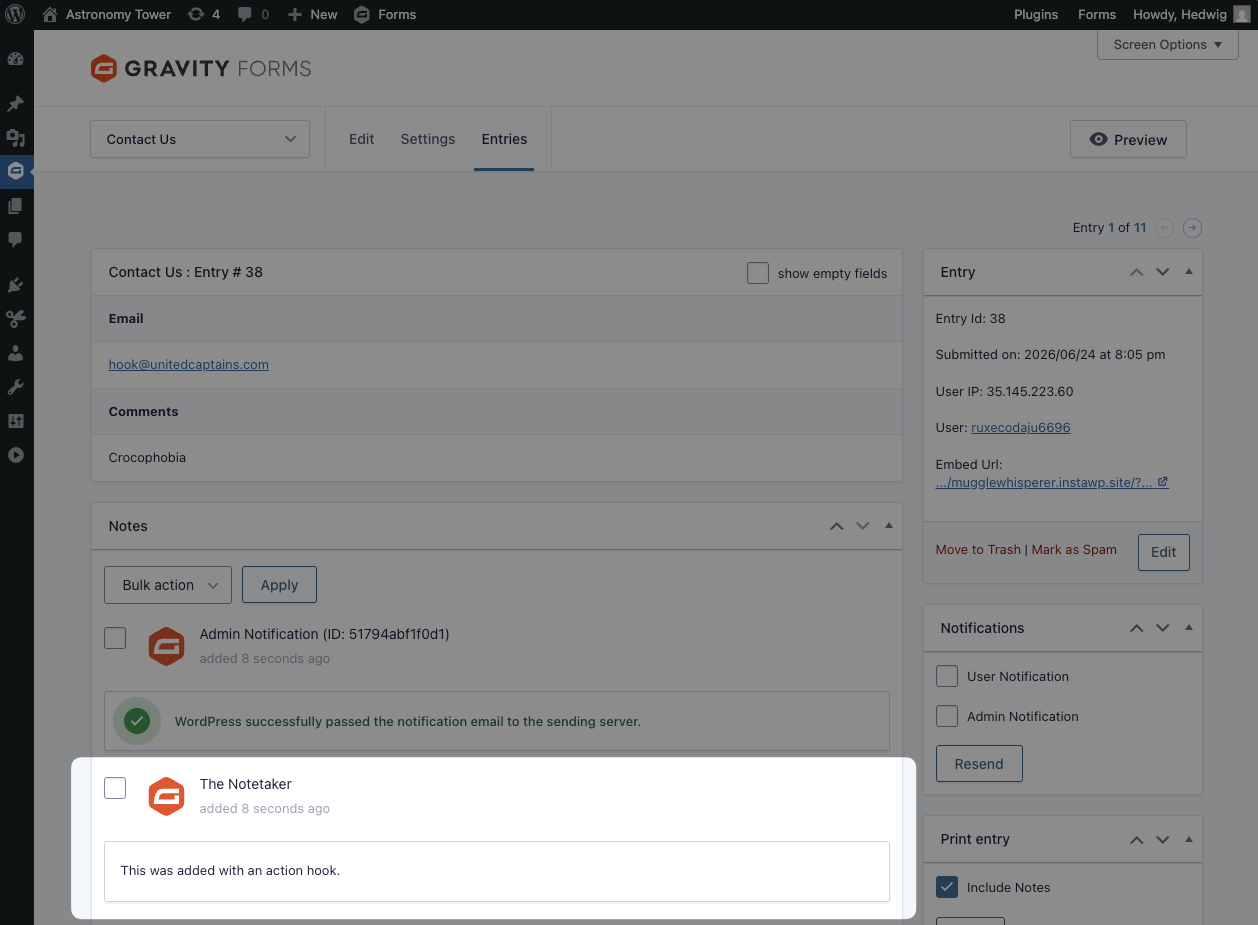
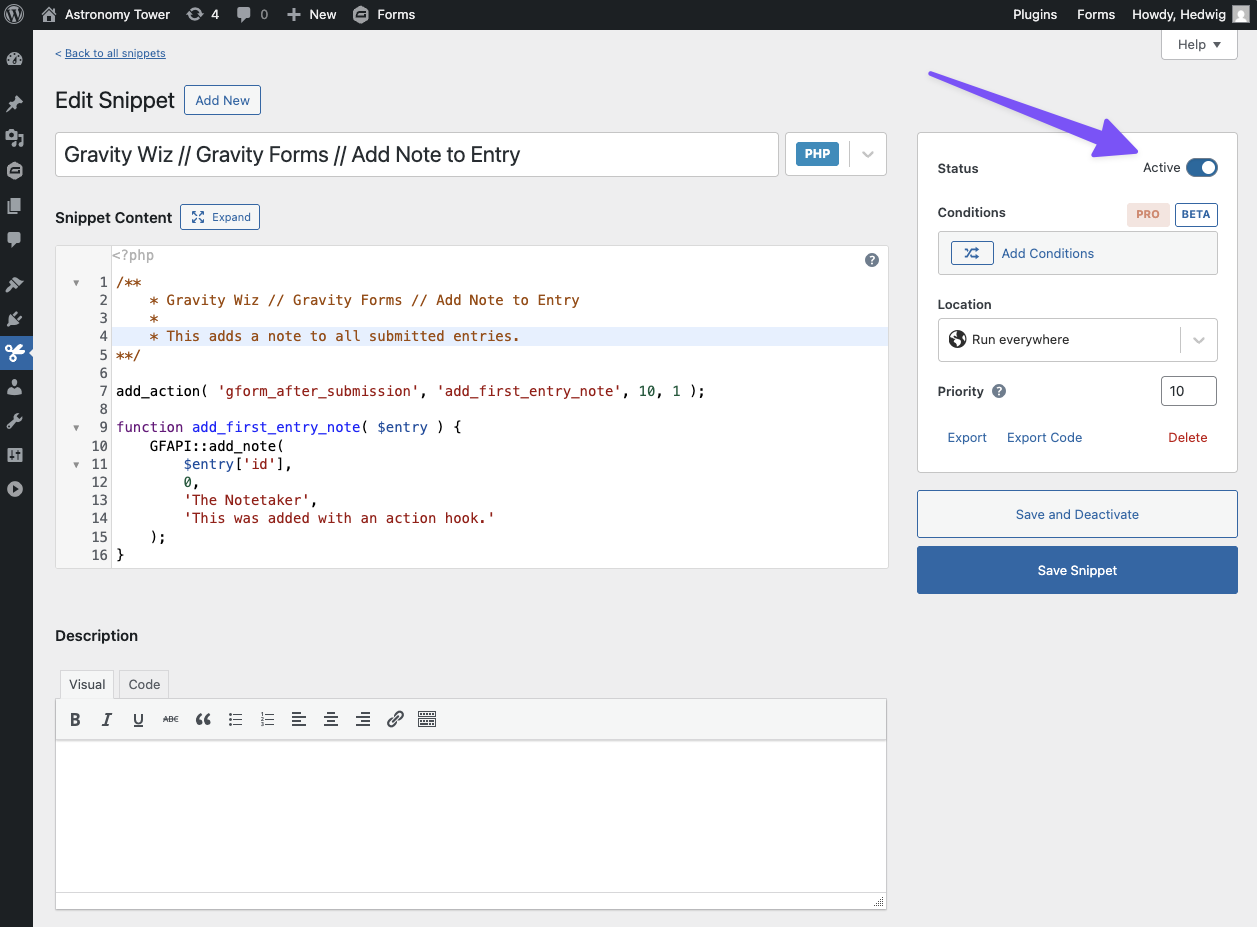
Time to get our hands dirty: let’s add an action that writes an entry note automatically after submission.
First, we’ll need a place to add our action to. I recommend using Code Snippets, a free snippet management plugin, for its ease of use.
Once you have it installed and activated, go to Snippets › Add New for our new playground.
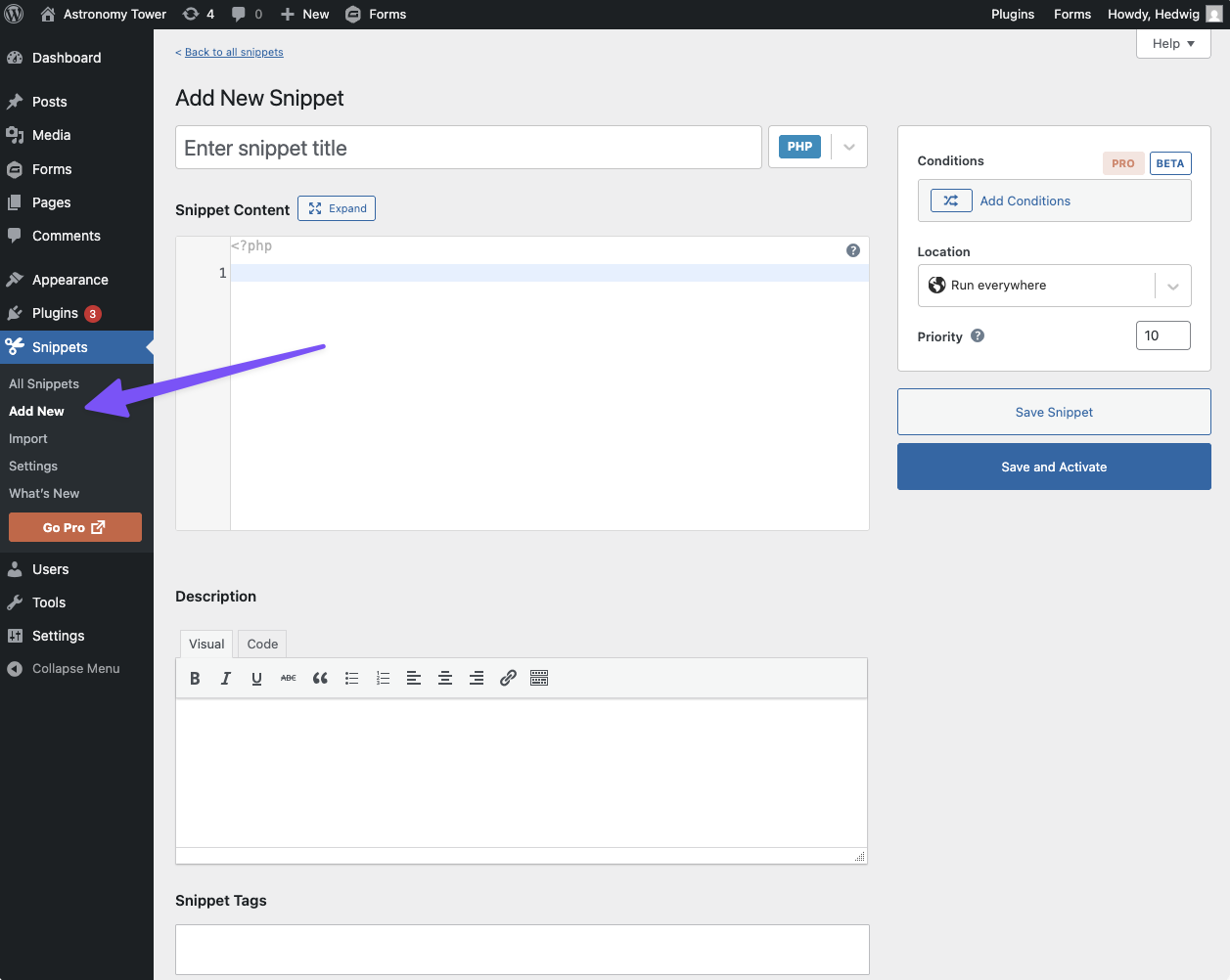
Paste the following bit of code:
add_action( 'gform_after_submission', 'add_first_entry_note', 10, 1 );gform_after_submission: A Gravity Forms hook used to perform actions after the entry has been created (i.e. adding notes or sending data to external applications).add_first_entry_note: Your callback. You can change its name, just make sure it’s unique and related to what it does.10: The level ofpriorityfor this action against all other actions attached to the hook. Lower numbers run first. Defaults to10.1: Number of arguments that the callback accepts. Defaults to1. More on that below.
If the default priority and number of arguments match what you need, 10 and 1 can be omitted.
Awesome — that’s our hook function (add_action()) attaching the add_first_entry_note() function to the gform_after_submission hook. Now we just need to create the add_first_entry_note() function. 😄
function add_first_entry_note( $entry ) {
    GFAPI::add_note(
        $entry['id'],
        0,
        'The Notetaker',
        'This was added with an action hook.'
    );
}
Function Breakdown (Optional Reading)
function: Lets PHP know you’re about to declare a function.
add_first_entry_note: The name of this function. It must match the callback name used in the function hook.
$entry: Parameter created by Gravity Forms for the gform_after_submission hook. Parameters are like official speakers for arguments (aka the actual data). In this case, the $entry parameter receives the data from the entry that was just created and can reference it.
GFAPI::add_note: This uses the Gravity Forms API (GFAPI) to add a note (::add_note). More nerdy details here.
$entry['id']: This asks the $entry parameter for the entry ID. Gravity Forms needs this so it knows which entry should receive the note.
0: This is the user ID for the note. 0 means no specific WordPress user is being assigned as the note author, so you can give it a custom name.
The Notetaker: The author of this note.
This was added with an action.: The note itself!
That’s it! Now click on Save & Activate on the left and go submit a form. Your note will be waiting in the entry. 👀
Once you’re done experimenting, you might want to deactivate this snippet as it will add this note to all entries created while it’s active.
How do I pick which hook to use?
Deciding which hook to use is the same as deciding when you want your code to run in the Gravity Forms process. We have a handy Gravity Forms hook reference that breaks down when each Gravity Forms hook happens and what it’s related to.
The reference also links to Gravity Forms’ official hook documentation, where you can find all of the relevant information about a hook (e.g. its parameters).
Hooked yet?
Let us know if you’d like to see a filter breakdown added to the article, or if you have any questions. Happy hooking!