
Introducing Gravity Connect Google Calendar

Today’s the date: Google Calendar events can now be created and updated directly from Gravity Forms.
- Magical data security
- Flexible dates and times
- Complete, ready-to-use events
- Conditional event creation
- Plans changed? Got you covered
- Save the date
Gravity Connect (GC) Google Calendar turns Gravity Forms submissions into Google Calendar events automatically, keeping schedules up-to-date without extra work.
At a glance:
- Securely connect to one or more Google accounts using OAuth
- Map form fields and more to event titles, dates, times, and descriptions
- Create events only when specific conditions are met
- Add Google Meet links and invite attendees automatically
- Keep calendar events in sync as entries are updated
The best part? No need to set time aside for the setup—you can do it in minutes. 😉
Magical data security
GC Google Calendar is powered by the Gravity Connect framework, which makes it lightweight and secure. It connects directly to Google using OAuth — your data never touches our servers. Built-in retry logic and error notifications ensure events are created reliably, even if Google’s API is temporarily unavailable.
What’s more? Unlike other popular integration and automation tools, Gravity Connect doesn’t charge you based on data usage. Send and sync hundreds of events per week with no additional fees.
Flexible dates and times
Build events from form fields, merge tags, fixed dates, submission time, or relative values like Tomorrow, +3 hours, or Next Monday. Perfect for task reminders or appointments with specific time-frames.
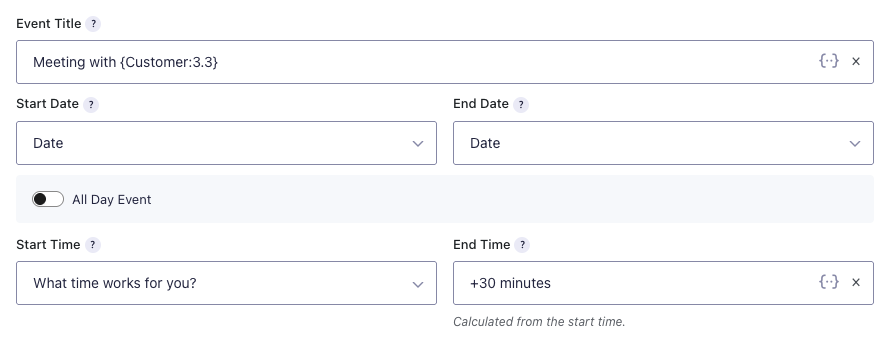
Additionally, switch between all-day and timed events as needed, just like in Google Calendar.
Complete, ready-to-use events
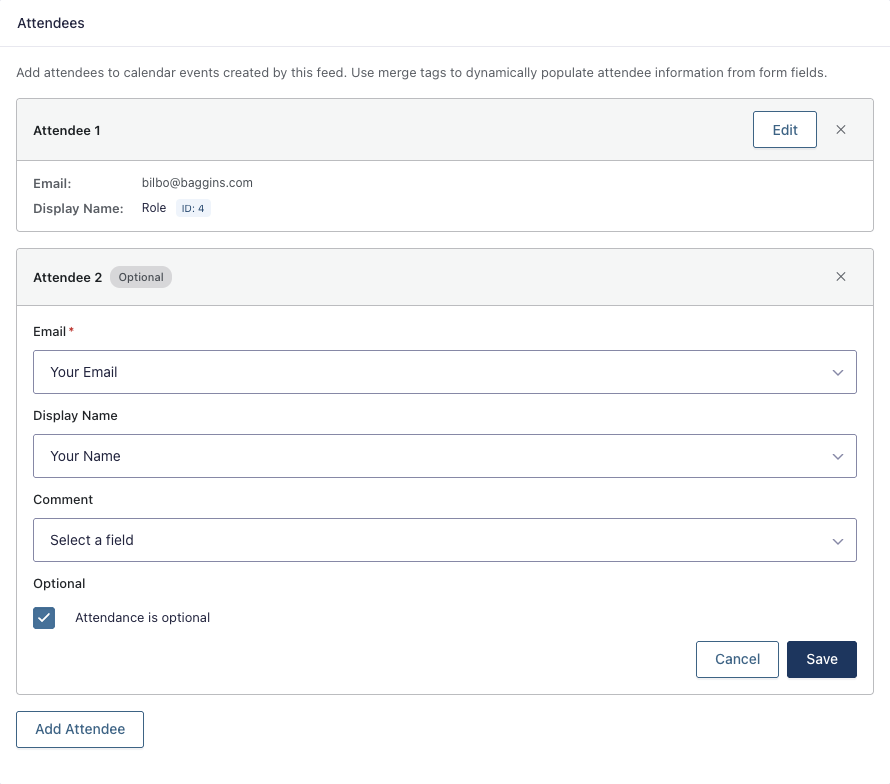
Set event titles, add detailed descriptions, and invite attendees automatically from Gravity Forms. Use merge tags to dynamically populate event details from any form field, unlocking personalized titles like “Meeting with {Name:3.3}” and custom event descriptions.
P.S — Hosting an online event, like a company meeting? Have the Google Meet link generated automatically too. 🪄
Conditional event creation
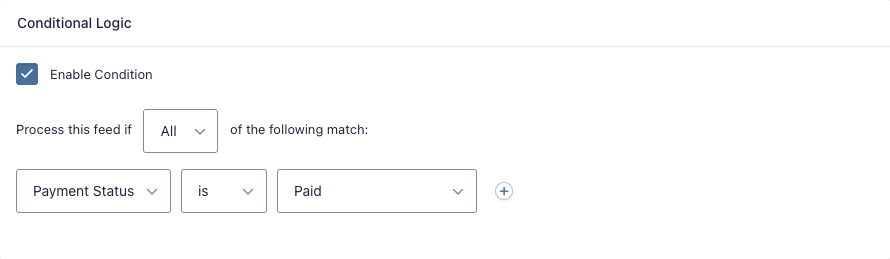
Keep your schedule accurate by using conditional logic to add events to Google Calendar only after payment is processed or manual approval is granted.
Plans changed? Got you covered
When enabled, events stay in sync with their corresponding entries. Updates and deletions in Gravity Forms are reflected in Google Calendar, reducing confusion and preventing outdated schedules from haunting your calendars. 👻
Save the date
GC Google Calendar is available now in your Spellbook — RSVP!
Not a Gravity Connect subscriber yet? Get connected here.
Will this support creating an event for a particular calendar while also attaching google calendar resources like rooms and other hardware that have their own calendars? It is important that we are able to represent which google resources are needed for a given event and therefore unavailable for use by other events.
Hey JT,
We don’t have any native support for Google Calendar resources yet, but we’d love to learn more about how this would fit into your setup. I just sent a follow-up email to gather some more information here!
Just saw that it doesn’t work with GP Bookings yet (I tried it and sure enough it didn’t work lol). Saw that it is coming soon, is there a timeline on when this is available so I can integrate GCGC with my GP Bookings forms?
Hey Bryan, we’re pushing hard to bring support for GP Bookings to GC Google Calendar in March! Not too much longer. 😉
BOOM! I love this! I’ve been wanting this for a while and it works great! Now all my birthday party bookings for my business appear in my google calendar and I don’t have to look it up all the information in the back office! Thanks for this!!!
Hey Bryan,
We love to hear that! It’s awesome to know GC Google Calendar is already making those birthday party bookings a breeze for you. 😀
Cheers,