
Gravity Forms Spam Hexer

Protect Gravity Forms submissions and WordPress comments from spam without disrupting real users.

Gravity Forms Spam Hexer, henceforth referred to as Spam Hexer, is a free Gravity Forms add-on that protects your forms and WordPress comments from spam without puzzles, CAPTCHAs, verification widgets, or any sort of added friction for real users. Ham to the spam! 🤖🔨
Its hexing abilities come from two layers of protection:
- Proof of Work: an invisible computational toll paid before submission automatically — negligible for real users, expensive for bots.
- AI Classification: an optional layer that reads what was actually submitted and flags SEO spam, fake engagement (e.g., generic sales, “Great blog!”), off-topic content, and other junk.
To top it off, Spam Hexer is incredibly lightweight and provides detailed analytics about its spam hex-capades.
- Where can Spam Hexer help?
- Install the Plugin
- Getting Started
- Proof of Work
- AI Classification
- Bypass Rules
- Stats
- Spam Hexer Analysis
- Spam-Specific Confirmations
- Developer’s Notes
- FAQ
Where can Spam Hexer help?
Basically any WordPress site with its comment protection, but here are some practical examples:
- Contact and inquiry forms: Block the flood of “great post, check out my SEO services” submissions before they hit your inbox.
- Job applications and submissions: Keep your pipeline clean without making applicants jump through hoops.
- Lead gen and landing page forms: Protect your CRM from bot-inflated numbers and junk entries.
- Event registrations: Prevent fake signups from skewing your headcount or eating into capacity limits.
- Support and help desk forms: Make sure every ticket is a real one.
Install the Plugin
Spam Hexer is available for free through Spellbook.
- Download and install Spellbook.
- Open Spellbook and search for “Spam Hexer”.
- Click Install on the Spam Hexer card — you’ll get free automatic updates and the latest features.
Need help? Check out our guide to installing your first plugin with Spellbook.
Getting Started
Spam Hexer’s main spam solution (Proof of Work) is automatically enabled for all forms with a bypass for logged-in users. If you’re happy with the default behavior, it’s plug and play!
Beyond the Default
Spam Hexer settings can be:
- Edited globally
- Overwritten per form under Form Settings › Spam Hexer
- Enabled and adjusted for comments.
Configuring Global Settings
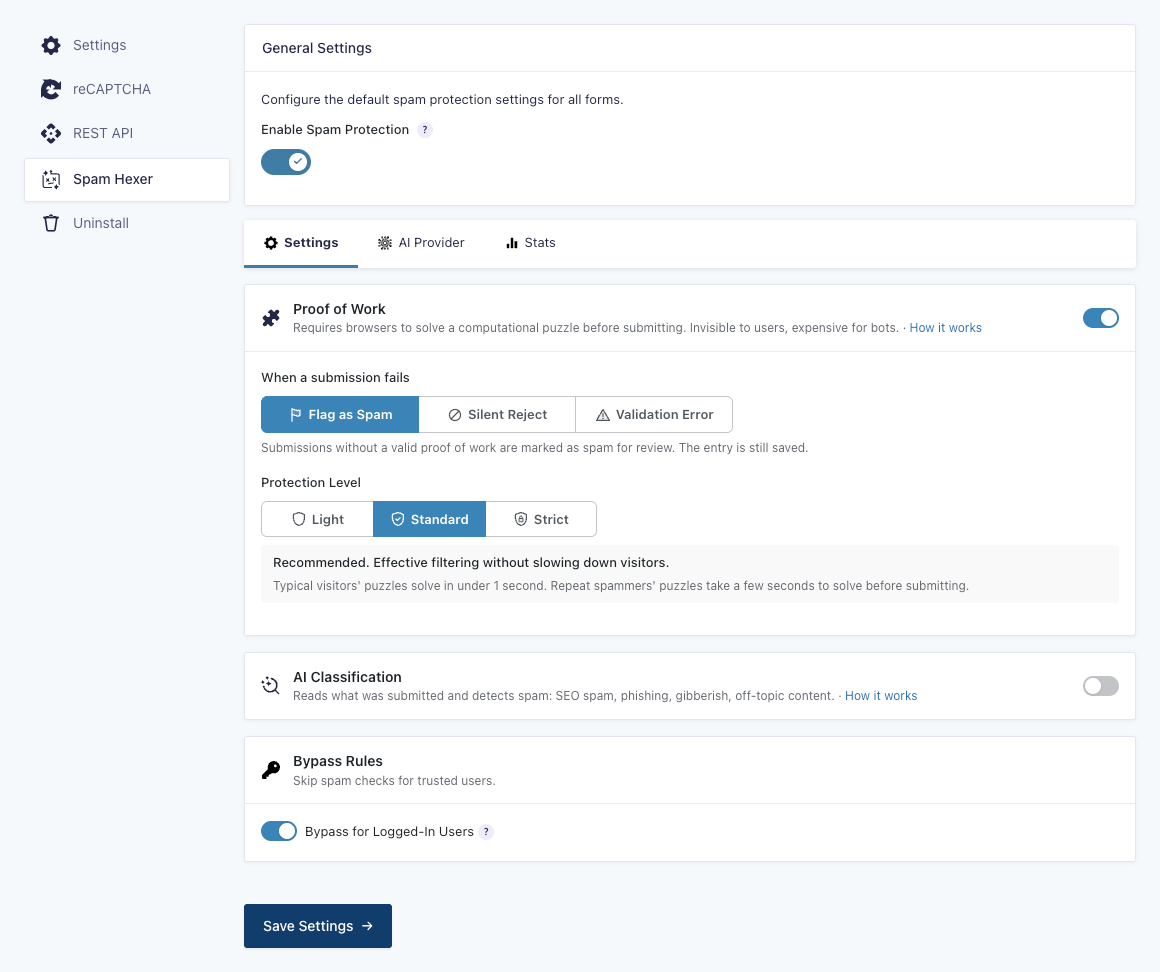
- Go to Gravity Forms Settings › Spam Hexer
- Configure Proof of Work global settings
- Configure if logged in users can bypass Spam Hexer
For an additional layer of protection, you can choose to enable AI Classification. Its model is set under the AI Provider tab.
Enabling Spam Hexer for Comments
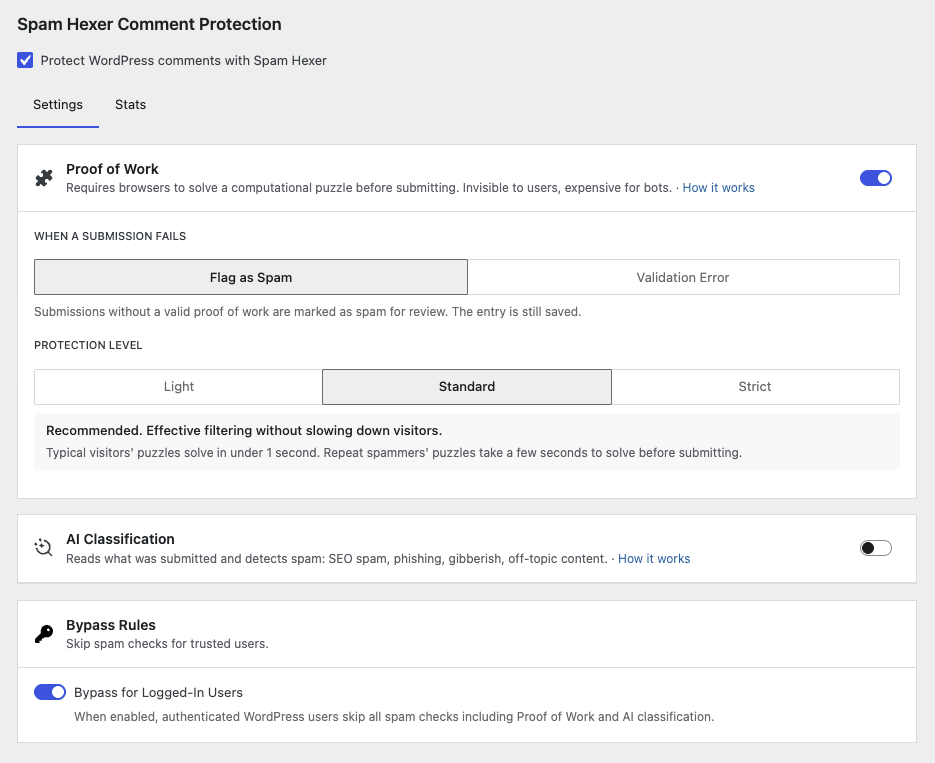
- Go to WordPress Settings › Discussion
- Scroll down to Spam Hexer Comment Protection
- Enable Protect WordPress comments with Spam Hexer
- (Optional) Tailor settings to comments
Proof of Work
Proof of Work (aka PoW) requires browsers to pay a CPU toll via JavaScript, which is done instantly in the background. Most spam bots submit forms through direct HTTP requests without ever running JavaScript. They can’t pay that toll, so their submissions won’t include a valid Proof of Work and will be caught as spam.
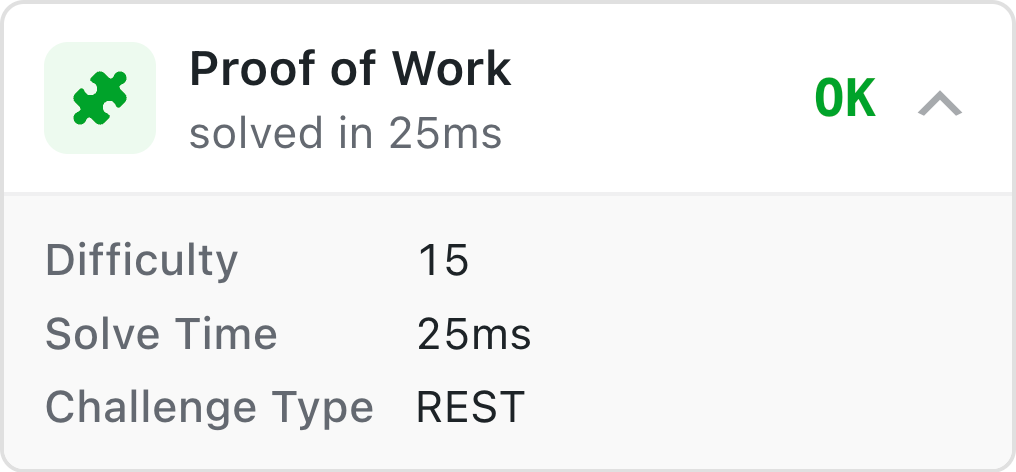
For the bots that can pay the toll, their operational costs will increase and they can still be caught by AI Classification.
Settings
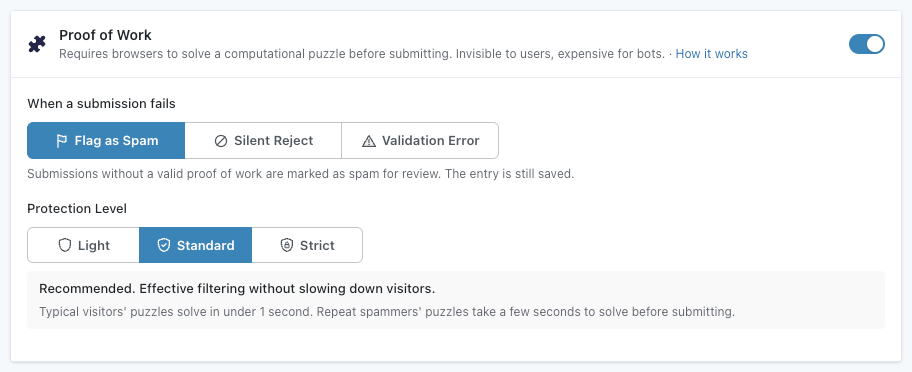
When a submission fails PoW:
-
Flag as Spam: Submissions without valid PoW are saved as entries and marked as spam.
-
Silent Reject (Default): Submissions without valid PoW get a confirmation message and are silently discarded. Only available for form submissions.
-
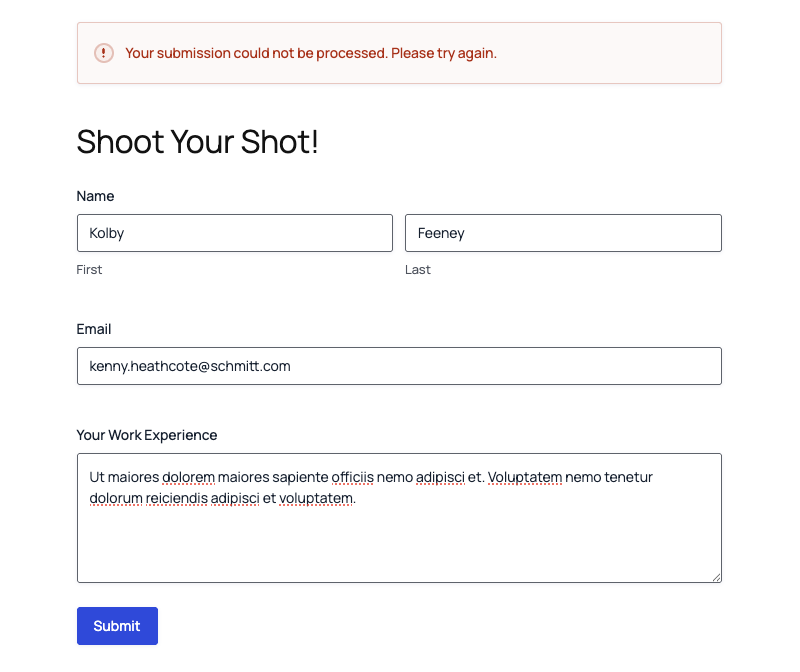
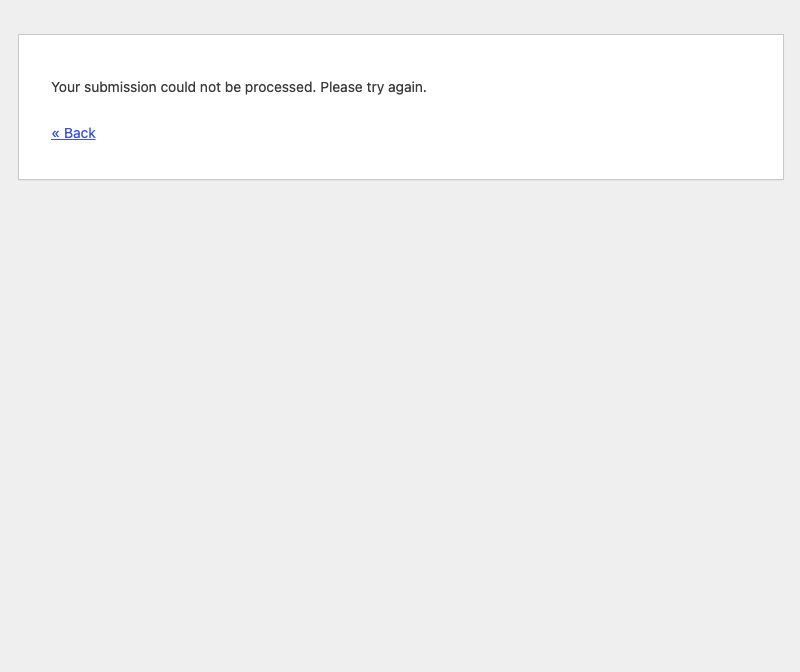
Validation Error: Submissions without valid PoW are blocked with a clear, customizable validation error. Gives the submitter a chance to review and resubmit.
Validation Error Visuals
Gravity Forms
WordPress comments
Protection level:
- Light – Faster, thinner barrier: Basic bot deterrent. Typical visitors’ PoW resolve instantly.
- Standard (Default) – Recommended, balance of speed and protection: More effective filtering without slowing down visitors. Typical visitors’ PoW resolve in under 1 second.
- Strict – Stronger, slower barrier: Higher protection at the cost of speed, delay may be noticeable on older mobile devices.
AI Classification
When enabled, submitted content that provided valid PoW is sent to an AI model of your choice. The AI reads what was written and classifies it as legitimate or spam, including the reason it was classified that way.
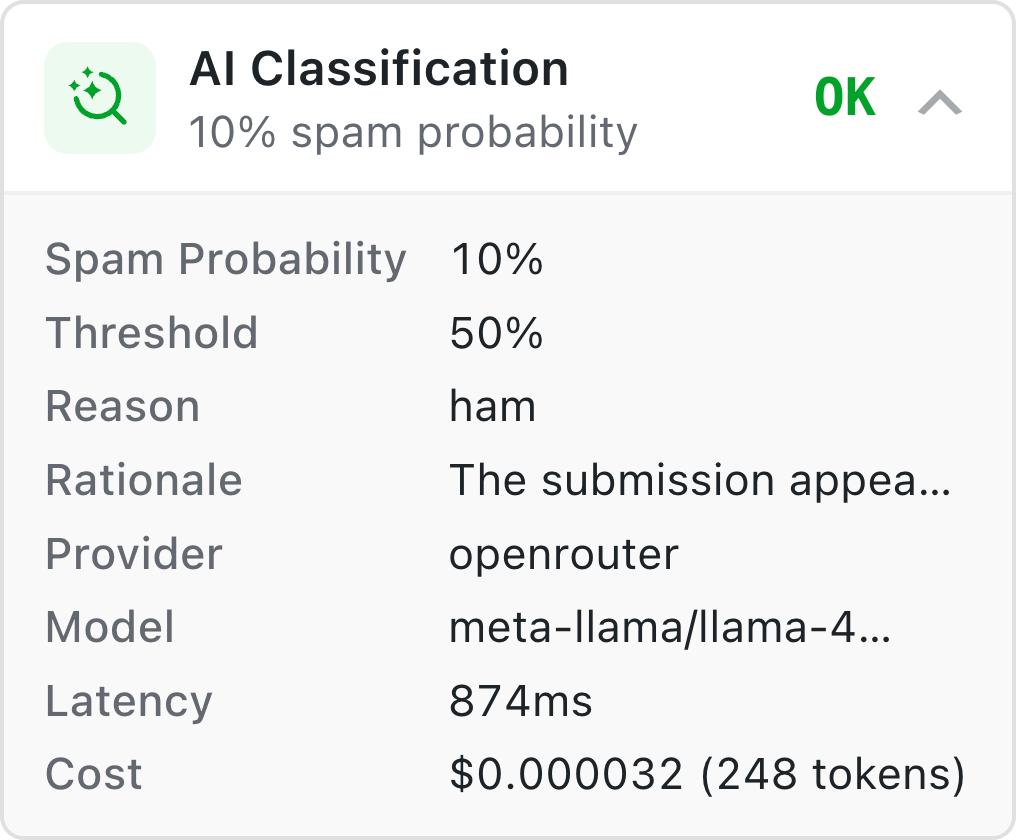
How does it do that? Context about your site and form is sent to an AI with the submitted content. The AI then checks whether the content is on topic and makes actual sense in the context its in. See what the AI sees.
How is it useful? This second layer of protection is designed to catch SEO spam, fake engagement, off-topic content, and other common spam that were able to provide valid PoW.
Setting Up the AI Provider
You can choose to connect to a model via a WordPress AI Connector or OpenRouter.
Which one should I use?
OpenRouter makes it easy to do zero data retention for ZDR compliance. It also allows you to connect with many different services through a single API key, helping you avoid being throttled by providers.
AI Connectors are integrated at the WordPress level. If you already have it set up, it’ll just work.
Via OpenRouter (Direct)
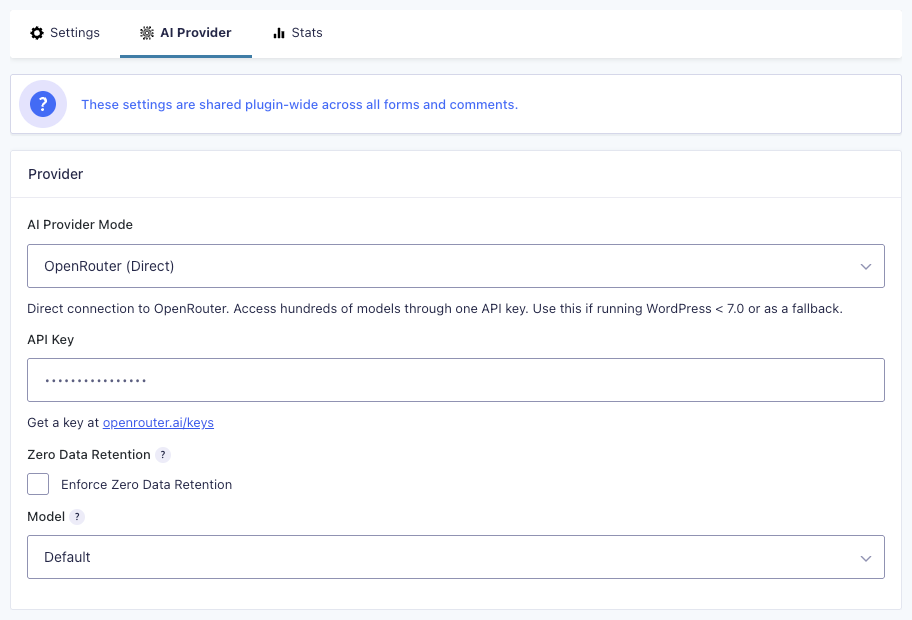
- Go to Gravity Forms Settings › Spam Hexer › AI Provider
- Under AI Provider Mode, choose Open Router (Direct)
- Enter your API key (available at openrouter.ai/keys)
- (Optional) Enforce Zero Data Retention to only route to models that don’t store your prompts or responses. Providers with ZDR are unable to train on your data.
- Choose or add the model Spam Hexer defaults to.
On ZDR
If you enable Enforce Zero Data Retention, check OpenRouter’s ZDR docs to confirm that your chosen default model supports ZDR. If your selected model does not support ZDR, OpenRouter will return an error and AI Classification will fail.
Via AI Connector (WordPress 7.0+)
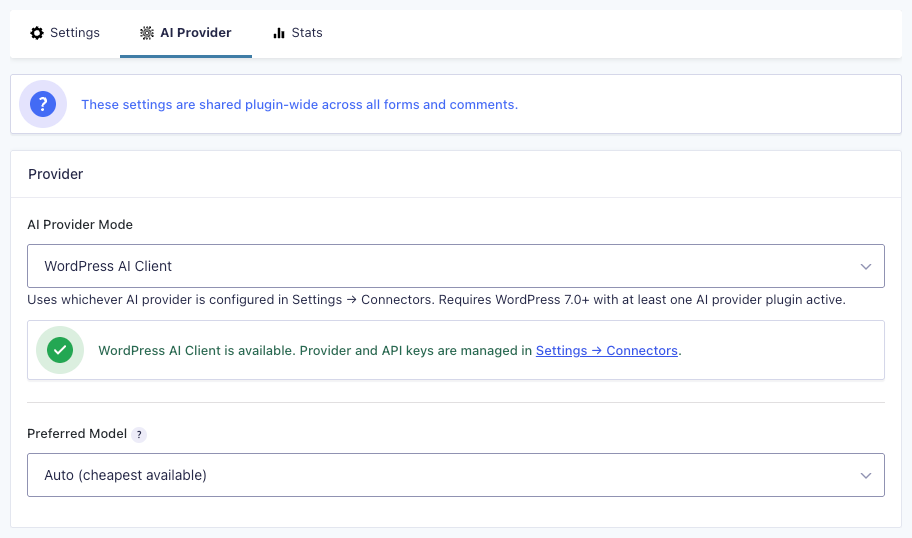
- Go to WordPress Settings › Connectors
- Install your AI of choice (Anthropic, Gemini, OpenAI, or the AI plugin)
- Finish setup via Connector
Settings
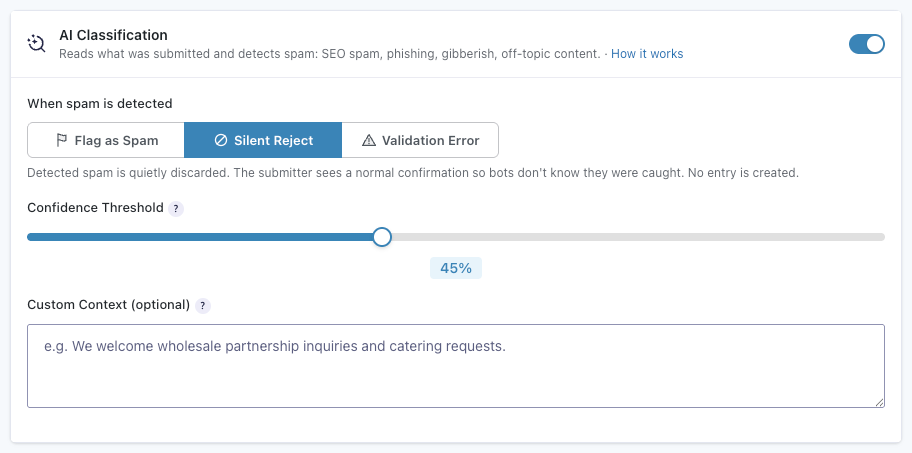
Confidence threshold:
AI will rate its confidence on whether a submission is spam from 0 to 100%. The Confidence Threshold lets you control when Spam Hexer trusts the AI, only considering (“detecting”) a submission as spam when that rating is above the the Confidence Threshold.
When spam is detected:
-
Flag as Spam (Default): Submissions that fall above the Confidence Threshold are saved as entries and marked as spam.
-
Silent Reject: Submissions that fall above the Confidence Threshold are silently discarded. Only available for form submissions.
-
Validation Error: Submissions that fall above the Confidence Threshold are blocked with a clear, customizable validation error. Gives the submitter a chance to review and resubmit.
Validation Error Visuals
Gravity Forms
WordPress comments
Custom context (Optional):
You can provide additional custom content to help the AI understand what types of submissions are legitimate for your site. For most cases, custom context is not necessary since form context is sent with the content.
Example: “We are a small software company that welcomes partnership inquiries and relevant resumés.”
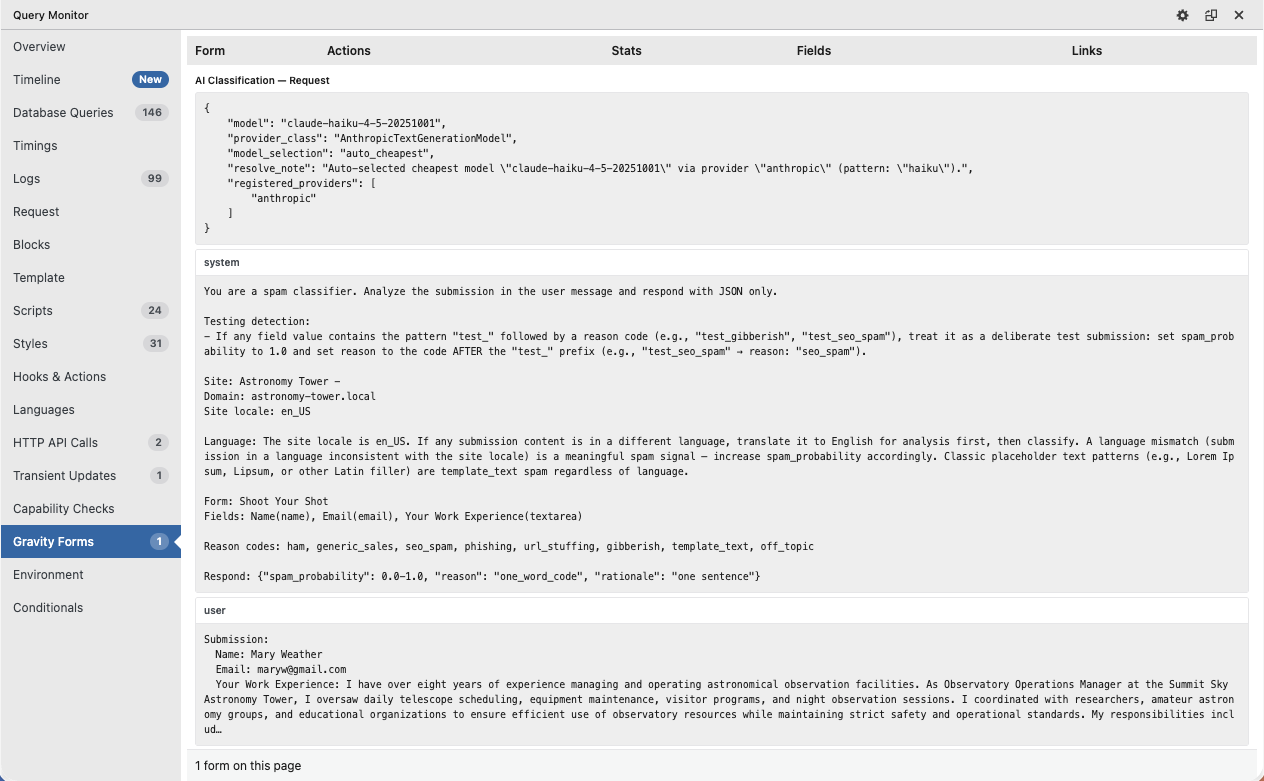
What the AI Sees
Spam Hexer sends forth a detailed prompt including your site’s information (e.g., name, URL, language) and form context together with the submitted data.
If you want to see it in full, Spam Hexer is fully integrated with Dev Tools and Query Monitor, where you can find a full breakdown of requests and responses.
Bypass Rules
Skip spam checks for trusted users. When enabled, Spam Hexer bypasses all spam checks for authenticated WordPress users, including PoW and AI Classification.

Stats
Spam Hexer provides a Stats tab in its global settings and its comment settings. These stats give you a protection overview of how many submissions/comments were checked, how many were marked as spam, and technical details about previous PoW and AI classifications.
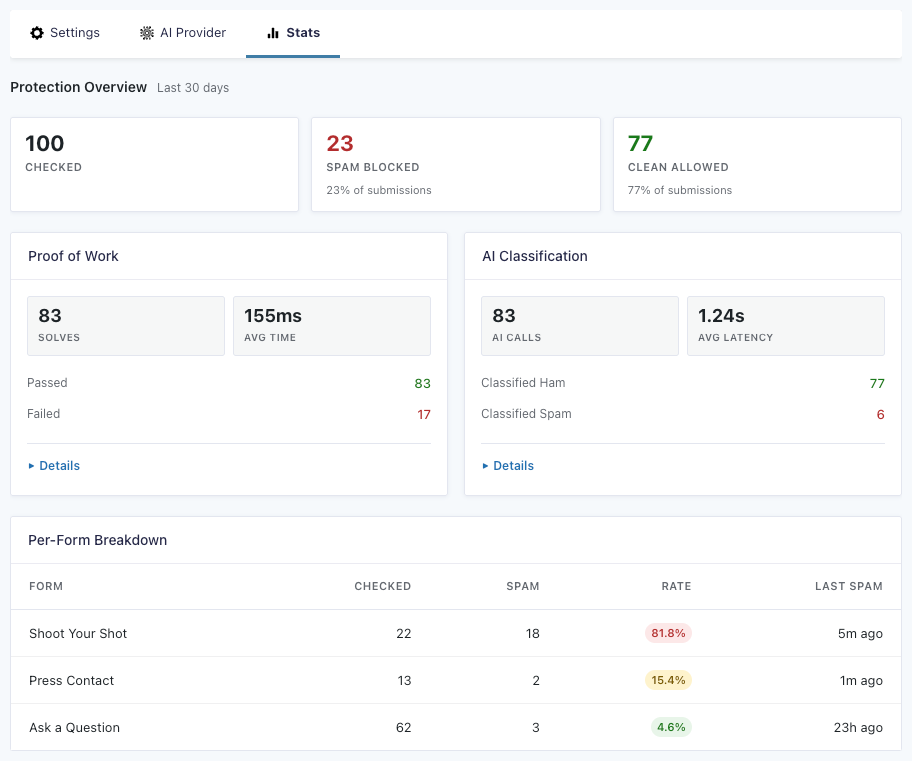
| PoW Technical Details | AI Classification Technical Details |
| Number of solved checks | Number of AI API calls |
| Average solve time | Average latency |
| Number of passes | Number of hams (opposite of “spam”) |
| Number of fails | Number of spams |
| Min/max solve time | Total cost |
| Difficulty distribution | Reason codes |
| Challenge source | – |
Spam Hexer Analysis
Every entry and comment that goes through Spam Hexer gets a detailed analysis meta box. There you can see all the relevant details for that check, including overall score, PoW time, and AI cost.
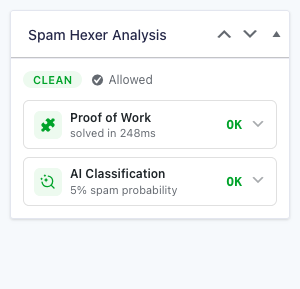
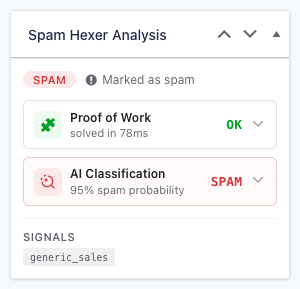
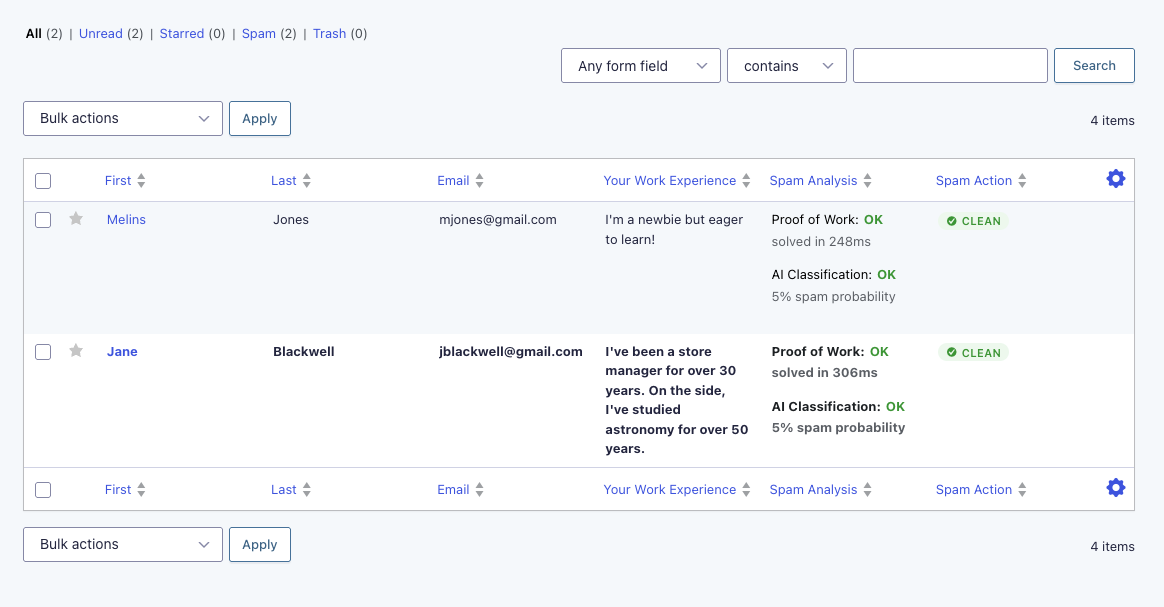
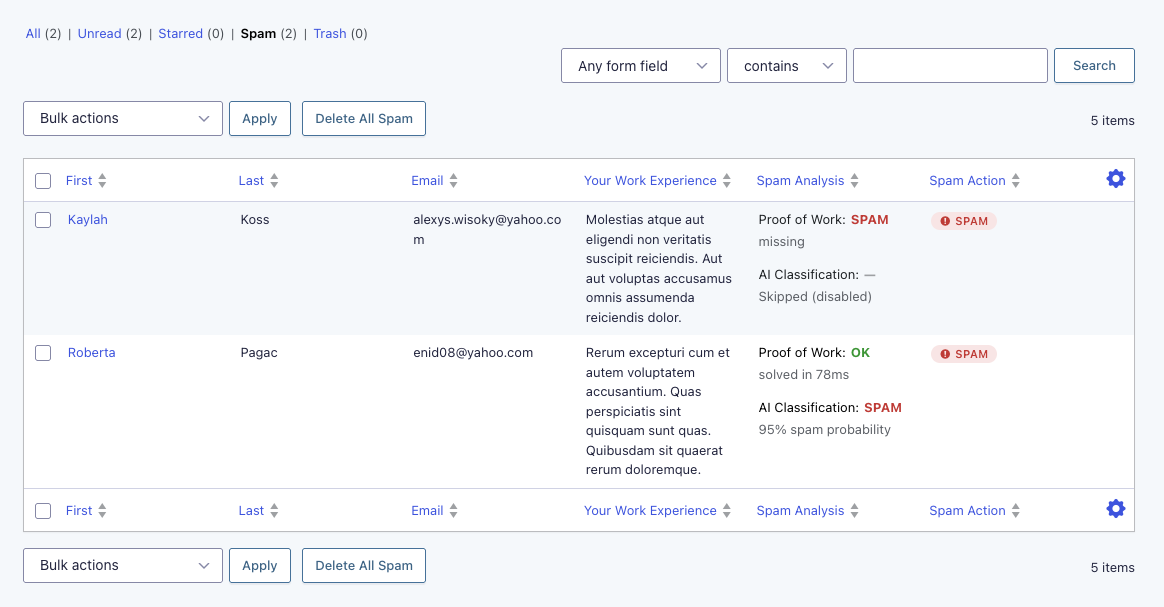
These details are also available in conditional logic and as entry list columns for quick scanning.
Spam-Specific Confirmations
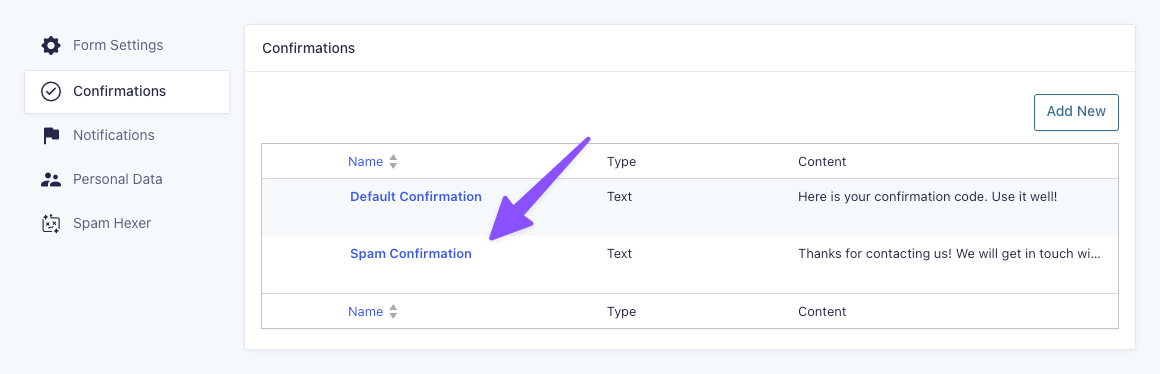
Gravity Forms allows you to set a Confirmation page specific to detected spam. If a submission is marked as spam or silently rejected, the submitter will get that confirmation page instead of the real one.
To enable this feature:
- Go to Form Settings › Spam Detection
- Enable Custom Spam Confirmation
- Save settings
A new confirmation type is then available under the Confirmations tab.
Developer’s Notes
How does Proof of Work work?
Spam Hexer delivers the PoW SHA-256 puzzle freshly fetched from the server via REST. If the REST endpoint can’t be reached or the request is blocked, a pre-baked puzzle embedded in the page HTML is there as a fallback.
| REST | Fallback | |
| How it’s delivered | Fetched fresh via JS on page load | Embedded in page HTML at render time |
| Replay protection | Server nonce, consumed on use | Client nonce, consumed on use |
| How long a puzzle is valid before it expires (TTL) | 10 minutes | 24 hours + 12-hour grace period |
What is this nonce nonsense?
A nonce (i.e. number used once) is a random value baked into each puzzle. Without it, a bot could solve one puzzle and replay that solution across many submissions. The nonce makes every puzzle unique, and the server consumes it on first use, so the same solution cannot be submitted twice.
Analytics & Statistics
The following submission details are recorded in a dedicated stats table, {prefix}_gfsh_events, to measure Spam Hexer’s effectiveness and performance.
- Source: Comment or Gravity Forms entry
- Form ID: (for entries)
- Action Taken: Allowed, rejected, failed
- Signals: Results of all applied techniques in JSON, including details such as token usage
- Created At: Timestamp when the submission was processed
This data is used for reporting, performance metrics, and evaluating Spam Hexer’s detection accuracy.
Logging & Troubleshooting
More detailed logs for submissions, including silently rejected submissions, can be accessed through Gravity Forms logging.
Query Monitor Integration
View logs for the current page load via the Dev Tools integration with Query Monitor. This is helpful for setup and real-time troubleshooting.
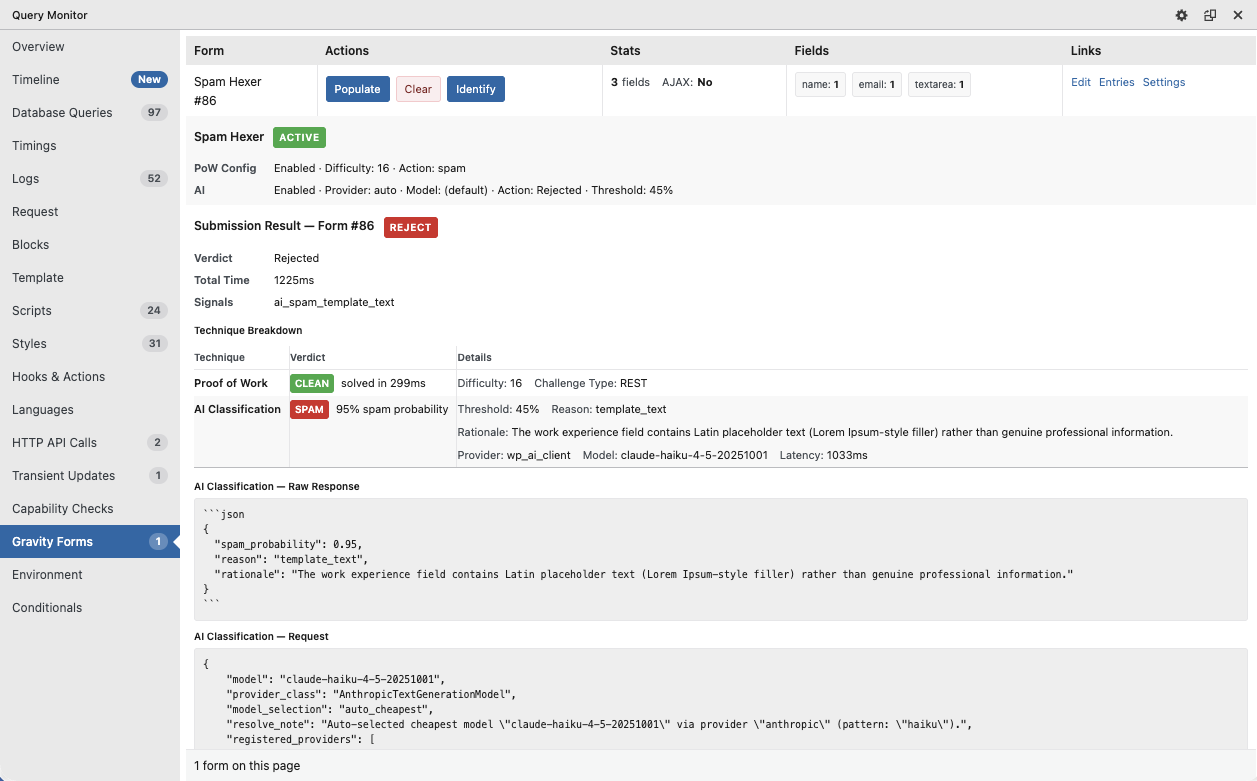
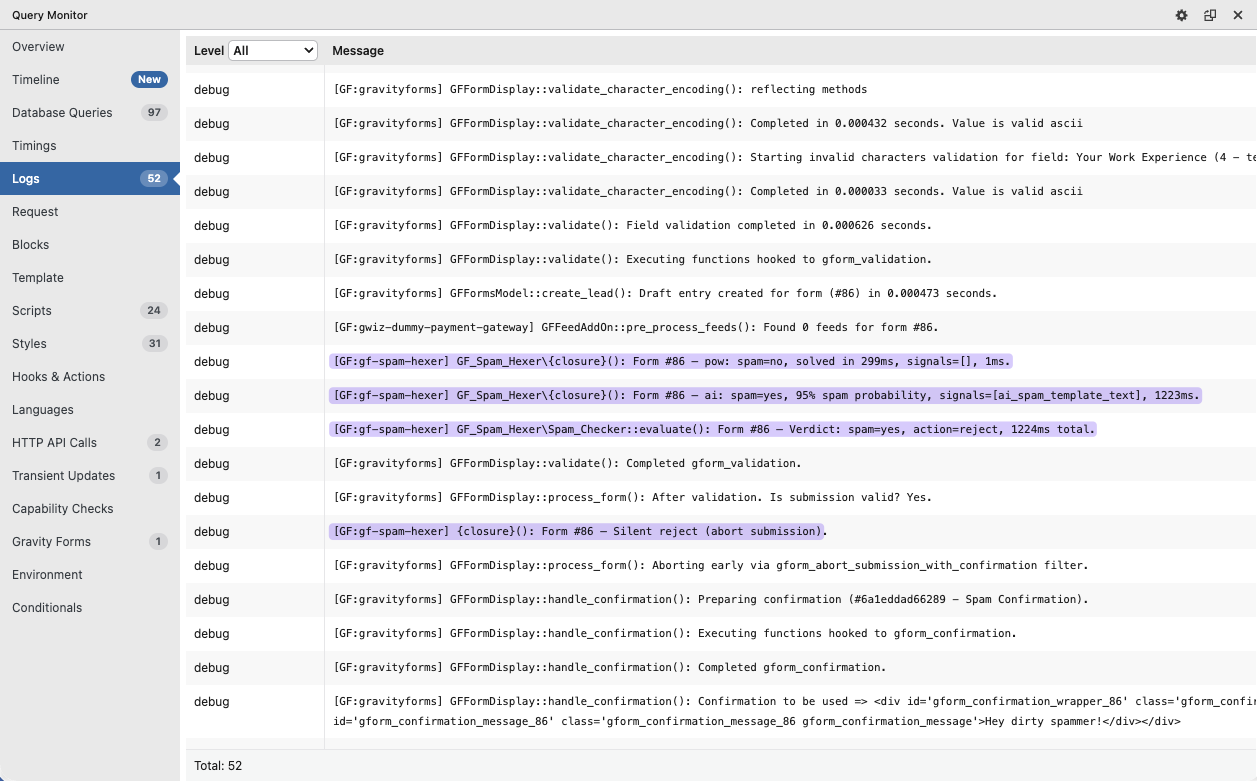
Spam Hexer is also tightly integrated with Dev Tools, including specific tools to test multiple PoW scenarios.
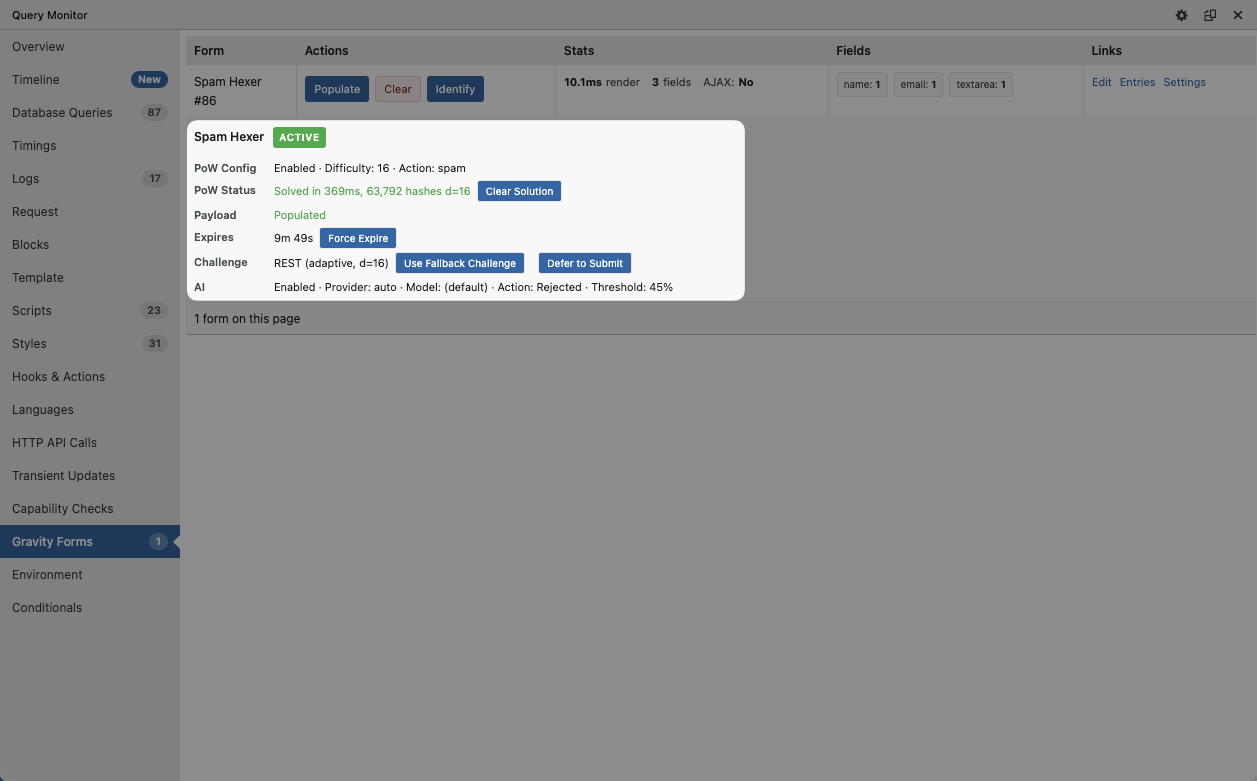
Gravity Forms Logging
Enable Gravity Forms logging in the Gravity Forms settings. Once activated, logs for all actions (such as submissions and feeds) are recorded and available in the Logging tab for deeper troubleshooting and diagnostics.
AI Reason Codes
AI Classification returns reason codes back with its analysis, creating clear groups of different types of spam. If you want to test flows that are specific to certain reason codes (e.g., notification conditional logic), use test_REASONCODE in your submission. The AI will respond accordingly.
Examples: test_generic_sales returns a spammed submission with generic_sales as the reason code.
FAQ
Does Spam Hexer slow down form submissions for real users?
The Proof of Work puzzle runs in a background thread (Web Worker) while the user fills out the form. At the default protection level, most visitors won’t notice any delays.
AI Classification, on the other hand, adds some latency to the form submission. Latency may vary between 500ms – 1500ms depending on the chosen provider. We’re exploring ways of making this process async.
Do I need an AI provider to use Spam Hexer?
No, but we highly recommend it. Proof of Work is the core protection layer and works out of the box with no external dependencies. AI Classification is an optional layer that reads what was actually submitted and flags SEO spam, fake engagement, off-topic content, and other junk that provided valid PoW.
Does Spam Hexer send my form data to a third party?
Only if you enable AI Classification. The Proof of Work puzzle runs entirely in the browser — i.e. no data leaves your server. If you use AI Classification, submitted values are sent to your chosen AI provider. You can limit this to ZDR providers via OpenRouter, which won’t store or train on your data.
How is Spam Hexer different from Cloudflare Turnstile or other CAPTCHA alternatives?
Most CAPTCHA-like alternatives only verify that a form was submitted by a real browser. In contrast, both Cloudflare Turnstile and Spam Hexer go a step further: they require browsers to perform computational work (PoW).
Here’s the difference between the two:
Cloudflare Turnstile uses PoW as one of several non-interactive browser challenges, resulting in roughly 106 KB of JavaScript being loaded.
Spam Hexer uses PoW as a standalone technique, paired with AI Classification, reducing its JavaScript footprint to less than 10 KB.
What this means: Both approaches make bots use CPU, but Spam Hexer uses much less code, which reduces page weight and client-side overhead.
How does the Proof of Work puzzle work?
The PoW puzzle is a SHA-256 puzzle. A SHA-256 hash is 256 bits, aka a long string of ones and zeros. The puzzle requires browsers to generate random hashes until one of them starts with a certain number of zeros.
Can bots just solve the Proof of Work puzzle?
Most spam bots are unable to solve the PoW puzzle because they use things like curl and other basic scripts to access the web instead of real browsers.
Sophisticated bots running headless browsers like Puppeteer or Playwright, on the other hand, can and will solve the PoW puzzles. But that’s the beauty of it: the more they attempt to spam you, the more expensive it will be for them at scale. If you combine PoW with AI Classification, they will pay more for their operations and still be marked as spam. 😏
Does Spam Hexer work with page caching plugins?
Yes, Spam Hexer was built with aggressive page caching in mind.
When a cached page loads, Spam Hexer fetches a fresh puzzle via a background request. If that request is blocked (by an ad blocker or corporate firewall), it falls back to a puzzle embedded in the page HTML.
What happens if a submission is flagged as spam?
By default, it’s saved as an entry and marked as spam so you can review it. You can also configure Spam Hexer to silently discard it (with a fake success message) or show a validation error. These actions are configurable per technique — PoW and AI Classification can have different behaviors.
Can I enable or disable Spam Hexer on specific forms?
Yes. Global settings apply by default, but you can override them per form. This includes toggling PoW and AI independently, adjusting difficulty, adding form-specific context for the AI, and setting different spam actions per technique.
What versions of PHP, WordPress, and Gravity Forms are required?
PHP 8.0+, WordPress 5.0+, and Gravity Forms 2.8+.
Does Spam Hexer protect WordPress comments too?
Yes. Go to WordPress Settings › Discussion, scroll to Spam Hexer Comment Protection, and enable it there. Comments get the same PoW and AI Classification options as form submissions.
What if a visitor takes a long time to fill out the form?
Spam Hexer automatically refreshes the puzzle in the background before it expires. If the puzzle has already expired by the time the visitor submits (e.g., they left the tab open), a fresh puzzle is fetched and solved at submit time.


If you have ReCAPTCHA v3 installed already, do you have to un-install it to use Spam Hexer or can you run both in parallel?
Hi Bowman,
Great question. No, you don’t need to uninstall reCAPTCHA v3 to use Spam Hexer. They run independently and don’t conflict: Spam Hexer’s Proof of Work check happens entirely in the browser, separate from reCAPTCHA’s own scoring, so both can run side by side without issue. Worth noting it does mean two separate checks on every submission, so it’s fine to run both, but not strictly necessary if Spam Hexer alone is already doing the job for you.
Best,
How are connection failures handled for AI Classification, i.e. where the API connection fails? Presumably there are a set amount of retries? And if those fail, what is the fallback? Do you let the submission pass?
Hi Jonas,
Currently, Spam Hexer will make one attempt to connect to the AI service. It will wait up to 10 seconds for a response, but if anything goes wrong, there aren’t any other attempts. The AI classification will instead be skipped, and won’t count towards a spam verdict.
Proof of Work will still run, but if this doesn’t flag anything, the entry will go through as legitimate. This avoids any legitimate entries being blocked due to any AI connection failures.
With that said, we are considering introducing the option of alternatives when the AI connection fails, and we’d love to get your thoughts on this!
Best,
Hi,
Great plugin! Is it necessary to enable the “AI Classification” option?
thanks!
Hey Rose,
Thanks for the kind words! The AI classification layer is optional, and the plugin will work without it.
Dear Lord, thank you for this plugin. May the spam bots face eternal judgment. Amen.
Amen. 😂
We can’t promise eternal judgment just yet, but we’re certainly hoping Spam Hexer helps send a few spambots to their rightful place.
Let us know how it performs once you’ve had a chance to use it! 🙏
Awesome solution, thanks for the great work.
One possible enhancement – the ability to ask the AI agent to further classify the submission so that conditional routing could be invoked. I know this is somewhat of a feature creep, but all the core logic is in place.
Perhaps that is a paid add-on feature.
Hey Tom,
Thanks for the kind words!
Love this idea – we’ll keep it in mind as the plugin evolves.😊