GWW 292: A Day Late

Temporary payment statuses for GP Inventory, how to create content paywalls using Gravity Forms, and a snippet for automatically filtering posts by current language.
Greetings, wizards!
We got a couple inches of snow here in Virginia Beach earlier this week and my youngest begged me to let her go and catch some snowflakes on her tongue before bed. How could I say no to that!?
Her enthusiasm ended up pulling the entire family outdoors for a spontaneous snow ball fight. And that, my friends, is the incredible energy I’ve been riding on the whole week. 😊
Let’s keep the good feels flowing with another edition of the Gravity Wiz Weekly! 😃
GC OpenAI: GPT-5.1
Enhance your forms with the magic of AI with one of our flagship connections, Gravity Connect: OpenAI. Generate text, images, and audio using Gravity Forms fields and data.
Editor’s Note: Of course, OpenAI releases GPT-5.2 the day before we announce GPT-5.1 support. 😆 We’ll be adding support for GPT-5.2 very soon!
We’re very pleased to announce that GPT-5.1 is now available in GC OpenAI. With each new model, OpenAI gets faster, more intelligent, and more accurate.
One of the biggest highlights of GPT-5.1 is that it follows instructions far more reliably. This means you can use shorter prompts and spend less time tweaking them to get the results you’re after.
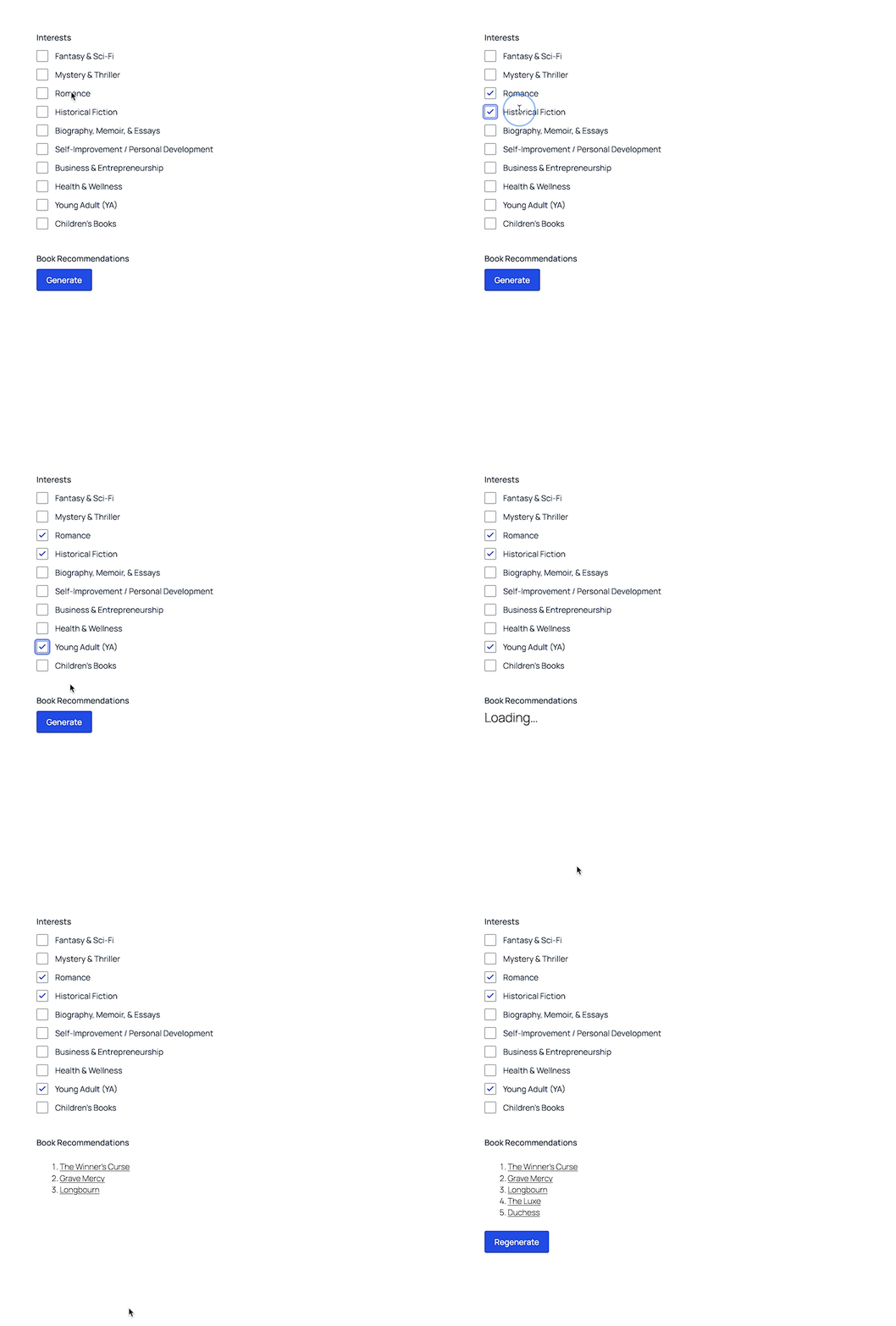
If you’ve you already got your prompts dialed in, GPT-5.1’s new none value for reasoning effort will give you near-instant responses. The reasoning effort is easily set by filter.
Top Picks: Product Highlights
GP Bookings
✦ Turn Gravity Forms into your complete WordPress booking platform.
We’ve added support for editing booking fields from the Gravity Forms Entry Details screen.
This lets you manage the booking details directly alongside the entry that created the booking. Context is king! 👑
We’ve also added a host of new booking-specific merge tags. More to come on that soon but if you want an early peek, check out the changelog. 😉
—
GP Inventory
✦ Easy, flexible inventory management for Gravity Forms.
By default, if your form collects payment, only paid entries consume inventory. This works well for most customers but there is one scenario where overselling can occur: high-volume payment forms using a payment gateway that redirects the user away to collect payment (e.g., Stripe’s Checkout form).
Historically, for customers in this scenario, we recommend adding “Processing” as an approved payment status so that these entries consume inventory as if they were already paid. The downside is that if you have dozens of users who never actually complete the redirected checkout flow, you have unclaimed inventory collecting dust on your shelf.
This week, we took a first step towards a better solution: temporary payment statuses.
The idea is simple. Use the filter to designate a payment status (like “Processing”) as a temporary payment status and assign it an expiration (e.g., 30 minutes). GP Inventory will then consume inventory for entries with that payment status up to the expiration. After that, the inventory is freed up for a customer who is ready to pay now.
—
GP Nested Forms
✦ A powerful repeater that creates forms within forms for streamlined data collection.
reCAPTCHA has plagued Nested Forms for far too long. In some browsers, reCAPTCHA prevented the child form from being submitted, creating frustrated customers and frazzled wizards. We finally unlocked some serious spell power to crack the code. reCAPTCHA is now fully supported in Nested Forms’ child forms!
Spotlight: Building Engaging Marketing Campaigns with Gravity Perks
Forms are a powerful artifact for marketing magic. Woorise is a perfect example of it.
This WordPress-based platform lets customers start from zero to create and run fully fledged marketing campaigns with Gravity Forms in minutes without touching code.
The best part—and focus of this week’s spotlight—though? They don’t have to spend much time coding either. A little sprinkle of perks does the trick for many features their customers need to be able to run the distance.
How To: Create Content Paywalls using Gravity Forms
Have you noticed how much new content we’ve been publishing on the blog lately? Our marketing team is slaying it! 🙌
This week, my new best friend—Dan the Scrollslinger—breaks down how to gate your best content (like courses, videos, guides, or exclusive downloads) behind a payment form. No logins needed.
New Snippet: Filter by Current Language with Populate Anything
Longtime customer, Dennis Hunink, solved his own problem with WPML and Populate Anything.
You see, with WPML you can create multiple versions of posts, each with their own language. When populating posts with Populate Anything, there’s no way to identify the current language and filter by that language with the existing UI. This snippet automatically filters posts by the current language.
He was generous enough to share this snippet with us and we thought it was useful enough to share with all of you. Thanks for your contribution to the Snippet Library, Dennis!
Product Updates
Gravity Perks
GP Bookings (1.0-alpha-4.4)
- Added new
{gpb_booking},{gpb_datetime},{gpb_service}, and{gpb_resource}merge tags. - Added support for editing booking fields when editing entries in the Gravity Forms Entry Details screen.
- Updated capability checks for GP Bookings to always allow users that have
gform_full_accesscapability to do anything in GP Bookings. This better aligns with Gravity Forms’ default behavior. - Improved availability checking logic by making checks smarter by merging all adjacent Availability Windows. This fixes some issues where having a Resource field with Automatic Allocation and resources with different availability windows could always throw validation errors depending on the Availability Window configurations.
- Fixed issue where rescheduling did not ignore the current booking which could prevent moving times due to buffers from the current booking. Additionally, the submit button for rescheduling is now disabled until the booking time changes away from the current time.
- Fixed regression where the client-side state of multiple Booking fields could collide causing the frontend behavior to not work as expected.
- Fixed issue where booking ID could get removed from the Booking field’s value if using a Payment Add-On.
GP Conditional Pricing (v2.0.21)
- Added support to prioritize the populated price of a product field ahead of the static price when using Conditional Pricing on the product field.
GP Entry Blocks (1.0-beta-2.24)
- Fixed an issue where multi-file uploads lost their files during entry edits on multi-page forms.
GP Inventory (v1.0.18)
- Added
gpi_temporary_payment_statusesPHP filter hook to hold inventory for certain statuses for a limited amount of time.
GP Nested Forms (v1.2.17)
- Fixed an issue where reCAPTCHA v3 failed on Nested Forms in Firefox.
GP Populate Anything (v2.1.54)
- Added experimental
gppa_flatten_multi_dimensional_array_to_index_arrayfilter hook. - Fixed an issue where AJAX requests always targeted the apex domain.
- Fixed issue where Populate Anything field settings would disappear when Enable “other” choice or Show values settings were toggled.
Gravity Connect
GC API Alchemist (v1.0.7)
- Fixed an issue where synchronous webhook responses skipped feed logging.
GC OpenAI (1.0-beta-2.16)
- Added support for gpt-5.1 chat completions model.
Gravity Shop
GS Product Configurator (1.0-beta-2.46)
- Improved product lookups and added
gspc_skip_product_form_lookupsfilter.