
Better Inventory with Gravity Forms

Set up simple, one-off inventory limits per field.
May 3, 2023: Added support for tracking "inventory" on currency-formatted Number fields.
November 11, 2012: Fixed issue where database prefix was not applied via $wpdb-<prefix.
Stop! There's a better way.
This snippet is available as a plugin with Gravity Perks, a suite of over 46 premium Gravity Forms plugins!
Overview
Gravity Forms does not support the concept of inventory out of the box. This snippet provides an easy method for setting up simple, one-off inventory limits on a per field basis.
Using the Snippet
Prerequisites
Confirm that you have Gravity Forms installed and activated and that you’ve installed the snippet.
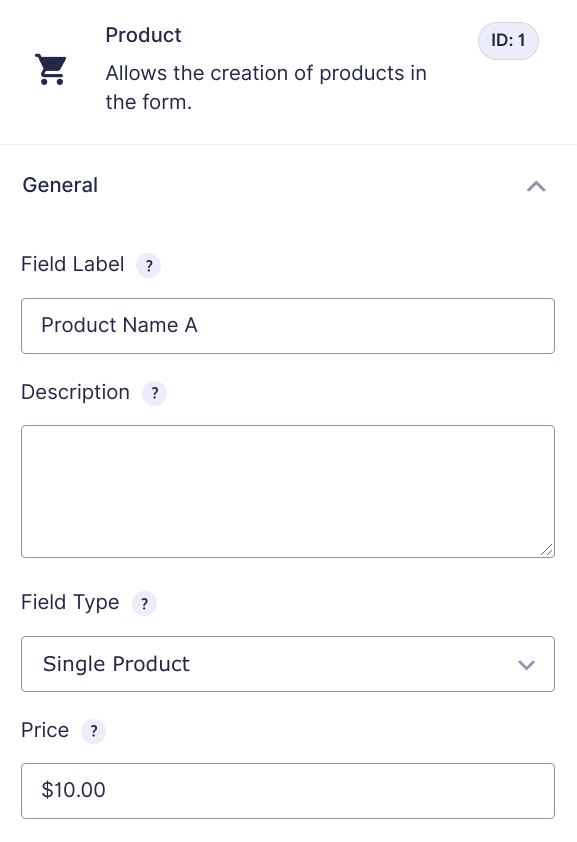
Add a Product Field
With the snippet installed, add a Product field to your form. Note the Product field’s ID.
Update Snippet with Parameters
Update the form_id and field_id in the snippet to match your Form ID and Field ID. Depending on the way your form is set up, you’ll need to format the Field IDs differently:
- If your form uses a separate Quantity field for the Product’s quantity, set the
field_idto the Quantity field’s ID. - If your Product uses the built-in quantity sub-field, set the field ID to your Product ID and add
.3to the end.
new GW_Inventory( array(
    'form_id'                  => 123,
    'field_id'                 => 4.3,
    'stock_qty'                => 20,
) );
Custom Stock Level Messages
Better Inventory includes default “out of stock” and “not enough stock” messages. These messages can be customized using the out_of_stock_message and not_enough_stock_message parameters.
new GW_Inventory( array(
    'form_id'                  => 123,
    'field_id'                 => 4.3,
    'stock_qty'                => 20,
    'out_of_stock_message'     => 'Sorry, there are no more tickets!',
    'not_enough_stock_message' => 'You ordered %1$s tickets. There are only %2$s tickets left.',
) );
Out of Stock
The out_of_stock_message is displayed when the product limit has been reached. You can get fancy with this and add HTML. Be sure to escape any double quotes with a backslash. Here’s an advanced example:
'out_of_stock_message' = '<div style="border: 1px solid #e6db55; background-color: #FFFFE0; padding: 10px;">Sorry, this show is sold out.</div>'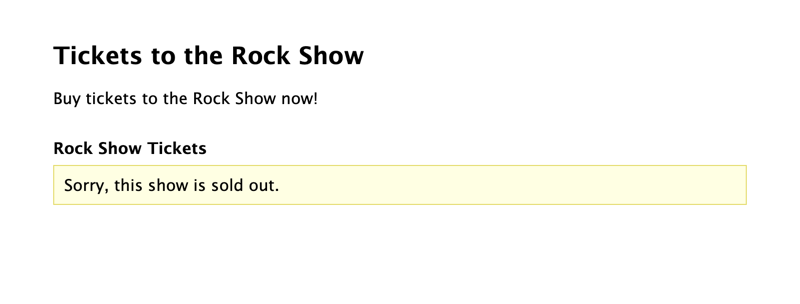
Not Enough Stock
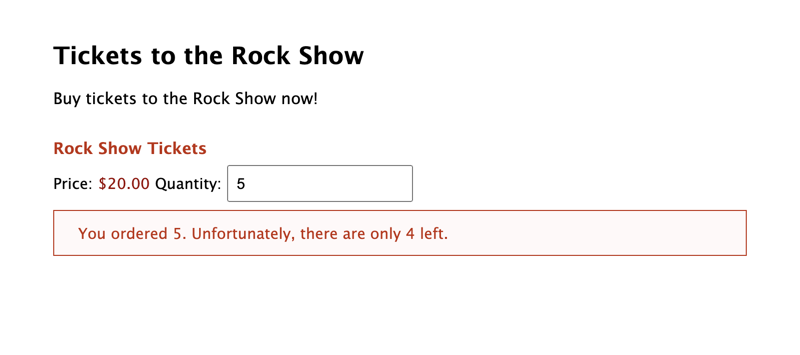
The not_enough_stock_message is displayed on the field if the limit has not been reached, but the user’s requested quantity would exceed the product limit.
Parameters
form_id (integer) (required)
The ID of the form you are working with.
field_id (integer|float) (required)
The ID of your product or quantity field. If using a Single Product field, specify the quantity input ID, which will always be
{field ID}.3. If using a separate Quantity field, simply specify the field ID.stock_qty (integer) (required)
The number of this item you have available.
out_of_stock_message (string) (optional)
The message which should be displayed to users when the product limit has been reached.
not_enough_stock_message (string) (optional)
The message which should be displayed on the field if the limit has not been reached, but the user’s requested quantity would exceed the product limit.
approved_payments_only (boolean) (optional)
Indicate whether all submissions for this field should be counted against the limit or only submissions with an approved payment.
hide_form (boolean) (optional)
By default this snippet will only hide the field when the limit has been reached. If you would rather hide the entire form, set this to
true.enable_notifications (boolean) (optional)
Enable the ability to create notifications that are sent when the stock of a product (or any configured field) has been exhausted
enable_notifications requires our Notification Events snippet to be installed on your site.
Shortcodes
Remaining
Show the quantity remaining for the specified input and limit.[gravityforms action="remaining" id="1" input_id="2.3" limit="50"]Sum
Show the current sum of quantities ordered for this field across all entries.[gravityforms action="sum" id="1" input_id="2.3"]
Taking It Further
Approved Payments
By default, all submissions are counted against the stock quantity. Use the approved_payments_only parameter to indicate that only submissions with an approved payment should be counted. You’ll want to be careful here when using PayPal Standard due to the delay between the form submission and the payment being approved. It could lead to users exceeding the limit.
new GW_Inventory( array(
    'form_id'                  => 123,
    'field_id'                 => 4.3,
    'stock_qty'                => 20,
    'approved_payments_only'   => true,
) );

Hi there,
i use the shortcode to show available items on another page: [gravityforms action="remaining" id="3" input_id="3" limit="50"], where id is ID of Gravity Form and input_id is ID of product field. But nothing shows, please can you help?
Thanks, Tom
Hi Tom,
In the snippet and shortcode, you will need to specify the quantity subfield of the Product field, which will be
.3. In your case, theinput_idparameter in the shortcode should beinput_id="3.3".If that doesn’t do the trick, we’ll need to dig into this some more. If you have a Gravity Perks license, you can get in touch with us via our support form with your account email, so we can help you troubleshoot.
Best,
Hi Matt, thanks for helping me! I do have deactivate the quantity subfield, because i do not need it. Is it possible to solve this issue without subfield? Cheers Tom
Hi Tom,
Even if you disable the quantity subfield on the product, and you aren’t using an external quantity field, you’ll have to append .3 to the input ID parameter of the short code. If it’s still not showing, then check to confirm if you’ve entered the correct Ids and values in the snippet configuration. However, if you’ve already done this, and it’s still not working for you, please contact us via our support form so we can take a closer look at your setup.
Best,
Is this snippet still working. I have been testing it on a very simple form. A single product field and when I exceed the inventory, nothing happens.
Never mind, found my error.
Hi Steve,
Glad you were able to figure it out.
Best,
Well I thought I had it all working, but I notice if I have 5 items left in inventory and I pick a quantity of 6, it will not warn me, it will let me order. If I come back in after that it says that there are no more items left in inventory.
dang as soon as I said that I got it to work.
Hi Steve,
It’s good to know you were able to get it working.
Best,
This looks great! I have a client who just needs something like this one time on one form (otherwise I would get them to buy your plugin!) Question: Can I use this on a product that is a dropdown field type? its a summer camp registration, and that 1 product has 6 summer camp options, and I need to limit how many entries for each camp. Ex: Camp 1, $250, 6 seats. Ex: Camp 2, $300, 12 seats. Can I use the above code to achieve this? or does each camp need to be its own product?
Hi Ann,
This snippet only works with Single Product fields. For dropdowns, we recommend GP Inventory.
I am getting a WP Notice when WP Debug mode is enabled. This is it:
Notice: Function GW_Inventory::$enable_notifications was called incorrectly. Inventory notifications require the ‘GW_Notification_Event’ class. Please see Debugging in WordPress for more information. (This message was added in version 1.0.) in /wordpress/wp-includes/functions.php on line 5831
Would you please be so kind as to look into it? Thank you.
Hi Laz,
We’ve already followed up via email to confirm if the issue is related to GP Inventory or the Better Inventory Snippet.
Best,
Can I use this widget to log an event? I want to show a message if records are collected according to the capacity of an event.
There is a post_type named :Events For ::Event, register limit field (acf field)
:Single “Event Register” form ::Field: Post_id ::Field: Post_title
The event looks like this:
Title: Yoga Event Capacity: 20
The list of form entries looks like this:
Event_ID: 136 Event_Title: Yoga Event_Guest: 1
Hi Ayhan,
I am not sure this snippet would work for what you’re trying to do. You can get in touch with us via our support form if you have an Active Gravity Perks license so we can request more information on your use case and assist you further? However, if you don’t have a license, you can send submit our presales form with more information on your use case. Maybe one of our Perks can do what you want.
Best,
Hi, can use for multiple form ?
Hi Mustaqim,
You can! Multiple instances of the
GW_Inventory classcan be added to apply it to multiple forms. Read more about that here.Great, very well documented solution. I get it working on the first try.
Two questions: Is it possible to set a different limit for another product field?
And: Is it possible to get the amount of the remaining quantity inside the product field? At the moment I use the shortcode in a separate html field, but it would be better to show the value directly in the product field.
Hi Thomas,
You can insert multiple instances of the
GW_Inventoryclass to apply it to multiple fields on the same form. More info here.Regarding displaying the quantity inside the field, that isn’t currently supported in the snippet. That said, we are cooking up a Perk that will include that feature. Keep an eye on our Weeklies!
Got this to work. I would like to use for a cafe who has a daily schedule with limited attendees for each day. This would mean we would need to have a separate form for each day. If there any thing you could do or suggest.
May Thanks
Hi Peter,
This snippet currently doesn’t support setting the number of stock available per day, so you will have to create a new form for each day, which will be a lot of work. A workaround solution will be to use our GP Limit Choices Perk to set a limit on a Product field with a single choice and then use our Daily Limit snippet to reset the limit left every day.
Best,
Hi Dario,
I’ve now set the Product as Single Product – https://eventsbuildertrendcom.kinsta.cloud/register/
But still it will not work. I’ve set the Stock Qty as 8, so in theory when you select 9 attendees it should give the sold out message? – http://snippi.com/s/iz1jn5n
Hi Jon,
If the stock is set to 10, and in the Quantity field the user set 12. This message should output: You ordered 12 tickets. There are only 10 tickets left. We’ve test locally and it seems to be working as expected. If you have a Gravity Perks license, you can get in touch with us via our support form with your account email, so we can help you troubleshoot.
Cheers,
hello, I am trying to implement this snippet, for my registration form – http://eventsbuildertrendcom.kinsta.cloud/register/
I have a hidden product with a price of $999 and then a separate quantity field (How many attendees? 1-10) selecting will update the Registration cost correctly. So to test i am trying to set a registration limit of 5 total, but it does not show the we are full message?
http://snippi.com/s/iz1jn5n
I’ve checked and the ID’s are correct?
Hi Jon,
Currently, the snippet doesn’t seem to support Products that are set to hidden but this feature request is something that we will consider in the future.
Cheers,
Created a form for a client the other day for booking places on a training course. They didn’t mention at the time that there are only 10 places per session, so this snippet potentially resolves that but….
The form was initially setup with a dropdown list of “options” (dates) on the “product” (training course, £85) and then a seperate “quantity” field (number of delegates). Simplified the form so that it is a dropdown list of “products” (date) but looks as though it may still not be able to work that way since the “quantity” field is seperate but needs to relate to the “product” or “option” still.
Is there a way to achieve this, or would it need to be a seperate form per date?
Hi Steve,
Since you need to limit places per session based on a Date, we would suggest using our Limit Choices Perk. We have also snippet which will allow to group Date, Place and Quantity to limit available choices and substract the quantity selected from the total available places for each Date/Place.
Best,
Brilliant, thanks Dario.
Not been able to find the snippet to include the (standalone) Quantity field when updating the Option (date) availability as yet though.
It appears that the number of items is stored somewhere other than the ‘stock_qty’ => #, parameter in functions.php
We have several items with a value set as above and if an order is placed for that value, it returns the “Not enough stock…” message reflecting a different quantity.
We, of course, tried purging caches, reloading, etc. No effect.
Help with this, please?
HELPFUL plugin, otherwise, so thanks for it!
Hi Anne,
The stock_qty parameter is what stores the number of items, so I am not really sure why you’re getting that “Not Enough Stock” message. You can use the shortcode to display the quantity left, to confirm if the right quantity that is set in the stock_qty parameter is being used.
Also, if you have a Gravity Perks License you can get in touch with us via our support form, so we can dig into this further.
Best
Hi GravityWiz Team,
Thanks so much for making code like this available to us! I, for one, am super grateful and thankful. :-)
My question is similar to Brad Haymond’s question from January 5th.
Scott wrote a good reply that same day, but he mentioned that in order to use the snippet, we should, “paste the code below the “Do I need to modify this snippet to work with my form?” heading TO YOUR THEME and adjust the parameters accordingly.”
Would anyone be willing/able to comment how we are to add this “to our theme” if the longer code is already being added via the functions.php file? That is, do we put the full code copied from the “Download Code” or “View Code” buttons into the functions.php file and then the shorter parameters code somewhere else, or do we modify Line 56ff in the actual code which is most similar to the snippet Scott mentioned in his reply?
Thanks so much for replying whenever able, and so sorry for the extra clarification! I haven’t been able to get it to work for some reason, so this is helpful. Thanks so much!
Hi Caleb,
If you prefer to copy the entire snippet into your function.php, you will just have to copy the snippet configuration, that is the shorter parameter code, and paste it below the longer code within the function.php. Here is a documentation on how to install a snippet.
Best,
Hello, I have our ecommerce shop where people can buy individual products, they can buy gift boxes which include individual products and we use gravuty form the build a build your own box section so they pick any products to design a gift box. Is it possible to link inventory amounts for all 3 so I have 10 soap, if a person purchases for all 3 area it will reduce to 7 in stock.
Hi Brenda,
I’m not really tracking your question well, but if I understand correctly, you to want group different products and link them to an inventory? If so, then unfortunately you wouldn’t be able to do that with this snippet. With this snippet, an inventory is linked to a Product and can’t be linked to a group of Products. You may have to do some customization to the snippet to achieve what you want. In case you need a developer you can hire one from Codeable.io.
Best,
I have my simple individual products and then I have my gravity form products which create a gift box from my products. So I have a cup as a simple product and the same cup in the gravity form. How do I set it up that when both are purchased it reduces the simple product stock count by 2?
Hi Brenda,
If you’re adding the Gravity Form to your WooCommerce product using the WooCommerce Gravity Forms Product Add-Ons plugin, you can link the quantity in the form to the WC stock using the Order Item Quantity setting. More info is available in their docs.
@Scott Buchmann what is I have 100 products in this one form. Do I add this to the product page, default qty 1 and hide it. Then when any of the products are selected it will automatically reduce the qty from the simple product stock?
Hi Brenda,
I think this particular scenario requires more specific support. If you’re a Gravity Perks customer, can you reach out to support so we can further assist you on this one?
Where does the code go to initialize a snippet? In the functions.php file? Or? Thanks!
Hi Tim,
Yes, you’ll insert the snippet into the function.php file. Please refer to our article on snippet troubleshooting for details on installing our snippets.
https://gravitywiz.com/documentation/snippet-troubleshooting/
Best,
Is it possible to have the shortcode for the Sum to have “Only_Approved_Payments” as True?
Hello Mohammad, you could change the ‘approved_payments_only’ => true, within the snippet to get this working.
Seems that the code snippet was updated without updating the instructions on this page. For example, I cannot find
new GW_Inventory
anywhere in the current snippet. I see an $args array starting on line 56 that I believe is where I want to specify my parameters, but it doesn’t match the instructions on this page.
Also, because the parameter array is different than all examples on this page and the comments, I am not sure how I can add inventory limits to multiple fields in the same form (or even across different forms). What is the correct syntax with the current snippet code to add an array of multiple fields with different limits?
Hi Brad,
We are in the process of removing usage examples from our snippets. Instead, usage examples are located in our tutorials. To use this snippet, paste the code below the “Do I need to modify this snippet to work with my form?” heading to your theme and adjust the parameters accordingly.
To apply the snippet to multiple fields in the same form or across multiple forms, check out this article.
Hi Jake,
You will definitely require some customization to the snippet, to achieve what you want. In case you need a developer to help, you can hire one from Codeable.io.
That said, this looks like a use case that should also be possible with the GP Limit Choices Perk and a snippet used to share limit across multiple fields. However, I’ll need to take a closer look at the form set up to be sure about this and assist you with the setup. In case you have an active Gravity Perks License, you can send an email with an export of the form via our support form so we can assist you further.
Best,
I was wondering if there was a way to make multiple product fields contribute to the same inventory pool. We want to cap the amount of people who register for an event. Customers can register in groups of four and get $50 off the last three people. We have it set up now to have a drop down menu that treats each number 1-4 as a different product to calculate price. I thought of creating a different product just to track inventory, but I would need a way to prepopulate it depending on the amount chosen in the drop down menu. The only way I can think of that would work would be to create four different single-product fields, but that would only work if inventory could go into the same pool. Is this capability supported? Any help would be appreciated.
How could we add support for multiple events? Say we add a radio button where they choose from 4 different event times (field IDs: 9.1 – 9.4) , then each
I was thinking of adding an if statement like this : // if ( $radio_selection_value == ‘2’ ) { new GW_Inventory_2( array( ‘form_id’ => 1, ‘field_id’ => 5, ‘stock_qty’ => 100, ‘out_of_stock_message’ => ‘Sorry, there are no more tickets!’, ‘not_enough_stock_message’ => ‘You ordered %1$s tickets. There are only %2$s tickets left.’, ‘approved_payments_only’ => false, ‘hide_form’ => false, ‘enable_notifications’ => true ) ); }
But I would need to make it support 4 different quantities, since each event would have the same initial stock_qty limit. Or should I just create a different form for each event?
Hi Nathan,
Different forms for each event would work, however this is a perfect fit for GP Limit Choices.
I’m trying to use this snippet to keep track of registration for summer camp. Is there a way to reach the limit but not hide the form but rather show a notification that they will be on a waitlist and allow them to complete the form. Thanks!
Hi Kenneth,
The snippet currently doesn’t support a waiting list. You may want to check out our GP Limit Choices Perk, that uses a snippet we have to allow a waiting list when the Limit has been reached.
I hope this helps.
Best,
Thanks for this snippet, this could probably solve my problem. Is it also possible to make the stock based on a custom post type? Let’s say I have a custom post type ‘seats’ with 5 posts which all have a status field ‘available’ or ‘reserved’, GF should check if any of these seats are available, if so the customer can book a seat.
Thanks
Hello Jochem, This should work correctly. Are you using a specific type of plugin to create the custom post types? If you would like for us to take a closer look, go ahead and send us a message through our support channel here.
I still have to build/generate the custom post type, and to be honest I still have to buy GF and Gravity Perks, so sending a support request will be difficult at the moment. But I guess I have to make some changes in the snippet to make it work right? Or should I use the Gravity Forms Populate Anything plugin?
Business case is a form to rent a ‘product’, we have 5 products of brand A and 5 products of brand B. The customer chooses a brand (if one of the products is available) and books a product, that product will be unavailable for other customers until it has returned. Is this possible with this snippet and a custom post type or does it need more customization?
Hi Jochem,
This is quite an interesting use case. Although you could use GP Populate Anything to populate a Product field with the Custom Post Type, you’ll need a way to update the status field of the Custom Post Type to reserved when an order is made. Currently, Gravity Forms Advanced Post Creation add-on doesn’t allow Post updates, so every submission of the form will create a new post. You will defintely require some custom coding, which goes beyond the functionality of this snippet, to achieve what you want. In case you need a developer to help, you can hire one from Codeable.io.
That said, if you plan to manually update the status field of the CPT when an order is made and when the book is returned, you should be able to use GP Populate Anything to populate a Product field with a list of Post saved to the CPT.
Best,
Thanks, David mentioned Populate Anything also on Twitter, so that seems like a good option.
Hi Samuel – Thanks so much! It seems to be working pretty well except for one thing. At the very bottom of the form, on the front end, a string of numbers show up. The string seems to be the number of tickets left for purchase so it’s dynamic and changes from the intial amount 1175, 70 and 65 to 0 0 0 as the tickets are sold out.
I copied the code direct and I cannot see an error in the way it is written. Is there a way to hide that? I’ve try to find the class in CSS but it doesn’t seem accessible with dev tools in Chrome.
Thoughts? Thanks.
Hello Sherry,
Thank you for writing in. This is a bit of a strange one. If you have a gravity perks account could you please send us an export of your form to our support channel found here so we could run some tests. Thank you.
Hi – I just found you guys so I don’t have a gravity perks account unfortunately. Is there another way to do this? The site is not open to the public yet.
I could take a screenhot if that helps? Would need an email to send it to.
Thanks.
This code worked perfectly for me and I am OH SO GRATEFUL! I’m not a php coder and it took me 2.5 hours to figure it all out and make my customizations but now it works and the client is happy.
Just wondering if you have any code that notifies the user when the inventory is close to its sell out. For instance, I’m using the code to sell raffle tickets by singles, and 2 types of value packs. It would be great if a purchaser would get a notice when there are only 5 single tickets left before they put in their order.
Thanks again!
Hi Sherry,
We’re glad to know how snippet worked for you 😀. You can insert the shortcode,
[gravityforms action="remaining" id="1" input_id="2.3" limit="50"]on the form page, to display the quantity remaining. This will make it possible for your users to see the quantity left before placing an order.I hope helps.
Best,
Hi I’m new to gravityforms in the past I’ve used wufoo, formstack, and form assembly. I this snippet was so important to me because my organization runs limited capacity events every year and out limit is even more critical this year with Covid-19 protocols in place.
We have had a few guests who were able to pay and checkout (authorize.net) when there were not enough tickets for the time slot. They recieved the message “You ordered 4 of this item but there are only 1 of this item left.” However they were still charged through Authorize.net, but they did not show up in our Gravity Froms entrees list and did not receive a receipt. Is there a way to make sure those who are attempting to order a time slot that is not available are not charged?
could you assist me? do I need to buy the something for this snippet to work ?
Hello Stephen, This is just a snippet that requires configuration at the bottom. You don’t have to modify the snippet itself. Just the parameters with which you initialize it. Check out our help article here for some snippet troubleshooting.
Hi there, I’m using this snippet to track entries for an online art exhibition as we have a maximum number of entries allowed. I’m pretty new to php, can you advise me what I change the class ‘GW_Inventory’ to as I’m getting an error? Do I create a class for the form and target this instead? Also, if this is not a paying entry, can I just remove the line: ‘approved_payments_only’ => false,
Thanks! Rachel
Hi Rachel,
You’ll first have to copy and paste the code with the Class into your function.php file, then add the configuration with the parameters as seen in the documentation, below the code. Also, do not remove the approved payment parameter, but instead, leave it as approved_payments_only’ => false, if payment will not be received.
In case you’re still having difficulties setting it up, please reply with the error message are you getting?
Best,
Hey Wiz-team!
This looks perfect for a form I’m working on for a client’s website. I have a Pro license for GravityPerks and was hoping to install this functionality using that, but I don’t see it listed in the GP “Install Perks” window.
Any help would be greatly appreciated!
Hello Carter, This plugin will not show up in your install perks window as it is a snippet. Because it is a snippet, you will need to install this in your themes functions.php file and modify the snippet to meet your needs. If you need more assistance with this one, check out our snippet troubleshooting here as well as reach out to us through our support channel here.
Does this work if I have multiple products, each with their own quantities?
Hi Tyler,
Yep! You can instantiate the class multiple times on the same form for each of the different product fields.
How do I apply a class-based snippet to different (or the same) forms?
How can you reset the stock quantity once it reaches 0? I don’t want the user to have to create a new form and edit the functions file.
Hello J, Would you like this to happen immediately or after a day? You can reset the inventory daily via the following steps:
Add a Date field to your form. Set the Default Value of this field to use the {date_mdy} merge tag. Set the Visibility of this field to Hidden. Add a “field_group” parameter to your snippet configuration where the “1” is the ID of your Date field: “field_group” => array( 1 ) This will make the inventory specific to the desired product and the current date.
Thanks for the reply! Ideally, it should happen after 1 week. I’m trying to create an even registration with limited seat numbers and have it reset after the event occurs or manually.
Hi Jack,
You can reset the stock quantity by trashing the submitted entries. So when you remove an entry, the number of seats available will be increased by 1.
I hope this helps.
Best,
I think this is what i require, i.e. several products that can be ordered on the day and when qty reached sold out but also need it to reset every day. I am a novice developer ( meaning im a designer with a little knowledge lol). Can you be more specific on how i would add this to the above snippet ( i.e. can you write it for me please) Thanks in advance for any help
one other quick question, could the snippet be altered for delivery date rather than the order date – thanks
Hi Alistair,
Assuming the ID for your Date field is 2, you would add the parameter like this:
The Date field can correspond to any date you’d like, including delivery date. What the field group does is tie the inventory to the specific date selected. So each date has its own stock quantity.
Thank you for this code. I am using this on a form where there are a limited number of add on tickets (using gravity forms product) that can be sold as part of a registration. How can I show the quantity of add on tickets remaining by this product?
Hi Karie,
You can use a shortcode similar to this “[gravityforms action="remaining" id="1" input_id="2.3" limit="50"]” to show the tickets left, below the form. But you can also check out our GP Limit Choices Perk, that will allow you to show the remaining limit by the product choices.
Best,
Hi,
i have 3 different fields with quantities. But when one of them is sold out, the out of stock message is shown. Even when there is quantity left in one of the other 2 fields.
I tried https://gravitywiz.com/documentation/apply-class-based-snippet-different-forms/ , but i am not sure if i used it right. This is how it looks now: http://snippi.com/s/lhou448
With this, the snippet isn’t working anymore. Do i have to add this ‘modifier’ too?
Thank you already !
Lena
Hello Lena, Thank you for that snippi link to your classes. It looks like your fields are not being linked to the quantity field and just the field as a whole. So you would need 16.3,28.3,29.3 to target the quantity of each field. I have just tested this and it should be working correctly.😃
Hi,
on the following page two items are sold out “Sitzsack in der vordersten Reihe”, “Garten-Loge (VIP-Ticket)”. You can find the soldout message “Leider gibt es zu dieser Kategorie keine Tickets mehr! (not available anymore)”. The prices for the sold out items are 53 CHF and 69CHF, together 122 CHF.
Even if they are sold out, the total sum in the and is always with these 122 CHF on the top. I used the attached code in function.php
May you help me with that?
Kind regards Gregor
CODE: http://snippi.com/s/krweapq
Hello Gregor, I am not 100% following. Are the items still showing up or is the price still showing at the end? Are you using the pricing in another calculation on your form? This one would require a bit more investigation to find out the total sum is being added with extra numbers. If you have a Gravity Perks license could you please reach out to us through our support channel and we would be more than happy to take a deeper dive into this.
Hi Ryan
the items are still showing but instead of the price field it shows the “no items in stock” available message. The price of the ticket is added to the total sum at the end oft the form. You can try it out here: https://j4fun.ch/shaketix/26-8/
Hi Gregor,
Better Inventory doesn’t expect both a
field_idand aninput_id. You should only include thefield_idin the args, and set that ID to the quantity field. For example:http://snippi.com/s/bh45h4r
If you’re still running into trouble with the snippet after making that adjustment, we’re happy to help via support if you have a Gravity Perks Advanced or Pro license.
I am using Drop Down with Pricing Fields (Products), is there a way with this code or with your paid plugin to connect it to inventory of another product? Let say I have a kit that has products A&B in it and there is an option to substitute B to C for a higher price. I also have stand alone products B & C that have their own inventory levels, can I use the inventory in the B & C products to show that in the drop down? Let say that if customer wants to choose option “C” and it is out of stock as a stand alone product then customer would see a message out of stock?
Hello Igor, this is an interesting question. Gravity Forms Limit Choices is a great way to provide inventory per choice in a Drop Down field. This can be combined with our very powerful Field Groups snippet to make the inventory specific to the choice and any other variations selected in other fields including options + other fields.
Is it possible to add a custom message, if there are „as example“ only 5 pieces in stock left? Right now I only get a “out of stock“ „not enough stock” message.
Kind regards Gregor
Hey Gregor, you would have to alter the parameters with which you initialize it. So, in this case, you would alter the ‘not_enough_stock_message’ parameter to meet your needs. Please note that when you modify, you are not changing the code, rather you will be adding this to the bottom with your custom code.
Hi, I am using this snippet, and I thought all was working well, however when I reached my stock limit of one of my items, the value of the out of stock item was added to the total of the form, despite the out of stock message being displayed and therefore the product could not be selected.
The item was not being listed on the order summary, just the charge added to the total.
This only appears to be occurring with items which are linked to quantity fields; items which are just product fields appear to be performing correctly, ie not adding cost once stock is exhausted.
Any ideas?
Hi, been trying a few times, but I don’t get it to work. What am I missing?
These are the settings: http://snippi.com/s/xvhrmj8 The form ID is 23, the quantity field ID is 53. Si I would expect that if you select AANTAL +10 an notification should pop-up?
Hello Mario, It looks as if yoou may not be targeting the quantity field completely. Try 53.3 and see if this would work for you.
First changed this to this http://snippi.com/s/orbv8lj
Then to this: http://snippi.com/s/2cvh7yi
Still not working :-(
Hello Mario, Generally you should be able to accomplish this with using something like this http://snippi.com/s/iaiegj0. Do you currently have a Gravity Perks License? If so you could send us a ticket with your form and we can take a deeper dive into this.
Sadly enough not working with your feedback. I’ve opened a support-ticket. thx for your help!
Hi,
First the snippets works great. But i have another question. Is the stock calculated per day? Or do we need to adjust the stock every single day?
For a client we created a form (under construction) for rental purposes. The client has 10 vehicles to rent with different timeslots. So when will the stock be deducted? After the payment and how can the customer “fill his own stock again”?
Thanks in advance.
Regards, David
Hey David, these are counted per entry. If you remove an entry the stock will return to normal. The stock will be deducted as soon as the form submits, so if you have a payment gateway that requires validation before submitting the data, the entry will be counted after completion.
I have found what looks to be a compatibility issue with GF Stripe addon. I am running the same settings across multiple forms using an array of form ids > http://snippi.com/s/9j2ke79 If I change hide_form to true and one fo the forms reaches the submission limit, the credit card number and CVC, postcode inputs are removed from all other forms just leaving the credit card name input for the CC field.
For some reason the hide_form wrongly removes those inputs from other forms. Any ideas why this would be happening?
Actually, please ignore/delete this. Seems the issue isn’t related to the snippet as it remains when removed.
Hey Nik, Sounds good! Let us know if you have any other questions regarding the snippets. 😀
Hi, I am getting a fatal error when using this snippet. http://snippi.com/s/p9dfnvd It’s installed in functions.php, I have tried your example with the same issue (with the opening php tag removed).
This is the error Got error ‘PHP message: PHP Fatal error: Uncaught Error: Class ‘GW_Inventory’ not found in /home/xyz/webapps/xyx/wp-content/themes/hello-theme-child-master/functions.php:26\nStack trace:\n#0 /home/xyz/webapps/xyz/wp-settings.php(497): include()\n#1 /home/xyz/webapps/xyz/wp-config.php(85): require_once(‘/home/xyz…’)\n#2 /home/xyz/webapps/xyz/wp-load.php(37): require_once(‘/home/xyz…’)\n#3 /home/xyz/webapps/xyz/wp-admin/admin-ajax.php(22): require_once(‘/home/xyz…’)\n#4 {main}\n thrown in /home/xyz/webapps/xyz/wp-content/themes/hello-theme-child-master/functions.php on line 26′, referer: https://www.xyz.com.au/wp-admin/admin.php?page=gf_edit_forms&id=3
Any ideas why it is causing a fatal error? Thanks Nik
Hello Nik, Thanks for writing in. Have you added the full snippet https://gist.githubusercontent.com/spivurno/3749223/raw/8149483790c36b26913db8db58fb85c1cbb5e017/gw-gravity-forms-inventory.php to your functions.php? The snippet you provided should be added as a configuration at the end of the snippet above. If you run into any other issues we do have a snippet troubleshooting guide found here.
Thanks Ryan, my bad, I thought GW_Inventory was part of the core. Makes complete sense and works thank you!
Hey Nik, No worries, happy it works. Have a great day!
Hey guys, I’m thrilled to use this snippet however I’m a bit confused about the parameters portion. I understand how to include this in my function.php file. The parameter code, do you append this to the main code? Where do you paste it if not to the function.php?
Hello, excellent question. You would add the new GW_Inventory( array() ); parameters to the end of the snippet. Whatever fields you alter there will then be modified within the snippet allowing you to be able to customize it to you needs.😀
Hey Ryan, TYVM! I thought so however I am not successful. Seems I’m triggering a critical error and the white screen of death. I have three product fields with quantities enabled and the ID as 5.3, 6.3 & 7.3 following the multiple instance same form format. I downloaded the snippet from github as well. I commented out two of the field IDs and then all but still getting wsd. What am I missing?
Hi, Oh no! This might help: https://gravitywiz.com/documentation/apply-class-based-snippet-different-forms/. It may be because you are adding multiple instances to the same form.
Yes, I saw that link in an earlier comment and used the same form multiple instances example by indicating the same form ID in each case. When that didn’t work, I commented out 2 of them to no avail. Just not sure where to look so I’ll start over. Thanks!
OMG! I figured it out. How simple. When I pasted the downloaded snippet code to my function.php, I included the <?php tag to the code already there. Duh. It’s nice to let folks know their solutions, it helps others.
I tried this on a multisite in the subsite’s child theme folder and got the following error: “Uncaught Error: Class ‘event_Inventory’ not found in /home/…” Does this work in multisite?
Hello Colleen, This snippet should work on a multisite but it would depend on your setup. If you like you could drop us a support request and we could take a closer look at your site. Thank you!
Hey.
Thank you for the plugin. Very useful.
Im using ACF for the tickets limit. Would you be able to tell me how can I add stock_qty as a acf field ( which essentially various from page to page)?
Thank you.
I think I have the answer:
https://snippets.cacher.io/snippet/b26d448f78d66a6df9ce
Thank you! :)
I think I rushed with the answer slightly, sorry.
It seems that the get_field is not picking the value from the post as it cat see the ID
How can I get the value of a field in function file?
Thank you.
Hey Dom, you could set the parameter as a function. Something like
'stock_qty' => function() {
global $post;
get_post_meta( $post->id, 'stock', true );
}
This would get the “stock” custom field for any post on which the form is displayed. If you still have questions regarding this could you drop us a support request for this? We’ll be happy to dig in.Hello!
I would this snippet be used for multiple forms? Would you just have to copy the form specific part of the code or can it really only be used for 1 form?
Hi Chelsea, this might help: https://gravitywiz.com/documentation/apply-class-based-snippet-different-forms/
Hi there any chance to show that how much inventory is remaining, like below
http://prntscr.com/qws4pt
Thanks!
Hi Thanks so much for this. How can we use the spaces left shortcode to fill a fields default value to use for conditionals please
Show the quantity remaining for the specified input and limit. [gravityforms action="remaining" id="1" input_id="2.3" limit="50"]
The shortcode can’t be used for this, but Limit Choices supports conditional logic on the number of remaining choices.
Hi this code snippet creates a fatal error- i get this in my error log PHP Warning: strpos(): Empty needle in /home4/hiddeob4/public_html/wp-includes/functions.php on line 4360
Does this have to do with your little snipit or is it some deeper issue?
Hi Steve, start by checking that you have the snippet installed correctly. If that doesn’t resolve the error, drop us a support request and we’ll dig into this for you.
Any chance this can work on a select/dropdown field? Was hoping to have an option where the user could select from one event date or the other (and each event date is limited to 4 registrations). If I’m reading this correctly, it only seems to work on a single field (that doesn’t have variations). I have a bit of a complicated situation where I’m using a WooCommerce product that can only be purchased 8 times (a workshop) and then there is an option add-on where users can buy it 4x per date – so it’s almost like I have dual stock management going on where I need to manage stock for the master product and then also at the variation level but I don’t believe there is a way for WooCommerce to do that either. That’s why I was hoping within the Gravity Forms Product add-on I could manage the stock there somehow.
Hi Justin, Gravity Forms Limit Choices is a great way to provide inventory per choice in a Drop Down field. This can be combined with our very powerful Field Groups snippet to make the inventory specific to the choice and any other variations selected in other fields (included a Date field or a Drop Down field with available dates).
Hi David,
Thank you for this code. I am using gravity forms product add-ons in Woocommerce and someone can place an order for more stock than is available, so your code snippet works great.
However what I need to do is vary the stock quantity (used in the GW_Inventory parameters) based around the current product stock quantity. No matter what I try to do I cannot get the code to recognise either the product id or the post id.
If I hard code the product id then something like this works fine.
http://snippi.com/s/dchklx9
I can happily output the post / product id to the page but when I try the same in your GW_Inventory parameters it returns a null value, and the main code fails.
Anything you could do to point me in the right direction would be much appreciated.
Thanks
Hi Jonathan, here’s an example of the preferred method for current-post-specific stock quantities: http://snippi.com/s/84wz11f
I have this integrated with a payment gateway Stripe. In the new release of Gravity Forms Stripe, we have the option to have the secure checkout be redirected to a “stripe checkout” form ( hosted by Stripe ) I have found that the inventory is subtracted even if the payment isn’t complete..
Is there a way to only take inventory if payment is successful ?
Thanks.
Hi Josh, you’re looking for the “approved_payments_only” parameter.
There it is. I apologize this was right in front of me :-)
Can this be used on one form with multiple fields? I’ve set up a shopping cart and would like to preload inventory for each of the items. Additionally, each week this form is cloned into a new one – all with new inventory items.
How can I apply the total stock limit to more than one field? In other words, I have two single product fields, but I want the total inventory of 100 to apply to the total of the combination of the fields. If I sell 80 and 20, or if I sell 50 and 50, then both should be out of inventory.
Hi Jeremy, this snippet doesn’t support this in a great way but you could use a Number field to calculate the sum of both product quantities and then apply the inventory on that field. The downside to this is that the validation error would be on this “Total Quantity” field and not the individual product fields.
Is there a way to add a out of stock css class to the field Id, for exemple deactivate the field?
Hi Benjamin, by default, the field will be “deactivated” and replaced by the out of stock message.
Your right… thanks a lot.
Another question.
I use the Many Different Forms, Same Settings snippet. but only one of them work ( the first one ) and when the first one work, it change the value for both of them…
There is my snippet
class GWLimitBySum extends GW_Inventory { }
foreach( array( 3,9 ) as $form_id ) { new GW_Inventory( array( ‘form_id’ => $form_id, ‘field_id’ => 63, ‘stock_qty’ => 16, ‘out_of_stock_message’ => ”, ‘not_enough_stock_message’ => ”, ‘approved_payments_only’ => false, ‘hide_form’ => false, ‘enable_notifications’ => false ) );
The code looks good and a similar setup is working for me locally… I don’t have any ideas about what might be going wrong for you. We do provide additional support for our Advanced and Pro Gravity Perks license holders.
Does this code: [gravityforms action="remaining" id="1" input_id="x.x" limit="xx"] change the items remaining only after approved_payments? I have set this parameter in functions.php “true”
You would need to set the
approved_payments_onlyparameter when you’re initializing theGW_Inventoryclass.Hi, Is there also a code if I will make the stock conditional? So for instance for a dance workshop I need to have the same number of male and female participants. Is there a way to manage this in gravity forms? Greetings Mary
Hi Mary, your best bet is to simply have two separate product fields for each workshop; one for males and one for females. In this way, you could maintain individual stock for each one.
Hi There,
I have 4 different forms I need to add quantity limits to. Is there a way to make that happen without copying all 400+ lines of code 4 times? Can I throw an array of form and field ids into the associative array?
Thanks, Tayler
Hi Tayler, this will help:
https://gravitywiz.com/documentation/apply-class-based-snippet-different-forms/
Ok, that does help, except that in the full code snippet I see this: http://snippi.com/s/tfy8jgz
There aren’t any visible classes to begin with, so where do I place those within the $args object?
If you look at the very bottom of the snippet you will see where the class is initialized. That is the code that should be duplicated.
Hy guys!
one month ago I used without any problem the plugin on a website, today I’m implementing the same code on another site but after copy past the code on functions.php the site goes down and report the sentence “the website has technical problems”.
If I remove the code, the site return ok.
Any idea?
There are no known conflicts. Try making sure you’ve installed it correctly: https://gravitywiz.com/documentation/snippet-troubleshooting/
Hey, How would this work on a dropdown list? I have different inventory depending on the choice taken from the dropdown.
Thanks for the reply
Hi Eric, this would be a better fit for Limit Choices: https://gravitywiz.com/documentation/gravity-forms-limit-choices/
Hello, noticed a number of updates in the change-log. Wondering if there is any documentation or explanation on how to use these additional features. Particularly field_group parameter “so that days with exhausted inventory or not available.” Looking at using a single form for booking an event which occurs on multiple separate days. Was wanting to get SUM based on a certain date field in the form entries. Thank you for this great plugin.
Hi Nick, the
field_groupshould be passed as an array of additional field IDs that are treated as a group to create a unique offering. For example, if you’re using a Number field to track inventory, you could group a Date field with that Number field via thefield_groupparameter.'field_group' => array( 2 ),…where 2 is the ID of your Date field.
Hi. I tried to use the code and: 1. I pasted code from”download code to function.php then 2 I’ve pasted code drom snippet to function php 4 I created a form with quantity field (separate with drop down list, id 9 (without .3) ) 5. I created pages – one with form, second with “remaining” and “sum” shortcodes. 6. I edited snippet in functions.php and in shortcodes. uff. ;-)
so – I can choose quantity, it is correct in forms , but shortcodes still shows 50 (maximum) of remaining and 0 of purchased.
I thought it was a mistake to input snippet (configuration) into “function php” so i used “code snippet” plugin and after pasting and activation – white screen of death… I was using demo installation at “gravitydemo.com”
So where should I paste a snippet code? into functions php?
OK. I see “code” and a “snippet code” “Code” should be pasted to “functions.php” and where should be pladed “snippet code”? I placed both in “functions .php” but it does not work.
Shotrcode returns remaining 50 and sum 0. Id was correct (quantity) tested both – single 8.3 and standalone quantity “9” No changes when I “purchased” items – but in database I saw, that there was changes. Looks like snippet did not take data from database.
Hi Max, if you’re having trouble installing the snippet, this is a good place to start: https://gravitywiz.com/documentation/snippet-troubleshooting/
Ok just simple question – should it work properly with BOTH codes in “function.php” ? For me it is working “partially”
Or is it necessary to place “main code” in function and a snippet in other place.
They go together.
I’m using this and it seems to be working.
How do I turn off a field when it’s full?
Here’s the form: https://salifeline.org/sa-lifeline-womens-retreat-2019/
Thanks
Hi Nate, not sure I understand. The snippet should automatically disable the field when the limit is reached?
I thought so too David.
Could it be because we are using Radio Button fields that then trigger a Product field based on conditional logic?
Let me know what additional information I can provide.
Thanks.
If you’re a Gravity Perks customer, we’ll be happy to provide support via the support form.
I have used your inventory code and that is working perfect but i need to know one thing if the room is occupied then free for use then how can we re available that space for use ??
Thanks K!
Hi Kuldeep, you will need to delete the entry that reserved the inventory or edit it so that it no longer reserves the inventory.
You means from the database ? or the code i have added http://prntscr.com/ma2x1g
I mean in the Gravity Forms admin. When you submit the form it creates an entry. Each entry stores the data that was submitted, including the requested inventory for a specific product/field.
ok thanks!
This snippet works great, thank you very much!
Question: who gets the email when
‘enable_notifications’ => true
, and is there any way to configure which email it goes to? I initially looked in Notifications for an Event but didn’t see an inventory related event in the drop down. Cheers!
Probably related, I have this in my debug log. Works great otherwise! Thanks
PHP Notice: GW_Inventory::$enable_notifications was called incorrectly. Inventory notifications require the ‘GW_Notification_Event’ class. Please see Debugging in WordPress for more information. (This message was added in version 1.0.) in /home/username/public_html/wp-includes/functions.php on line 4161
Hi Steve, you’ll need to also install this snippet to use the notifications feature.
https://gist.github.com/spivurno/bd9d8e118f45999fb08c
Hi David,
First of all: thanks for creating such usefull codes…!
Regarding the question I had the shortcode: Shortcode: Display Number of Entries Left, you directed me to this shortcode. I installed it on my website and it first looked to be working fine.
However in my case the following isn’t working. I have multiple forms for workshops (4). These forms all have a specific form id off course. Every workshop has it’s own limit of allowed participants (mostly 12). For this form I use the productfield with list of choices to add the amount of participants.
When I use this snippet: new GW_Inventory( array( ‘form_id’ => 1, ‘field_id’ => 9, ‘stock_qty’ => 12, ‘out_of_stock_message’ => ‘Sorry, er is helaas geen plaats meer voor deze workshop. Zoek een andere workshop uit of neem contact met ons op voor de mogelijkheden’, ‘not_enough_stock_message’ => ‘Je wilde %1$s deelnemers aanmelden voor onze workshop. Er zijn maar %2$s plaatsen over.’, ‘approved_payments_only’ => false, ‘hide_form’ => false, ‘enable_notifications’ => true ) );
it workes great for one workshop. But how do I make this work for all workshops? I tried creating multiple of above snippets and also took a look at your page https://gravitywiz.com/documentation/apply-class-based-snippet-different-forms/, but I can’t seem to figger it out.
Can you please assist?
Regards,
Jorrit
I’m using the shortcode [gravityforms action="remaining" id="1" input_id="2.3" limit="50"]
Just wondering, if I have multiple product fields on the same page that all start with the same stock quantity, can I pass on multiple field ids at once in the initialization script?
Thanks again!
This snippet must be configured per field. You would just duplicate the configuration bit at the bottom and replace the field ID.
Hi, Is there a way to use this snipped if my product field is set to the Radio Buttons field type. We have a form where users can select from up to 8 choices and I’d like to track inventory for each choice (ideally be able to set a different stock quantity for each choice).
Is this possible? I’d be happy to pay for your time if the snippet would need to be modified. Thanks!
Choice-specific inventory is better handled by our Limit Choices plugin:
https://gravitywiz.com/documentation/gravity-forms-limit-choices/
Thanks for pointing out the Limit Choices perk — it’s exactly what I need!
I used the plugin, but it does no longer work well, so I am interested in using your way. But Is there a way I can set this up for my client, so he will be able to adjust the quantity limits? I cannot give him access to the functions.php.
$stock_qty the number of this item you have available.
Thanx!
Hi Kitty, the “stock_qty” does not need to be a static value. You can set it as a callable function which would allow you to retrieve the stock dynamically. Here’s an example where the quantity is fetched from a “stock” custom field on whatever post/page the form is embedded.
http://snippi.com/s/sr3ccf4
Is there a way to use this globally for all forms instead of limiting it to just one?
Hi Viv, since the inventory is for a specific field, it must also be for a specific form. If you’re looking to limit submissions across all forms (rather than inventory), check out our Gravity Forms Limit Submission plugin.
Is there a way to display the remaining inventory quantity? Something like — There are 50 spots remaining —
Hi Peli, I’ve updated the article above with instructions on the available shortcodes with this snippet. You’ll want the “remaining” shortcode.
Hello,
I was wondering if there was an easy option to send an email when the max quantity has been reached instead of displaying the “out_of_stock_message” That email just has to have that same message saying the max. number has been reached but the person who is using the form should be able to submit.
Thanks for your replay.
Hi Marino, you can enable notifications via the “enable_notifications” parameter. If “hide_form” is set to false, the form will not be hidden.
Hello David,
First of all, thank you for this awesome snippet!
I wanted to bring something to your attention. It appears that the snippet works fine, but that the REMAINDER shortcode doesn’t.
I happen to have two different forms, form 58 and form 60. Form 58 has 4 field IDs that we are limiting: 95.3 & 131.3 & 101.3 & 129.3 Form 60 has just 2 fields IDs, but those two happen to also be: 95.3 & 131.3
On the page that I display Form 58, I use: [gravityforms action="remaining" id="58" input_id="95.3" limit="10" /] [gravityforms action="remaining" id="58" input_id="131.3" limit="10" /] [gravityforms action="remaining" id="58" input_id="101.3" limit="10" /] [gravityforms action="remaining" id="58" input_id="129.3" limit="10" /]
and on another page where I display Form 60, I use: [gravityforms action="remaining" id="60" input_id="95.3" limit="10" /] [gravityforms action="remaining" id="60" input_id="131.3" limit="10" /]
The problem is that for [gravityforms action="remaining" id="58" input_id="95.3" limit="10" /] & [gravityforms action="remaining" id="58" input_id="131.3" limit="10" /] it shows the actual remainder of [gravityforms action="remaining" id="60" input_id="95.3" limit="10" /] & [gravityforms action="remaining" id="60" input_id="131.3" limit="10" /]
This makes me believe that for some reason the shortcode is ignoring the form id and only looking at the Field ID.
Can you kindly look into this? It’s hopefully a quick fix. It would be great we can get the correct remainder to display when the same field_id is used among multiple forms.
Thank you for your support.
Hi staff, is it possible set an inventory by day?
eg: I would make available 10 items by day so that when a user select a day he can see how many items left and reserve for one or more days.
I hope I was clear…thank you!
Great find! David, thanks very much for sharing this nugget!
I’m wondering if there is a way to display how many “tickets” are left? Right there on the form, or somewhere so the user can see.
Is that something you can share here too? … is it fairly simple?
Trying to limit the number of total entries to 230 for https://golfcarsales.com/reservations/2018-south-dakota-state-fair/ For ‘field_id’ => 53.3, I’ve tried 53, 53.3, 63, 63,3
code below that is inserted into our functions.php file along with the code in the tutorial and we have your plugin and addons also installed.
We are getting no screen messages, not working as far as we can see.
Hi Bradford, first, if you’re trying to apply this to the “Quantity – Passenger 4” field, the correct value would be:
'field_id' => 63This might also help clear up any installation issues: https://gravitywiz.com/documentation/snippet-troubleshooting/
Right, so do we actually have to run through the order 1st before we see this?
HI – this is great, thanks!
Is there any way to have the snippet deduct the inventory from more than one quantity field? For example, if I’m selling spots in a Marathon, customers can register for the Full Marathon or the Half Marathon (using the same form) but I want to be able to deduct both of those from a single inventory of 500 spots.
Thanks you in advance for the help.
It’s not pretty but it is possible by adding a new Number field, enabling calculations and getting the sum of both Quantity fields on your form. Label the field something like “Total Quantity” and base the configuration of this snippet on this field rather than the two separate Quantity fields.
I am thinking of purchasing Gravity Perks. Is inventory management included in the Perks or will I need to handle that on a per field basis using this code snippet?
Hi Wordna, choice-based inventory is supported in Gravity Perks via Gravity Forms Limit Choices. Field-specific inventory is not available in Gravity Perks (yet). You would need to use this snippet.
Hello,
Thanks again for a great snippet of code.
Found a possible little bug.
I have a page with 3 separate forms, each with a unique form id and each declared separately in functions.php using the new GW_Inventory() code.
They all have the same id for the field id used to calculate the inventory.
If the inventory of one form books out then all forms show as Fully Booked, even though each form has a unique formId.
It works correctly if the inventory field in each form is changed so that it has a unique Id compared to the other forms on the page.
Is this intended behavior? Or is it a bug?
Hi nr, I took a look through the code and all the filters are properly prefixed with the form ID specific to the current instance. If you’re a Gravity Perks customer, we’ll be happy to provide additional support via the support form.
Thanks David for the prompt reply. Definitely an issue with having 3 unique forms all with identical inventory field id’s displaying on same page. When only 1 form sells out, all forms show as sold out. Not a Gravity Perks customer. Happy to create a test page to demonstrate the issue. If not, will use the workaround of creating unique id’s for the inventory fields across each form. Thank you for your assistance.
Hi nr, your workaround sounds great. We’d love to provide bug support for every configuration but we’re a small team. :)
Hi David, thanks for the code. I have been using it a while now. I want remaining tickets displayed. It seemed to work ok but it does not mind “approved payment only” So if a order is canceled befor payment the amount of available tickets is adjusted anyway. Hope you can help :)
I’m not able to recreate this with the demo. If you’re a Gravity Perks customer, we’ll be happy to provide additional support via the support form.
Ok, so awesome snippet. However, I am using a plug in called code snippets with wordpress and when I plug in the snippet once, it works perfectly but when I plug it in a second time so…one snippet for one item in my inventory and then another snippet for another item in my inventory…well with the second use it crashes my site and I have to deactivate the plug in to get things working again. Am I doing something wrong?
I’m betting you’re copying the whole snippet multiple times. You only need to copy the initialization part to apply this to multiple forms or fields. More info: https://gravitywiz.com/documentation/apply-class-based-snippet-different-forms/
Hi David,
If one radio button runs out of stock, the message appears and all the radio buttons disappear. How can I make it so that the message appears for that specific radio button, or that radio button greys out?
Also, how do I put inventory on multiple radio buttons?
Thanks in advance
You’re looking for Gravity Forms Limit Choices. Happy to answer any questions. :)
Thank you very much!
For this add-on, does it take into account purchased inventory?
Example:
30 spots left
5 spots purchased
It will automatically say 25 spots left?
If you use this snippet with that perk, it will automatically tell you the remaining spots left next to each choice label.
https://gist.github.com/spivurno/7858140
Are there any videos showing how a person goes about copying and pasting this code? I saw your comments above to add a html to your form and paste code in content section but that did not work for me as I am sure i did something wrong. For a beginner, anything out there that shows the whole process?
Justin, the code snippet goes in the functions.php file of your active theme.
See this help article: https://www.skyverge.com/blog/add-custom-code-to-wordpress/
So by one off does that mean this code is only good for one event. So if I have a rental business where people check out items and then return them can I reset my inventory or basically this snippet just allows you to go through inventory one time and then its done?
It is entry-based. If there is a return, you can edit the entry to indicate that the item is not “reserved” by that entry and it will be available for selection again.
Hello, thank you for providing this snippet. It is very useful.
Is it possible to retrieve the remaining inventory outside of the form? For example is there a shortcode to print just the remaining inventory somewhere else on the site? Can this also show a custom SOLD message if there is no more remaining inventory?
For the above and for the standard gravity forms remaining shortcode, is there a way to only show the remaining inventory when less than a certain inventory is remaining (eg show remaining when inventory is <= 5)
Thank you in advance.
Hi nr, there is the remaining shortcode which will work anywhere shortcodes are supported. It does not support displaying a different message when sold out.
[gravityforms action="remaining" id="363" input_id="2.3" limit="50" /]Thanks David.
This shortcode is good. I have used jQuery to complete the implementation on client-side.
One issue though…on staging environment the Remaining shortcode correctly returns remaining number.
However on production environment the Remaining shortcode
[gravityforms action="remaining" id="2" input_id="3" limit="18" /]
Only ever returns the limit (18) and not the remaining items (should be 7). Strangely if I place a Sum shortcode
[gravityforms action="sum" id="2" input_id="3" /]
Next to it, this Sum returns correctly the total number of entries (11).
Any ideas or suggestions as to why this might be happening?
I would just make sure your ids are correct. Other than that, it’s hard to say what could be going wrong.
Thanks for the prompt reply David. The id’s are correct. I just changed to using the SUM shortcode and setting the limit and performing the calculation on client side.
Hi! Seems like a nice bit of code, but why doesn’t it work for me? I am getting one extra item ordered every time. If Gravity Perks is required for this to work, thats not spelled out in the article.
I have inventory set to 3 for 2 different products, ids 4, and 6 which are single product gf fields.
If I order 2 items of each and return to the form, it will tell me both are sold out.
Gravity Perks is not required. I just tested this locally and it’s working as expected. We provide complimentary support for our snippets to our Gravity Perks users.
Very useful script, thanks for publishing. I am having trouble getting it to work however. Though I think I have followed the examples, when i run a test submission, I get strange results.
I have 4 “products” with an inventory of 3 or 4 each. When I just submit for a single item, all the products inventories are reduced, some to zero where I am expecting just the submitted item to have its inventory decremented by one. This is despite a look at the stored gf entry shows that only a single item was submitted.
Got any advise or ideas about what could be the cause? Thanks
Hi Lou, I have not experienced this issue nor am I able to recreate it with the demo form. If you’re a Gravity Perks user, we do provide complimentary support for our snippets via the support form.
Having the same issue with the stock quantity when using multiple on one form/page. It’s almost like the ‘stock_qty’ field isn’t unique to each new GW_Inventory and by the time mine is on the 4th one with 3 current entries it says out of stock.
I’ve upped the ‘stock_qty’ for now to make it work.
Hi David,
Thank you for this code! I hope you can help me with this: $not_enough_stock_message is shown when customer orders more than available. Is it possible to show stock available in the form to inform customers before they order? So kind of static field “items available: 5”
Jeroen
Hi Jeroen, check out the remaining shortcode:
[gravityforms action="remaining" id="363" input_id="2.3" limit="50" /]Thank you David. It’s not clear to me where to paste this code. Can you please tell me? Thanks!
You can add an HTML block to your form and paste it in the content setting.
Hi,
If I have two Radio Button for Product. How do I set quantity 6 for each radio button? How I set in ‘field_id’ => 2.3?
Please advise, thanks!
Hi Elvin, this will help: https://gravitywiz.com/documentation/apply-class-based-snippet-different-forms/
Hello,
Thanks for this code! I am using this snippet on an event registration form and I have a question about how to limit the total number of tickets sold.
I have to use 3 different products at 3 different prices. The audience might purchase any quantity of tickets at each price. I tried to put the tickets into one single product with a dropdown, but that simply does not work for my clients’ needs.
My total number of tickets available is 150. I tried changing the ‘stock_qty’ of each ticket product to 50, but that is not logical in this scenario. Is there a way to set or sum the total number of tickets (products) sold in this code and be sure that total inventory runs out at 150?
Thank-you for your help!
Hi Andrea, we don’t have a pretty solution for this use-case (yet) but here’s a stop-gap solution.
Hi David,
Thank-you for this work-around. I am not sure if I have implemented it correctly, because, after testing, users are still able to purchase tickets above the 150 limit.
I set the form to be hidden after the limit is reached, but a user is still able to complete their transaction of X number of tickets that crosses over the limit. My number field, Total Tickets, field_id is 28 and you can see my configuration in the code attached.
Is there a way to solve this issue?
Thanks again! I appreciate your speedy response.
Hi Andrew, your “field_id” should be 28 rather than 28.3. Let me know how that works. :)
Thanks David! That works perfectly!
Glad to help, Andrea. :)
HI David! We love this snippet!
Question: I’m assuming that the # of items sold (in this case rooms at a conference center) is dynamically generated from the entries for this particular form, so that if the room is sold, but then later that registrant/customer cancels, we could simply delete/trash their entry, and the number of available rooms would go up by one. Am I correct in assuming that?
Yup, that’s right. :)
Will this be available in Gravity Perks soon? I was kinda hesitating on renewing for a while as this plugin seems to be working fine and I like the way it integrates which makes it easy for my client https://wordpress.org/plugins/gravity-forms-quantity-limits/ (problem is it’s just really old)
I will renew my Gravity Perks anyways to support the work you do but still wish this was included with it. Thanks and keep up the amazing work David!
Hi Todd, we have definite plans to combine this functionality with GP Limit Choices and provide a complete inventory solution for Gravity Forms. Not definite ETA but it will happen.
We really appreciate your continued support of Gravity Perks and Gravity Wiz. :)
Great solution! Thanks
Q1)
Ie: see code snipet.
Q2)
How do i test this to be sure it is working?
Hi Naim,
1 – This will help: https://gravitywiz.com/documentation/apply-class-based-snippet-different-forms/ 2 – Just set a very low limit (i.e. 1) and make a test submission.
I posted a comment last week but it does not appear.
The amount of the order appears in the message. You ordered 2|100 seat(s). Only 1 seat(s) are available.
How do you remove the |dollar?
I’m not seeing this on my end, Gisele. If you’re a Gravity Perks customer, we’ll be happy to provide additional support via the support form.
Thanks for the reply, the 2 represents the number left the 100 is the value of the 2 seats. However it no longer is a problem for the client if it remains.
But I do have another issue can the limit be a soft quota, meaning if it is set to say a limit of 200 can it accept 1 over that limit to 201?
Hi Gisele, soft limits are not supported currently. You would need to set the limit to the exact amount you want to accept.
I’m loving this script, thank you. I’m stuck on something and not a coder, so I’m sorry in advance.
using the code, the scenario is ordering 2 seats when there is only 1 left.
The message appears: you ordered 2 | 100 seat(s). Only 1 seat(s) are available.
the 100 is the value of the order, I don’t want to show that. I just want to show “You ordered 2 seat(s). Only 1 seat(s) are available. Want to remove the pipe and value.
nobody posted something similar, so I’m not sure if it’s something I’ve done wrong? I copied your code as is, only changing the text. Including my code in the code box as well.
Thank you for any help.
Hi Joe, sent you an email requesting some details.
Hello David, thanks for your wonderful work. I have a question about the code. I have a field with radio buttons for 40, and 80. I am trying to limit the quantity of 1600, and it works great. However, at the point of quantity 1560, the radio button of 80 (which will result in 1640, over the limit) is still showing. Any suggestions? Please help! Regards, Bi
Hi Bi, this would require customization to filter the choices based on the remaining inventory. We don’t have a ready solution for this one.
Hi David, thanks for your work! I’m trying to create a form to make reservation for a dance show, users could choose which show to see inside the program of a festival. One of the shows has the limitation that could have only 30 places, and i would like to use your snippet to make possible that, after 30 entries that has select that field, field is no more visible… I’m using a checkbox to select the shows. I tried to connect a hidden number field, with a “1” assigned by default if in the entry the show is selected. The form stopped to store the number after the defined amount, but doesn’t notify nothing to the user, nor hidden the field… can you suggest me how to proceed?
Thank you!
Hey… I solve it… sorry! The feedback didn’t appear because i set the number field as a “hidden” one, just for calculation. Due to the fact that the snippet was connected to it, even the alarm was hidden…
I use the “number” field as a trick… is there a way to make it work only counting how many entries check a specific field?
thanks
I’m sorry, Francesco. I’m not sure I understand what you’re trying to accomplish. Could you clarify?
I’m currently trying to set up a ticketing function using Gravity Forms. Seeing that these (very useful BTW, thanks a lot!) snippets were evolved from a “Simple Ticket Inventory”, I thought I’d ask about two stumbling blocks I encountered while trying to get a single GF form to work for all events (so that people don’t need to duplicate forms and then re-enter all the somewhat elaborate Mailchimp and Stripe and PDF and whatnot feeds for each event).
1) User can order up to 4 tickets, any of which can be discounted from full price b) student = 50% discount c) member = 100% discount. Basically I have this all set up, with pricing read dynamically into GF from ACF fields attached to an event. However, I don’t see how I could make these tickets get subtracted from the ticket inventory. Either I have up to 4 different single product fields, or Gravity Wiz eCommerce Discounts get subtracted from the total, not from each individual ticket.
2) Is there a simple way to tell Gravity Forms to not display any longer after an events’ date has passed? I.E. probably control GFs Form settings > schedule form dynamically – is there a Wiz that could help here?
TIA for any hints :-)
Hi Phil,
1) You could create a Number field, enable calculations, total the combined quantity of products being ordered and apply this snippet to that field. There are some drawbacks to this approach like the necessity of making this field visible to the user so that validation errors when too many items are ordered can be visible.
2) Form Schedule is probably your best bet which can be set dynamically via the gform_pre_render filter. Not exactly what you need but here’s an example of how you can modify the form schedule: https://gist.github.com/spivurno/9321fd9cc5db4f900d89b7a4ccc0c63a
@David Thanks a lot for pointing me in the right direction! I think I’ve got the inventory problem solved, using calculating numbers and gform_after_submission to update_post_meta.
Glad we could help, Phil. :)
Hi,
Out of curiosity, could this code be applied to a custom post type using WordPress POD’s plugin? So that a client can edit from the dashboard and not php file? I saw you linked to this
https://gist.github.com/anonymous/c843adb8ceff516b8d8cc1a1c3d5c68a
in another comment. Does it apply to POD’s as well?
Hi Luis, yes, I would expect this to work with PODs.
If I already own gravity perks, I can do this with the limit options perk right?
GP Limit Choices is the closest to this solution but it only applies to choice based fields (i.e. Drop Downs, Radio Buttons, CheckBoxes, etc). It automatically integrates with any configured Quantity fields for choice-based Product fields as well. You would still need to write a bit of custom code if you’re trying to pull the limit dynamically though.
Hi There…love this and I think I can get this to work with my requirements, however I need my client to be able to enter the stock quantities rather than playing with the functions file. How do I go about setting it up so that my client can enter the stock quantities?
Here’s an example of how you can fetch the inventory quantity from a custom field named “stock” that is specified for the post on which the form is currently being loaded.
Thanks so much David! I’ll give that a go!
Hi there, this snippet seems like it is what I need, but its not working quite as expected so I hoped you could help pinpoint where I’m going wrong. I’ve successfully got it limiting the number of entries (taking approved payment into consideration) and hiding the form when that number has been reached. However, I also need to display the number of remaining entries and send notifications upon successful submission with payment, and neither of those things are happening.
Questions: 1. Are both the functions config and shortcode necessary? When playing around with it the shortcode seemed to override the functions config but I wasn’t positive. (Curious because the client will eventually be managing this so I was hoping they’d be able to update the form ID via shortcode as needed vs having to access the functions file shutters at the thought)
How can I display the number of entries remaining (based on approved payments not just all entries)? Right now if I have 2 successful payments and 1 person who clicked submit but exited before finishing with paypal, the remaining value shows as 2 (5 – 3) since there were 3 entries…. but it should be showing as 3 since only 2 of those entries were completed payments. So the form itself is working correctly and hiding after the correct number of approved payments vs total entries, but the shortcode output is incorrect.
Why aren’t the notifications coming through? I have 2 set, one to the admin and one to the purchaser. If I navigate to a completed payment entry via the WP dashboard and choose to resend the notifications they arrive successfully…. but it seems (and ideally) this should be happening automatically. For my ‘Notification’ form settings the ‘Event’ is set to ‘Payment Completed’, and under ‘Paypal’ I have the ‘Send notifications for the ‘Form is submitted’ event only when payment is received’ box checked.
Hey Stacey, you can display the remaining count like so:
[gravityforms action="remaining" id="363" input_id="2.3" limit="50" /]Your issue with notifications does not sound like it is related to this snippet. I would disable this snippet and confirm that you are still not receiving notifications and then reach out to Gravity Forms support.
As you can see in the related code posted above, that is exactly what I have (with the ID’s switched out to match mine). My form ID is 3 and the single product field is 18, so I have:
[gravityforms action="remaining" id="3" input_id="18.3" limit="5" /]
…and that snippet is counting ALL submissions, not JUST remaining.
Hi Stacy, I missed your related code. I’ve made an update to the snippet. Latest is above.
YESsss that did it, thank you!!
This worked perfectly!!! https://heroeskids.org/eoa_brochure_sponsors-adventure_edition/ Thank you so much :) Super happy camper here.
Glad to hear it, Chaplain TIG! :)
Hi David,
Thanks for this!
Can i use this on two forms? If yes, do i just write this section twice with the different Id’s?
new GW_Inventory( array( ‘form_id’ => 363, ‘field_id’ => 2.3, ‘stock_qty’ => 20, ‘out_of_stock_message’ => ‘Sorry, there are no more tickets!’, ‘not_enough_stock_message’ => ‘You ordered %1$s tickets. There are only %2$s tickets left.’, ‘approved_payments_only’ => false, ‘hide_form’ => false, ‘enable_notifications’ => true
Hi I have to print on front page remaining places that user can reserv and i m using following code
[gravityforms action=”sum” id=”1″ field_group=”17″ / gravityforms action=”remaining” id=”1″ field_group=”17″/]
but it doesn’t result anything. I would like to show for a visitor how much places are still free for today. Where field id (5) is my guest count and field group (17) is date picker.
mejdan.net/forma
Hi Adde, the shortcode does not support field groups. You can check the sum of a specific input like so:
[gravityforms action="sum" id="1" input_id="2" /]
Hi David,
thanks for your post on 27.02. Is there possibility to use your code to fill form_id and field_id with a custom field too? I tried it with your code, what it throws “Catchable fatal error: Object of class Closure could not be converted to string”. What am i doing wrong?
Thanks in advance!
Greetings Stefan
The form_id and field_id do not accept a function. You can do one of two things, a) initialize the snippet later and dynamically set those parameters at that time or b) create a new instances for each possible form and field combination more deets.
How do you use the notification when I enabled the flag in the code? Also, is there a way to display the remaining inventory on the order page before user submit the form?
Thank you so much for your help!
Hi Frank, once the option is enabled, you will find a new notification event when you add a new notification via Gravity Forms. You can use the remaining GF shortcode action to show the user the remaining inventory for a specific option like so:
[gravityforms action="remaining" id="363" input_id="2.3" limit="50" /]Can I use this on more than 1 product fields in the same form? How do I configure it then? thanks!
Hey Frank, I’ll respond via your support request shortly. :)
I’d really like to know how to do this too :) Thanks!
Hi Erica, here’s the basic idea: https://gravitywiz.com/documentation/apply-class-based-snippet-different-forms/
Hi, great snippet…trying to figure out how I can apply it for my current need. I’m using an events calendar plugin, but i need a more customized solution for ticket sales, which can be either free, donation based, or for a fee. So ive created a gravity form that reflects that, and I have a hidden field which contains the name of the page (event). I’d like to embed the form in the single event template, and then have inventory checked vs “product” (my hidden field with the event name) and “quantity” (a separate field where they will choose their number of tickets). is this something i can accomplish with this code? inventory would essentially reset for each event page the form was displayed on. thanks!!
Hi Laureen, here’s an example which shows how to get the inventory from a custom field for whatever post the form has been currently loaded for.
Hello, I’m very much looking forward to the plugin version of this snippet, because I will not have any access to the PHP environment.
My problem is this: I will be using the form to manage new signups for events offered in a church auction. Mutliple events will appear for purchase on the form (much as Mark Hannon described in his Jan 12 comment about continuing education), but the user will be allowed to reserve multiple slots. (If you sign up for a dinner, you’d rather not go alone!)
So GP Limit Choices plugin isn’t right for this task – the selection must be a number or quantity field and there will be many of them on the signup form.
Any suggestions?
Hi Laurie, one thing you might consider is using the Code Snippets plugin which can be administered from the WP admin and does not required access to the PHP directly.
With that said, if you’re able to load your events into a Drop Down or Radio Button Product field, GP Limit Choices will automatically integrate with the associated quantity field and allow multiple spots to be reserved.
Thank you for the suggestions, David. The radio button and dropdown product fields don’t, unfortunately, allow buyers to select multiple items, only single items. So they don’t work for my purposes.
Frustrating … I know how to make this work with PHP, but our developers don’t want me touching any PHP. This is my fault — I warned them that PHP errors within customizations could crash the entire website (for example, if the brackets don’t match up) — and then you have to repair functions.php directly in the cpanel. Code Snippets don’t help me because they can still crash the website, though they do get around the problem of the developers not wanting to set up a child theme.
We’re migrating from Joomla and RSForms!Pro, where PHP is entered within specified areas, and in that environment, PHP errors only crash the form. I should have just not told them about the distinction!
It would be lovely if your snippet could use something like jQuery to extend its function to multiple fields and quantities. This is way beyond MY pay grade … I’m a self-taught volunteer, and barely know any jQuery.
Ah, ok. In that case, you will probably have to hold out for the plugin version. We’re actively working on it but don’t have a definite ETA. Stay tuned. :)
Well … I downloaded the GravityWP_Count plugin, and placed a series of shortcodes (representing the number of purchases already made of each item) in an HTML field within tags that have ids assigned, so these values could be accessed by the form without needing to touch the PHP.
Then I used a lot of ugly Javascript (I’m no expert) and a little duct tape and spit and was able to get my inventory control system to work with multiple items for purchase.
Currently I’m trying to figure out the best way to do totals. Likely, I’ll be messing around with this form a lot before I optimize it.
Greetings,
Can I use multiple instances of the snippet within the same form and even for individual checkboxes?
I am developing a website for a continuing education program. The registration page is here (scroll down to see the form): http://allesva.markhannondesign.com/all-course-registration
The left column of checkboxes are for courses where the location is at the instructor’s home or at a local business. The right column is for classes taught in partnership with a local community college, but the classroom sizes vary. As a result, the max number of students can be different for many of these classes. My client wants to make sure that once each class reaches its max limit, no new students can register.
I am hoping I can use a new instance of the snippet for each of the checkboxes. Will this work?
Hi Mark, this will be a much better fit for GP Limit Choices. Happy to answer any questions you have about it. :)
I’m wondering if someone enters a quantity of 5 when the inventory level is set to 3 will the form still be able to submit? also I am wondering if it is possible to have the inventory reset daily?
Hi Michael, if someone requests 5 when the inventory is 3, they will receive an error and the form submission will not be processed. You can reset the inventory daily via the following steps:
This will make the inventory specific to the desired product and the current date.
Hello, I’ve been having the same problem as Jenny on October 6, 2016 at 12:35 pm. The ‘not_enough_stock_message’ is being triggered when ‘approved_payments_only’ is set to ‘true’ but I am redirected to PayPal when it is set to ‘false’.
I believe the problem may be connected to the brackets applied to $wrapped in your ‘prepare_strings_for_mysql_in_statement’ method.
When the brackets are removed I am directed properly to PayPal. Furthermore after submitting, editing the status to ‘Paid’ within the form entry and then changing the inventory available to 1 your inventory code works properly to deny the user.
Hope this helps take care of this bug.
Hi Barrett, sent you a direct email.
Hi there – I’m having the same issue that a few people have reported. This fix does allow the payment to go to PayPal, but it is also recording the entry even if payment isn’t approved. Has there been a fix since this was posted?
And you do have the “approved_payments_only” set to true?
I do indeed. :)
Hi Evan, I’m not sure if the issue I found is exactly what you were experiencing, but I’ve just made an update that might work for you.
Seems to be working just fine now – thanks so much!
My pleasure, Evan. Glad to hear it’s working. :)
Back again. Really weird bug that seems to have appeared out of nowhere. (I don’t think this was happening when I tested the other day.) Now, every time someone hits “submit”, the “sum” increases by 2018. I’ve tried this on a number of forms. So, if I start at 0 entries, and hit ‘Submit’, whether I complete payment or not, the sum changes to 2018. Again, 4036. Again, 6054. That isn’t a figure I have anywhere on the form – do you have any ideas why that would be happening?
To clarify, by “sum” I mean the amount of “entries” (though it isn’t actually counting entries) as displayed using these codes:
gravityforms action=”sum” id=”23″ input_id=”3.3″ / gravityforms action=”remaining” id=”23″ input_id=”3.3″/
(Where 23 is my form ID, and 3 is the product field ID)
You can disregard, as I’ve solved this – the bug was being caused by having a number in the product field label – in this case, it was called “2017 Registration” – so each time it was submitted, it went up by 1 + 2017. Simply changing it to “Registration” solved the issue.
That said, as an FYI, all submissions are currently still counting toward the total, even with “approved payments only” set to true – but I can work around that. Sorry for the multiple comments!
Ah, I see what’s happening. This will be fixed in the plugin-version. If enough people experience it with the snippet, I’ll address it here too.
A plug-in version? Nice!!
Thanks David! I can’t get the “approved payments only” working – It’s still counting all submissions. Is it possible to hire you to help me troubleshoot? If so, please send me an email when you get the chance. :)
Sure thing. Just drop me a line here: http://ounceoftalent.com/contact/
Is this “Better Inventory with GF” included as one of the perks in the GF Perks package?
Hi Dario, if you need the functionality described in this article, it is available above (see the “View Code” button). If you need to limit individual choices, check out GP Limit Choices.
David, thanks for the info. I think I like GP Limit Choices. Question:
1 – I assume it works with Check Boxes and Radio Buttons as well, right?
2 – The choice limit works accumulative across multiple sessions of the form, right? For example if we have 10 apples available and first person uses the form to pick 1 then the next person using the form has 9 available and so on.
Hi Dario, yes to both questions. :)
Hi! If I try this snipped I get this error “Cannot redeclare class GWLimitBySum”. Maybe our version is too old? GP Limit Choices v.1.5.5
Before the client wants to renew the licence, they want to be sure that this snippet works together with “Limit Choices”
The requirement is the following: A registration form for a course has drop-down product field. Every item has a quantity limit. If a quantity limit of any of the items has been reached a notification should be sent.
Example (first field): http://www.niederstaetter.it/weiterbildung-befaehigungskurse-mit-zertifikat/kurs-fuer-bagger-und-radlader-erdbewegungsmaschinen/anmeldung-bagger-radlader/
Might this be possible with this snipped? If not can it be done with another perk or can we hire you for such a solution?
Regards Phil
Hi Phil, GP Limit Choices does everything except send a notification. Unfortunately, while this snippet does send a notification when the inventory is exhausted, this does not integrate with GP Limit Choices in that way.
If you’d like to hire me to add support for this feature to GP Limit Choices, I’d love to talk more. Get in touch.
Pasting in the code in functions causes an error (white screen of death) Ahhhh!
Is there a portion of the code that should be removed if other functions are already listed in the code?
Hi Eric, this might help.
Awesome snippet! I’m just having one issue related to the $not_enough_stock_message – no matter what number I put in the form, it comes back with “only 0 items of that size left.” Any thoughts? Here’s the page: http://runbuts.com/hoodies-sweatshirts/
Correction – that only occurs when $approved_payments_only is set to “true” so I guess I can just set that to “false” unless you see something else that I can do.
Hi Jenny, are you using PayPal Standard? If so, are the entries actually being marked as paid? You can confirm via the Entry Detail page.
That’s exact issue that I am encountering, as mentioned earlier. I thought it was a bug?
Hey Hody, this is still working correctly for me. I’m just trying to narrow down what might be going on with Jenny. If one person reports it, it’s usually something on their end. If two people report it, there might be a configuration issue that needs to be addressed. :)
Is it possible that I have declared two GW_Inventory configurations that handling two products in the functions.php?
I meant that I have declared two GW_Inventory configurations, is it possible that’s the cause of the issue?
Hi there, great plugin, however I think I have discovered a bug. When you enable the “approved_payments_only” to true. The stock quality will go zero when you try to submmit the order. Therefore not possible to submit!
I try to find the issue but couldn’t locate it. Perhaps you should have a look?
Cheers
Hi Hody, the “approved_payments_only” feature is working correctly on my end. We do provide an installation service if you’re having trouble getting this to work. Get in touch.
Hi David
I Just used your code snippet to set the quantity limit of a product and it works well however if i have a form with more then one product field (Field type=single product) how do I set the form up so that only 1 submission is allowed? at the moment I can buy multiple products and I want to limit that down to choosing only 1 product?
Hi Jae, I don’t currently have a solution for this. One potential idea is showing/hiding the product fields via conditional logic so only one product field can be active (and submitted) at a time.
Absolutely LOVE this snippet!!! Makes life easier to track ticket sales! One thing I have an issue is with that how do I get it to update value if Credit Card is used (Stripe) to make purchase? I get PayPal purchases reducing the available tickets, but not the Stripe Purchase (so for now I am manually reducing short code values, I don’t have that much traffic to purchase items yet).
Thanks!
Guess I jumped the gun! It seems to have updated the values now….guess I didn’t wait long enough.
Awesome Snippet!!!
Glad you like it, Ken! We have a bunch of improvements in the pipeline for this functionality. :)
Really helpful tool, thank you — worked like a charm.
Glad to help. :)
Integrates with gravity forms product Addons for woocommerce?
Not very well. It will technically work with the WC GF Product Add-ons plugin; however, since the limit is entry based, the inventory is “consumed” every time someone adds it to their cart regardless of whether or not they actually complete the checkout.
Is there a good way to do this ” [gravityforms action="remaining" id="1" field_it="3.3" limit="10" /] ” remaining feature for a large group of inventory products. I have over 20 in my form and my coworkers now want the remaining number showing in the form. I wish I could just include this in the description as a merge_tag or something.
Not right now but this snippet is going to be rolled into the GP Limit Choices perk soonish and making this data more accessible is on the road map. Doesn’t help you now but figured I’d share. :)
Hi David,
Thanks a lot for this snippet – it saved me a lot of time. There is just one problem, I am using this with the latest versions of Gravity Forms + PayPal Standard Addon. I have two PayPal feeds running and one of them is processed based on whether the client wants to purchase the product one-time or get subscription.
The quantity is being calculated correctly but only for one time purchase only. Is it because i have two PayPal feeds? Would love to have your thoughts on this.
Form : http://cakebag.co.uk/order-checkout/
Give this updated version of the snippet a try: http://pastie.org/private/debhdxhygxsjzgm18weea If it works for you, I’ll update the article’s code as well.
Hi David. Thank you for taking your time out for this reply. I did replace the code in my functions.php file but it did not work.
Hi Yuvraj, does it work for either case or only the non-subscription orders?
Hi. The original code works only for non-subscription orders whereas the one you shared here (http://pastie.org/private/debhdxhygxsjzgm18weea) does not work at all for me.
Great snippet! Got it to work on a test form, however, the $not_enough_stock_message only displays after the user has hit the Submit button for the form. How can I get the $not_enough_stock_message message to display after a user has entered a number in the Quanity field but before he/she has submitted the form?
Hi Jen, this will be available in an upcoming perk that merges the functionality of GP Limit Choices with this snippet to support inventories for almost every Gravity Forms field type. No official ETA.
Is there a decent way to display the stock quantity on the front end? I kind of need that to be shown in certain instances. Also, the “Not enough stock” functionality does not seem to work when I submit a form over the allowed quantity… but upon reload it does then say “out of stock” … but the overage was accepted into the form entries. Ideas?
Hi Ryan, the Not Enough Stock option is working on my end (example). Not sure what is happening on your end. To display the quantity remaining see this response here.
Awesome code! Thank you. Added this code to my form. We are selling campsite registrations -one per lot, so stock quantity is 1. Have set the approved payment setting to false because we may have multiple people trying to reserve the same site at once but is first come first served. We tested it and “purchased” a site. Going back to the form that site is still listed. Is the functionality to still show it in our list but have a message appear if it has already been “reserved” or purchased?
Also do you know about notifications? Does this or gravity forms send an email summary of the purchase? Can you point me to where I can learn about that?
If you are limiting a choice-based field (i.e. Drop Down, Radio Button, Checkboxes), you’ll want to use GP Limit Choices. This snippet only supports Single Product Fields and Number fields.
I am not sure I understand. We have a radio button that when selected expands with a list of available campsites. There are actually two radio buttons -one for standard hookup and one for full hookup. Then they select a campsite and register. The code is working great so far but even though we have set one available per field it isn’t being disabled after it is purchased. I don’t know a better way to do this. There are 123 campsites and obviously only one person can purchase the site and it is first come first served.
I am at the point where I need to hire this out. Can you refer me to anyone?
Hi Claire, do you have a URL where I can view your form? I’m almost positive that what you need is the [https://gravitywiz.com/documentation/gp-limit-choices/](GP Limit Choices) perk but I’m happy to confirm if you can show me your form.
David, you were right. I purchased Gravity Perks and added the Limit Choices perk. That did the trick! Thank you so much.
Form Submitted. Just discovered something else. This snippet doesn’t take pages into account when handling validation. I’ve been flipping back and forth between pages and if I leave a number higher than the available inventory the snippet doesn’t ignore it if I am not on the product page, but instead reports an error which means you can’t click next to correct field and must reload the form. Just something I noticed. This snippet rocks. I hope it grows into an Inventory perk or addon someday.
Hi David,
I have a situation similar to the one as Wes@February 7, 2016 at 8:16 pm above. Since wes never asked you never shared your “hacky solution”, so if you could, please share now. It would be much appreciated.
Regards, Jorge
Hm, I’m honestly not sure what I was going to recommend to, Wes. Could you detail your exact scenario? Maybe it will jog my memory.
I’m having an odd result when using this snippet. As soon as I have one entry all the products are listed as full. The form is located here: http://archatl.com/offices/catholic-schools/parish-preschool-programs/summer-education-institute/summer-education-institute-registration/
At first I tried to use the following code to create my new http://pastebin.com/m3cNXv5a I have removed that and put in individual entries for the first few products but even individually they seem to have the same problem.
Did I miss something? Do I need to have a unique name somewhere to make each of the products appear different?
Thanks, I love yours snippets and Gravity Perks.
Hi Jonathon, I just did a quick test based on your code and it works as expected on my end (code). I assume the $session_ids are fields? Not sure what is causing it to fail on your end.
My problem seems to be that all stock qty is being treated the same for all the different product fields. So if I set the QTY to 25 the first time I reach 25 all the products are sold out. I have disabled every plugin in my test site except Gravity Forms and I am doing all this through the Preview so I can’t think of anything else that could be interfering. Can you think of any reason why a long Product name would break this? It seems like if I change from a full product name to something like session 101 and add the name to the description it works. If I use the full name it seems to be putting all the qty together as one product?
Hi Jonathan, send me your form export and the current of your snippet configuration via the support form and I’ll take a look.
Great Snippet! I’ve pasted the code in to my theme’s child function.php file. Everything’s still loading OK on the site. So I guess I have a silly question now … how do I actually implement the snippet on fields within my forms? Where/How do I set the parameters?
Thanks for the help.
Hi David, you’ll modify the configuration at the very bottom of the snippet to apply to your form. See the parameter list for a set of instructions how how these options should be updated. :)
Thanks for your reply. I caught on to this just shortly after asking my question.
Hey David, How does one use this for different forms?
Hi Ja, this will help: https://gravitywiz.com/documentation/apply-class-based-snippet-different-forms/
Thanks, David, for sharing this. Is there an easy way to apply the same concept to multiple products on the same form? So that product 1 has a finite limit of x to sell, product 2 has a finite limit of y, etc.? Thanks for any info
Yep, just create a new instance of the class for each field that needs a limit: https://gravitywiz.com/documentation/apply-class-based-snippet-different-forms/
Does this snippet require the Gravity Perks plugin?
Hi Lisa, it does not. Just copy, paste and configure. :)
How do we test the quantity limit and subsequently reset the inventory level?
Set the limit to 1. Order 1. Out of inventory message should display when you reload the form. Delete the entry and you’ll be good to go. :)
If the shortcode_remain section, limit is coming back as FALSE, rather than using the stock_qty. Changing it to an int works.
Same again with the shortcode, if limit=20 is defined, it works, but without it, it’s always 0
Not sure I understand what you mean, Andrew?
The shortcode for remaining. It doesn’t work. Using Kint Debugger to see what was happening, the shortcode always returns 0. Kint shows me that $limit is bool:false, meaning nothing is being passed through to it.
Everything is populated like it should be and it’s working in terms of counting down until showing the message, it’s just the shortcode doesn’t output the right value.
to force it to show it, i use [gravityforms action="remaining" id="1" field_it="3.3" limit="10" /] <– adding limit to the shortcode to pass it through
Hi Andrew,
They way you have described it is how it works currently. The shortcode is powered by the class but is independent from any configuration of the class. You must provide all the necessary data to in the shortcode itself including the limit if you wish to determine the remaining amount.
Can this number be reset? Either by date or another method? I have a small club i’m setting up where children can sign up to learn to code – the club is monthly and I’d like for new kids to sign up each session if people drop out and places become available etc :)
Yes, this is entry-based so deleting the entry or simple updating the entry so that the applicable item quantity is 0 will automatically make that quantity available for selection in the form.
Hi David,
The scenario: For an event people can register. There are four age groups. Each group has a different price. There are 200 tickets available. I need to limit the entries based on all number fields. (In total max. 200) So one entry can contain a number of registrents.
The setup: – four number fields each one mapped to a different single product field with each age group a unique price
How can I manage to limit the form based on the total number of all the “number fields” that are mapped instead of entries?
I hope that you’ve got the idea.
Regards, Wes
I don’t have a great solution for this… but I do have a hacky one. If you’re still interested (it’s been a while since you posted), let me know and I’ll be happy to share.
Is it possible to change the qty remaining? I tried changing the stock qty in the new GW_Inventory array, but did not see any change on the front end.
The quantity is not displayed in the frontend but the ‘stock_qty’ parameter is the place to change the quantity available.
I noticed a new parameter – “enable_notifications” – since I last used this code. Is there an explanation somewhere for what that does? Also, could you once more clarify the “approved_payments_only” parameter? When set to true, I get this:
WordPress database error: [Not unique table/alias: ‘l’] SELECT sum( ld.value ) FROM wp_rg_lead_detail ld INNER JOIN wp_rg_lead l ON l.id = ld.lead_id INNER JOIN wp_rg_lead l ON l.id = ld.lead_id WHERE ld.form_id = 11 AND CAST( ld.field_number as unsigned ) = 2 AND l.payment_status = ‘Paid’ AND l.payment_status = ‘Paid’ /* From [curtbeavers.com/?page_id=1278&preview=true] in [/nas/content/live/curtbeavers/wp-content/plugins/code-snippets/php/snippet-ops.php(383) : eval()’d code:111] */
But when I set back to “false”. I get no errors. However, I don’t want to count anything but paid purchases.
I’m using Stripe as my payment gateway.
I’m looking to use this again but never saw a response to this. Could you take a look at this original comment/question and provide any insight you can? Thanks!
Hi Kevin,
1 – The “enable_notifications” parameter will add new notification events (a drop down on your notification edit screen) which will provide the ability to send that specific notification only when the notification event is triggered. In this case, the notification event that is available is when a product’s inventory has been exhausted.
2 – The “approved_payments_only” parameter is only applicable for payment gateways that do not capture the payment prior to submission (like PayPal Standard). If you’re using Stripe, you won’t need this parameter.
Hope that helps. :)
Excellent! Thanks, David. So, to clarify, I can leave the “approved_payments_only” parameter to “false” and it has no impact on count if I’m using Stripe as my gateway? The count is only increased when Stripe captures payment. Correct?
That is correct. With the Stripe payment gateway, the submission will return a validation error if the payment is not successful and the entry will not be created until the submission is successful. Thus, every entry paid through Stripe is has an approved payment before it is created.
The update from July 31, 2015: Updated paid status to “Paid” from “Approved”… doesn’t see to be reflected in the code. “Approved” is still used at line 234.
Should this be changed to “Paid” here?
Perhaps I am missing something?
Hi Gomow, you’re right. Not sure what happened there. The code is now updated.
In the field idea is the .3 for something specific?
Mine is field_id 1
I have 7 selections and each one should be limited to 50. So do I still enter 1.3 or do I just enter 1 since there are multiple selections?
Hi Joe, if by selections you mean different product fields, you can create as many instances of the class as you need (one for each product field). The “.3” refers to the input ID. The field ID refers to the overall field (can be multiple inputs). In the example above which is based on a Single Product field, though it appears the quantity input is the only input of the field, it is actually the third input (hence the .3).
So if I’m using radio buttons, each one equaling a quantity of one, and I want to limit each of the radio buttons to 50. I just need to enter the field_id as 1 with no .3?
What does the input_id cover? Do I need to change that from false? None of my categories have quantities.
Do you have a URL to your form, Joe?
http://www.lindyontherocks.com/registernowxiilive/ you’ll want to select the full weekend pass, which will on the third page of the registration form bring you to where it says select a tier at the top, that is where I’m trying to limit to 50 for each selection.
Ah, I see. For Radio Button fields, you’ll want to use GP Limit Choices instead.
Hi David,
i’m loving your workaround for this but I have a question: is it possible to use this option with a product-field and radio-button choises.
It’s like this: I have a stock limit of 200 tickets and people can choose 1 or 2 tickets to order trough the radiobuttons.
When i’m out of stock, it should read: no more tickets left, but that doesn’t seem te work now.
This is what i use:
the productfield with the radiobuttons is ID 15
and this is what i entered in your code: ‘form_id’ => 1, ‘field_id’ => 15.3, ‘stock_qty’ => 200,
please advise
thx
Peter
Hi Peter, it sounds like you’re saying that which radio button they select dictates the quantity they are ordering? If so, you might consider setting the “value” property of each choice as the quantity and limiting on the field directly. Here’s a screenshot. In this case the “field_id” would be “8” rather than “8.3”.
thx man, that did the trick!
P.
Thanks the great snippet. Is there a way to show the number of inventory for each product in the admin backend?
This snippet doesn’t support this currently displaying the inventory in the admin. It does offer two shortcodes for the inventory “sum” and also the inventory “remaining”. The “id” attributes refers to the form ID, and “input_id” refers to the same input you configure in the snippet itself. There might be a plugin that will let you display shortcodes in the admin.
[gravityforms action="sum" id="16" input_id="13.3" /]
[gravityforms action="remaining" id="16" input_id="13.3" /]
Hi,
This looks perfect for a project I am about to start. Can it support two products with limits on the same form? We are selling regular tickets and some VIP tickets to an event that both have limits. If it can support both of the products on the same page that would be great. If not am I correct in assuming that I just paste the code into function.php twice if I need to separate the two ticket types onto different forms. Thanks.
It can support multiple products on the same form. Don’t be mislead by the title of this post, it will still apply to the same form as well. https://gravitywiz.com/documentation/apply-class-based-snippet-different-forms/
David, many thanks for this code. It saves us from a lot of manual work and phone calls. We are using this for dinner/event reservations and it’s always been a problem when we allow each person to reserve multiple seats.
One suggestion for you. It appears that inventory can be “replenished” by deleting entries, which is excellent. In our case people call to cancel reservations so we have to make their seats available again. However, entries that are moved to Trash are still counted as “sold” – the Trash actually has to be emptied before the inventory count is increased. It might be better for you to treat the Trash as deleted – in my case we want to keep the information about people who canceled their reservations.
Besides that one improvement this is perfect for our needs.
Hi Robert, you’re correct. This is actually fixed in my local version of this snippet. Here’s a copy of that you can use (updated snippet). It’s not quite ready to be the “main” version on this page yet (pending a few more changes) but it should work just fine for you.
David, that works perfectly. Will have a few more people testing it tomorrow and will report any problems.
Hey David!
First, thank you so much for this plugin, it’s exactly what I needed. One problem.
I have about 11 products on this page with limits. The 1st through 9th place prizes are individual products with a limit of 1. If I submit a sponsorship for one of the prizes, even if that prize is not previously sponsored, I get an error message, but nothing is highlighted.
This is definitely caused by the plugin limits because if I have no previous submissions on this form, it goes through just fine. I had this exact configuration working last year…
However, if I do have someone sponsor a table, and I try to submit a second entry, that’s when I have this issue. Any ideas on this? My client needs this working soon, and I’ve hit my end! :(
URL: http://www.remaxtpcharityevent.com/sponsor-the-event/
Thank you for your help and time.
Hi Dakota, can you send me an export for your form and your configuration for this snippet? Email david at gravitywiz dot com.
Hi,
Can we use this snippet for multiple quantity field id? We have an order form with heaps of single products.
Do we simply separate these field ids with a , ?
Thank you, Ada
Hi Ada, this will help: https://gravitywiz.com/documentation/apply-class-based-snippet-different-forms/
Hi David,
I just created a test page with one single product on the form, copy and paste your code into function.php(child theme), configured to target form id 6, field id 1.3 and limit to be 1, however I can still submit more than 1 product.
http://sale.boatinglifestyleadventure.com/inventory-test/ password:test
Can you please help me identify the issue?
Thank you, Ada
Hi Ada, can you share a pastie of your functions.php?
Hi David,
the pastie link is http://pastie.org/private/nfqahulxouhfichk0wyamg
Thank you, Ada
Hi Ada, your configuration looks correct. I’m wondering if this file is being loaded and the code being executed. Could you add this line below the snippet so we can verify?
http://pastie.org/private/jubnfrzkjl7dyyx10dgudq
It will just output a comment in the source. It won’t be visible to frontend users. Let me know once you’ve done this so I can view the source and see.
@David – THANK you, this seriously rocks.
One change I’m trying to make: When the product is sold out, instead of showing a limit_message or hiding the field, i want to show a different form — a Wait List signup.
Looks like i’d change line 51 in limit_by_field_values() , but instead of using gform_get_form_filter to replace the html of the original form, i’d need to load a different GF form. Is that possible, at this point in the code snippet, or is it too late here? Any quick insight for how to do that?
Also, i might want to be able to specify the wait-list form-id to load, as another value in GWLimitBySum (maybe like alt_form?), so i can use a different wait-list form for each new GWLimitBySum. I think i see how to do that.
Thanks again, David, this is super useful.
I think this might be possible by replacing this line:
add_filter('gform_get_form_filter', create_function('', 'return "' . $this->_args['limit_message'] . '";'));…with this line:
add_filter('gform_get_form_filter', create_function('', 'return do_shortcodes("' . $this->_args['limit_message'] . '" );'));And then adding the GF shortcode (i.e. [gravityform id="x" /]) as your “limit_message”.
Any way to display a quantity counter? So it automatically reduces the amount shown available after payment?
This snippet actually supports two custom actions on the [[gravityforms/]] shortcode: “sum” and “remaining”.
[gravityforms action="remaining" id="16" input_id="13.3" /]/20 remainingThis would give you something like
2/20 remainingHi David,
This snippet is coming in handy for a very specific item I am working on….Am I correct in understanding the quantity counter fields are:
id = Form ID input_id = Field ID of form?
and the /20 would be the limit on the # of items available
Because if I understand it the way outlined above, I am getting 0/30 remaining after 6 tickets “approved” for sale….
Thanks!
Ken
break did not occur where I wanted it
id = Form ID
input_id = Field ID of form?
i’m also seeing 0 rather than the correct amount remaining.
Found the problem, by looking at the shortcode_remaining() function in the code snippet. The shortcode just needs a “limit” attribute, like this:
[gravityforms action="remaining" id="2" input_id="1.3" limit="50"] remaining!
Ah, perfect! Thanks for sharing. :)
Hi Ken, can you send me a link to your form and your exact usage of the shortcode?
Here is the link to the page I am working on
http://phannation.org/ticket-sale/
Here is the shortcodes I have in the page itself:
There are currently: [gravityforms action="remaining" id="6" input_id="2" ]/30 remaining
[gravityform id="6" title="false" description="false" ajax="true"]
Hi Ken, the ID of your quantity field is “4”. If you update the input_id to “4”, this should work.
Got it working…not sure where you saw field_id is 4 for the quanity field, but this is what I have now and it is showing 22 remaining on my dev site (I will push change to production later this week (once we actually buy the tickets for the game)
Here is my shortcode as of now and it looks great!!
There are currently: [gravityforms action="remaining" id="6" input_id="2" limit="30"] remaining!
[gravityform id="6" title="false" description="false" ajax="true"]
Thanks for everyone’s input!!!
Ken
Another great snippet, thanks!
The function get_field_values_sum casts the field_number and input_id as unsigned, so it may not work for subfields with ID format ‘x.y’.
‘where’ => $wpdb->prepare( “WHERE ld.form_id = %d AND CAST( ld.field_number as unsigned ) = %d”, $form_id, $input_id )
This works for me.
‘where’ => $wpdb->prepare( “WHERE ld.form_id = %d AND CAST( ld.field_number as char ) = %s”, $form_id, $input_id )
Thanks for the input, Steve. Just tested to confirm. Casting as unsigned works for both the integer and float field numbers (“5”, “5.3”).
For an event scenario, how difficult would it be to have two ticket types: an individual ticket and a “table” or group ticket where each one counts against a total capacity, or inventory limit? Someone could choose 1 ticket, 4 tickets, up to 9 tickets. Or, a second ticket type would be “Table” which includes 10 individual tickets, and they could choose up to 5 tables, which would be 50 tickets. But regardless of the quantity of individual or table tickets they purchase, the total “seats” are being counted. Does that make sense? A little more code and a little bit of conditional logic and some hidden fields?
Hi Kevin, the hook is available in the code that would make such a modification possible but it would required additional code to accomplish. The hook is “gwlimitbysum_query”. It lets you modify the query that is made to retrieve the current quantity of the specified product that has been ordered. You could update the query to include the quantity of a second (or more) product field as well.
If you’re interested in commissioning me to write such an enhancement, get in touch.
Thanks David. Just sent you a message. In the existing version of code, does the sum change if entries are deleted? For example, I run some test purchases, but then delete those entries. The function is such that it’s counting quantity of real, existing entries, so once an entry is deleted, even in the case of a refund and we manually deleted the entry, would that adjust the count accurately?
Hey Kevin, yup. Your understanding is correct. Deleting an entry will replenish that quantity back to the total count.
Does using Stripe rather than PayPal have any impact on functionality of the code snippet? If not, would using either PayPal or Stripe in “Test Mode” have any impact on functionality? I’m in test mode using Stripe with the test credit card numbers. The form/purchase is submitted/approved, and when viewing the form entries I see the Payment Details Status as “Paid”, but the limit reached message is not displaying unless I set $approved_payments_only to false. I also haven’t embedded the form into a page yet, I’m just using Gravity’s Preview Form feature to test. Thanks so much for this great piece of code and all your help.
Hi Kevin, I’ve just updated the snippet to use the new and correct status of “Paid”. Prior to the new GF Payment Add-on framework, the value was “Approved”.
The Snippet worked great for us earlier this year. Thanks so much.
I’m trying use it again on a different site, with one change. I have two tickets (single product) within one form. One ticket is available to everyone, the other is available conditionally based on user selection in a prior dropdown field, i.e, they enter their position with the organization/company and those that are at a certain level or above will then be offered an opportunity to purchase an additional separate ticket for a second day “leaders-only” event.
I followed the concept here: https://gravitywiz.com/documentation/apply-class-based-snippet-different-forms/, to add a second instance for the second Qty field in the same form.
Here is my code:
I’m seeing this error message when I load the page with the form:
SELECT sum( ld.value ) FROM wp_rg_lead_detail ld INNER JOIN wp_rg_lead l ON l.id = ld.lead_id INNER JOIN wp_rg_lead l ON l.id = ld.lead_id WHERE ld.form_id = 3 AND CAST( ld.field_number as unsigned ) = 2 AND l.payment_status = ‘Paid’ AND l.payment_status = ‘Paid’ /* From [peachtreebootcamp.com/2016-purchase-tickets/] in [/nas/wp/www/cluster-41210/ptree/wp-content/plugins/code-snippets/php/snippet-ops.php(383) : eval()’d code:111] / WordPress database error: [Not unique table/alias: ‘l’] SELECT sum( ld.value ) FROM wp_rg_lead_detail ld INNER JOIN wp_rg_lead l ON l.id = ld.lead_id INNER JOIN wp_rg_lead l ON l.id = ld.lead_id WHERE ld.form_id = 3 AND CAST( ld.field_number as unsigned ) = 20 AND l.payment_status = ‘Paid’ AND l.payment_status = ‘Paid’ / From [peachtreebootcamp.com/2016-purchase-tickets/] in [/nas/wp/www/cluster-41210/ptree/wp-content/plugins/code-snippets/php/snippet-ops.php(383) : eval()’d code:111] */
The page is: https://peachtreebootcamp.com/2016-purchase-tickets/
Any thoughts?
I tried to use pastie for the code, but apparently I’m not doing it right. Let me try again.
http://pastie.org/private/2f7cr4nmdkrhshmyzdkw
Just sent you an email requesting more details, Kevin.
Hi. Can this snippet be used on a multiple product field? Please see screenshot. Screenshot.
Hi Janice, no, it only supports Single Product fields. GP Limit Choices does offer this functionality.
Hi David,
I want to be able to use an inventory system limiting the quantity of tickets for different options. For example, have 100 tickets available for EACH date. 60 of which are ‘reserved ticketing’ and 40 for ‘general admission’.
Any ideas on how I would best achieve this?
Thanks.
Would this be by each date selected in a Date field or from a Drop Down of available dates?
It would be from a drop down of available dates.
I can’t think of any simple way to achieve this without additional custom code. You could add two product fields, one for reserved and one for general admission. Configure the snippet separately for both fields. Then you’d need to write some custom code to modify the query based on the selected date.
If this is something you’d be interested in commissioning me to write, let’s talk about it.
I am using this code to limit number of tickets purchased for an event:
new GWLimitBySum( array( ‘form_id’ => 35, ‘field_id’ => 8, ‘limit’ => 20, ‘limit_message’ => ‘Sorry, there are no more tickets!’, ‘validation_message’ => ‘You ordered %1$s tickets. There are only %2$s tickets left.’, ‘approved_payments_only’ => false, ‘hide_form’ => true ) );
Let’s say that there are 15 tickets available and 11 have already been purchased. Then someone tries to order 5 more tickets. I am expecting the validation message to stop them from purchasing the tickets by telling them that they ordered 5 tickets, but there are one 4 tickets remaining, but it doesn’t, it accepts the order. Then on the next attempt to purchase tickets, the form disappears and says “sorry, there are no more tickets.” What am I doing wrong? How can I fix it?
Hi Michele, the expected behavior is correct. I tried to recreate your issue locally but was unable to. Can you provide me an export of your form and the configuration code you’ve used to instantiate this snippet?
Thanks a lot for the code, I’m using that to build a credit-based submission system!
That’s awesome! Thanks for sharing, Daniele. :)
Hiya David,
Thanks for the code! I was trying to use this code for multiple forms on the same site at once. So basically I have a form that takes enrollments for a class, the class meets over multiple sessions and so every instance of the class has it’s own form (6 total forms). Is there a way to use this code for multiple forms? If I call new GWLimitBySum() more than once, I get a WP database error and adding additional form_ids on the same call doesn’t work for more than the first form it seems. Any insight you could give would be appreciated. Thanks!
Hey Bush, creating multiple instances of the GWLimitBySum class should be no problem. Here’s what it should look like: http://grab.by/HiYM
Thx for the help David but still no dice. (#):(
I’m using the exact code below:
new GWLimitBySum( array(
    'form_id'                => 7,
    'field_id'               => 11.3,
    'limit'                  => 16,
    'limit_message'          => 'Sorry, there is no more space in this class.!',
    'validation_message'     => '',
    'approved_payments_only' => true,
    'hide_form'              => false
) );
new GWLimitBySum( array( 'form_id' => 8, 'field_id' => 11.3, 'limit' => 16, 'limit_message' => 'Sorry, there is no more space in this class.!', 'validation_message' => '', 'approved_payments_only' => true, 'hide_form' => false ) );
And then I get the following screen : screen shot
Thoughts?
I see the issue. Try this version: http://pastie.org/private/vel5iasau603tqsavvf1nq
Hey David,
Thanks for the code! It DID take away the error message but unfortunately it didn’t work for multiple forms and for one form it wouldn’t pop the “limit_message” and instead would just Zero the form total… I had to change “hide_form” to “true” in order to get it where the user wouldn’t be confused as to what was going on. But I think it’s probably very close!
Hi David,
This is great however, any idea if it would work for the following:
I need to have my users select 1 of 10 categories in a radio button list and, to better the user experience, I’d like to show the remaining quantity for each category at the end of each radio button description. Then, when the user selects the radio button, a payment gateway will appear.
Thanks!
It sounds like GP Limit Choices will help here. Gravity Forms can handle conditionally showing the payment gateway based on whether a radio button has been selected or not.
Yes! Thanks David, that’s exactly what I need!
I David, I have a white page with nothing when i add the snippet in m’y theme function.php have you an idea ?
Thx
This might help: https://gravitywiz.com/documentation/snippet-troubleshooting/
Hey David!
I’m using gravity forms with Gravity Forms Product Add-Ons for my ecommerce site. Im looking at getting something like GP Limit Choices to help with inventory management on some radio button options. What happens with a choice is no longer available? Does it become grayed out, alternate displayed or just not displayed? Thanks so much!
Ah sorry just read the description. So it says ” If a choice reaches its specified limit it will no longer appear in the field on the front-end.” Is there a way to gray/disable it instead? Or display an alternate option text like “Sold Out”?
Crossing my fingers this would be perfect if so!
Yes, this is supported. :)
There is a filter you can add to not remove the choices which will disable them instead:
add_filter( ‘gplc_remove_choices’, ‘__return_false’ );
This snippet is awesome. Thanks for putting it together.
My question is whether or not there is a snippet that allows someone to enter the constructor arguments directly in the form editor in Gravity Forms?
If not, how complicated do you think it would be to add this functionality? That way it could be used easily within the WordPress admin without having to edit any PHP files.
Thanks again.
Not at this time. We do have plans for converting this into a perk (for Gravity Perks) but no official ETA.
Sounds good. Thanks for getting back to me David. Is there an article or code sample you could point me to if we wanted to write this into the admin ourselves?
Have a good one.
Hey David! I have a site with products that have variations (radio button options). I want to be able to set inventory limits or disable certain variations/options once they become unavailable. Is this something your snippet would be able to help me with? :)
Hi Jeen, I don’t have anything that does this just yet but… This is coming to GP Limit Choices very soon.
Ok, so it wasn’t “very soon” but GP Limit Choices 1.6 was just released with support for this feature. :)
https://gravitywiz.com/documentation/gp-limit-choices/
We have a website where we sell trainings. Our form is set up as ‘Select a Training’ (product field). We have a ‘Select a Training Date’ (Drop Down field) which we delete past dates and add new ones as time goes on. We have a user input ‘Number of participants’ (quantity field). We want to be able to limit the number of “tickets” we sell for each date and also show how many tickets are available for each date. Pricing is based on ‘Select a Training’ and not ‘Select a Training Date’
Code: http://pastie.org/10042267 Site: https://nationalmedicalacademy.com/enrollment/
I am not to familiaer with codeing but I got this far lol.
Hi Nick, your comment got lost. Sorry about that. I’d go GP Limit Choices for this functionality.
Hi David,
Is there a way to call your snippet from a post where you pass the limit parameter from a custom field specified within that post? (And maybe even the form-id parameter) That way it would be possible to use it to registere for different events with a different amount of available seats.
Thanks, Carl
The issue is you would also need to limit by the post ID as well so that when using the same form, only entries specific to the current post are applied to the limit. I’m still waiting to hear back from another user on their interest in commissioning this extra functionality. If you’d like to commission it, please feel free to get in touch.
Hi This is fantastic and could be just what I’m after.
What I’m trying to achieve is a custom post type called events. Each event has a different price and different limit to the number of spaces.
At the moment, we’d have to create a gravity form for each event and edit the above code. Sadly, this isn’t a great method.
Is there any way 2 custom fields: Price and Limit could be added to each event. When someone then books/pays, it gets those values and just uses one generic form?
Happy to pay for this if you could provide a cost
Thanks for your time
Hi Ian, I replied via email. Did you get my response?
Hi David,
Does this snippet work in this case:
I got a simple product for a ticket, the buyer can buy a ticket extra for his/her partner.
No product value field is needed the person just need to tick a checkbox or so, that he/she will order a ticket extra. The amount gets doubled and the inventory will be -2 tickets.
So it all comes from 1 inventory.
How would you do it, or is it not possible with this snippet?
Gr. Tom
Hi Tom, it isn’t possible with this snippet alone. The way I might achieve this is to use a little jQuery to add +1 to the value in the quantity field for the ticket product when it is checked and then -1 when the checkbox is unchecked.
My case:
I hold 2 inventories for a product (Variable product). Is this snippet possible with something like that…
Can i hire you for some small things…
Gr. Tom
Hi Tom, I replied to your email. :)
Hi David,
Thanks for putting this together! I do volunteer work with a youth organization and use GF for a lot of their web work.
We’ve got one form that has two product (“registration”) choices (different prices depending on if they are registered with us already). We only 50 spots available, so whether they end up with Registration Option A or Registration Option B, the total of A+B can only be 50.
Is there a way to use your code so that we can set a limit that would add take both A+B into account?
Thanks in advance! Chris
Hi Chris, your comment was lost. I’m sorry about that. This is not currently possible with this snippet. If you’re interested in commissioning the functionality, get in touch.
I have changed my code back to the following below.
http://pastie.org/private/tylx6rthelrixv3kbqsmg
Why is this?
FYI, I am using Stripe with Gravity Forms.
Thanks.
Hi,
I am trying to setup a registration form (using Gravity Forms) for a class that has limited seating. I am trying to implement this code, and for the first single product it appears to work, but not for the second single product. Thus, I assume something in my code is not correct.
new GWLimitBySum( array( ‘form_id’ => 1, ‘field_id’ => 18.3, ‘limit’ => 3, ‘limit_message’ => ‘Sorry, this class has sold out!’, ‘validation_message’ => ‘You are trying to reserve %1$s spots. However, unfortunately there are only %2$s spots left.’, ‘approved_payments_only’ => true, ‘hide_form’ => false ), array( ‘form_id’ => 1, ‘field_id’ => 19.3, ‘limit’ => 1, ‘limit_message’ => ‘Sorry, this class has sold out!’, ‘validation_message’ => ‘You are trying to reserve %1$s spots. However, unfortunately there are only %2$s spots left.’, ‘approved_payments_only’ => true, ‘hide_form’ => false ));
I need to get the site up and running, but this is the one last part that is not working for me… Would appreciate your support on this one.
Also, when you set ‘approved_payments_only’ => true, does this also count Stripe TEST transactions?
At last, when I erase an entry (a submission), does it make the spot available again? How does it calculate how many spots are left?
Thanks,
Kaz
Hello David, Is it possible to get the number of remaining seats per event, if I’m using one form for all my custom posts for my Events. So in my form’s entries list I have listed entries for several events not just one and I added the Event ID and Name to identify each event in the list.
But this snippet sums up all the seats in all the events. How can I use it for multiple events??
Thank you.
Hi David,
I’m using this shortcode for my Gravity Form, and try to use the remaining functionality in the shortcode as well, like this: [gravityform id="1" action="remaining" input_id="2.3" limit="3" name="Event Registration" description="false" field_values="event_cost='. $event_cost .'"]
However, this doesn’t output any form. How should I use the Remaining functionality as shortcode?
Hi there! Great snippet!!
How can I print the remaining seats? I am using ACF Pro and using the_field(“the_capacity”) to print the capacity.
Cheers, Fernando.
Hey Fernando, I’ve updated the snippet to provide support for a “remaining” shortcode:
[gravityforms action="remaining" id="363" input_id="2.3" limit="50" /]I’m using the Gravity Forms Add-On for WooCommerce. Is there a way to show the remaining seats by making changes to the “new GWLimitBySum” function within functions.php?
It’s possible but would require a decent bit of customization. I’m assuming the inventory is per product within the form rather than for the WooCommerce product that “hosts” the Gravity form? The issue here is that just because a user adds a GF-configured product to the WC cart, does not mean that the user checked out. Therefore, you could end up with your inventory exhausted even though only a few people actually successfully ordered the item. If you’re looking for a quick solution, Codeable.io might be able to help you here.
Hi David, In your example (selling tickets), is there a way to always show “available tickets” instead of showing only when the quantity exceeds the available tickets via $validation_message? With this way I believe I can encourage customer/visitor to buy limited tickets. Thank you in advance! Regards, prSetiadi
Hey prSetiadi, I’ve updated the snippet to add support for a “sum” action on the [gravityforms] shortcode. Example:
[gravityforms action="sum" id="363" input_id="2.3" /]Great idea. Thank you. Can this code work with a standard drop down option? Or products as drop down/radio buttons? Each of the options should have a limit/quantity?
The ability to limit products in a drop down or radio button field is available with the GP Limit Choices perk which is part of the Gravity Perks package. Check it out!
Hello and thanks for the addon.
Just one question. There is a way to add the limit for two products.
Thus, I have A and B, but I want got the limit of A+B, no the limit of A and the limit of B.
Any solution?
Thank you
Hi Mario, it is possible and the hook is available in the code that would make such a modification possible but it would required additional code to accomplish. The hook is “gwlimitbysum_query” which lets you modify the query that is made to retrieve the current quantity of the specified product that has been ordered. You could update the query to include the quantity of a secondary product as well.
If you’re interested in commissioning me to write such an enhancement, get in touch.
I sent you a mail. Thanks
This is a great solution. I was referred to you by Gravity forms support – high praise!
I have one question.
What happens if I end up changing the available seat limit in the php once sales have begun? Sounds like a crazy requirement but I’ll explain.
I have to launch my event early tomorrow morning. I’m selling tickets with limited inventory. After sales begin I’m likely to receive a more accurate limit than the one I have right now. If I start out offering 40 tickets and later find out my real limit is 50 (or worse, 30) can the code/database account for that? Or, would I need to make a new form with different ID and just relaunch with a new form and limit?
Thanks for any help you may be able to provide.
Hi Julian, you can change the limit at any time and this snippet will continue to work as expected. The “inventory” in this case is entry-based. So if on Day 1 you have a limit of 20 and 5 entries are submitted, the available inventory is now 15. If on Day 2 to you increase the limit to 30, the available inventory would now be 25 with the 5 entries submitted the prior day still deducted from the increased limit.
Would like to request a quote for custom code that would send a notification email when the inventory capacity has been reached for a field. Please contact me.
Looking forward to working with you on this, Greg!
Is there a way to change the value of the # of submissions available based on a post meta value?
this is the code that I have:
ID, 'tickets_available', true); ?>
         3,
        'field_id' => $post->ID.5,
        'limit' => $submit_limit,
        'limit_message' => 'Sorry, there are no more tickets!',
        'validation_message' => 'You ordered %1$s tickets. There are only %2$s tickets left.',
        'approved_payments_only' => false,
        'hide_form' => false
        )); ?>
but I dont think it’s working properly.
hmm – pasting that code in didn’t work very well. Here is a link:
http://pastie.org/8847363
Hey Jessie, just wanted to follow up to your comment here. My brother should be getting back with you in the next day or so with a quote on getting this to work correctly. The basic premise is that you need to limit by two fields rather than one: 1) the quantity field and 2) an additional field that tracks which “event” the form was submitted for.
I was wondering if this could be used in conjunction with the datepicker? i.e. Our inventory is a fixed number that can be rented out per day- so the days when the inventory is all checked out would be grayed out on the datepicker?
Certainly possible but not without additional custom work. This would require modifications to how this script checks for inventory and some extra modifications to gray out the unavailable dates in the datepicker.
I have 6 “products” in my form with a limiter.. 6 dates with 120 places available each date. But as soon as one of the dates is sold out, the form is not working anymore. It gives the message that there is an error without pointing out what the error is. I think it has troubles with dealing with one sold-out product. Any idea how to solve that?
since I didn’t get this working, I made 6 forms, 1 form for each date. But still it has some troubles with the limit. On each form I set the limit. But when I order some and the next time I want to order more I get the message that there are only X items left where X is less than the limit minus what I have ordered before (checked entries… mine was the only entrie) Deleted all entries permanently, tried again. Limit is 120, order 100 first time, ordered 10 next time. Message you’ve ordered 10 items, there are only 5 items left. Or I order 110 items the first time, next time: sold out. And before trying, I always remove the entries permanently.
hello David
I’m trying to create a list of topics for users , and i want to limit the topics picked by users.
user will select any of the topics listed (topic 1- 15) after user selects the topic, he or she will have to register for the topic’s chosen. now i will like to limit the selection of each topic by 3, means only 3 users can register for the same topic.
i don’t understand how to add or set ( field_id ) to each of the topics that i will like to limit inside the form .
please help
I have sofar done :
new GWLimitBySum(array( ‘form_id’ => 8, ‘field_id’ => 13.3, ‘limit’ => 3, ‘limit_message’ => ‘Sorry, this topic is close!’, ‘validation_message’ => ‘You ordered %1$s tickets. There are only %2$s tickets left.’, ‘approved_payments_only’ => false, ‘hide_form’ => false ));
Hi Jose,
It sounds like what you want is the GP Limit Choices perk. It will allow you to set a limit per choice in any choice-based field (i.e. drop downs, radios, checkboxes). You can get it with Gravity Perks.
Best,
I was wondering if there was any way to have this not limit the registration, but rather trigger a waiting list. So to add a hidden field to the form that denotes everyone signed up after the limit as being on the waiting list?
Hm… with some modification, you could extend this class and instead of adding validation errors to fields in the limit_by_field_values_validation() method, you could populate a hidden field on your form with a flag, indicating whether it should be considered on the waiting list or not.
Hi David,
I’m wondering if an official waiting list implementation has been developed since Jesse’s 2014 comment above. The best I have come up with thus far is to include a mailto HTML anchor (including email subject) in the out_of_stock_message.
Hey Andrew, it has not. We have tentative plans for combining this snippet with GF Limit Choices. Adding support for a waiting lists would likely be part of that project. No definite ETA.
Have an event limited to 20 guests max. Each guest can be one of two categories, different price for each category. Can I set a combined total of 2 fields with Better Inventory with Gravity Forms? Each form can register anywhere from 1 to all 20 guests.
Hi Randy, do you have a link to the form in question? It would help me understand your request better if I had a visual. :)
Hi David, I tried that but then for the second product I get the message that no seats are available anymore – so it’s already sold.
I found your snippet and it looks useful. But I have multiple products (the show has multiple dates and every date has it’s own nummer of seats). how can I add this limit on every product?
thanks
Karin
Hi Karin, you can create multiple instances of the class like so: http://pastie.org/8722316#5,15 You’ll notice the only difference between to the two instances is the “field_id” parameter. You’ll need to add a new instance for each product on your form and modify the other parameters as needed.
Hi David, I just tried this and couldn’t get it to work. Here’s the pastie:
Here’s the form:
http://sandbox.drummerboyhosting.com/pastaforlife/purchase-your-seats-to-pasta-for-life/
The username to access it is: guest and the password: lol123. Thanks!
Hi Atlante, I was unable to access that page. Getting an authentication error when I used the provided login.
Thank you for the code. I appreciate your prompt response. My question is would this work in my situation where:
End users are being asked to reserve 1 of 8 half-hour blocks for a massage at a Valentine Day event.
In other words, between 10 and 11 am, if 10 slots are opened, I would want gf to remove that spot from the form.
The GP Limit Choices is probably a better fit for this. You can set up each time slot as a choice on the field and then set a limit of “8” so only 8 massages can be schedule per time slot. Let me know if I misunderstood what you’re trying to do.
Hey David,
Have there been any updates to this snippet? We have tried it and can’t seem to get it to work. Plus, our form is for a registration for classes at a pre-school and there are multiple options with multiple number availabilities per class.
Thanks for the response.
Nate
Hey Nate, nope, this is the most up to date version of this code. I just tested locally and didn’t run into any issues. If you can send me a copy of your functions.php and a link where I can view the form it isn’t working on, I’ll let you know if I can see any issues.
Awesome snippet. Thanks heaps!
My pleasure! Glad you found it useful.
Hello, I have one field in a form that I need to limit submissions for. I added the code to functions.php, with the id’s needed, but my form is not showing any changes at all.
What am I missing?
Thanks.
Hello David,
Two questions. What happens if someone presses the submit button to go to paypal but then don’t complete their purchase? Are those non-purchases counted towards the total?
Also, I need to have tickets for each person, so I was advised by Gravity forms to create a separate entry for each ticket, whatever that means. But if I wanted the limit based on say, three different products (same product really) could I put the id numbers for the field like this? ‘field_id’ => 3.3, 4.3, 5.3 and so on?
Hi Mary,
One of the configuration options for this snippet is “approved_payments_only”. When set to “true”, this will only count submissions with an approved payment status towards the inventory limit. When set to “false”, all submissions regardless of payment status are counted towards the limit.
I’m not sure I understand your second question. Are you asking if it is possible to “span” a limit across multiple products? If so, this snippet does not support that. If you’re interested in hiring me to customize the snippet to do so, please feel free to get in touch.
Cool! I was wondering how I can modify the GWlimitBySum function to limit the collective number of items sold.
Scenario: There is an event selling 2 ticket types, but collectively, only X amount total tickets can be sold.
(I saw a previous post using the foreach array. But that just puts the same limit for each field. Is there a way to SUM the two field ID’s and limit them together?)
Hey David! I am looking into solutions for inventory management. It gets a little tricky, here’s why: I am using gravity forms, product add-ons to build products using conditional logic. I sell paintings. “Cubes” is available as an original (only 1 available), prints, and reproductions (both prints and repros have unlimited stock). The gravity forms cannot manage inventory, to my knowledge. And using Woo-Commerce product variations interferes fatally with Product Add-Ons. I need a solution that allows only ONE purchase of the original without limited purchases for the prints and repros. Any ideas?
anyway to set the remaining via an option or a field? i want to accept support requests for free users, and want to show how many are in the queue.
Is there a way to disable the option once the inventory is 0, but still have it show up with the other options?
With “GP Limit Choices” is there a way to disable an option (a radio button) once the limit has been reached and NOT remove it completely?
Also, is there any way to show how many are remaining before they chose?
Thanks for this David, haven’t got it up and running yet but looks like just what I need. I was having some problems with server errors though so thought I’d post here in case other people do as well. Tracked the problems down to single/double quote issues. Changed
return “
{$this->_args[‘limit_message’]}
“;
to
return “
{$this->_args[‘limit_message’]}
“;
and
$query[‘where’] .= ‘ AND l.payment_status = ‘Approved”;
to
$query[‘where’] .= ” AND l.payment_status = ‘Approved'”;
Now all seems fine. Off to try it out now!
Hi Dave,
Thanks for this code. It work’s a treat but in my instance it needs just a bit more refinement.
I have created an online “booking form” for a client that provides airport shuttle bus services.
So on that form, he would like to limit the number of passengers that are able to attend on any particular date within each time slot to 9 passengers per each time slot (his van carries 9 passengers).
You can check out the form in question:
http://www.southeastairportshuttle.com.au/book-a-shuttle-bus/
So for example. If you were to book 9 passengers on May 1st, 2013 at the 5:00am time slot, then that would get “blocked-out” to the next customer that tries to book at the same time.
Yet even better, if you booked 8 passengers on that particular date and time slot, then it would perhaps echo out a message saying something like “one slot available” and if you selected more than 1 passenger (Adult or Children, but Toddlers don’t count as a passenger), then it would spit out an error.
Just thinking about this problem seems like it’s trying to land a man on the moon, but I really hope that there is an easy hack for it. Let me know if you need anything from me and thank you very much in advance for your help!
Warm Regards,
Ned
Looking to see if the Gravity Perks “GP Limit Choices” will remove a choice from a dropdown for all following visitors? Example, 5 concert tix, you buy seat 3, will all following visitors only see 1,2,4 and 5 available?
Based on your example, yes. For each seat you would simply set a limit of “1”. When that “1” seat is taken, it will no longer appear in the drop down.
Hi David, Is there also a way to set a higher limit per choise in a drop down or radio list?
For instance: – choise 1: 10 O’clock (10 places available) – choise 2: 12 O’clock (15 places available) – etc …
Then when a choise is selected, FI “choise 1”, it wil decrease by one? So that there are only nine places available anymore for the next applicant? And when all places ar taken for a particular choise it will be removed from dropdown or radio list? Thanks!
Hi Rinni, Gravity Perks‘ GP Limit Choices can handle this for you.
Thanks for the great work on this David.
I’ve used it a couple times on sites so I decided to turn it into a full plugin. It’s still early on, but it works for now.
https://github.com/bhays/gravity-forms-limiter
Good stuff! I have plans to develop this into a perk for Gravity Perks as well. I haven’t had a chance to check this out yet but I will definitely make a point to do so. :)
The Github repo has changed, should anyone come across the above link: https://github.com/bhays/gravity-forms-quantity-limits
This is awesome! How do I customize this to use on multiple for multiple registrations/sales on my site? Do I need to install this in functions.php for each form I want to use?
Yes. You’ll want to create a new instance for each form and field you want to apply this to. Something like so: https://gist.github.com/spivurno/3802601
Wow what great timing. I’ll make sure to try it out.
Thanks.
This works great. I have the problem now(i.e. client request)with limiting the quantities of the option for each of my products. I have 7 products and 8 checkboxes(options) that represent weeks on the summer calendar for a children’s day camp. I would like that once one of the options (week) is full to stop taking registrations for that week but leave the other options(weeks) available. Would your limit choices perk work for that?
This would make an amazing standalone plugin. definitely worth a donation. Thanks!
Do you have a link to the form you’d use this on?
The site is still in development. Should be online next week. But here is the form we are using. http://nimblize.ca/summercamp/
I just noticed the options are an all or nothing for conditional display so getting inventory control over each option (be it a dropdown, radio button(yikes!) or the checkboxes would be difficult I imagine.
Hi Todd, this snippet is for simple inventory limits. You can limit “inventory” for multi-product product fields with the Limit Choices perk available for purchase this weekend. Subscribe here to be notified when Gravity Perks launches. :)
Hi David,
I’m trying to use this snippet, but I’m confused on what to modify.
I have 1 ‘Product’ Field; I have multiple ‘Option’ fields with prices added to them as ‘checkboxes’; and I have one ‘Total’ field.
My scenario is that: I want to set a limit of options; that when a certain amount of options is selected, the $limit_message is shown under the ‘Total’ field (if possible).
How would I go about doing that using this snippet?
Thanks!
This snippet allows you to specify a limit on the quantity of a product that can be ordered so it doesn’t sound like it will do what you want. If you could provide a more detailed description of the desired functionality I’d be happy to recommend another snippet that might better serve you or if none exists, I am available for hire.
Unfortunately David, this does not seem to work with Dropdowns or Radio buttons…
Such as:
If you have a dropdown called “What date would you like?” and you have options like Monday, Tuesday, Wednesday as your options, the field id appears to be a number (ie “6”) but unlike your example it will not be 13.3, but would be something like “What date would you like?:6”
Hi Slydawgg, this functionality should only be mapped to a quantity field, so you’re correct that it isn’t very applicable for multi-product fields (such as drop downs and radio buttons). I have perk that allows you to limit choices, drop me a line at david[at]gravitywiz.com and I’ll hook you up.
Hi David, I can’t seem to get it to work, every time I submit the form it goes through, no validation error is ever given. Here’s the server, gravity and wp info:
PHP Version 5.3.10 MySQL Version 5.1.57 WordPress Version 3.5 Gravity Forms Version 1.6.11
Here’s my code, am I doing something wrong?
[removed code from comment and placed in pastie] http://pastie.org/5594892
Thanks in advance!
Found a solution, it was my mistake, I do have one more question. How can I make the “parameters” be called from inside the loop of the a custom post types template file? Example: single-events.php will look for the parameters found in each post’s custom metabox and can be changed only when they are being called…
I want to do it like this so that I can create a custom metabox inside the custom post types so that each event can just be managed from within the wordpress backend and not have to modify the functions.php file every time there is a new event.
Hope that’s clear–thanks!
Hi Atlante, sorry I’m not following. Could you elaborate?
Okay, so basically, what I want to do is set it up so that the code is executed from within the loop. Set up the class in functions.php but the paramaters: http://pastie.org/private/lpkzjhy9bytdxdvaud9rlw would be called from within the loop so that my clients don’t have to modify the functions.php file every time there is a new form for a new event.
I guess to put it simply, can I add the class to the functions.php and then run the paramaters to modify from within a page in wordpress? Complicated I know… Thanks for all you do!!
Hi Atlante, yes, this code can be used within the loop. The only requirement is that it is called before the content is output. :)
Any way you can provide a sample of that? What content–the content from the loop? Sorry got confused a bit. Thanks!
Atlante
Hi Atlante, here is some untested sample code:
http://pastie.org/5601032
The concept is simply to replace any of the parameters required for the
new GWLimitBySum()call with values retrieved from the current post’s meta (where I’m assuming your custom meta box setting values will be stored).Is there a way to configure this code so that it can be used on more than one field within the same form?
Easiest way is to create any array of your field ids and then loop through them creating a new instance of the GWLimitBySum class. Here is an example: http://snippi.com/s/dvbv55g
Thanks for your quick response. Unfortunately I’m not given an error message on either item. I’ve confirmed that I’ve added the proper Form ID and Field IDs. Both items are Drop Downs, not Single Items, so I did not add a .3 to the Field IDs. I’m at a loss.
Does anything else in this code need to be changed? Perhaps within class GWLimitBySum? Thanks for all your help.
Hi David, I am also interested in the Limit Choices perk. Can I find it anywhere?
Hi Coen, just sent you an email. :)
Hi David,
I’ve been trying to get this to work on a website but to no avail. I’ve copied the full code and put it in my functions.php of my theme but it causes an unexpected T_string error on this line: return “
{$this->_args[‘limit_message’]}
“;
However, my ultimate goal is to use this to manage volunteer donations. I am trying to create a form where if we need 50 boys toys and 50 girls toys, a person can fill out the form and commit to donate say 5 boys toys and 4 girls toys and have them removed from what is needed. Then when we have reached the fully needed amount it will let them know.
Possibly you know of a better solution?
Hi Edward,
This snippet will allow you to limit the number of toys that can be donated as you’ve described. As far as the error your seeing, do me a favor and try copying and pasting the snippet from the “view raw” link below the snippet. Let me know if the error persists and I’ll be happy to dig in.
David,
It worked! Thank you so much! You’re code is helping kids affected by Hurricane Sandy have a great Christmas.
That is really awesome! Made my day. :)
I have entered the following in the code to be changed:
new GWLimitBySum(array( ‘form_id’ => 166, ‘field_id’ => 14, ‘limit’ => 185, ‘limit_message’ => ‘[error]Desværre. Der er udsolgt.[/error]’, ‘validation_message’ => ‘Du forsøge at købe %1$s billet(ter). Der er kun %2$s tilbage.’, ‘approved_payments_only’ => true, ‘hide_form’ => true ));
When I try to order a quantity larger (250) than the amount available, I get an error stating that I have 185 items left. When I change limit to 200 and order 250, I get the error with 200 items left.
What to I do wrong?
Allan, thanks for bearing with me while I dug into this issue. It was caused by the “limit_by_approved_only()” function not using the $wpdb->prefix property to retrieve the correct prefix for your WP installation. This has been updated both on your site and in the snippet above.
Hey, thanks for this code, but when using it on multiple fields within the same form, it is breaking for me. I have at times seen a failure for the quantity limit to appear to persist… For example setting a small amount as a test (2), I will get feedback if I try to buy 3 (only 2 left). But if I try to buy 2 twice in a row, it will let me. This is without PayPal turned on (for testing), and not requiring it either. In a smaller test, I tried NOT using a loop I had built to make multiple copies of this class, and just create two in a row exactly as you did in your suggestion to Roman. However, this caused the quantity on ANOTHER sold out item to not allow the form to be posted because it seemed that any quantity was upsetting it. I am not very versed in Class objects/functions, but my gut tells me the issue might lie when trying to have multiples of these classes all floating around. Hoping you can provide a fix as this is the closest I’ve come to a working solution. Thanks.
Per my email, this issue was caused because you had the “approved_payments_only” option set to true but did not have any approved payments.
Hey, I love this solution, I’m just wondering how to re-purpose this with multiple inventory items that are in the same form. So… in Field 1 option which is on Oct. 1, you can order 1-10 tickets (inventory of 100). Field 2 option which is on Oct. 2, you can order 1-5 tickets (inventory of 50), etc. Should I just put in an if statement within the parameters array based on Field ID?
Hi Roman, you should be able to simply create multiple instances of this class. Try something like this:
https://gist.github.com/3802601
Apologies, I realized I didn’t actually explain this adequately. What I meant was I have one field with a list of 6 drop down items, and another field with another list of quantity drop downs. So essentially two fields. Now I’d like to key in for each drop down item a different quantity limit. For example, they pick in field 1: Oct 1 and the quantity limit should be 20, but if they pick in field 1: Oct 2 the quantity limit should be 5. I guess I’m over complicating things perhaps a little. Also thanks for the speedy reply. I appreciate it :)
Ah, I see what you mean. For that, you might be interested in my “Limit Choices” perk. It’s not available to the public just yet, but if you’re interested, please feel free to email me: david[at]gravitywiz[dot]com.