
New Release: Advanced Conditional Logic (Alpha 1)

Expand Gravity Forms conditional logic with multiple AND/OR rule groups, four new operators, and support for dates, times, formulas, and dynamic values.

We’re unconditionally excited to announce Advanced Conditional Logic Alpha 1!
Ever dreamed about AND/OR (aka All/Any) groups, smarter operators that save time, or comparing dynamic values from fields, users, and form context? The time has come to start bringing those dreams into reality. 🧙♂️
There is one condition:
This alpha release is ready for test sites — and we’re eager to hear your feedback. Conditional logic is a special kind of magic, so we want to get it just right. Together, we’ll make this production-ready in no time.
So… what is available in Advanced Conditional Logic?
- Multiple Any/All groups with independent logic
- Four new operators
- Dynamic values available for conditions
- Date and time support
- Formula support
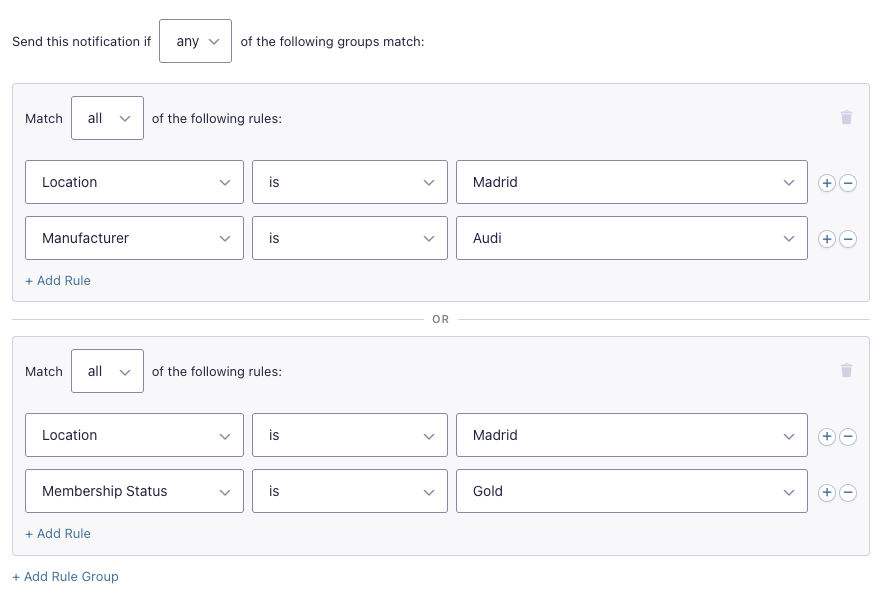
Multiple Any/All groups with independent logic
Build as many rule groups as your logic requires. Give each group its own Any/All logic, then define how groups relate to each other.
Four new operators
does not containflags a value carrying something it shouldn’t.is inchecks a source value against a list and passes if any match.is similar toandis not similar totreat near-matches as matches (useful for catching typos 😉).
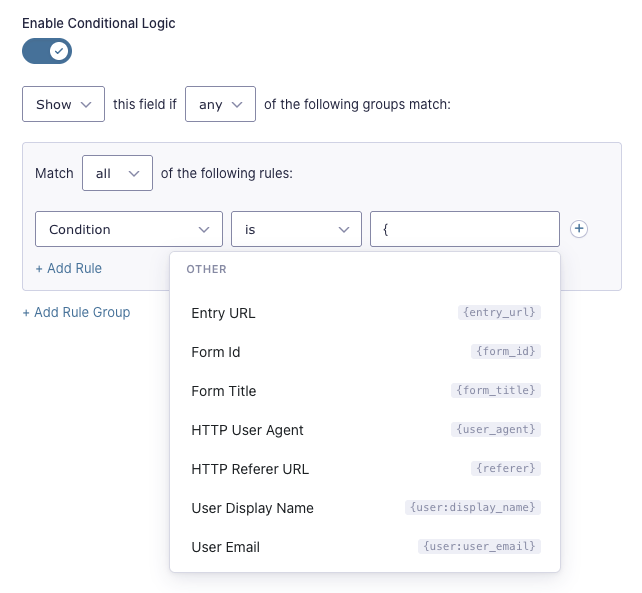
Dynamic values available for conditions
Your conditional logic eyes are open. Compare a live field against another live field using merge tags. Pull in contextual values like the current page URL or the user’s IP address. Reference user roles and logged in status. 👁️👄👁️ ✨
Date and time support
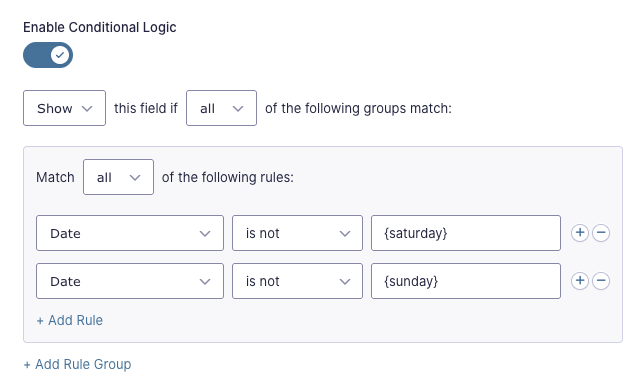
Conditions can reference:
- Date/time fields
- Static dates/times
- Relative dates
- The current date/time
- Days of the week
- And more!
Here’s a little secret.
This is actually the full feature set of another perk, Conditional Logic Dates, which is being merged into Advanced Conditional Logic. BOGO!
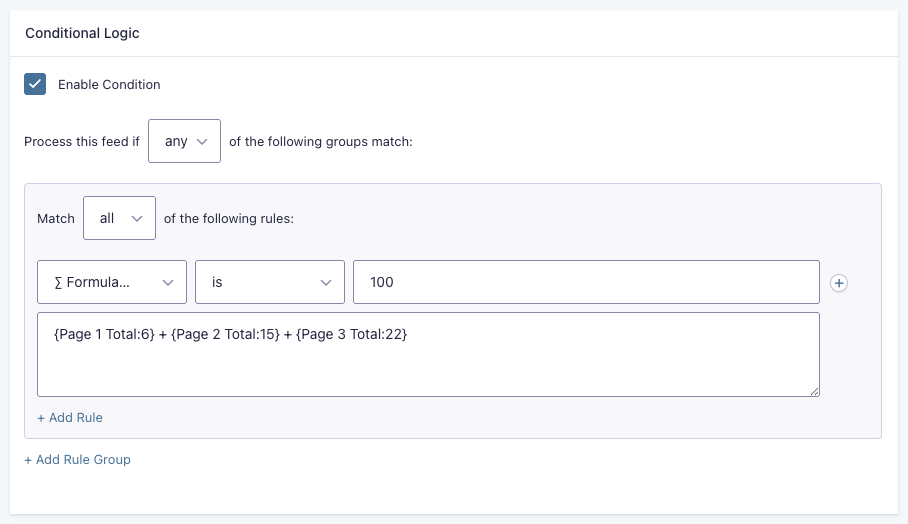
Formula support
Write conditions against calculated values and formulas. Branch forms and trigger feeds based on weighted scores, a running total, or meeting a certain threshold.
Logical conclusion
Take Advanced Conditional Logic Alpha 1 for a spin — it’s available for download in Spellbook! Then, share anything you find with us.
Don’t meet the “Gravity Perks License” condition yet? Evaluate it here.


I had an issue with it not showing the conditional for every field (especially html fields). Had to quickly deactivate it. But I see the promise! I don’t have a test site, but let me know how I can help.
Hi Tony,
Thanks for the feedback!
I just tested this on my end, including with HTML fields, and everything appears to be working as expected.
I’d love to take a closer look at what you’re seeing. I’ll reach out via a support ticket so we can troubleshoot it together and figure out why those conditional fields weren’t showing up for you.
Thanks again for giving it a try, and I appreciate you letting us know about the issue.
Cheers!
Can this plugin access meta data in the options table?
Hi Gary,
This plugin can’t access the data in the option table, but you could use our GP Populate Anything Perk to access the metadata in the options table.
Best,
This is HUGE — so much benefit to be had by expanding the operators and conditions. Cannot wait to test it out!
Hi Steve,
We’re really excited about it too. Looking forward to hearing what you think once you’ve had a chance to test it out.
Best,
Wondering if this can set another dropdown to limit choices based on the first dropdown selection.
Hi James,
The Advanced conditional logic feature doesn’t populate or set the choices of a field. The conditional logic setup is applied to the entire field itself. If what you’re trying to do is to populate a second dropdown field based on the selection in another dropdown field, then you’ll need to use our GP Populate Anything for that. Here’s a tutorial with a similar setup, which should guide you.
I hope this helps.
Best,
Thank you. I have that, but when I use GravityView it does not always show the first dropdown in report. It’s a hit and miss.
Hi James,
Can you please submit a support ticket for this so we can take a closer look at your setup and assist you to get it working in GravityView.
Best
Dani …
This sounds like such a very good idea!
I am going to (try and figure how to) set up a “test site” … just so that I can play with … I mean … test it!
Shawn
Hi Shawn,
That sounds like a great plan. If you run into any issues while setting it up or testing things out, just let us know; we’ll be happy to help.
Best,