
Scheduling in Gravity Forms: A Wizard’s Guide

All you need to know to take appointments, bookings, and reservations in Gravity Forms — and which tools to use depending on how complex your scheduling needs are.
- But first. Why use Gravity Forms for scheduling?
- How bookings work in a nutshell
- Creating a complete booking system in Gravity Forms
- What industries can GP Bookings handle?
- What if I’m looking for something simpler?
- Taking it further
- Key Takeaways
- Frequently Asked Questions
Scheduling needs are varied — just like the Gravity Forms ecosystem.
In the bulk of this article, we’ll cover the main capabilities needed for scheduling, focusing on a handful of Gravity Perks (shortened as GP). Later on, we’ll share a few tips as to how to take your setup further.
Let’s get started. 🧙♂️
But first. Why use Gravity Forms for scheduling?
Gravity Forms is a form plugin with a ton of features — conditional logic, dynamic field population, and multi-page forms, to name a few. This means you’ll have all of these features available for your booking forms and any other form you create.
Plus:
- Booking data lives in WordPress, not a third-party account
- No iframe, redirect, or separate dashboard for your clients
- Bookings are entries, so they flow into the same notifications, automations, and integrations already set up on your forms
- A booking form in Gravity Forms can also collect intake data, trigger user registration, create posts, handle file uploads, and more
- Gravity Forms is well supported, with a rich ecosystem of add-ons and integrations extending its capabilities
How bookings work in a nutshell
On its own, Gravity Forms can collect dates and times. If you want to do more, you’ll need at least one add-on.
GP Bookings, for example, turns Gravity Forms into a booking system with configurable availability, the option for bookable resources like rooms or staff, customer self-service, and a dashboard for managing bookings.
For extra simple operations, other perks can handle scheduling basics like blocking off dates without the additional setup.
Creating a complete booking system in Gravity Forms
GP Bookings gives you access to the necessary features to run most booking operations from WordPress. It requires some setup, but once it’s there, you can set it and forget it.
Setting up your first booking
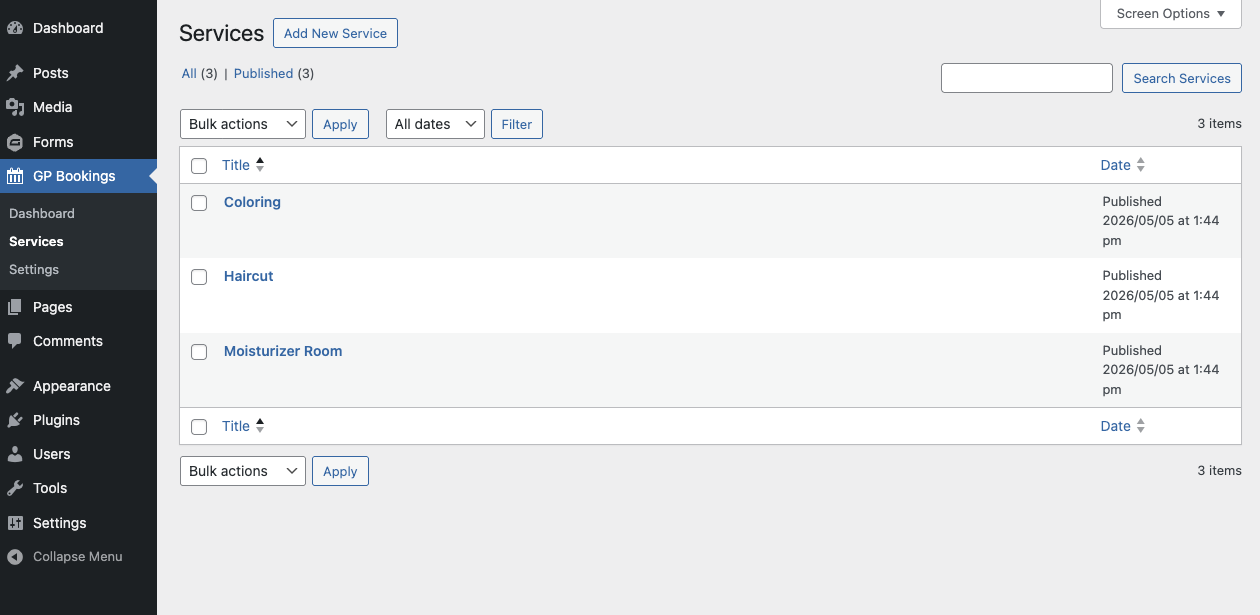
Let’s say you’re running a salon and GP Bookings is freshly installed.You start by adding your services — aka your haircuts, coloring, special rooms — in GP Bookings itself. You can choose to set them up manually or use the setup wizard, but either will land you with your services neatly listed in the Services area.
Inside these services, you can add specific stylists as resources under the Resources tab.
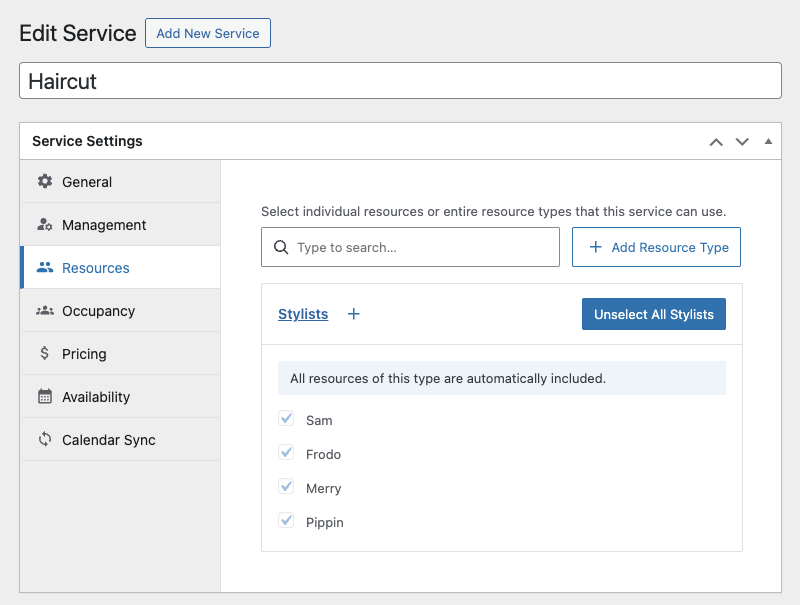
Each resource is its own entity with its own settings for things like pricing and availability. They can also be assigned to multiple services at once.
What this means: You can mix and match service and resource settings to fit the specifics of your operation. 🙌
Here’s an overview of those settings:
- Booking Duration
How long a booking of that service takes, with the option to make it flexible - Padding Time
How much time is needed before a booking is placed or between bookings - Capacity
How many of that booking can be taken at a time - Pricing
How the pricing is calculated based on booking conditions
Availability
When the given service or resource is available
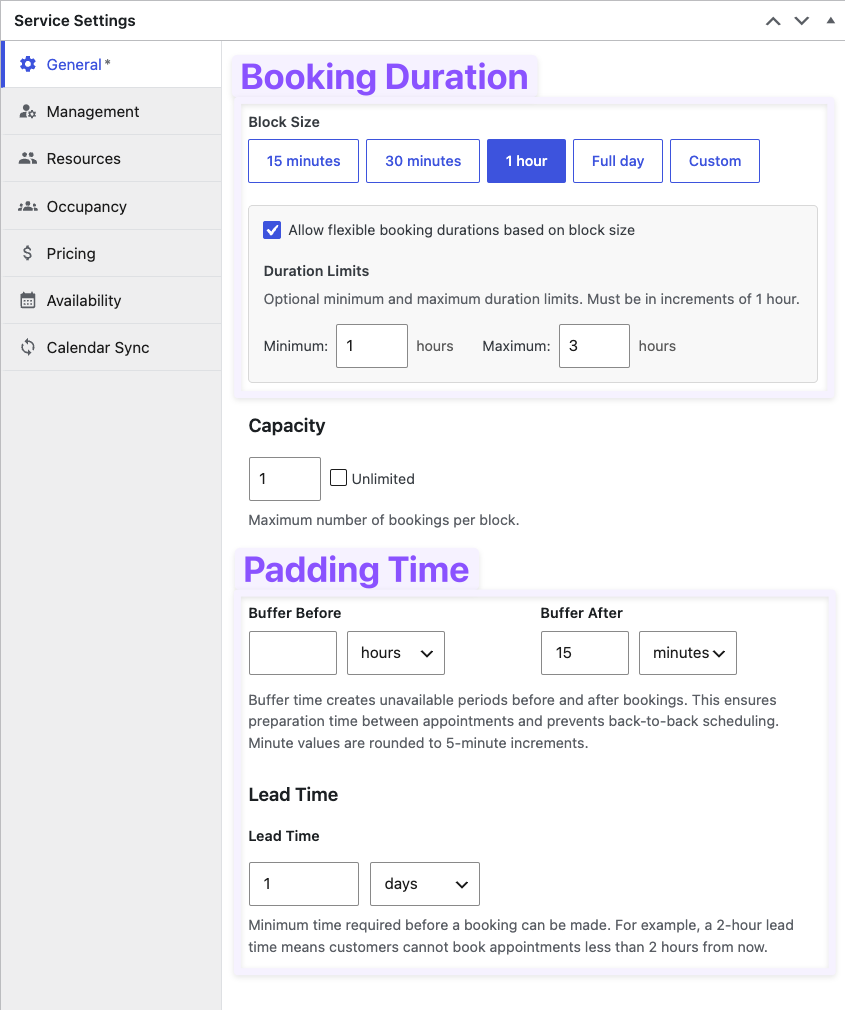
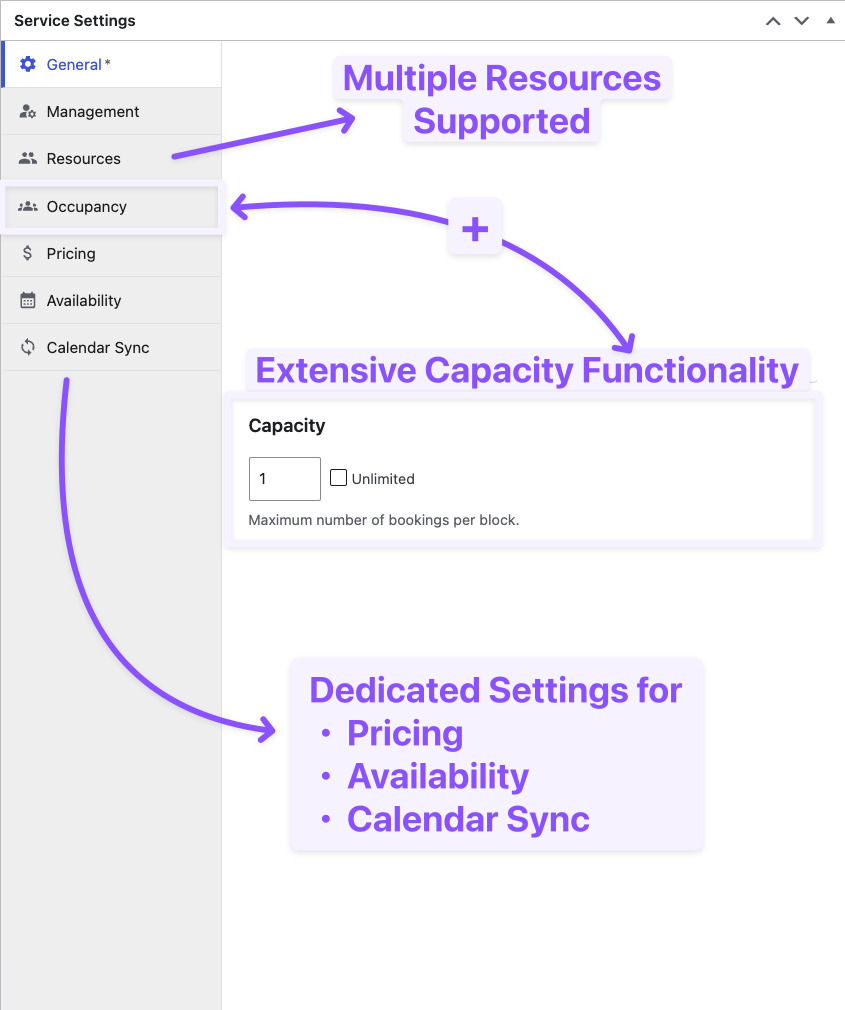
Okay, that’s a lot of arrows. Let’s break these settings down with examples from your salon:
-
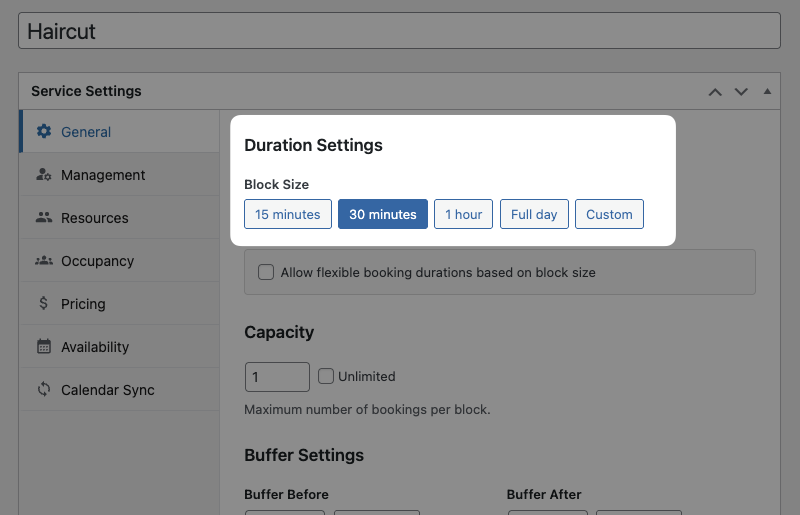
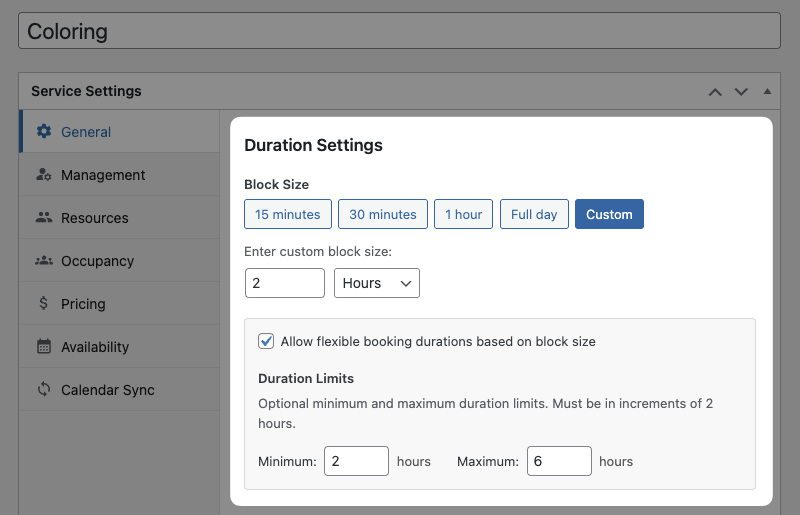
Booking Duration (service specific)
30min for haircuts, 2–6h for coloring.
-
Padding Time
Your salon only takes reservations up until 24h before appointment time. Stylists need 15 minutes after appointments for cleanup.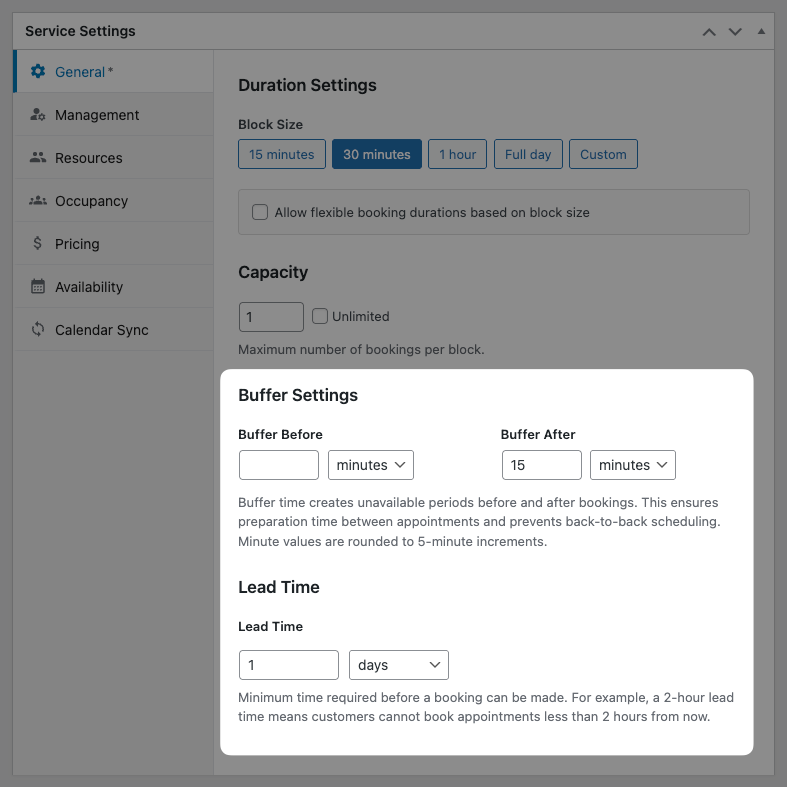
-
Capacity
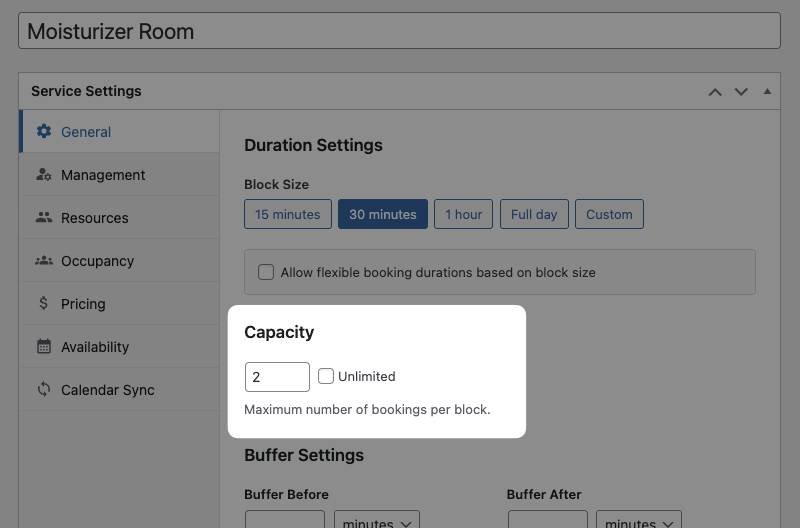
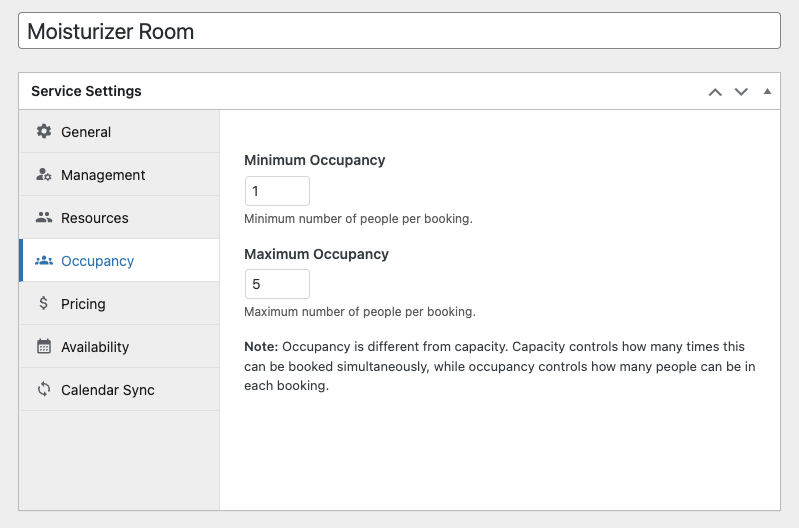
You offer two private moisturizer rooms (capacity) that fit five people (occupancy) per block of time. Normal hair appointments only have capacity for one person at a time.
-
Pricing
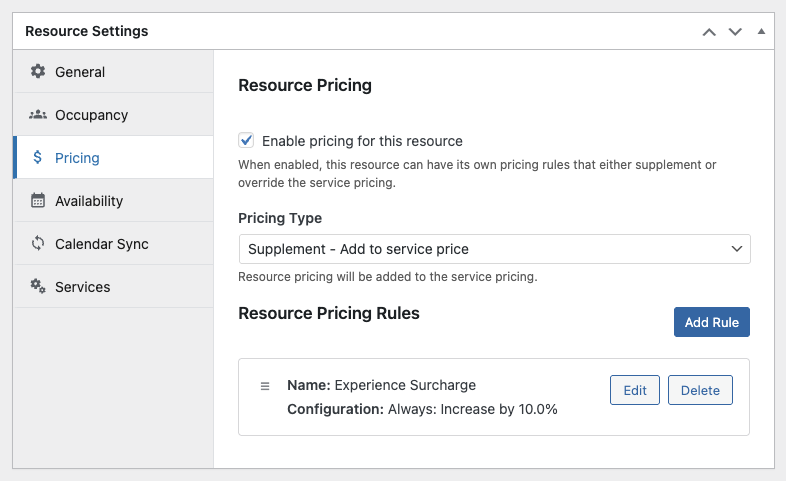
Sam, your senior stylist, charges an additional 5% on top of the standard price. The moisturizer rooms historically have less demand in during October, so there’s a $10 spooky discount.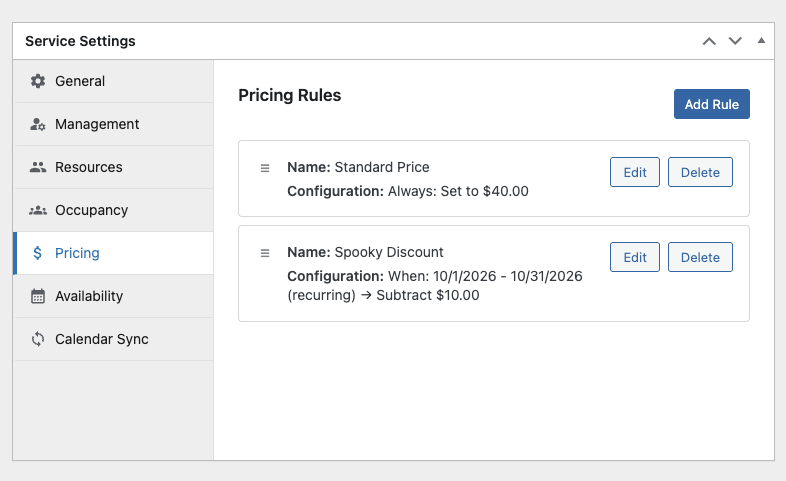
-
Availability
Even though the salon is open Mon–Sat, Sam only works Tuesdays and Thursdays from 1pm–7pm. The moisturizer rooms, on the other hand, follow the salon hours.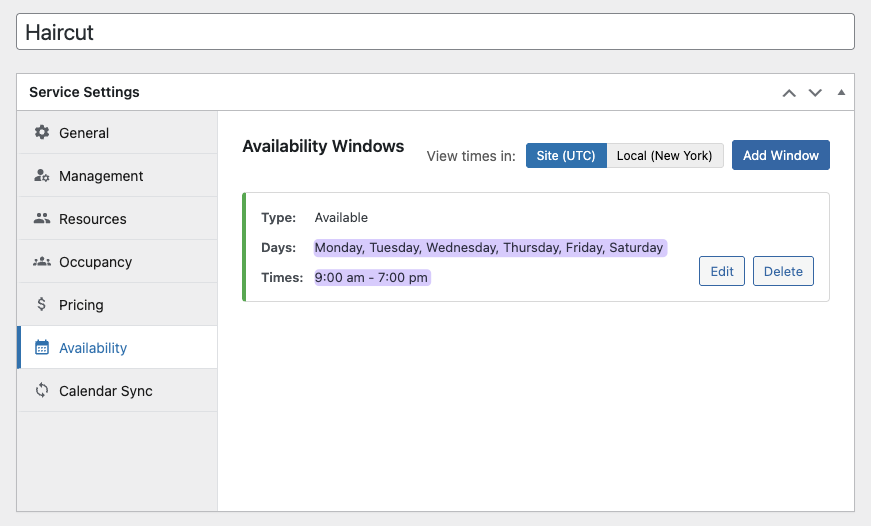
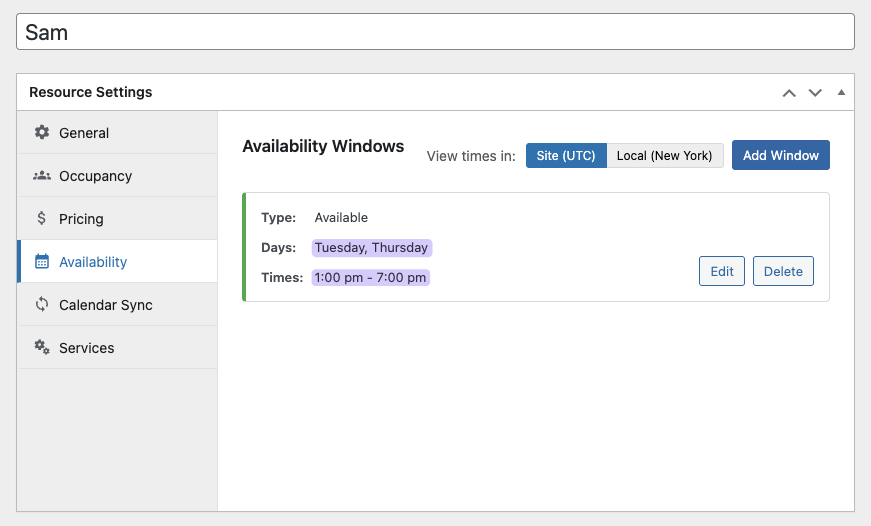
Services can be booked on their own. Resources are always booked with a service. Because of this, resources can have their own settings or follow the service’s settings instead.
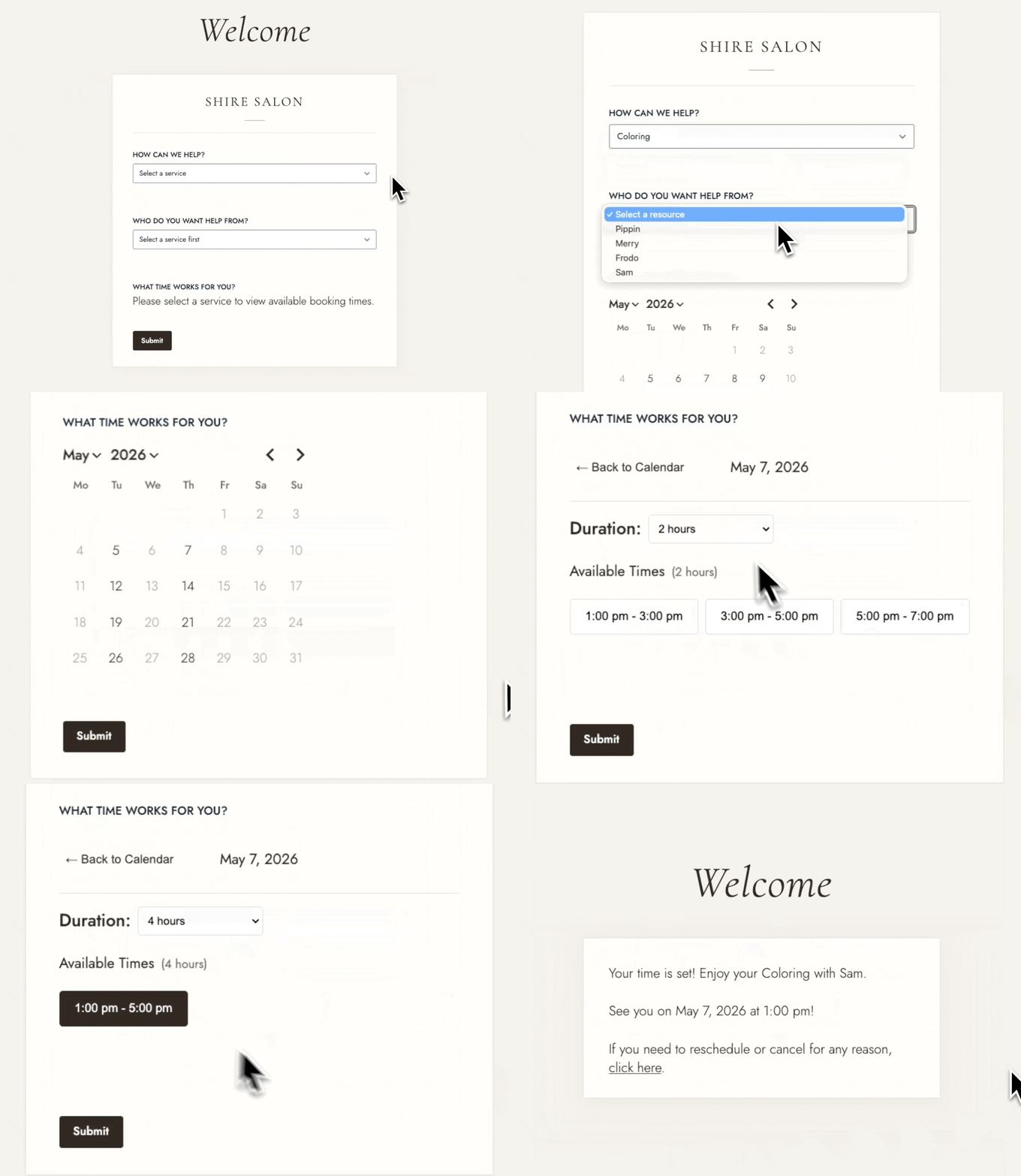
With all this information in place, you can build a form where customers choose a service, a stylist, and pick from available time slots. Once a slot is booked, it’s shown as unavailable, and you can send confirmation emails, reminders, or reschedule notices using Gravity Forms notifications.
Managing your bookings
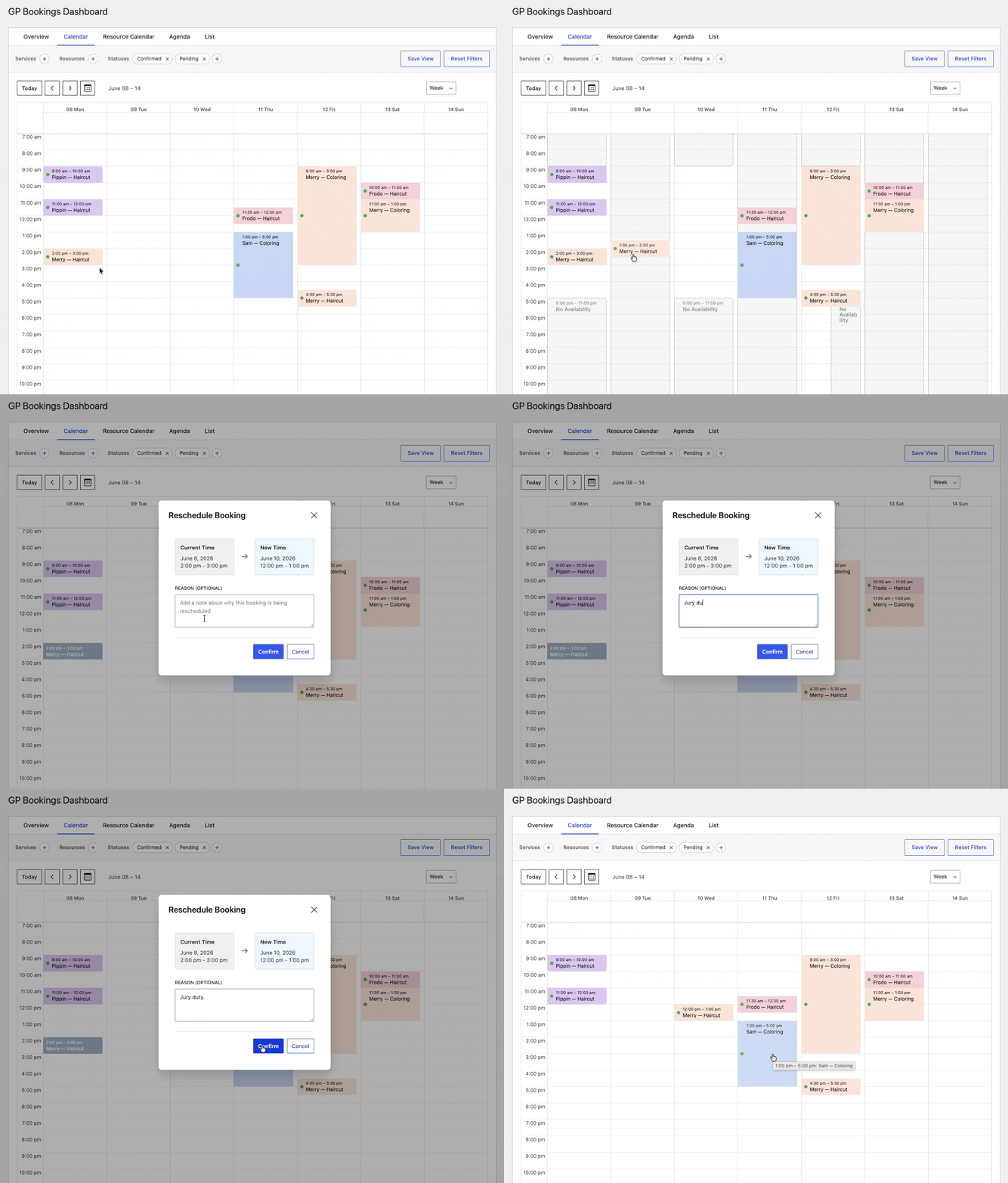
Bookings are stored as entries and can be managed from two places: the entry itself or the GP Bookings Dashboard, a customizable multi-view interface where bookings can be approved, rescheduled, or cancelled.
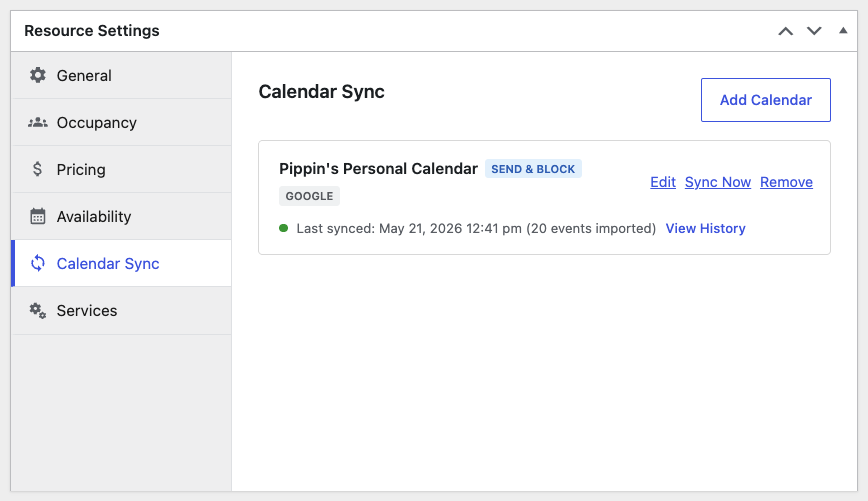
You can sync GP Bookings with your existing calendars to keep schedules up to date everywhere. GP Bookings creates calendar events when bookings are scheduled, and availability in GP Bookings is blocked based on all events from your calendar.
External calendar support overview:
- Instant sync with Google Calendar via the Gravity Connect: Google Calendar integration
- Configurable ICS feeds for all other calendars, like Apple Calendar and Outlook
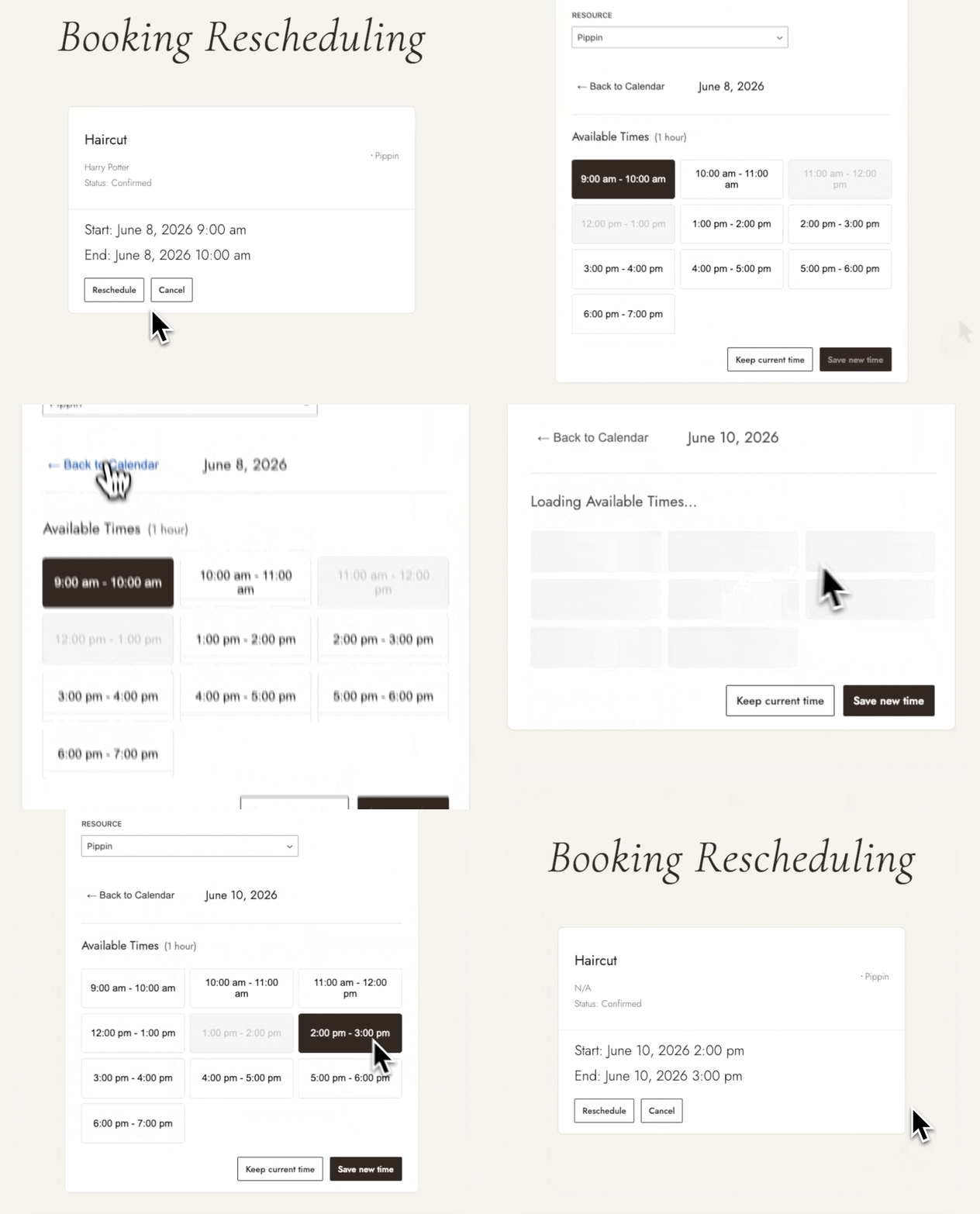
Additionally, if you want your customers to be able to cancel or reschedule their bookings, each booking has its own Booking Management Page that can be sent to the customer at any time.
What industries can GP Bookings handle?
GP Bookings covers most scheduling use cases out of the box with its flexible service, resource, availability, and pricing systems. Both a freelance tutor with a few subject offerings and a tutor collective with over ten subjects would be accommodated.
Here are some examples of different scenarios:
- How to Turn Gravity Forms into a Hotel Booking Platform
Covers seasonal pricing, room inventory, and minimum stay requirements. - How to Set Up a Salon Booking Platform with Gravity Forms
Covers setting up stylists, service durations, and buffer time. - How to Turn Gravity Forms into a Spa Booking Platform
Covers multi-resource availability, occupancy-based pricing, and client self-serve. - How to Turn Gravity Forms into a Gym Booking Platform
Covers capacity, coach schedules, and peak season pricing. - How to Create a Tutor Booking Form with Gravity Forms
Covers session scheduling, subject selection, and per-session payments. - How to Build a Legal Booking System with Gravity Forms
Covers consultation booking, intake forms, and secure client data. - How to Automate Seasonal Hotel Rates with Gravity Forms Bookings
Covers stacked pricing rules, date-specific rate automation.
What if I’m looking for something simpler?
If you’re looking for something closer to a simple form that limits a few dates and manages basic inventory, here’s what you can do.
Adding date limits to Gravity Forms Date fields
Limit Dates controls which dates are selectable in Gravity Forms datepickers. You can use it to block specific date ranges, limit date choices to weekdays or weekends, or link two date fields so a checkout date can’t precede the check-in date.
Example uses:
- Rental forms with blocked unavailable periods
- Booking forms restricted to business days
- Date range selection for multi-night stays
If this is sounding like the right track, here are some tips on getting more from the Gravity Forms datepicker.
Caveat:
Limit Dates shapes which dates are selectable, but doesn’t enforce capacity. In other words, a date won’t be blocked because it’s “full.”
Adding capacity/slots to Gravity Forms dates and choices
GP Inventory adds inventory management to Gravity Forms. When a limit for a product, choice, or date is reached, that option is automatically removed — even between forms.
You also have an Inventory Dashboard in each form, which gives you a bird’s eye view of all inventories present there.
Example uses:
- Classes where each slot has a set number of available spots
- Rentable assets present in multiple forms
- Per-day or per-hour capacity
Caveats:
GP Inventory works like a quantity gate. You define a quantity limit, it decrements as entries come in, and blocks that option when stock hits zero. Depending on your needs, this simplicity means you’d have to manually create every time slot as a form choice, with no way to automatically block scheduling conflicts.
Adding conditional pricing to Gravity Forms
Conditional Pricing creates flexible pricing levels for Product fields based on conditions in your form — quantity, user input, field values, and more. Conditional Logic Dates extends that to date and time selections, making date-based pricing rules possible.
Example uses:
- Weekend surcharges
- Seasonal pricing
- Early bird pricing
- Tiered quantity discounts
- Age-based pricing
- Member vs. non-member rates
- Fields that only appear for certain booking windows
Caveats:
Conditional Pricing works like conditional logic for pricing, applying a single pricing level based on whichever condition is met first. While it covers a wide range of pricing scenarios, it can’t stack rules or compound conditions. For pricing that needs to build on itself across multiple conditions, GP Bookings handles it more cleanly.
Want more pricing scenarios like this?
Our guide to building calculators in Gravity Forms covers rounding, tiered pricing, and more.
Taking it further
A few more add-ons worth knowing about depending on what your operation needs.
Accepting payments and applying taxes
eCommerce Fields adds Tax, Subtotal, and Discount fields to any form. Useful when bookings involve upfront charges that need to be displayed clearly before payment, or when tax-compliant pricing is a requirement. Gravity Forms also includes a Coupons add-on with Elite and Non-profit licenses for discount codes clients can apply at the time of booking.
Generating QR code tickets
GP QR Code generates scannable QR codes from booking confirmation data — useful for event check-in, ticket validation, or any booking with a physical component.
Displaying booking history
Entry Blocks displays Gravity Forms entries on the frontend in a filterable, searchable table or gallery — useful for creating client portals or staff dashboards. With its frontend entry editing capabilities, it could also serve as an alternative to the Booking Management Page for customer self-service.
Generating PDF invoices
Gravity PDF generates PDF invoices or booking confirmations from form entries automatically on submission.
Connecting to WooCommerce
Gravity Shop Product Configurator embeds any Gravity Form inside a WooCommerce product page — connecting both ecosystems natively, including cart, checkout, and payment processing.
Displaying time-based notices
Closing for a holiday? Pair blocked dates with Form Notices to show visitors a message above the form explaining when you’ll reopen.
Key Takeaways
- Gravity Forms is a full-featured form plugin that can also handle scheduling.
- Natively, Gravity Forms handles date collection, time slots, and basic pricing, but doesn’t enforce availability or capacity without add-ons.
- GP Bookings brings a full-featured native booking system to Gravity Forms, handling availability, resources, complex pricing rules, and client self-serve by itself.
- Simpler needs can be covered with other perks like Limit Dates, GP Inventory, and Conditional Pricing. As complexity grows, GP Bookings offers the most solid foundation.
- The Gravity Forms ecosystem can extend a booking setup further — taxes support, QR tickets, booking history, PDF invoices, WooCommerce connectivity, etc.
Frequently Asked Questions
Can Gravity Forms handle scheduling on its own?
On its own, Gravity Forms can handle the basics:
- Use a Date field to show dates in a datepicker
- Use Choice fields to present specific time slots
- Use Product fields to set different prices based on selections
- Use conditional logic to show or hide fields based on values
For anything beyond that, like enforcing availability, blocking dates, or limiting slots, you’ll need at least one add-on.
What’s the difference between GP Inventory and GP Bookings for scheduling?
GP Inventory manages capacity against a fixed count — when a slot reaches its limit, it’s automatically removed, and that’s it.
GP Bookings, on the other hand, takes schedules and additional factors (like resources) into account. Its capacity settings are part of a broader availability system that accounts for existing bookings, buffer times, and more.
How does GP Bookings compare to other WordPress booking plugins?
From a Gravity Forms perspective, GP Bookings lives inside Gravity Forms. Bookings are entries, your form data and booking data are centralized from the start. Standalone booking plugins run their own systems with Gravity Forms as an optional layer.
From a general perspective, GP Bookings is extremely flexible in comparison to other plugins. Services, resources, availability, and pricing rules that stack on each other are independently configurable — i.e. the same system that handles a single-staff salon handles a multi-location spa.
For a more detailed analysis, see a full comparison of WordPress booking plugins.
Can Gravity Forms handle taxes or discounts for bookings?
GP Bookings includes pricing rules for date, time, duration, occupancy, and quantity-based adjustments. For tax fields, subtotals, and more structured order summaries, GP eCommerce Fields adds those directly to any Gravity Form. Gravity Forms also includes a native Coupons add-on for discount codes.
Can I connect Gravity Forms bookings to WooCommerce?
Yes. Gravity Shop Product Configurator lets you embed a Gravity Form inside a WooCommerce product page, connecting both ecosystems natively.



What would actually be useful is if the booking form had an inline date picker where the user could pick multiple individual dates when booking, etc, Monday and Tuesday, not just single days.
We use your gravity forms for almost everything from trial registration to membership registration.
And now we want to introduce booking where we offer a few weeks of service with limited spaces, but we want users to book/select multiple days from the given selection of available days.
Hi Justas,
We have a soon-to-be released perk, GP Booking, which looks like a suitable solution for what you’re trying to do. The perk is currently only available to Pro users on request. If you have a Gravity Perks pro license, you can submit a ticket to request access to the perk.
Best,
Can this be used to fill an “add to google callander” button with in the notification please?
I.e customer books a ticket to a show, Notification contains button that gives the time, date and location to google calander for the event they chose?
Hey Ben, An “Add to Google Calendar” integration isn’t supported directly out of the box yet, but we would be happy to hear more about your potential use case for this feature via support!
I’ve got a need to have a booking solution for a spa where each individual service has a specific duration.
A massage may be 60 minutes as an example. A client might purchase a 60 minute massage and a 30 minute manicure. I need a solution where the customer now needs to see/find an available date and time of 90 minutes to book.
At the moment they only have 1 practitioner, but in the future it may need the ability to have a per practitioner selector or a combined calendar.
Just fishing for ideas on how to tackle this little challenge. Existing booking tools from Square etc don’t allow for this as far as I can tell.
Hey Kyle, Inventory could handle most of this with its Scoped Inventory concept; however, doesn’t have a concept of an actual “schedule” so it wouldn’t be able to block off 1:00 – 2:30 if a 90 minute session was booked. This seems like a fatal flaw for your use case.
I’d take a look at Simple Schedule Appointments which integrates with Gravity Forms (and Gravity Perks). The only thing I’m not sure if it can do is handle multiple resources (e.g. masseurs).
Hi, Can I use this tool for group-trainings as well? And limit the number of participants? There is a function Limit number of entries, but you only see the message when you submit.
And how to setup reminder mails in function of the date.
Hi Bjorn,
You can use GP Inventory to limit the number of participants per session.
Our Notification Scheduler Perk is perfect for sending reminder emails before the date.
Let’s say we use Gravity Forms Limit Dates to constrain which dates are available.
When a date is selected, how can we feed that date back into Gravity Forms Limit Dates, so that it cannot be selected by somebody else?
Longtime subscriber, love each and every one of your sexy perks.
Hi Adam,
Thanks for the kind words!
This should be possible with GP Inventory perk to remove that date.
Cheers,
Hey, on April 12, 2022 – Samuel said: “You could add a dropdown field with the time slot for the day as the choices and use our GP Inventory Perk to scope the Date field with the Time slot Dropdown field and apply limits on the Timeslot for each day. Please check out our GP Inventory Perk Documentation on Scoped Inventory for more information on this.”
I tried doing this but I think I am missing step. I can get a date linked to a product to work but when I tried to add a timeslot – no joy.
My setup is a Date field that has the GF Limit Date perk set up. A drop down field with timeslots that are set up with GF Limit and then my Product has the Inventory Type set up.
I can do multiple dates with multiple sign ups but cannot do multiple dates with multiple timeslots with multiple signups. Possible?
Hi Elizabeth,
We’ll have to take a look at your setup to assist you with what you’re doing. If you have an active Gravity Perks license, you can get in touch with us via our support form so we can look into this.
Best,
Hello. Can I book a gravity forms appointment with a CPT named Event post type?
I want to make an appointment for each event?
Hi Ayhan,
You could probably integrate this tutorial with the Advanced Post Creation Add-On from Gravity Forms to create the CPT
Best,
Is there an approach or workflow that would allow people to cancel their reservations or some other way to automate the removal or update of an entry that acts like a cancelation? I know this is pushing what any form software is meant to do.
Hi Patrick,
That would depend on your setup. If your users will be logged in, then you can use our GP Entry Block Perk to display to the users, their booking on the frontend, where they can manage their booking/entry including deleting/canceling the booking.
Best,
So this is great if you have unlimited space. But what if you only have 2 time slots per day. I don’t see anyway to see if a time is already picked for a specific date and don’t show it. Any ideas?
Hi,
You could add a dropdown field with the time slot for the day as the choices and use our GP Inventory Perk to scope the Date field with the Time slot Dropdown field and apply limits on the Timeslot for each day. Please check out our GP Inventory Perk Documentation on Scoped Inventory for more information on this.
Best,
If you aren’t using time slots, but let users enter start times and end times themselves, how to you set up the logic so times can’t overlap? So someone can’t reserve a pace for 2:00 pm to 3:00 pm and someone else can’t reserve the same space from 2:45 pm to 3:15 pm?
Alternatively, you can use FormDesigner.pro and select and customise one of the pre-designed templates.
Hi Ivan,
Thanks for the suggestion! The tutorial shown here uses Gravity Forms to create an Appointments and Bookings page that leverages WordPress integrations and the developer community.
Cheers,