How to Turn Gravity Forms into a Spa Booking Platform

GP Bookings lets you set flexible spa service durations, book facility spaces (like a sauna) without assigning any staff, and let clients reschedule on their own, right inside Gravity Forms.

- Schedule Any Appointment Length with Buffer Time
- Prevent Double-Booking with Resource Types
- Adjust Pricing Automatically Based on Guest Count
- Let Clients Manage Their Own Bookings
- Running a Steam Room or Sauna Without a Staff Member?
- Schedule Like a Pro. Relax Like a Client.
GP Bookings turns Gravity Forms into a booking platform built for the full treatment: flexible scheduling, a calendar that never double-books, and a self-serve portal for clients who need to reschedule, all without leaving WordPress.
You decide how long each service runs, hold space between appointments, make sure the right people and rooms are free, and let clients handle their own reschedules. Set the rules once, and the form does the rest.
It works across just about any business that takes bookings. But for spas? This one hits the right pressure points. 💆
Let’s get into it.
Key Takeaways
- GP Bookings lets you set a different duration for every treatment you offer. Whether it’s a 15-minute brow wax or a 90-minute massage, each service runs on its own schedule.
- With GP Bookings, both a room and a massage therapist need to be available before a booking is confirmed. Link multiple Resource Types to a single service and the form checks Capacity and availability across all of them.
- GP Bookings lets you run facility spaces like steam rooms and saunas without any staff assignment. Set a Capacity limit and the slot disappears once it is full.
- With GP Bookings, clients can reschedule or cancel through a secure link sent in their confirmation email. They land on a Booking Management Page and make changes on their own.
This article requires the Gravity Forms Bookings perk.
Buy Gravity Perks to get this perk plus 46 other premium Gravity Forms plugins!
Schedule Any Appointment Length with Buffer Time
In GP Bookings, a Service is what you are offering—a session, an appointment, or a treatment of any kind. Each one gets its own duration and runs on its own schedule.
Pair that with Buffer Settings and you get automatic breathing room before or after every appointment. The calendar holds that time without you having to manually block it.
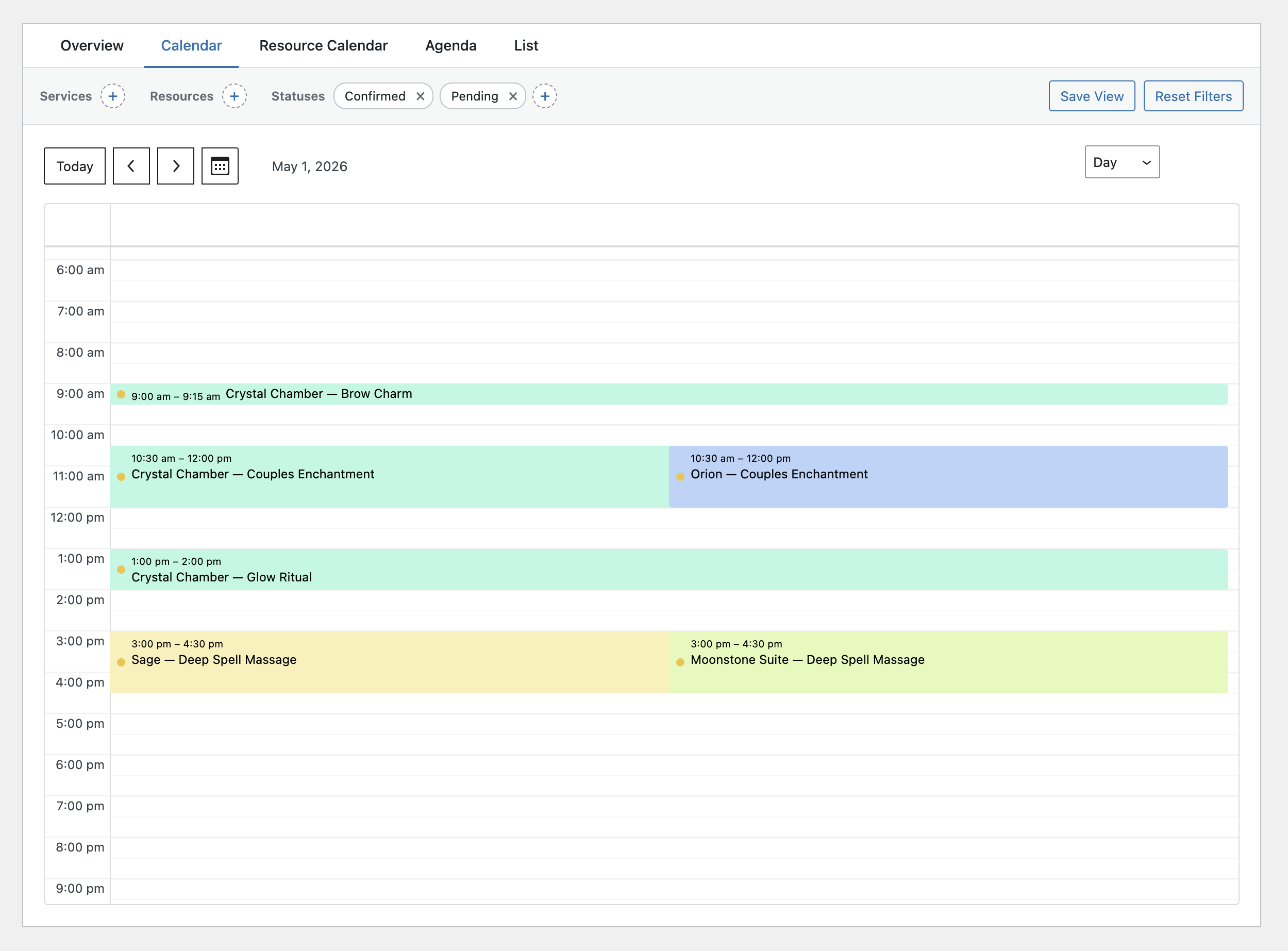
For spas, that could mean a 15-minute brow wax, a 60-minute facial, and a 90-minute massage all living on the same form, each running its own clock with its own buffer.
Wizard’s Note
Want to go a bit deeper on services with different durations? We have a quick guide that walks you through setting up different service durations.
Prevent Double-Booking with Resource Types
A Resource is anything an appointment actually needs to happen—a room, a staff member, or a piece of equipment. Resources live inside broader categories called Resource Types, and you can link as many as you need to a single service.
When a client picks a time, the form checks availability across every linked resource before surfacing that slot. If even one resource is already taken, that time will not be available to book.
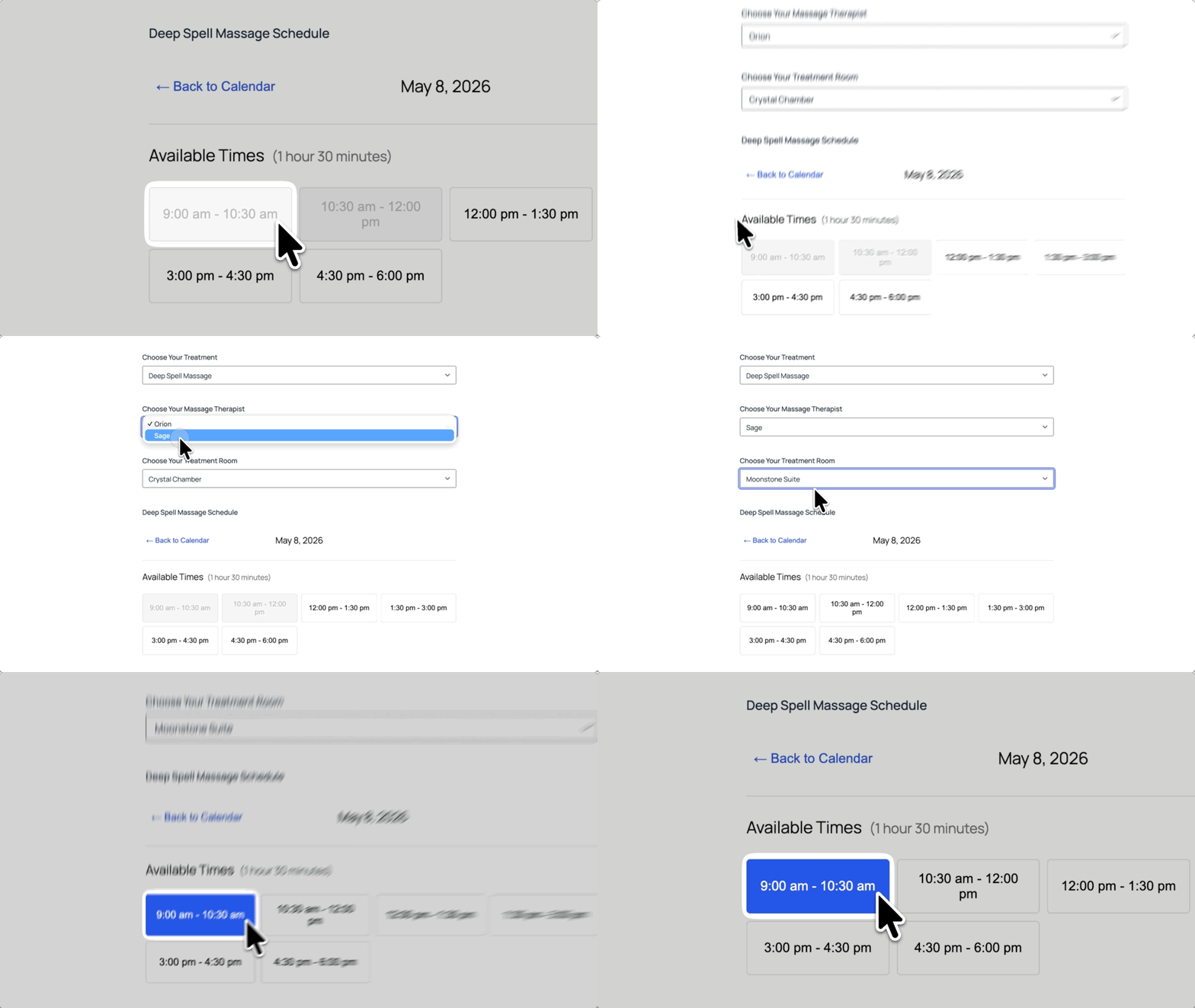
For a spa, that means linking “Rooms” and “Massage Therapists” to your massage service. A client picks their preferred room and massage therapist, and the form confirms both are free before locking anything in.
Pro Tip
In your Resource field settings, limit which resources appear per service. That way clients only see the rooms and massage therapists that actually belong to the treatment they picked.
Adjust Pricing Automatically Based on Guest Count
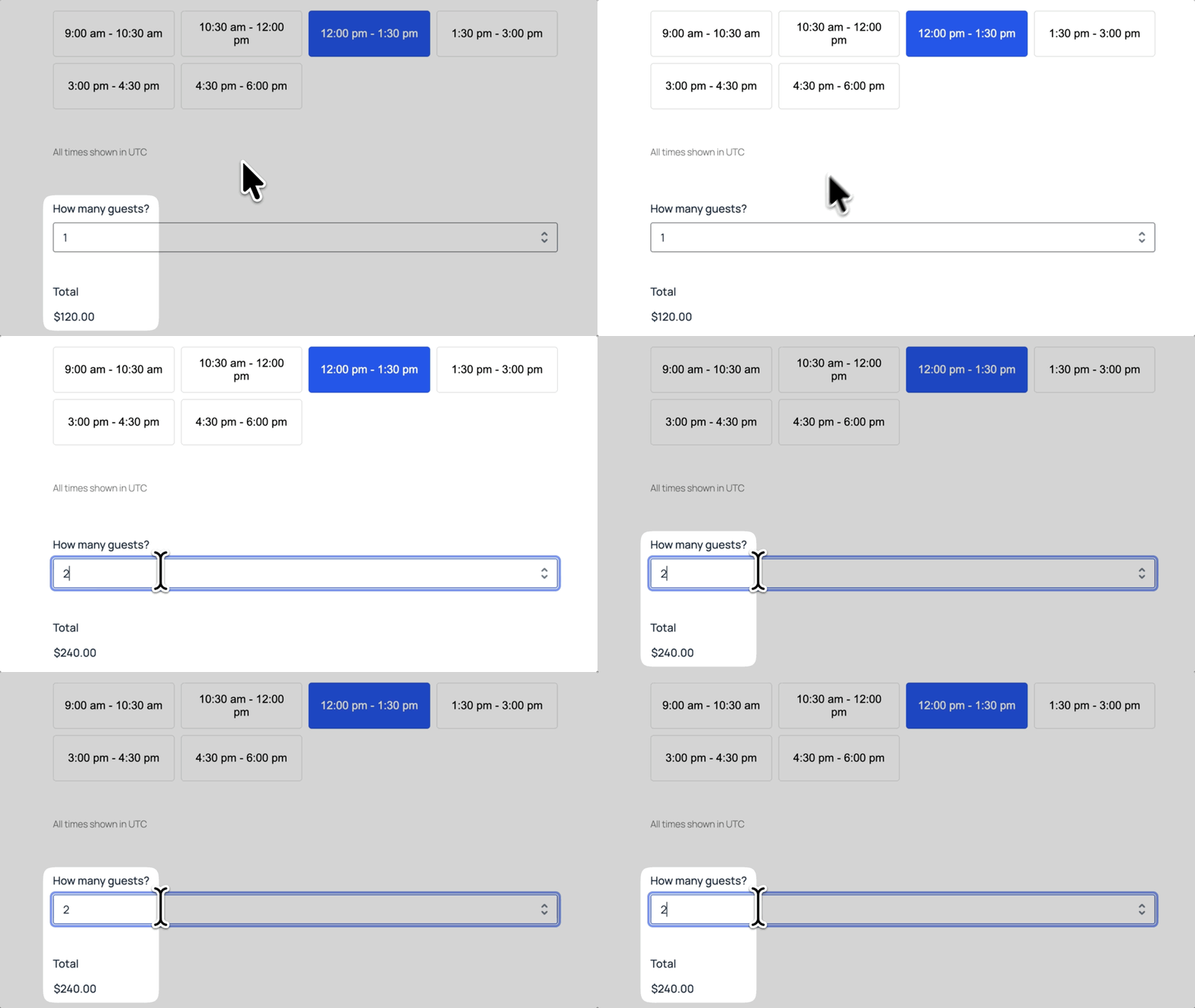
Occupancy tracks how many guests are tied to a single booking. Pair it with pricing rules and the total adjusts in real time as that number changes.
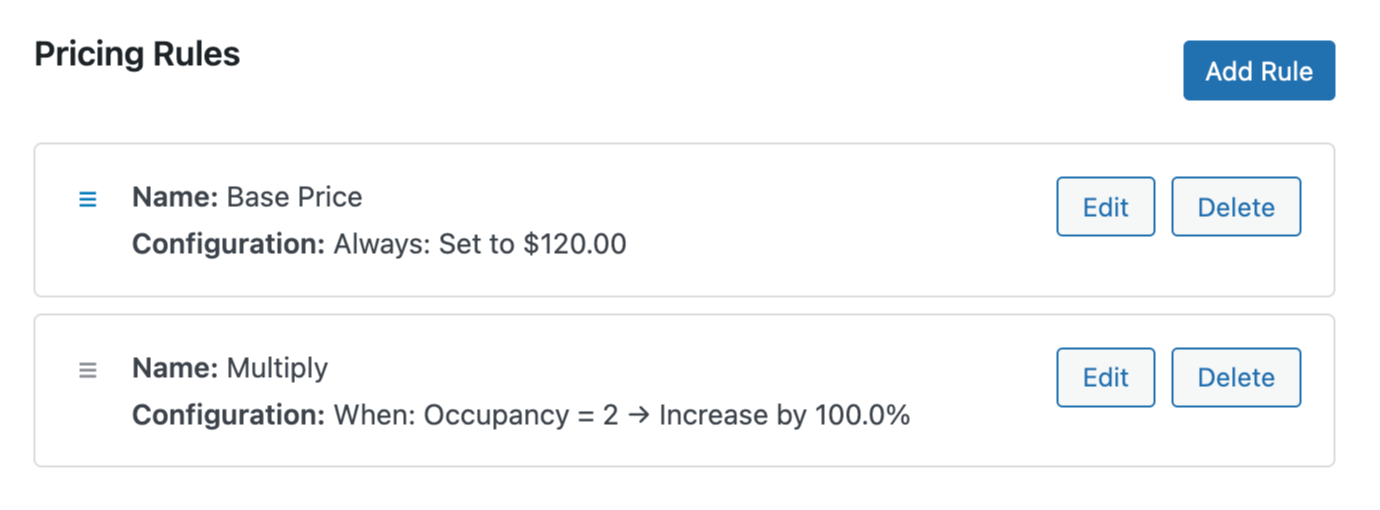
For a couples treatment, set an Occupancy field with a max of two and add a pricing rule that multiplies the base price by the number of guests. The moment a client bumps the guest count to two, the price updates right there on the form before they check out.
Wizard’s Note
Pricing rules can also change based on factors, like the time of year. Check out how date-range-based pricing handles seasonal hotel rates.
Need help choosing a payment gateway? Check out our guide to Payment Gateways in Gravity Forms.
Let Clients Manage Their Own Bookings
GP Bookings lets you set up a Booking Management Page where clients can reschedule or cancel on their own. You set the cutoff deadlines and clients can only make changes before those windows close.
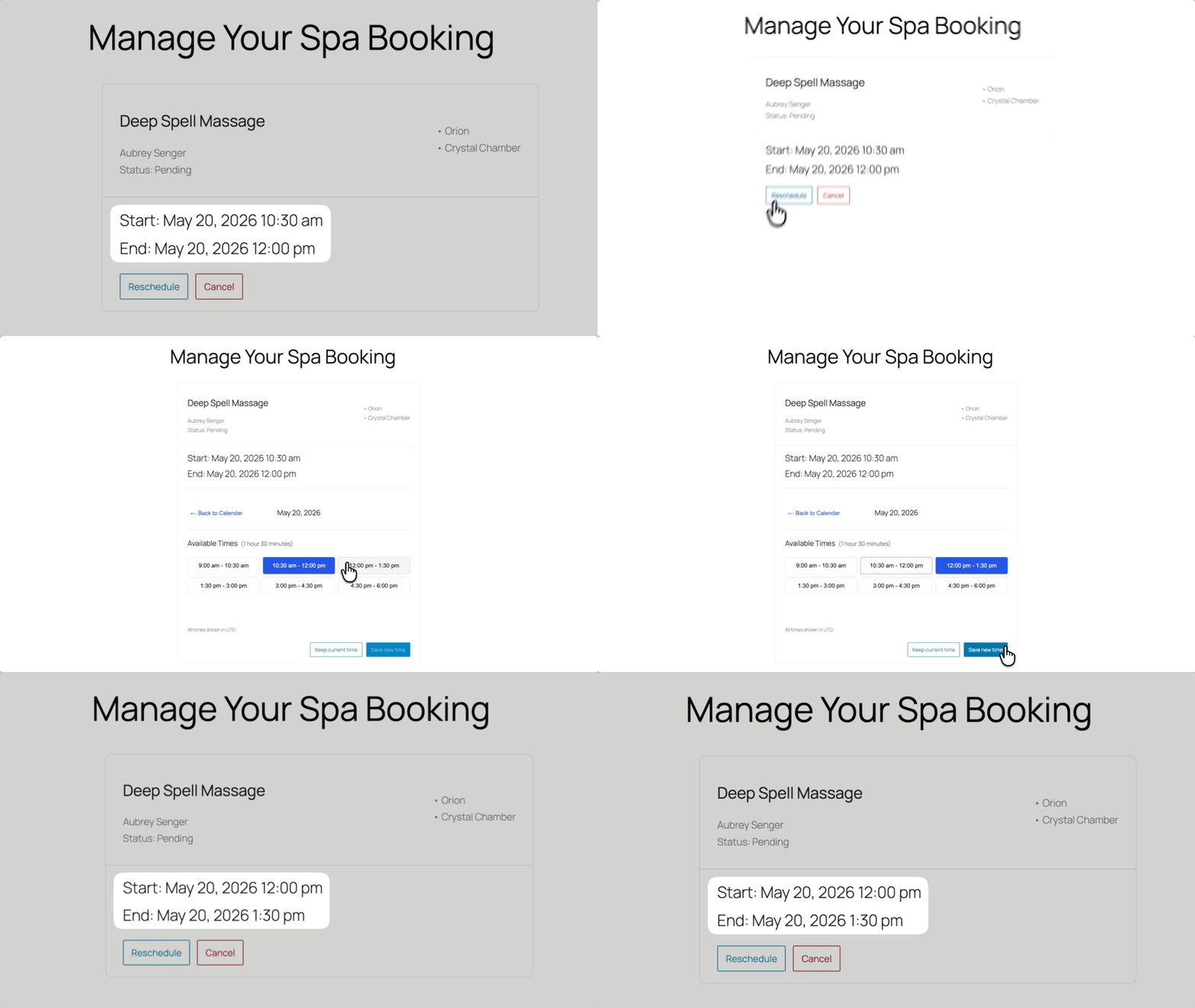
For spas, drop the {gpb_manage_booking_url} merge tag into your confirmation email and every client gets a direct link to their booking. They make the change, your calendar updates, done.
Running a Steam Room or Sauna Without a Staff Member?
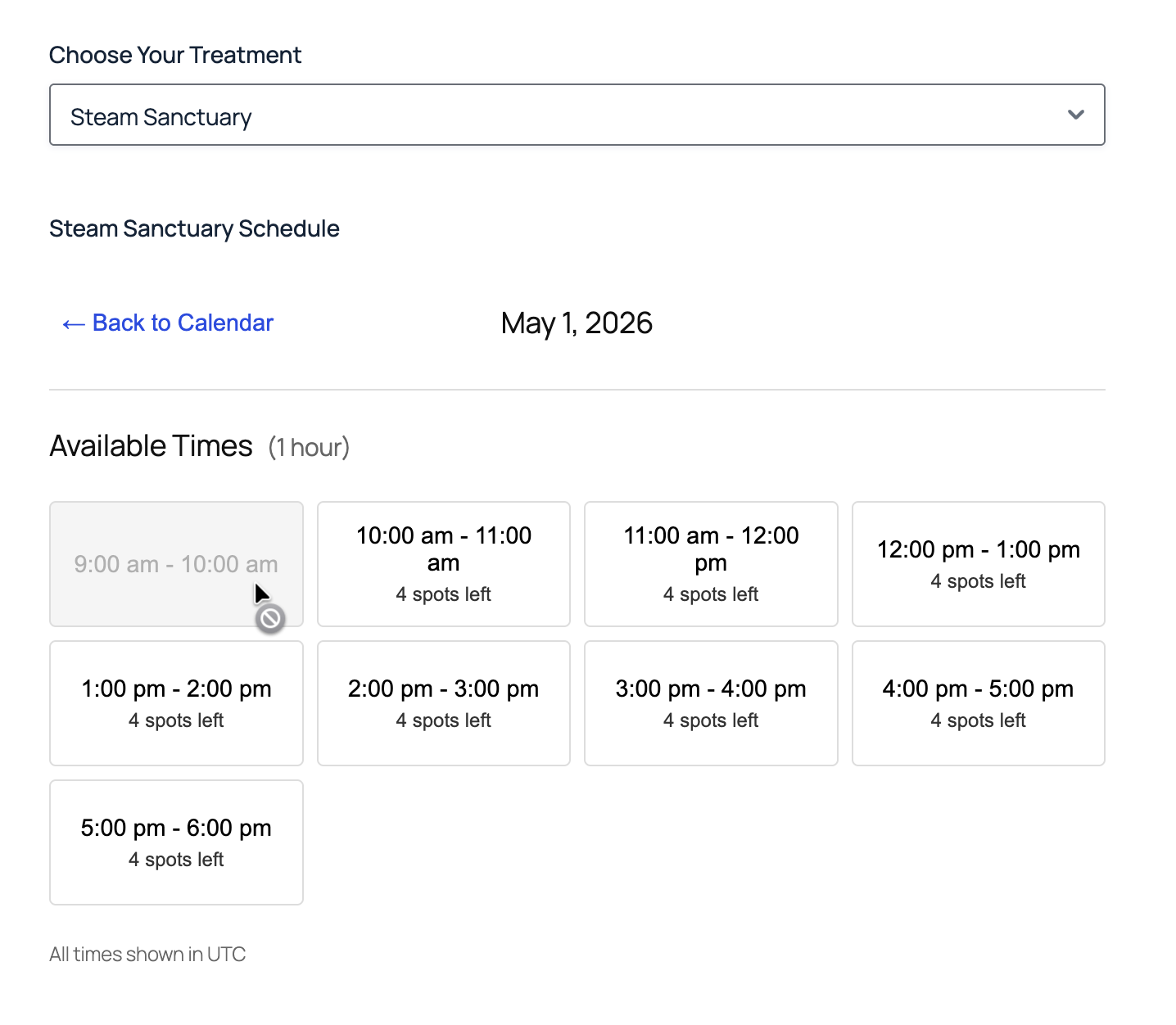
GP Bookings supports services that do not require any resources—rooms, staff, or equipment. Instead, just set a Capacity limit on the service, and when it’s reached, the slot grays out automatically.
Wizard’s Note
Capacity limits work well for any drop-in service. Check out how they help prevent overbooking in gym group classes.
For spas, that could mean a steam room or a sauna running completely on its own. Guests pick a time, the form checks availability, and with a Booking Management Page they can even reschedule or cancel without anyone on your end getting involved.
Pro Tip
Use Availability Windows to set the exact hours each facility is open. The form will only show time slots within those windows.
Schedule Like a Pro. Relax Like a Client.
GP Bookings does a lot on its own. Pair it with more perks on your Spellbook and it does even more.
Here are some examples:
- GP Nested Forms lets you register big groups in one go, handy for group spa days where each person needs their own service selection.
- GP Copy Cat copies details from one section of the form to another, handy when a client doesn’t want to fill in the same info twice.
Want to see what else GP Bookings can handle? The full documentation breaks it all down.
Running something other than a spa? Drop a comment. We might cover yours next. 🧙