GWW 303: See Other

Format date and time merge tags! Plus, GP Popups speaks shortcodes, GP Bookings adds a display mode, and a guide to automating with n8n.
Greetings, wizards!
Ever since we hit the 300th edition of this newsletter, I keep thinking of HTTP response status codes. 😆
In the spirit of 303 See Other, I encourage you to check out my appearance on GravityKit Live earlier this week. I went deep on how GF Dev Tools can save you hundreds of hours if you’re working regularly with Gravity Forms. It was a lot of fun. 😄
Now, let us redirect our attention back to our spellbooks for this week’s magic lesson. It’s a good one! 🪄
Top Picks: Product Highlights
GP Bookings
✦ Turn Gravity Forms into your complete WordPress booking platform.
We’ve added a “Display Mode” setting to the Booking Time field. You can now choose between the default “Calendar” view or a new “Simple” display mode that displays the next n time slots as radio buttons.
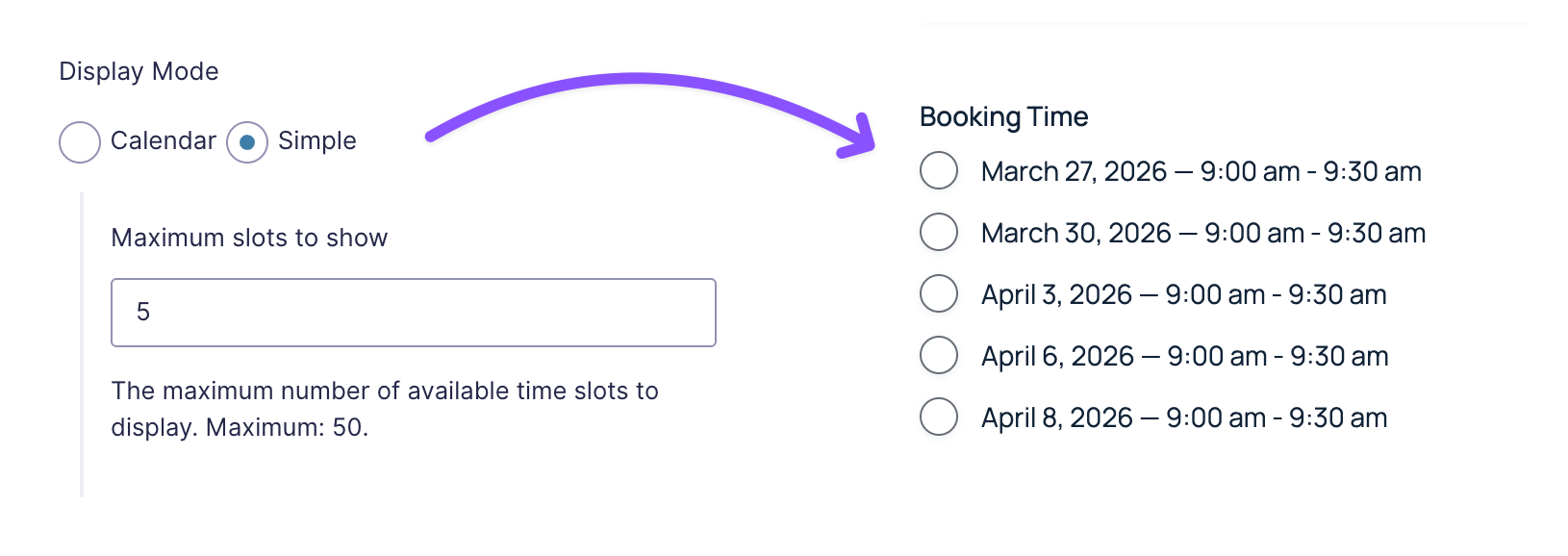
This is particularly useful in cases where you aren’t offering daily bookings but rather specific times on specific days (e.g., coaching sessions, workshops, onboarding calls).
GP Popups
✦ Turn your Gravity Forms into smart, targeted popups.
While dialing in our Spellbook popup (click to launch the popup) I ran into a really annoying limitation. The popup template content didn’t support shortcodes!
This meant I couldn’t use a shortcode to fetch our free and premium plugin counts (which would save me the hassle of manually updating these every time we release a new product) and I couldn’t use the conditional shortcode to tweak the content depending on the page the popup was rendered.
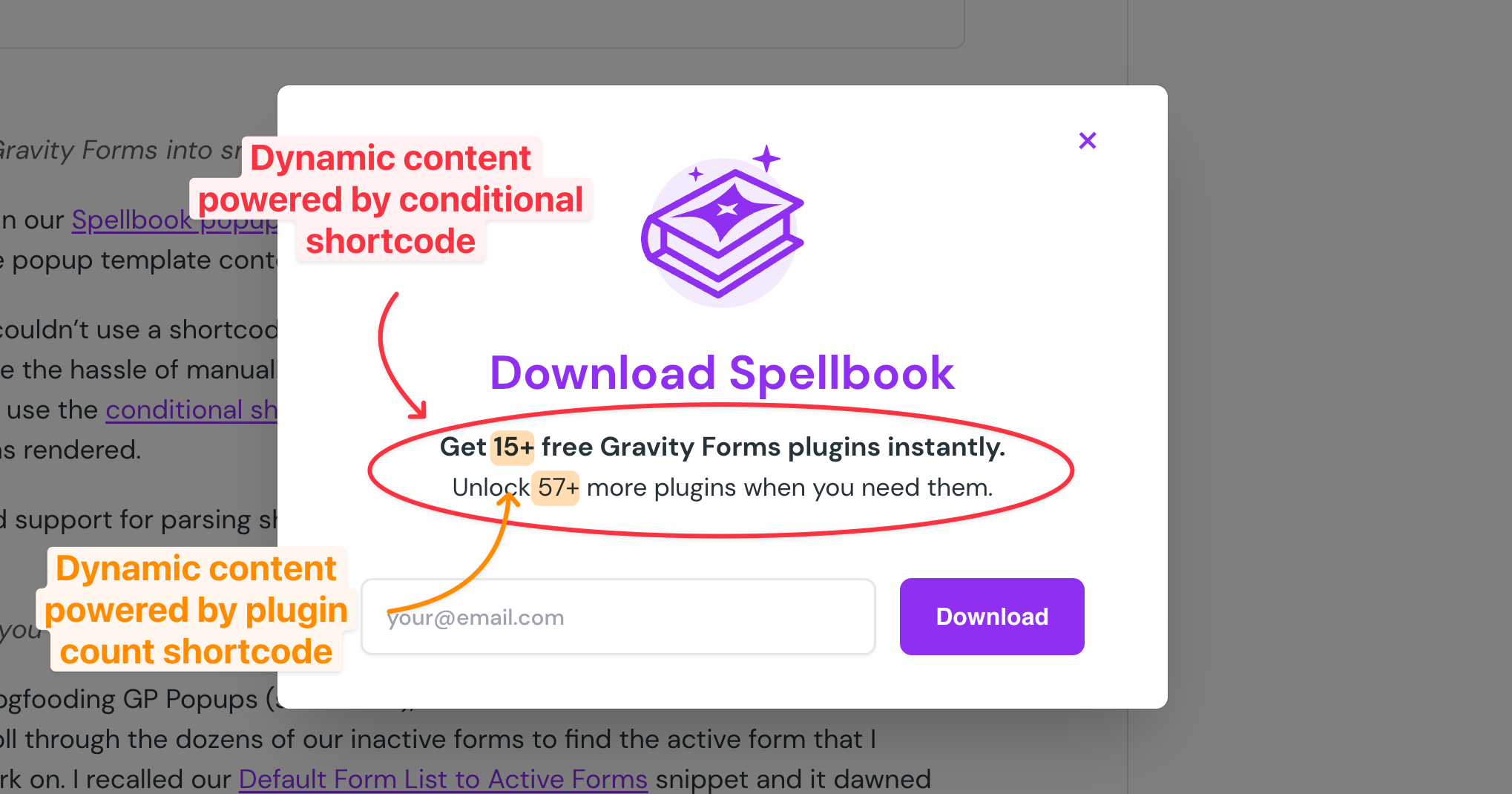
So… we added support for parsing shortcodes in popup templates. Tada! ✨
GF Dev Tools
✦ Everything you need to test and debug Gravity Forms in one toolkit.
While I was dogfooding GP Popups (see above), another bit of friction I encountered was having to scroll through the dozens of our inactive forms to find the active form that I wanted to work on. I recalled our Default Form List to Active Forms snippet, and it dawned on me that this would make a great feature in GF Dev Tools.
Happy to report: now it is! 🫡
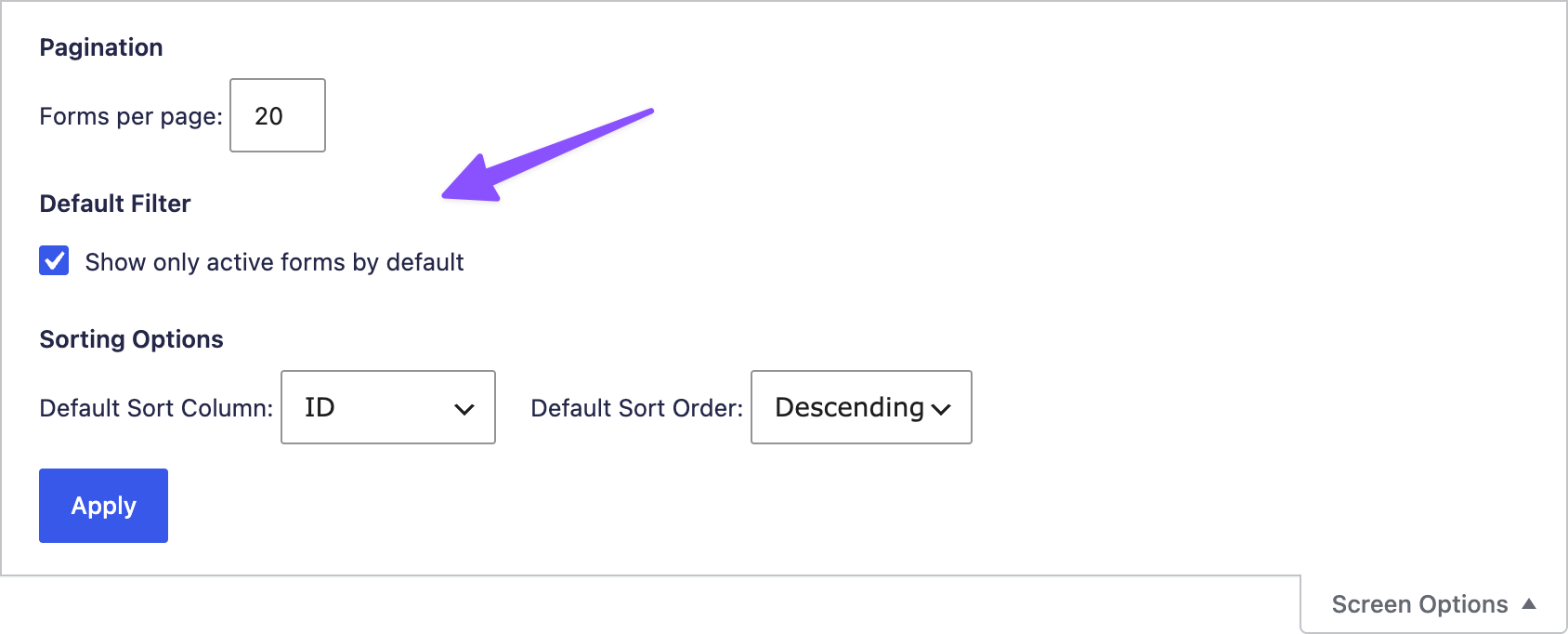
Want to see me demo this new feature live? I actually covered it in my GravityKit live appearance!
Hot or Not? Gravity Wiz Edition
Last week I begged asked earnestly for your honest reviews of your experience with us here at Gravity Wiz—and you delivered. We got 20 new reviews! Thank you so much, fam. 🤗
Here are a few statements that stood out:
- “Gravity Forms + Gravity Wiz is one of our most important installs on every site.”
- “If you’re using Gravity Forms, you’re doing it wrong if you’re not using these wizards.”
- “…the support is one of the finest I’ve encountered in 20 years of experience.”
It would be so incredible if we could get to 100 reviews. It’s just such a lovely number, isn’t it? And we only need 28 more reviews to get there!
Would you share your Gravity Wiz experience with us?
Magical Mentions
- Clever Service: The clever folks at Clever Ogre are offering a service to help transition your forms off of GF’s Legacy Markup. If anyone uses it, let me know how it goes!
- Secure Broadcasting: Missed this one — Gravity Ranger shared a great walkthrough on using Submit to Access to create a secure broadcasting page.
- Fresh Videos: We’ve added nearly 30 new videos to our YouTube channel this year—easy ways to sharpen your Gravity Forms and Gravity Wiz skills.
Guide: Send Data Between Gravity Forms & n8n
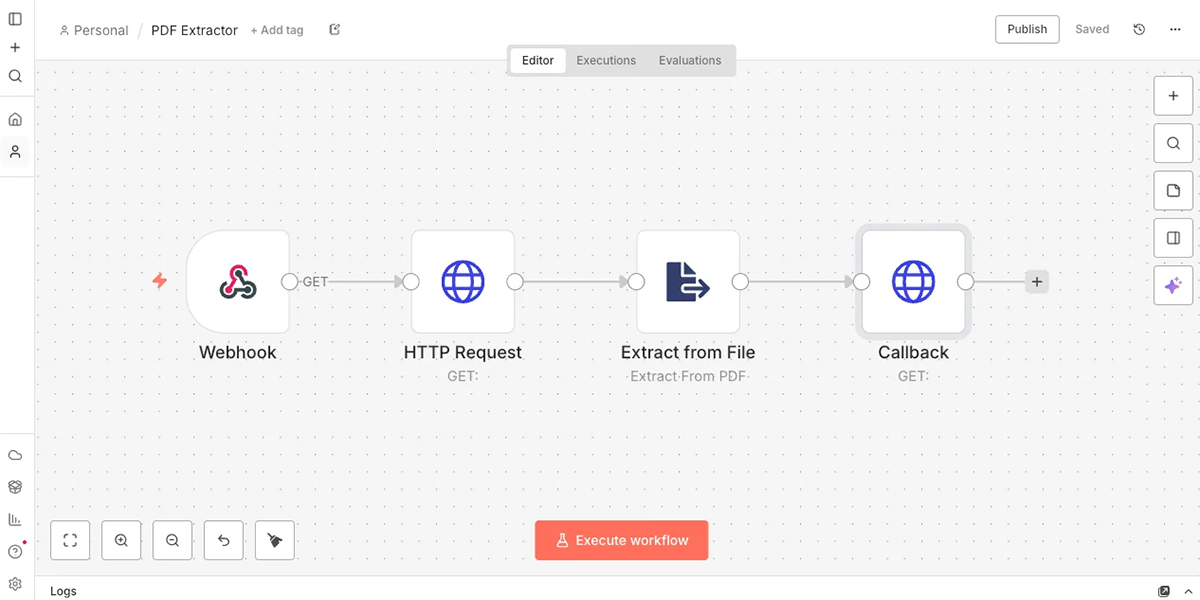
If Zapier is the king of workflow automation, n8n is surely the righteous usurper. 👑
We use it for all kinds of things here at Gravity Wiz and you will too! …after following this beginner-friendly guide. 😉
Format Date and Time Merge Tags
Our Format Date Merge Tags plugin now supports formatting Time field merge tags too.
There are all kinds of ways you can use this, but the use case that prompted the addition was a customer who needed to pass each portion of the time value individually to another plugin (e.g., hours, minutes, am/pm).
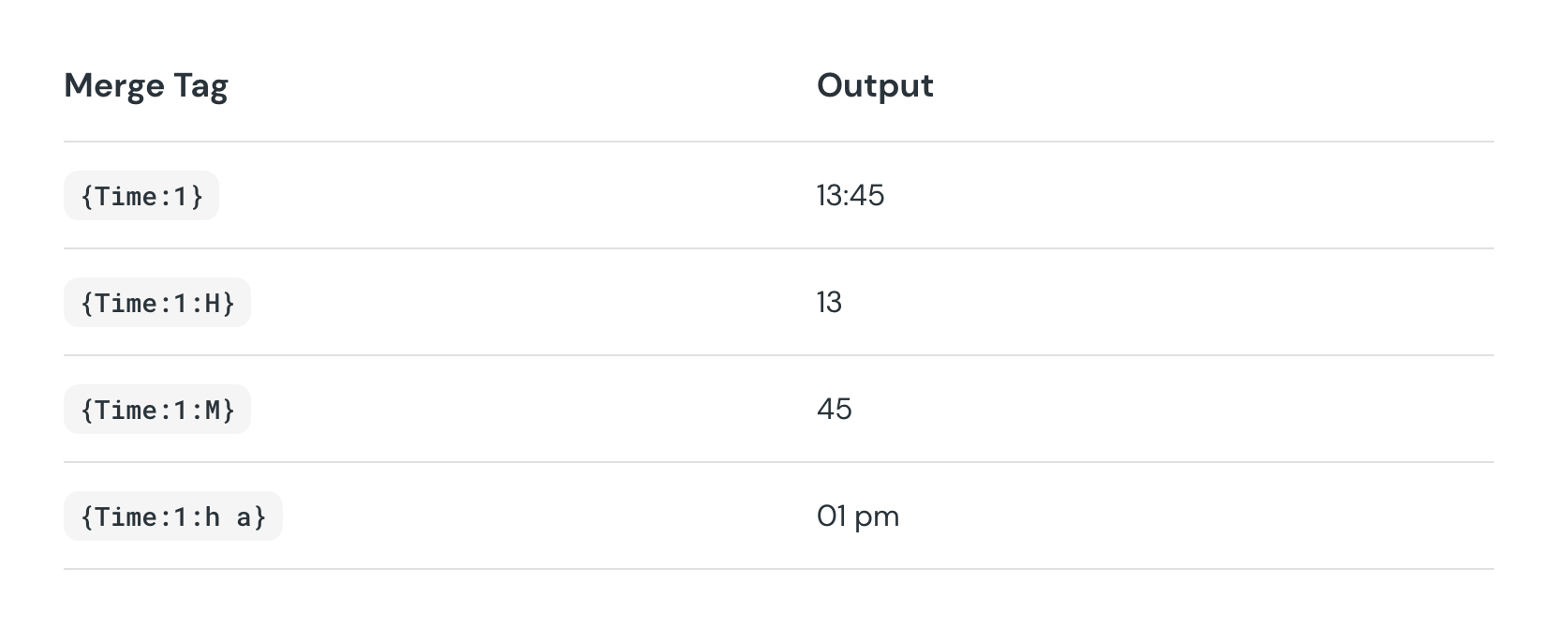
This little plugin consistently finds new ways to help our customers do cool things. 😎
Product Updates
Gravity Perks
GP Bookings (1.0-beta-1.6)
- Added support for setting the end time of Availability Windows to midnight.
- Added “Display Mode” setting to the Booking Time field and added new “Simple” display mode that will show radio choices for time slots.
- Fixed PHP notice about loading of text domain too early.
- Fixed an issue where selecting a date range spanning multiple months was not possible.
- Fixed an issue where non-flexible bookings had a zero-duration range in the booking time hidden input prior to submission, causing booking time merge tag modifiers to output incorrect values.
- Fixed an issue where the resource select placeholder was not translatable in frontend field updates.
- Fixed an issue where booking child fields did not explicitly support conditional logic.
- Fixed an issue where rescheduling allowed fully booked slots when capacity was already reached.
- Fixed an issue where the Perks tab for GP Inventory settings did not appear on Product fields set to Radio Buttons or Dropdown when GP Bookings was active.
GP Copy Cat (v1.4.96)
- Fixed regression where Copy Cat did not work as expected with conditionally hidden target field.
GP Nested Forms (v1.2.24)
- Fixed an issue where the Nested Form field displayed “Configuration required” when resuming partial entries via Gravity Flow.
- Fixed an issue where the French translations did not work after recent updates.
- Fixed an issue where editing a child entry after resuming via Save & Continue with Partial Entries enabled would create a new entry instead of updating the existing one.
GP Populate Anything (v2.1.63)
- Fixed an issue where Name fields with custom prefix choices could not be filtered or matched in queries.
- Fixed an issue where raw live merge tag data may show for a conditionally hidden email field.
GP Popups (v1.0.9)
- Added support for parsing shortcodes in popup templates.
- Fixed an issue where the iframe hook cleanup process could trigger PHP warnings when loading a popup.
- Fixed an issue where Corner popups without a backdrop still blocked page link clicks.
Free Plugins
GF Dev Tools (v1.0.4)
- Added new module that allows users to only show active forms in the Form List by default.