New: GP Bookings 1.0

Turn Gravity Forms into a full WordPress booking platform — and now, let WordPress users run their own schedule, whether that’s your team or a whole marketplace of providers.
GP Bookings turns Gravity Forms entries into manageable bookings — appointments, rentals, classes, reservations, and just about anything else you can put on a calendar. 🗓️
Today, after a long beta and a lot of real-world scheduling, it graduates to 1.0 bringing along not only our promise of stability, but also a highly requested feature:
The ability to let WordPress users manage their own schedules and offerings.
GP Bookings in a nutshell
If you’re new here, this is what GP Bookings does:
- Bookings built from Gravity Forms entries. Add Booking fields to a form and every submission becomes a booking, complete with customizable availability, support for group bookings, and pricing logic.
- A calendar dashboard inside WordPress. Approve, reschedule, cancel, and complete bookings across every schedule from one multi-view dashboard.
- Two-way calendar sync. Keep GP Bookings and external calendars like Google and Apple in step, in both directions, so a booking made anywhere shows up everywhere.
- Self-serve rescheduling and cancellations. Let customers manage their own bookings up to a deadline you set, with confirmation, reminder, and cancellation emails sent automatically.
Everything is organized around flexible bookables: your Services (what’s being booked) and your Resources (who or what provides it). That’s where the new feature comes in.
What’s new in 1.0: User Assignments
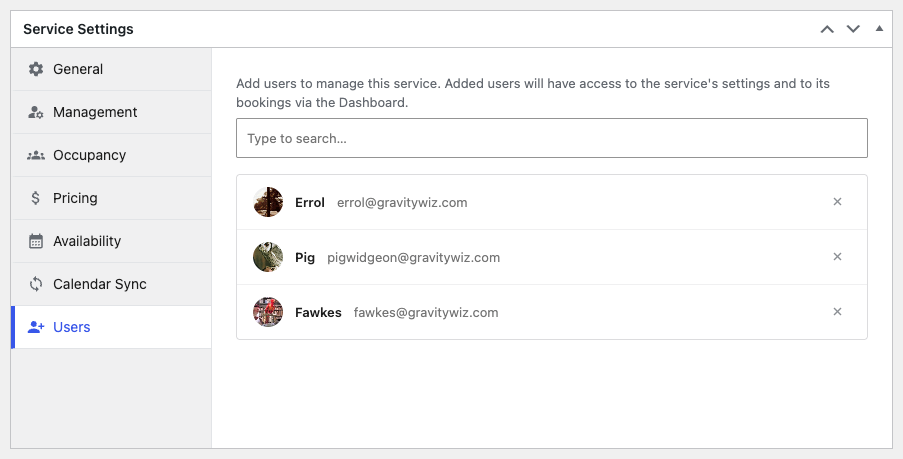
You can assign specific WordPress users to individual bookables — giving each person full control of their own bookings, availability, pricing, external calendar sync, and more.
- Hand your team their own schedules. Give your stylists, trainers, or location managers freedom to control their own offerings without opening up the whole GP Bookings backend.
- Run a booking platform for other people. Since each person is a real WordPress user managing their own corner, it’s safe to open the door to vendors and partners, not just staff.
- Assigning a user takes about ten seconds. You select them, click Update, and they’re in.
Using GC Google Calendar?
Make sure to also update GC Google Calendar to its latest version to allow assigned users to connect their own calendars.
Usage Examples:
- A two-location restaurant can keep each location’s bookings completely separate — location A never sees location B’s calendar, and vice versa.
- A mentorship marketplace where each mentor owns their availability and prices
- A wedding directory where every vendor keeps their own calendar
- A provider network of therapists and technicians who each run their own appointments
Ready to book it?
GP Bookings 1.0 is available now via Spellbook, backed by our legendary support team. 🧙♂️🧙♀️
Not a wizard yet? Start scheduling for as little as $59/year with Gravity Perks.