Spotlight: Building a Salary Survey with Gravity Forms

Kay Smoljak used Gravity Forms and Gravity Perks to build a survey form that collects anonymous salary data, helping documentarians negotiate fair pay.
Spotlight Function
Salary Survey Form
A Mission for Transparency
Meet Write the Docs, a global community dedicated to the art of documentation. In 2019, they set out on a mission: help documentarians secure fair pay. But without benchmarks, who knew what “fair” actually looked like? People were negotiating in the dark. They knew the only way to fix this was to arm the community with real data—so they decided to build a salary survey.
But building one was tricky. It needed to be simple enough for people to actually complete, smart enough to ask different questions based on who’s answering, and private enough that people feel safe sharing sensitive info like their salary.
Enter Kay Smoljak, a web developer who took on the challenge of turning a massive 30-question form into a modular experience while keeping respondents anonymous.
Opening the Spellbook 📖
Kay had been wielding WordPress and Gravity Forms for over 15 years, but her wizard training truly began when she stumbled upon Gravity Perks. Instead of coding from scratch, she opened her Spellbook and found the exact spells to break through the survey’s limitations.
Here’s how she used them.
Managing Complex Branching Logic
Kay’s biggest hurdle was the survey’s branching logic. Employees and contractors needed to answer different sets of questions, but cramming both paths into one 30-question form created a confusing maze.
Her solution was to break it into two parts.
First, she used GP Easy Passthrough to let users pick “Employee” or “Contractor” on a quick initial form, quietly passing on that choice to the main survey.
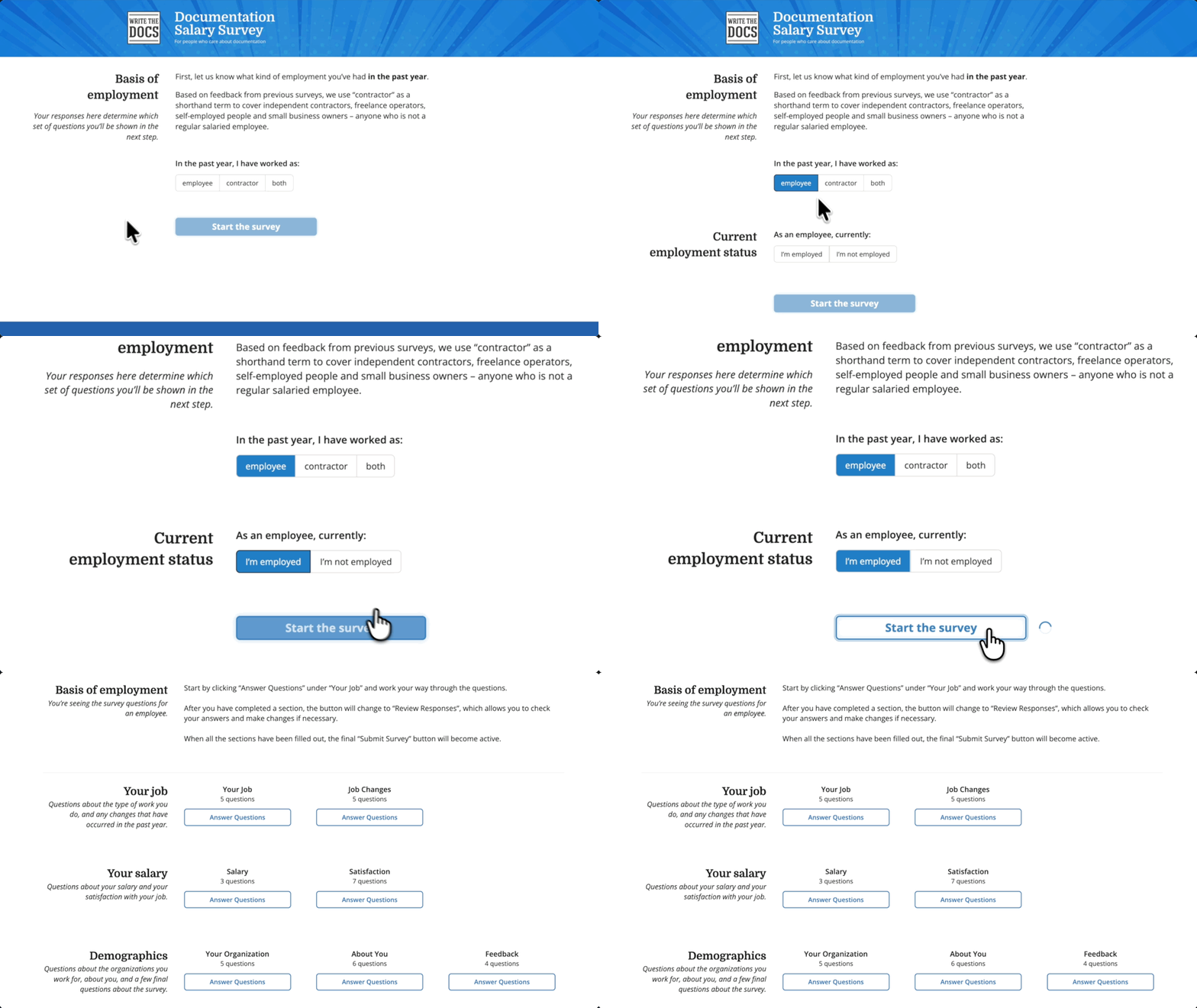
Then came GP Nested Forms. Instead of one giant form, she split the survey into 7 bite-sized forms—Employment, Salary, Demographics, and more. Now people could jump around and fill out whichever sections they wanted in any order.
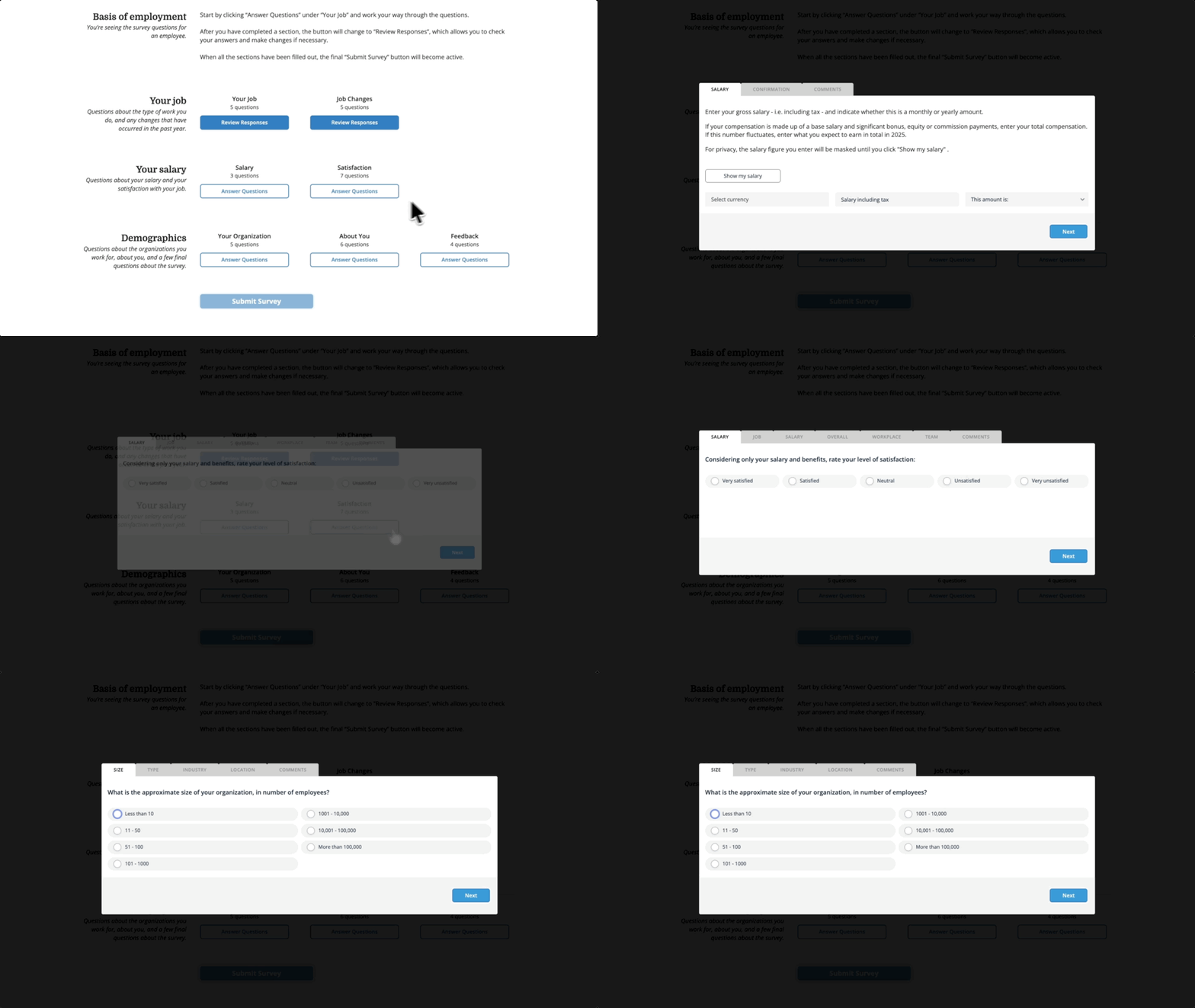
The community gave me a lot of positive feedback on the new format—one respondent referred to it as “choose your own adventure.
Collecting Anonymous Location Data
The survey needed location data to calculate regional salary medians. But asking “Where do you live?” felt like a privacy red flag.
To solve this, she used GP Address Autocomplete along with a custom snippet that pulls only city, state, and country—nothing more.
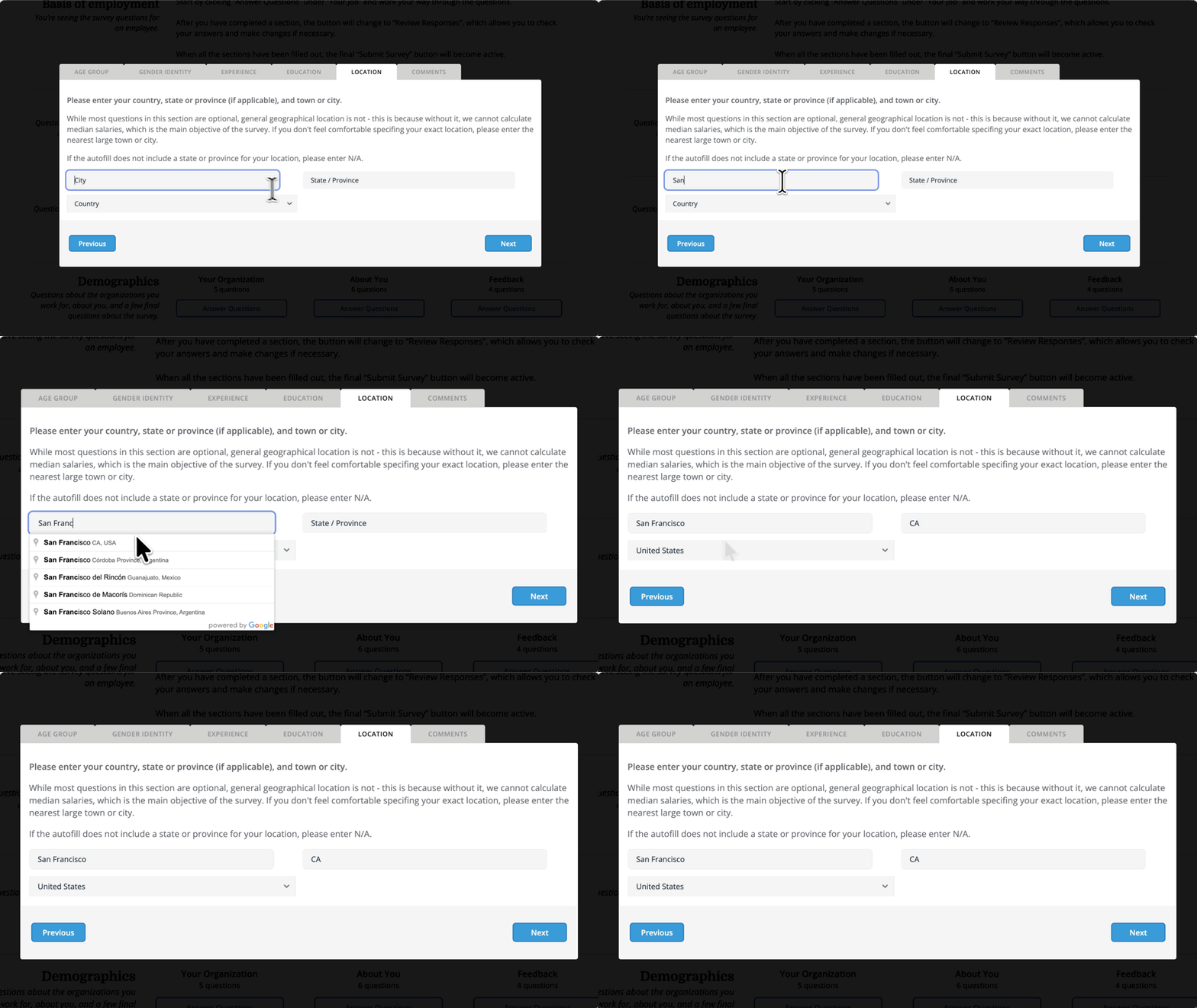
GF Address Autocomplete allowed us to easily collect accurate location data without alarming our privacy-conscious respondents, which really exploded the value of the results.
Double-Checking Salary Entries
When dealing with salary data, a single typo can ruin the averages. So Kay wanted users to verify their salary input before it entered the database.
For this, she used GP Copy Cat, which echoed the entered salary back to the user for confirmation.
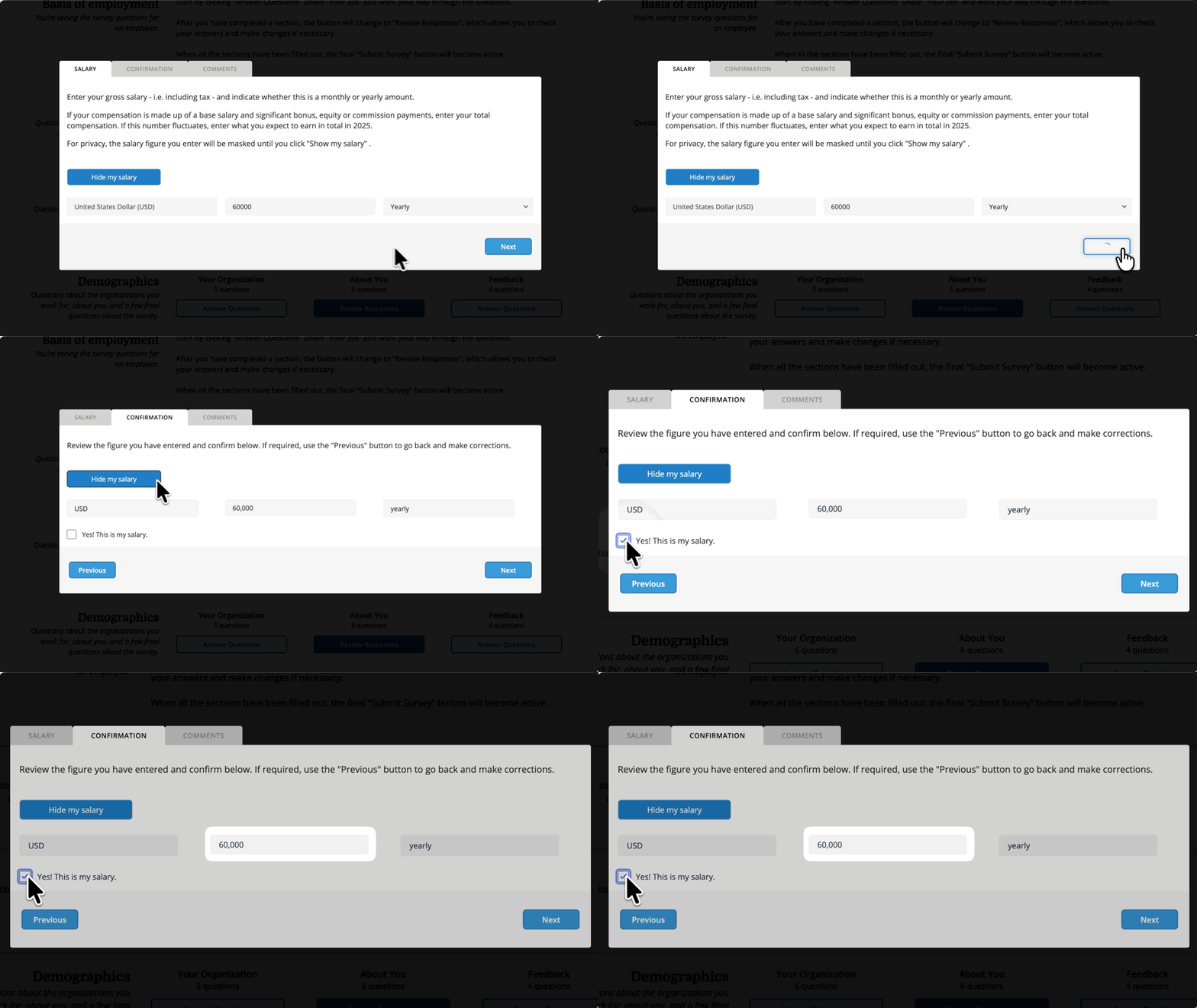
My “gateway drug”—I found the plugin [GP Copy Cat] when looking for a solution to a specific problem… But looking at what other plugins were available in the Perks suite, [it] gave me more ideas about ways I could improve the usability of the form and the cleanliness of the data.
Supporting Spells
Kay also layered in a few more perks to keep everything running smoothly:
- GC Google Sheets piped submissions into BigQuery and Looker Studio—giving her a live view as data rolled in.
- GP Advanced Calculations crunched numbers behind the scenes, keeping everything analysis-ready.
- GP Read Only and GP Unique ID locked down fields and tagged each response to keep everything secure and tamper-proof.
- GP Multi-Page Navigation and GP Advanced Select polished the experience with smoother page flow and searchable dropdowns.
The Gravity Wiz support wizards were incredibly helpful… My support experience with Gravity Wiz has always been absolutely top-notch.
A Survey Built by the Community, For the Community
Kay built a privacy-first survey form that respects the user as much as the data. It was so rock-solid that she’s been able to reuse the exact same setup since then with barely any changes.
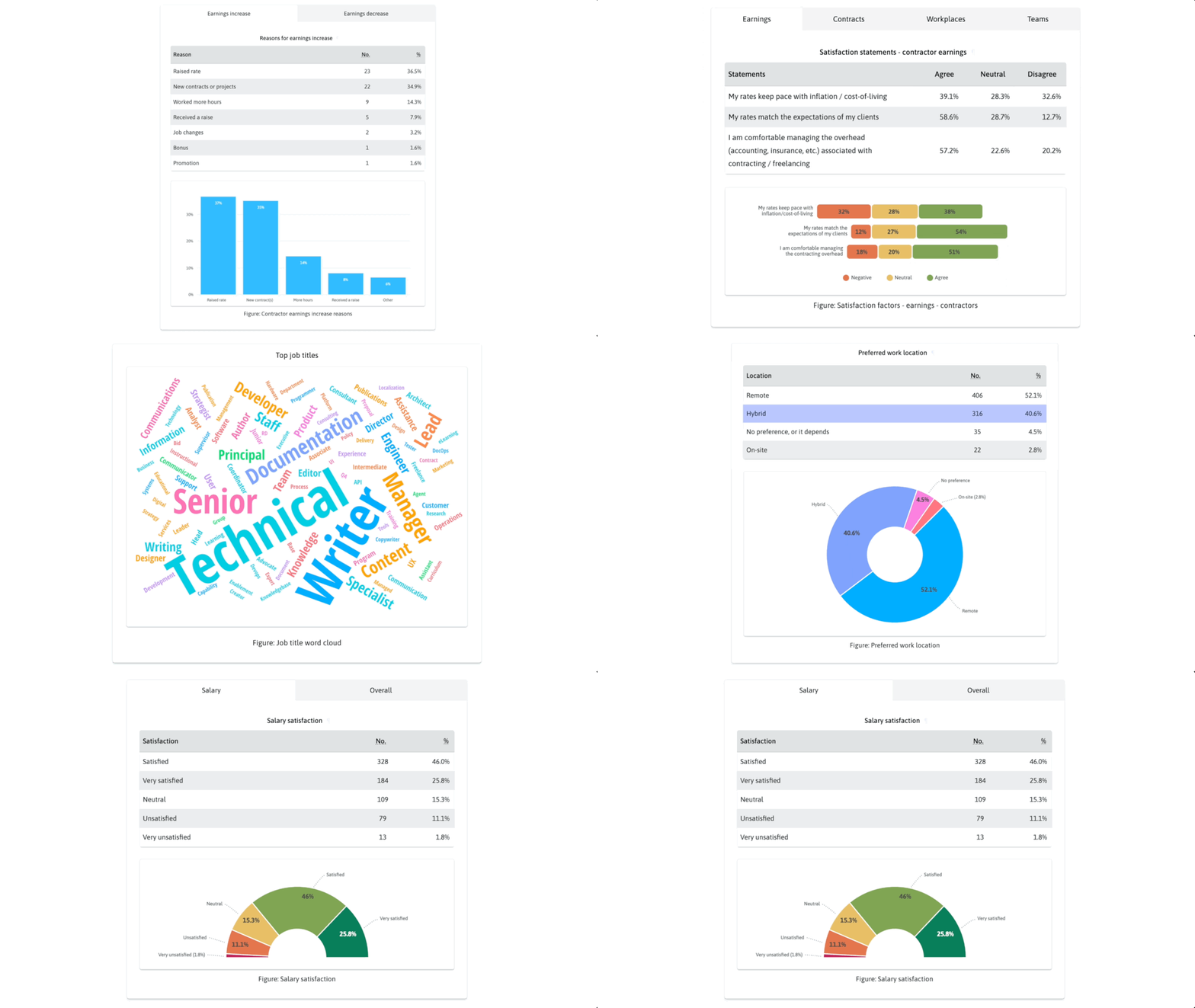
But the real magic is more than the time saved—it’s what the survey does for its people. One member even used the public results to negotiate a 30% raise, while countless others finally have the data to make salary transparency a reality.
The holy grail!
Thanks, Kay, for showing us what’s possible when forms do more than just collect data. 🪄