
Gravity Forms Advanced Conditional Logic
Ridiculously powerful conditional logic with and/or groups, date and time rules, user-aware logic, and so much more.
What does it do?
This plugin adds advanced features to Gravity Forms conditional logic. Create multiple conditional rule groups, compare between a wide range of dynamic values (including formulas), and use expanded operators to adapt your forms to any situation.
With Advanced Conditional Logic, you can:
- Trigger automation feeds only when multiple Any/All groups are met simultaneously
- Apply early bird or late registration pricing
- Block eligibility applications when they fail a primary condition or two sub-conditions
- Branch survey and quiz forms to different result pages based on a calculated score
- Route notifications if a field does not contain a certain value
- Display fields based on a recurring schedule
- Show follow-up fields even when a user’s free-text input has minor typos
- And many more!
Features
- Group multiple conditions at once.
Create multiple conditional paths using rule groups. Any/All logic is available for each group and between groups. - Show, hide, route, and run.
Advanced Conditional Logic is available in the form editor, confirmations, notifications, and feeds. - Unlock date and time logic.
Use Date and Time field values, static dates/times, current date/time, and relative dates/times in conditional logic. - Bring formulas into the equation.
Write calculated conditions using field values, like weighted quiz answers. Make it even more powerful with GP Advanced Calculations. - Magical conditional logic operators.
Turn multiple “Any” rules into one, use fuzzy match to catch similar values, and check if a field doesn’t contain a value. - More values available for comparison.
Choose from a new variety of options to compare to and from — including things like user meta and post ID. - Automatic updates.
Get updates and the latest features right in your dashboard. - Legendary support.
We’re here to help! And we mean it.
Get Gravity Perks
This plugin is part of Gravity Perks, a suite of 49+ essential Gravity Forms addons with support you can count on.
Have a question?
We’re here to help, just send us a message.

- Version 1.0-alpha-1
- Updated May 12, 2026
- Released May 12, 2026
All Connections
All Perks
- GF Address Autocomplete
- GF Advanced Calculations
- GF Advanced Conditional Logic
- GF Advanced Phone Field
- GF Advanced Save & Continue
- GF Advanced Select
- GF Auto List Field
- GF Auto Login
- GF Better User Activation
- GF Blocklist
- GF Bookings
- GF Conditional Logic Dates
- GF Conditional Pricing
- GF Copy Cat
- GF Date Time Calculator
- GF Disable Entry Creation
- GF Easy Passthrough
- GF eCommerce Fields
- GF Email Users
- GF Email Validator
- GF Entry Blocks
- GF Expand Textareas
- GF File Renamer
- GF File Upload Pro
- GF Inventory
- GF Limit Checkboxes
- GF Limit Dates
- GF Limit Submissions
- GF Media Library
- GF Multi-Page Navigation
- GF Nested Forms
- GF Notification Scheduler
- GF Page Transitions
- GF Pay Per Word
- GF Populate Anything
- GF Popups
- GF Post Content Merge Tags
- GF Preview Submission
- GF Price Range
- GF QR Code
- GF Randomizer
- GF Read Only
- GF Reload Form
- GF Sliders
- GF Submit to Access
- GF Terms Of Service
- GF Unique ID
- GF Word Count
Documentation
How do I enable this functionality?
After installing and activating Gravity Forms Advanced Conditional Logic, conditional logic in the form editor, feeds, and confirmations becomes advanced conditional logic.
Fret not — existing rules are auto-converted into a first rule group. 😄
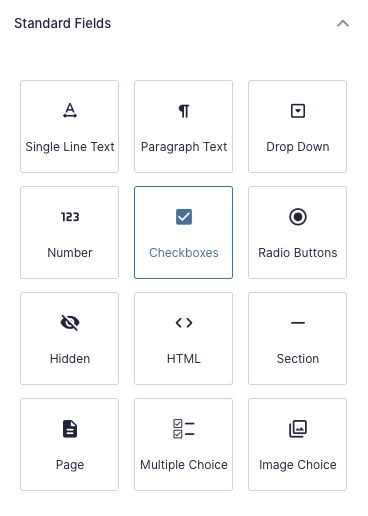
Step 1
Add any field or feed that supports conditional logic.
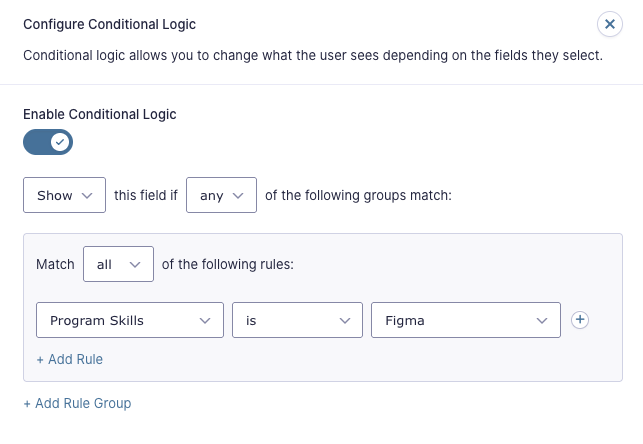
Step 2
Navigate to the Conditional Logic tab and enable Conditional Logic.
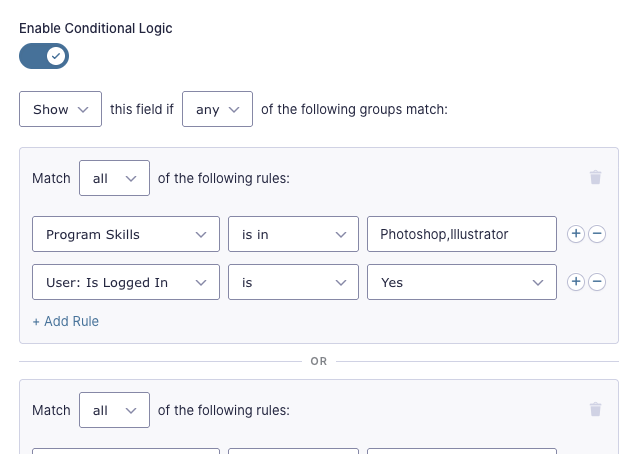
Step 3
Configure your Advanced Conditional Logic rules.
Let’s dig into the specifics of the different configurations for Advanced Conditional Logic.
Terminology
- Source value: The form field or other source being evaluated (e.g., “Email”, user meta, formula).
- Operator: Defines how the field is compared to the value. Gravity Forms core operators are:
is / is notgreater than / less thancontainsstarts with / ends with
- Target value: The value checked against the source value according to the operator (e.g., “@gmail.com”, “Premium”, “10”).
- Rule: One complete condition (e.g., Product Type is Premium).
- Logic type: Controls how multiple rules are evaluated.
- All → logical AND
- Any → logical OR
- Conditional action: What happens if the conditions are met (e.g., Show / hide a field, enable / disable a submit button, trigger a notification or feed).
Feature Details
Conditional Rule Groups
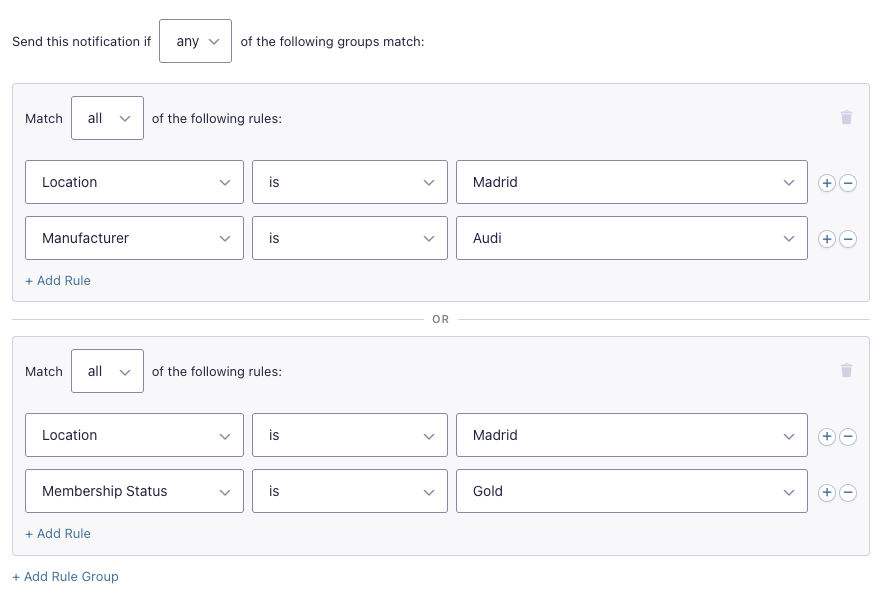
Create multiple groups of rules for the same field, confirmation, or feed. Rule groups support Any and All logic both inside each group and between groups.
Example — Notification Routing: Store manager notification only gets sent based on location and service level.
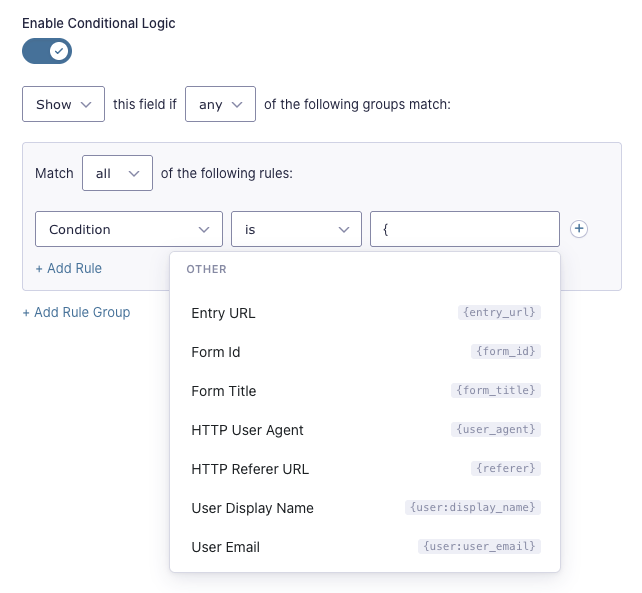
Merge Tag Selector
Choose from a variety of merge tags that pull in form fields, system-level data, and contextual data automatically — things like the current user’s email, the page the form was embedded on, the user’s IP address, and other request meta data.
The selector appears when a { is typed into the target value.
Field-to-Field Comparisons
Compare live field values to other live fields — or to themselves — using merge tags via the merge tag selector. Choice fields work the same, but have a drop down instead.
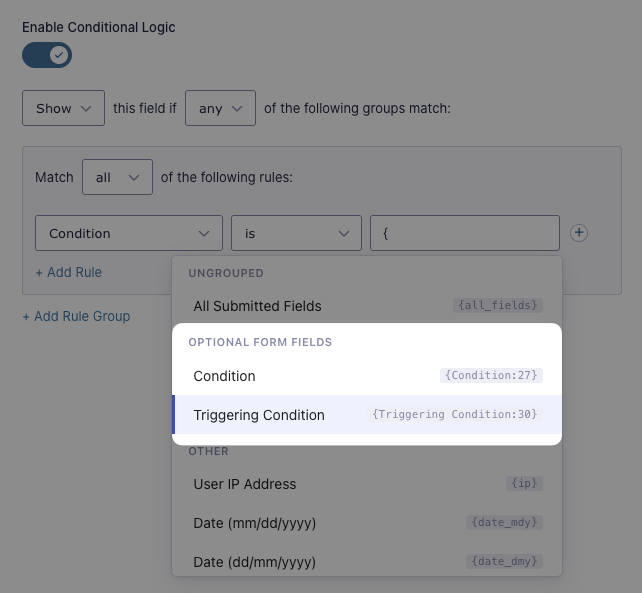
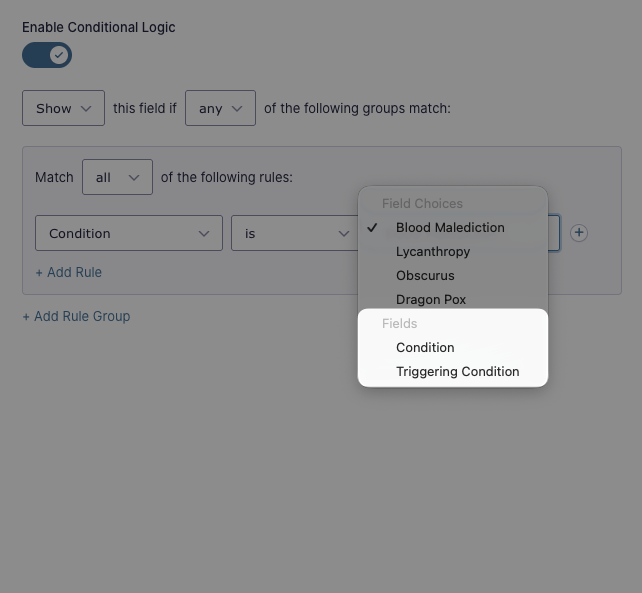
Example — Dynamically Populated Fields: Compare a field to itself to automatically hide it if Populate Anything filters return zero results, which would result in an empty field.
Advanced Operators
Advanced Conditional Logic adds operators that allow for advanced conditional logic rules.
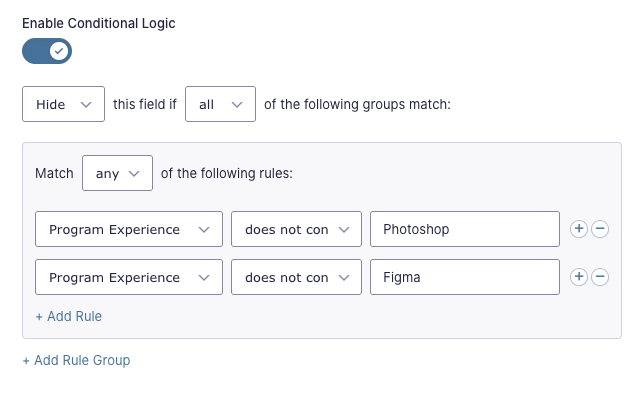
Partial Exclusion — does not contain
The does not contain operator checks if the source value does not have the target value anywhere in it.
Example — Checkbox Filtering: Step with additional qualifying questions is hidden if applicant doesn’t have prior experience in core programs.
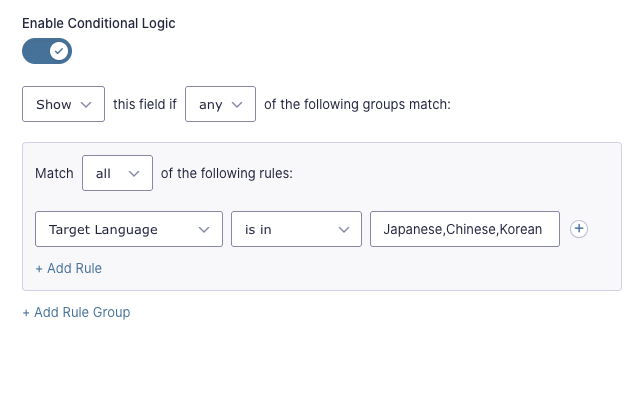
Multiple Valid Values — is in
The is in operator checks the source value against a list of target values. If the source value matches any of the listed target values, the condition is met.
Example — Request Routing: Translations to Japanese, Chinese, and Korean go to a dedicated form page.
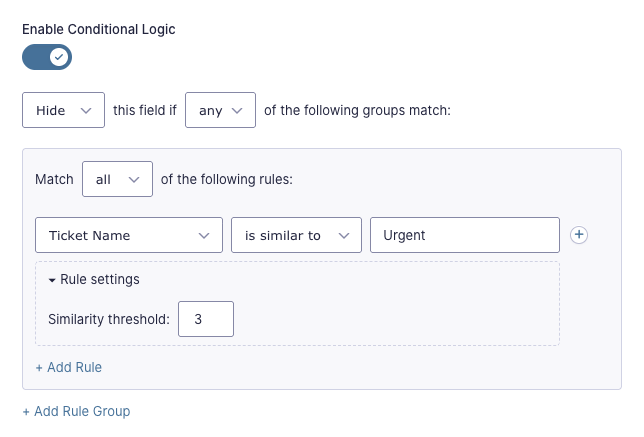
Fuzzy Match — is similar to / is not similar to
The is similar to / is not similar to operators treat similar values as a match. Edit the “Similarity threshold” setting to determine how many characters can be different for the operator to consider it a match.
Example — Ticket Filtering: Tickets named “Urgent” or typos of “Urgent” skip questions for speed.
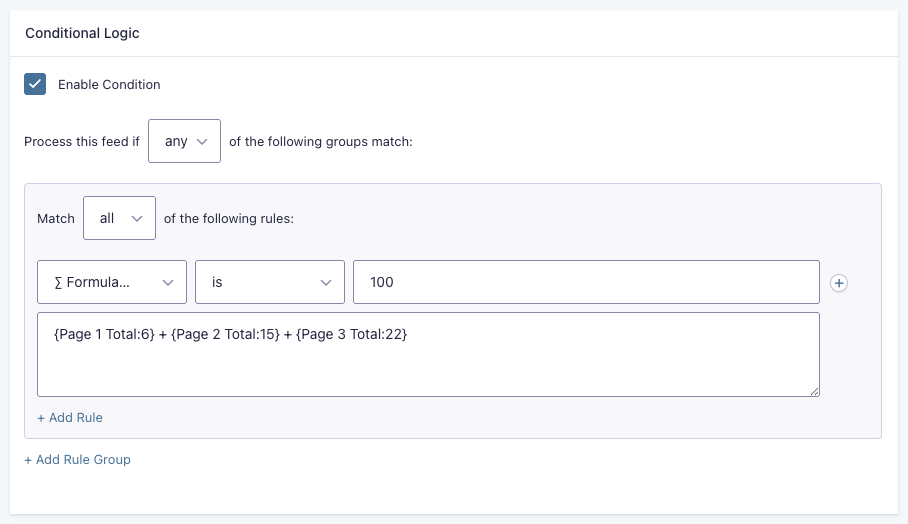
Formula-Based Logic
Write formulas into your conditions — the result of the formula will be checked against the target value according to the operator.
Example — Quiz Prize: Quiz participant is only invited to the special Winner’s Meeting if the submission gets the highest score.
If you need advanced mathematical functions (or even want conditions inside your formula rule), pair it with Advanced Calculations.
Entry Meta Logic
Advanced Conditional Logic exposes entry meta for use in conditional logic. Entry meta is used by many Gravity Forms add-ons to include additional data pertinent to its function.
Examples:
- Partial Entries Status Routing: Send partial entries to a separate sheet via GC Google Sheets feeds.
- GravityView Approval Status Routing: Only send emails scheduled with Notification Scheduler to approved entries.
- Country Routing: Direct entries to specific feeds based on their phone number’s country code with Advanced Phone Field.
User-Based Logic
Use user data, such as role, user meta, and logged-in status as source values in conditional logic.
| Source Value | Checks Against | Available Operators | Available Target Values |
| User: Is Logged In | User’s logged in status | is | Yes / No |
| User: Role | User’s roles | is / is not | User roles (e.g., Editor) |
| User: Meta | User’s meta values in specified meta keys | All core Gravity Forms operators | Static values and merge tags |
Date-Based Logic
Date-based logic supports static dates, relative dates, days the week, and date parts. This is done using four comparison operators:
is/is notis after/is before
Multiple rules can be combined to match date ranges or exclude specific dates from the match.
Static Dates
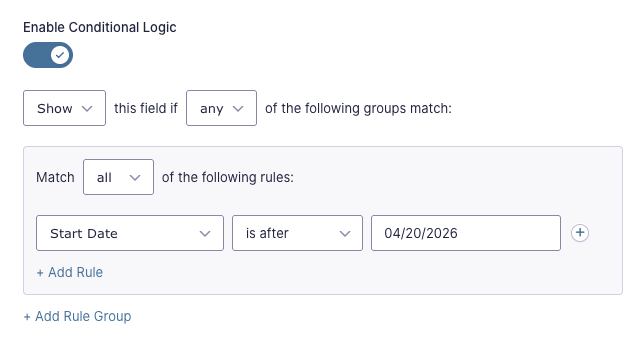
To compare a Date field to a static date, select the Date field, choose a comparison operator, and enter the static date to compare against.
Example: Display field if selected Start Date is after April 20, 2026.
Usage Examples
Relative Dates
There’s two ways that relative dates are supported in Advanced Conditional Logic:
- Comparing a user-inputted date to a relative date.
- Comparing the current date to a static or relative date.
User Input via {today} Merge Tag
Comparing user input to relative dates is done using the conditional-logic-only merge tag {today}. It allows conditional logic to be applied to fields based on how the selected date compares to the current date based on the chosen operator.
Example: Display field if selected date is today.
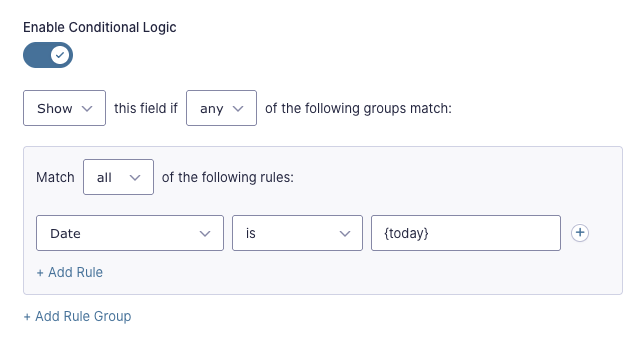
The {today} merge tag supports modifiers for making date comparisons like:
- Date is at least 2 weeks away:
{today:+2 weeks} - Date is no more than 90 days before today:
{today:-90 days}
All merge tags above are accessible via the merge tag selector.
Usage Examples
Current Date
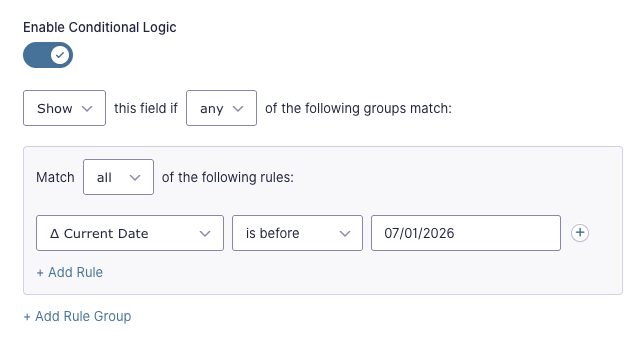
Use the special Δ Current Date source value to build conditions based on the current date.
Example: Display field if current date is before July 1, 2026:
Usage Examples
Days of the Week
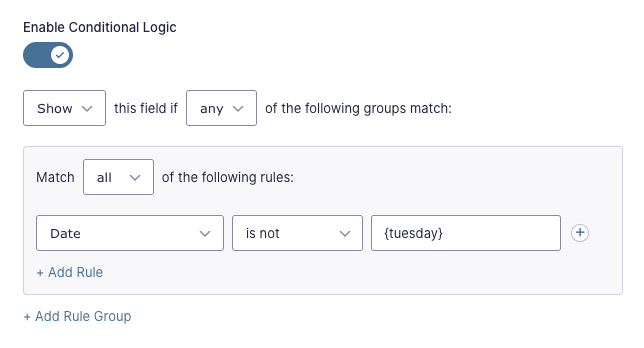
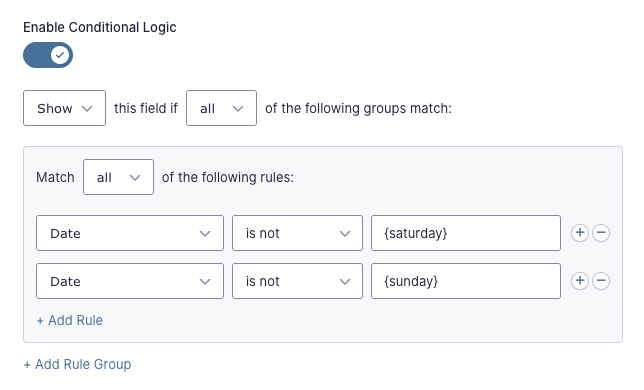
Use the following conditional-logic-only merge tags to check for a specific day of the week: {monday}, {tuesday}, {wednesday}, {thursday}, {friday}, {saturday}, {sunday}. These are used in the same manner as the {today} merge tag and they’re accessible in the merge tag selector.
Weekend or Weekday
Using the days of the week merge tags, you can apply conditional logic based on whether the date falls on a weekend or weekday.
First, we’ll tackle checking for weekend dates.
- Open the field settings for the field that should be shown/hidden based on the day of the week and navigate to the Conditional Logic tab.
- Enable Conditional Logic.
- Select Any from the group drop down that contains the options Any and All.
- Select your Date field from the source value drop down.
- Select is from the operator drop down.
- Enter
{saturday}in the target value input. - Add a new rule by clicking the (+) button at the end of the row and following steps 4 and 5 again.
- Enter
{sunday}for the third input on the new condition.
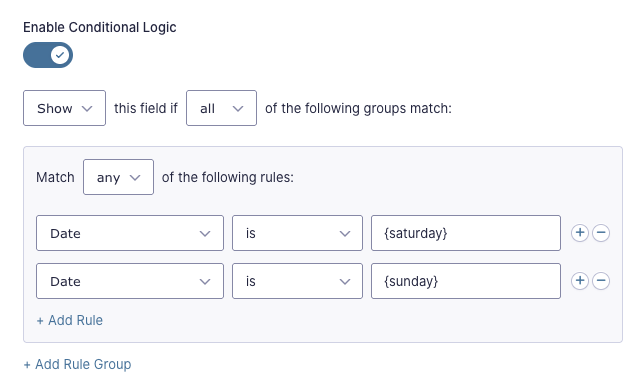
You can follow the same steps to check for a weekday. The only differences are:
- Select All from the drop down that contains the options Any and All.
- Select is not from the second drop down of each condition.
Usage Examples
Date Placeholders
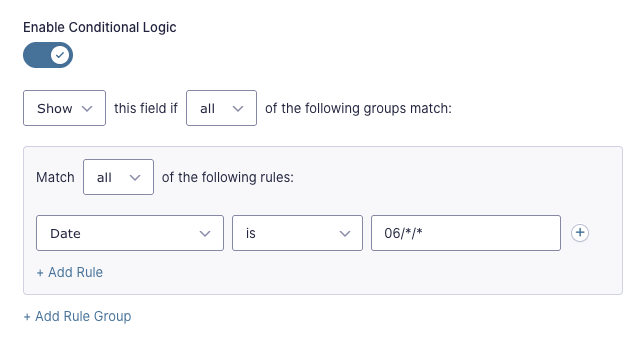
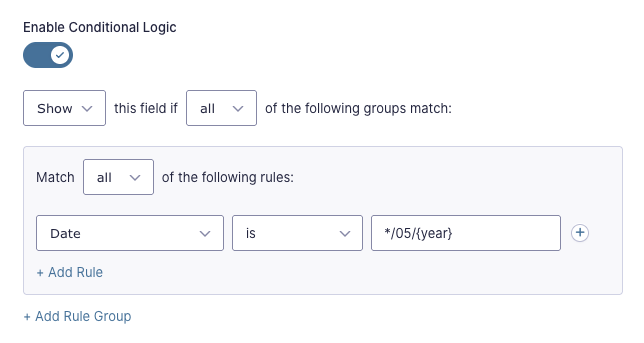
Advanced Conditional Logic has two types of date placeholders that let you target a specific day of the month, a specific month, and/or a specific year while keeping the other date elements open-ended.
| Placeholder Type | What It Represents | How to Use |
| Date Parts | Current date, month, or year | Use the conditional-logic-only merge tags {day}, {month}, {year} |
| Wildcards | Any date, month, or year | Use an * (asterisk) in the spot that should accept any value |
Here are a few examples:
Display field if selected date is within June of any month of any year:
Display field if selected date falls on the 5th day of any month this year:
Usage Examples
Time-Based Logic
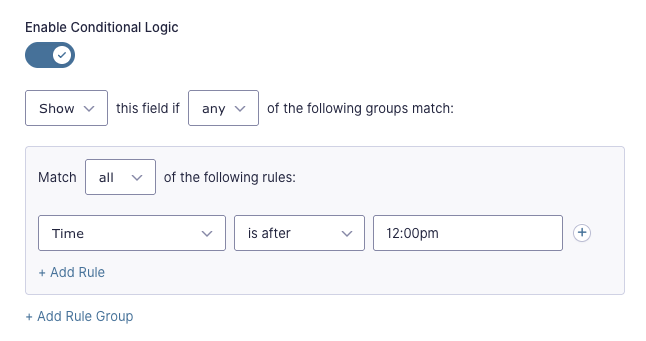
Time-based conditional logic supports both static and current time comparisons using the same operators as Date-based logic.
Static Times
To compare a Time field to a static time, select the Time field, choose a comparison operator, and enter the static time to compare against.
Display field if selected time is after 12:00 pm:
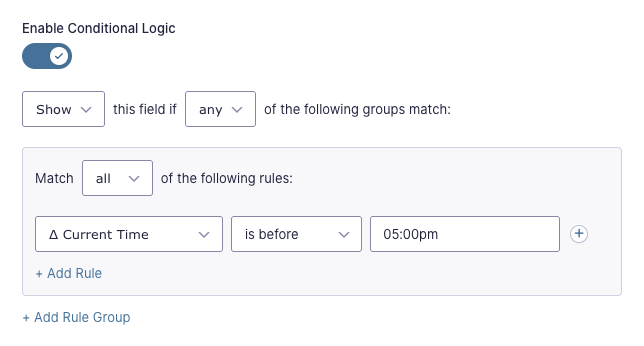
Current Time
Use the special Δ Current Time option to show or hide fields based on the current time.
Hide field if current time is before 5pm:
Usage Examples
Compatibility
Gravity Forms Core Conditional Logic
When activated, Advanced Conditional Logic will take over core Gravity Forms conditional logic per individual field, feed, notification, and confirmation after that element has been edited and saved.
Advanced Conditional Logic is also compatible with all of Gravity Forms’ conditional logic hooks.
If Advanced Conditional Logic is deactivated, the first rule group is preserved in native Gravity Forms conditional logic. When re-enabled, all other rule groups come back.
Conditional Logic Dates
Conditional Logic Dates is being rolled into Advanced Conditional Logic. Once Advanced Conditional Logic is activated, it will deactivate Conditional Logic Dates and take over conditional logic rules switched from the Gravity Forms core conditional logic.
Integrations
GP Advanced Calculations
Advanced Calculations adds many mathematical functions, comparison operators, conditional statements, and a powerful formula editor with merge tag shorthands to Gravity Forms. All of its goodness is available to Advanced Conditional Logic’s formula-based logic.
Gravity Connect
Connect your forms to top-shelf services like Google Sheets or to any REST API. Then, use Advanced Conditional Logic to trigger when these feed-based add-ons are executed.
Examples:
Google Sheets | Formula-based routing: Send a submission to a “High Priority” sheet only when a calculated score (e.g., weighted quiz or assessment answers) exceeds a threshold.
Google Calendar | Date/time-based event creation: Create a calendar event only when a registration is submitted before a cutoff date (early bird window) or during business hours.
MailPoet | Multi-group conditional subscription: Add a subscriber to a list only when both a qualifying service interest is selected and their submitted date falls within an active campaign window.
Explore the connections:
- GC Google Sheets
- API Alchemist
- GC Google Calendar
- GC Airtable
- GC MailPoet
- GC OpenAI
- GC Notion
- GC Drip
GS Product Configurator
Build highly customizable WooCommerce products while keeping your forms simpler. Product Configurator links Gravity Forms to Woo products, Advanced Conditional Logic handles complex logic without the need of helper fields. Dream team energy.
GP Conditional Pricing
Conditional Pricing lets you create an unlimited number of conditional pricing rules for Gravity Forms Product fields. When integrated with Advanced Conditional Logic, you can apply date-based and time-based pricing rules — like early bird pricing or late fees.
Heads up.
Currently, only date and time logic is available for Conditional Pricing. If having other Advanced Conditional Logic features available in Conditional Pricing would make the difference in your build, we’d love to hear from you!
GP Notification Scheduler
Notification Scheduler lets you define when Gravity Forms notifications are sent. Pair it with Advanced Conditional Logic to control if they are sent in the first place.
GP Easy Passthrough
Easy Passthrough transfers data between forms and supports conditional logic. Use Advanced Conditional Logic to elevate your multi-form workflows with advanced data transfer logic.
GP Email Users Coming Soon!
Email Users makes it easy to send personalized emails to users who have filled out a form. It supports core Gravity Forms conditional logic for filtering who the email will be sent out to — like users that bought a particular product, answered a survey question, or are a certain age.
With Advanced Conditional Logic, emails could be conditionally sent based on when users submitted the form, a calculated total, or whether all stacking condition groups are met. Would this be useful to you? Let us know about it here!
Multi-Page Forms
Advanced Conditional Logic works with Gravity Forms Page and Next Button conditional logic. Here’s the multi-page form dream team:
- Create complex page conditional logic with Advanced Conditional Logic
- Make page navigation a breeze with Multi-Page Navigation
- Have smooth page transitions with Page Transitions
Troubleshooting Issues
If Conditional Logic Dates isn’t showing or hiding fields as expected, here are some troubleshooting tips you can try.
- Review the conditional logic settings for the field and confirm the comparison operator (is, is not, greater than, and less than) is correctly set.
- If the condition compares a Date field to a static date, ensure the static date is formatted as MM/DD/YYYY (US date format).
- If your time-based conditional logic isn’t working as expected, verify that your server’s timezone is set correctly. Conditional Logic Dates evaluates conditions using the server’s timezone by default. To have conditions run according to the visitor’s local timezone instead, use the
gpacl_use_visitor_timezonefilter - Make sure there are no JavaScript errors appearing in the browser console, as they can disrupt Conditional Logic Dates on the frontend.
- Perform a theme or plugin conflict test to determine if another plugin is affecting the functionality of Conditional Logic Dates.
FAQ
What timezone is used by Advanced Conditional Logic?
By default, Advanced Conditional Logic will use the server’s timezone for conditional logic.
To change it to the user’s time zone, use the gpacl_use_visitor_timezone filter.
Usage Examples
- An online course giving students until midnight in their own time zone to complete a class.
- Limiting content access restricted by date in different countries. (Usually for licensing reasons)
- Scheduling online appointments based on the user’s local time.
Can I use conditional logic on confirmations and notifications, or just fields?
Advanced Conditional Logic is available on fields, the Submit button, confirmations, notifications, and any feed that supports Gravity Forms’ native conditional logic.
One Gravity Forms quirk worth knowing: the default confirmation doesn’t support conditional logic — you’ll need to create an additional confirmation for that.
Does Advanced Conditional Logic work with multi-page forms?
Yes! You can apply rule groups to page breaks and Next button visibility, just like any other field or feed.
One thing to keep in mind: if a conditional field on an earlier page is hidden and reset, nested dependencies on later pages may not evaluate as expected. Adding the parent field’s conditions explicitly to the dependent field is the safest workaround.
Can I combine date/time logic or formula logic with other condition types in the same rule group?
Yes. Date, time, user, formula, and field-based rules can all live in the same group — or across groups — with Any/All logic applied at both levels.
What happens to conditional logic rules if Advanced Conditional Logic is disabled?
When Advanced Conditional Logic is disabled, the first rule group is preserved in native Gravity Forms conditional logic. When re-enabled, all other rule groups come back.
Translations
You can use the free Loco Translate plugin to create translations for any of our Perks. If you’ve never used Loco translate before, here’s a tutorial written for beginners.
Hooks
Gravity Forms has hundreds of hooks. Check out our Gravity Forms Hook Reference for the most thorough guide to Gravity Forms’ many actions and filters.
Related Resources
No related resources found.