Gravity Forms Limit Submissions
Limit the number of entries that can be submitted by almost anything (user, role, IP, URL, field value) for almost any time period.
What does it do?
Limit who, what, when, where, and how many times your form can be submitted. Create complex submission limits based on the submitting user, their role or IP, any field value submitted on the form, or the page from which the form was submitted.
Features
- Limit who can submit your forms.
Limit by user, role, and IP. - Limit what can be submitted.
Allow the same combination of name and address to be submitted only once – or – any number of times – or – any other combination of fields. - Limit where your forms can be submitted.
Use the same form on multiple pages and limit the number of submissions per page. - Limit when your forms can be submitted.
1 per minute? 5 per day? 10 submissions ever? It’s all easily configurable with comprehensive time periods! - Combine multiple limitations for granular control.
Create complex submission limits that mix and match any of the limitation rules. - Custom limitation message.
When the limit is reached, display a custom, merge-tag-supported limitation message. - Limit reached notifications.
Notify the admin and/or submitting user when the limit has been reached using flexible Gravity Forms notifications. - Handy shortcode to display submission and limitation counts.
Display the current number of submissions, the remaining count, and the total limit. - Powerful developer options.
Global feeds, collective multi-form limits, and well-documented hooks to extend this feature-rich plugin even further. - Automatic updates.
Get updates and the latest features right in your dashboard. - Awesome support.
We’re here to help! And we mean it.
Get Gravity Perks
This plugin is part of Gravity Perks, a suite of 47+ essential Gravity Forms addons with support you can count on.
Have a question?
We’re here to help, just send us a message.

- Version 1.1.15
- Updated April 19, 2024
- Released December 25, 2017
All Perks
- GF Address Autocomplete
- GF Advanced Calculations
- GF Advanced Phone Field
- GF Advanced Save & Continue
- GF Advanced Select
- GF Auto List Field
- GF Auto Login
- GF Better User Activation
- GF Blocklist
- GF Conditional Logic Dates
- GF Conditional Pricing
- GF Copy Cat
- GF Date Time Calculator
- GF Disable Entry Creation
- GF Easy Passthrough
- GF eCommerce Fields
- GF Email Users
- GF Entry Blocks
- GF Expand Textareas
- GF File Renamer
- GF File Upload Pro
- GF Google Sheets
- GF Inventory
- GF Limit Checkboxes
- GF Limit Choices
- GF Limit Dates
- GF Limit Submissions
- GF Live Preview
- GF Media Library
- GF Multi-Page Navigation
- GF Nested Forms
- GF Notification Scheduler
- GF Page Transitions
- GF Pay Per Word
- GF Populate Anything
- GF Post Content Merge Tags
- GF Preview Submission
- GF Price Range
- GF QR Code
- GF Randomizer
- GF Read Only
- GF Reload Form
- GF Terms Of Service
- GF Unique ID
- GF Word Count
Documentation
How do I enable this functionality?
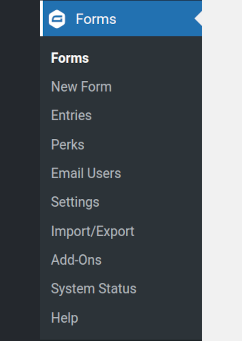
After GP Limit Submission is installed, you’ll want to configure a Limit Feed. A Limit Feed is a group of rules that dictate who or what should be limited, how many submissions they are allowed, and for how long the limitation period should last. Let’s add your first Limit Feed.
|
Navigate to your form in the Gravity Forms form editor. |
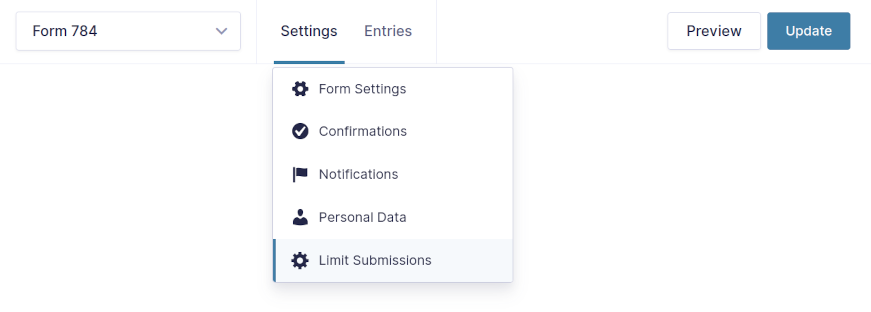
|
Select “Limit Submissions” from the “Settings” submenu in the Gravity Forms toolbar. |
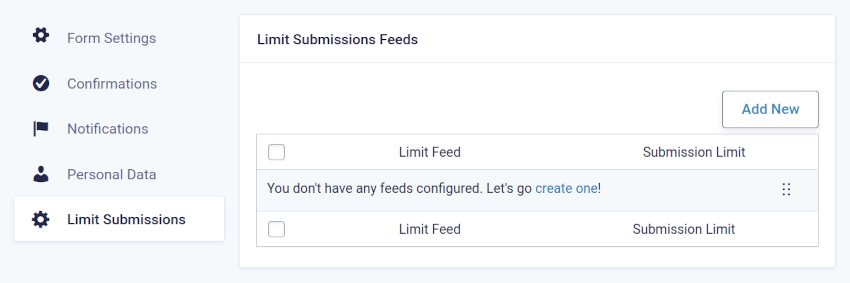
|
Click “Add New” to add a new Limit Feed. |
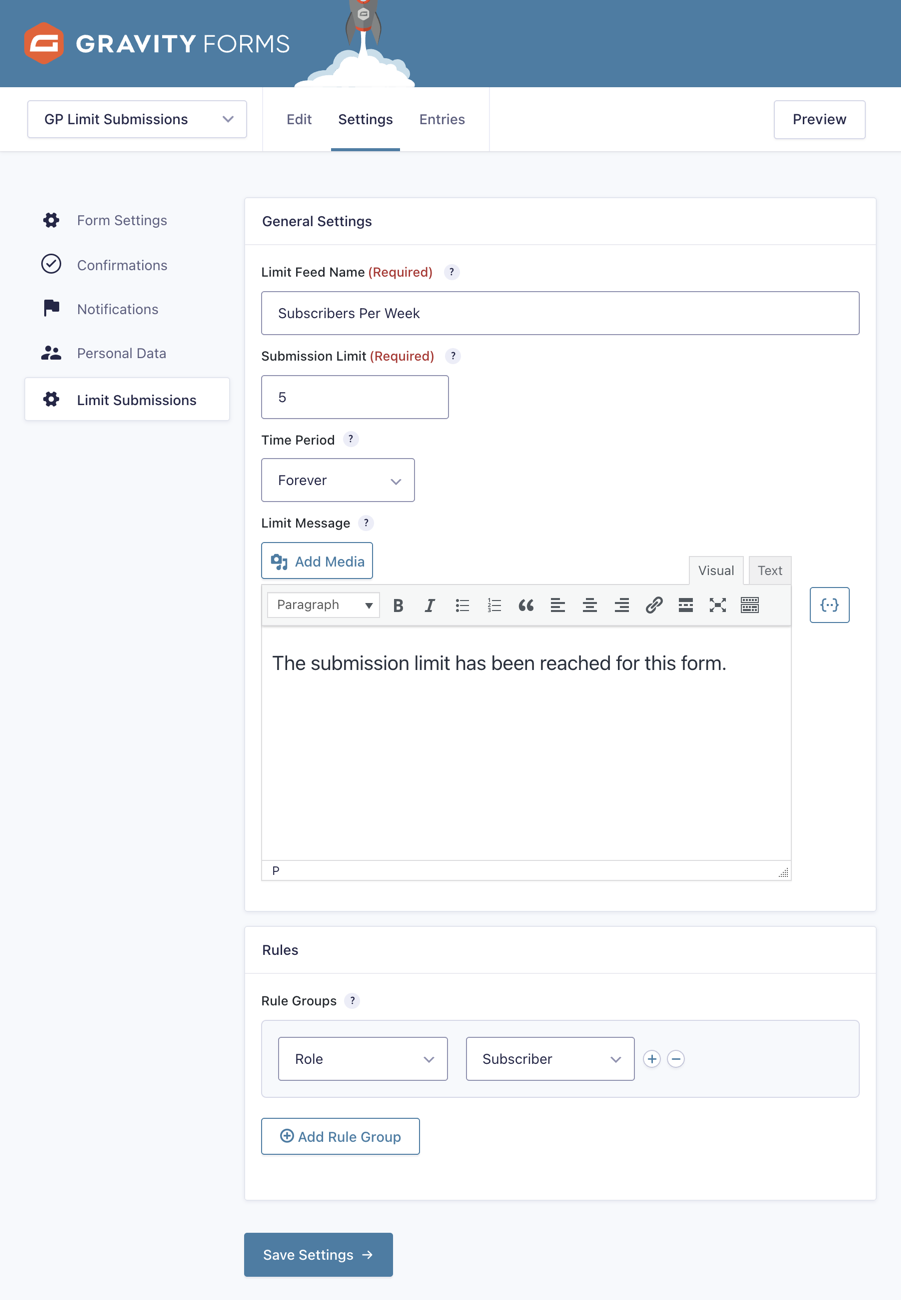
|
Configure your Limit Feed as desired (for more details on the available options, see the Feature Details section below). |
Feature Details
Limit Feeds
A Limit Feed is a group of rules that dictate who or what should be limited, how many submissions they are allowed, and how long the limitation period should last.
Unlimited Feeds
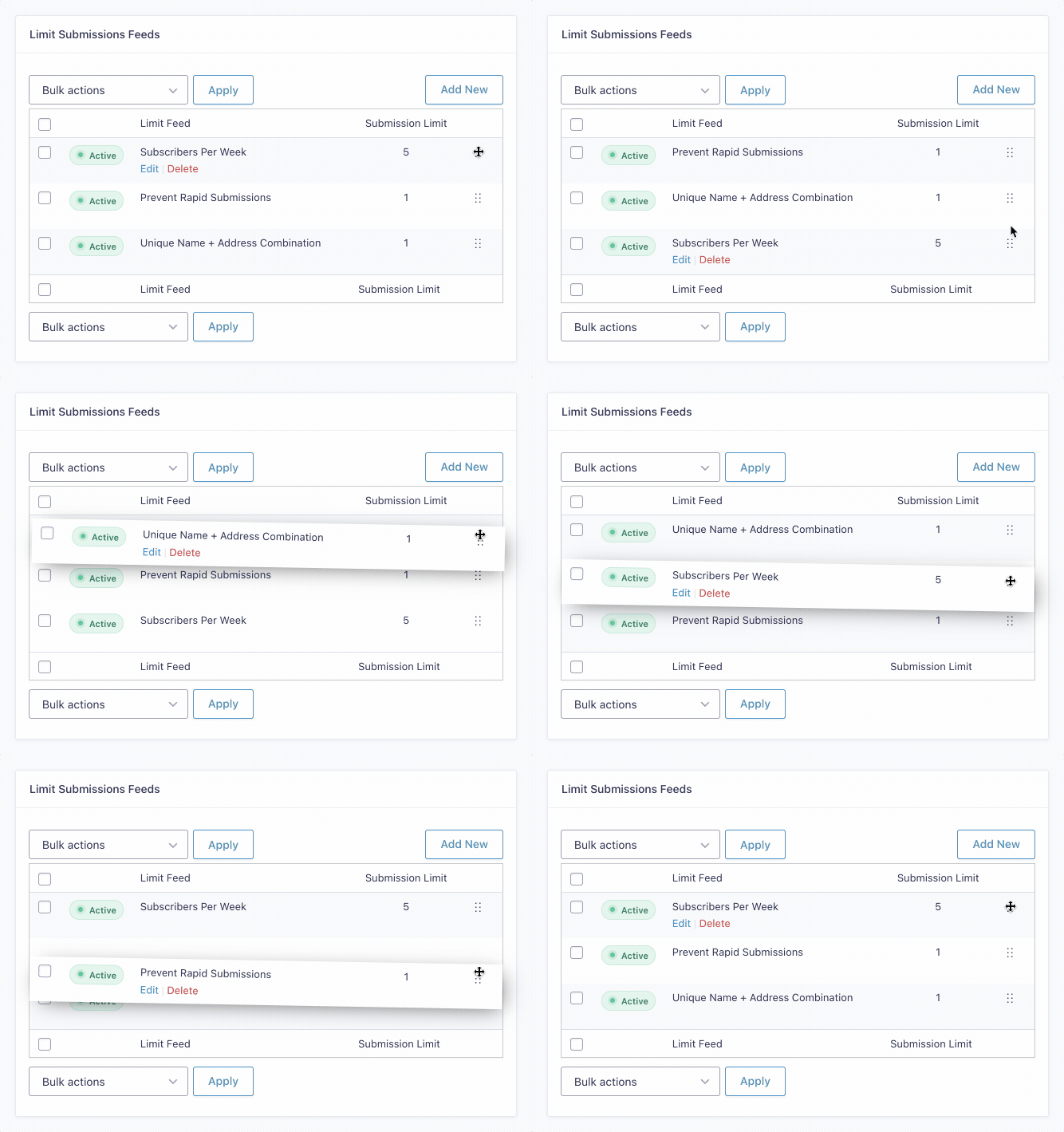
You can create as many Limit Feeds as you require. Limit Feeds are enforced from top to bottom. The limit message from the first feed with a reached or exceeded limit will be displayed. No additional feeds will be evaluated.
Re-ordering Feeds
You can re-order your feeds on the Limit Submissions Feeds view by clicking and dragging on the drag icon in the far right column.
Limit Feed Settings
Limit Feed Name
Specify a name for the Limit Feed. It will be displayed on the feed list view and will help you remember the purpose of the feed.
Submission Limit
Specify the number of entries that may be submitted if this Limit Feed applies.
Time Period
Specify a time period for which the Limit Feed applies. Only entries submitted during this time period will count towards the submission limit.
- Forever – All existing entries that match the rules for this Limit Feed will count towards the submission limit.
- Time Period – Only entries that fall within the specified time period (counting back from the current time) will count towards the submission limit. Supported units of time are seconds, minutes, hours, days, weeks, months, years.
- Calendar Period – Only entries that fall with the specified calendar period will count towards the submission limit. Supported calendar periods are “Per Day”, “Per Week”, “Per Month”, and “Per Year”.
- Form Schedule – Only entires that fall within the current form’s configured form schedule will count towards the submission limit. You can configure your form schedule on the Form Settings page via the “Schedule Form” setting.
Limit Message
Specify a message that will be displayed to users if their submission is limited or if the form’s submission limit is reached.
Rules / Rule Groups
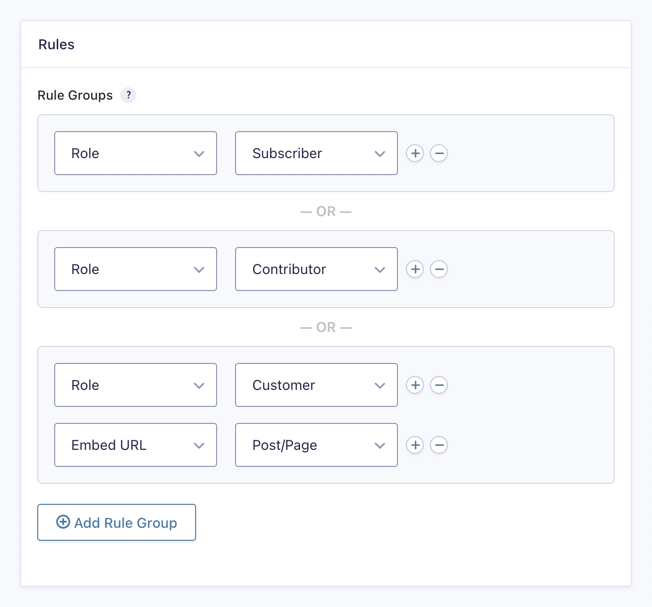
Create groups of rules that determine whether this Limit Feed applies. Add a rule to your group with the (+)/(-) icons to the right. All rules in a group must be true for the group to match. Add another group by clicking the “Add Rule Group” button below. If any group matches, this Limit Feed will apply.
For more details on the Limit Rules, see the Limit Rules section below.
Limit Rules
Gravity Forms Limit Submissions allows you to limit by almost anything. Let’s dig into the specifics of the different rule types and what you can do with them.
IP
Limit by the IP address of the submitting user. This is useful for limiting visitors to your site that may not have any other identifying information.
- Each IP – Apply the feed limit to all IPs, per IP. This means each unique IP will be able to submit the form up to the limit rather than all IPs sharing a collective limit.
- Specific IP – Apply the feed limit to a specific IP.
User
Limit by the WordPress User ID of the submitting user. This is useful when you’ll be limiting users who are logged-in to your site.
- Each Users – Apply the feed limit to all WordPress users, per user. This means each unique user will be able to submit the form up to the limit rather than all users sharing a collective limit.
- Specific User – Apply the feed limit to a specific WordPress user. Your site’s users will be populated into the drop down for easy, filterable selection.
The number of users that appear in this drop down is capped at 1000. For sites with more than 1000 users, the gpls_rules_get_user_args filter can be used to show all users.
Embed URL
Limit by the URL from which the entry was submitted. This is very useful when using the same form on multiple pages and wanting to apply the Feed Limit per page rather than per form.
- Each URL – Apply the Feed Limit to each URL from which the form is submitted.
- All URLs – Apply the Feed Limit to all URLs from which the form has been submitted.
- Specific URL – Apply the Feed Limit to a specific URL from which the form is submitted.
- Post/Page – Apply the Feed Limit to a specific post/page from which the form is submitted. This works identically to the Specific URL option with the exception of providing a list of post/pages to select from in the UI.
Role
Limit by the WordPress user role of the submitting user.
- Specific Role – Apply the feed limit to a specific role. All existing WordPress roles will be populated in the drop down for selection.
- Anonymous – Apply the feed limit to users with no role. This special option is only available when the gpls_apply_role_limit_per_user filter has been implemented and returns
false.
Field Value
Limit by one or more submitted field values. Select from a list of form fields. Add multiple fields to the same rule group to limit by a unique combination of those fields’ values.
[gpls] Shortcode
The [gpls] shortcode allows you to display the limit, count, and remaining number of submissions in the context of the current user. Since you can have multiple limits configured per form, if no Limit Feed has been exhausted, whichever feed is nearest to reaching it’s limit will be used.
Display Remaining Submissions
Display the number of submissions remaining before the limit is reached for the contextual Limit Feed.
[gpls form="123" action="remaining"]
Display Submission Count
Display the number of submissions that are counting towards the contextual Limit Feed.
[gpls form="123" action="count"]
Display Limit
Display the configured limit for the contextual feed. This is useful when wanting to show the count or remainder in context of the total limit (i.e. “You have submitted 3 / 5 entries.”).
[gpls form="123" action="limit"]
All Options
- form – Required. Specify the form ID to which the shortcode should apply.
- action – Optional. Specify the action to perform (
remaining,count,limit). Defaults toremaining. - feed – Optional. Set the context of the shortcode to a specific Limit Feed by feed ID. You can get the feed ID from the
fidparameter in the URL of the Limit Feed edit view.
Note: Limit feeds that contain Field-Value-based rules will not work with the shortcode since these feeds can only be evaluated based on submission.
Limit Reached Notifications
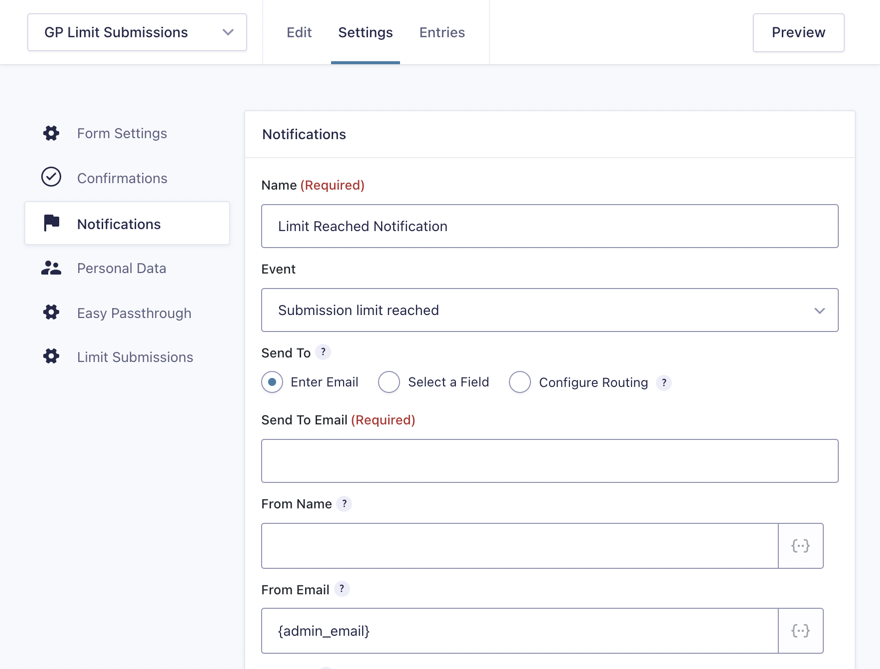
GP Limit Submissions provides special notification events that allow a Gravity Forms notification to be sent when a Limit Feed’s limit has been reached. The recipient of the notification can be configured in the notification itself and multiple notifications can be created for the same event. This allows you to notify an administrator and/or the submitting user when a limit is reached.
The default notification event is “Submission limit reached”. This will be triggered when any Limit Feed’s limit has been reached. GPLS also provides support for feed-specific notification events so you can trigger a notification only when the limit for a specific Limit Feed has been reached.
FAQs
Can I apply a Limit Feed to all forms?
Yes, you can apply the feeds from one form to all other forms with this snippet. Update the $primary_form_id variable with your own form ID.
Can I apply the same Limit Feed to a group of forms?
You may find that you need to apply a limit feed to a specific group of forms rather than all forms on the website. If that is the case, you’ll want to use this snippet!
How can I apply the limit collectively rather than per form when applying a feed to multiple forms?
Here is a modified version of the snippet above that will apply the feed’s limit collectively rather than per form.
Are limits enforced when editing entries?
Limits are never enforced when editing entries via the Gravity Forms entry editor. Limits are also not enforced if you are editing entries via Nested Forms, GravityView, or Sticky List.
What’s the difference between Limit Submissions and GP Inventory?
Limit Submissions limits the actual number of submissions that can be made in a form; GP Inventory limits the amount of times a choice or product in a form can be selected.
Common use cases for Limit Submissions are online surveys, contests, user registration, and support requests. Limiting the number of submissions that can be made prevents abuse.
Common use cases for GP Inventory are concert tickets, curbside pickup, eCommerce, and online classes. There is a limited number of spots, items, or times available.
Hooks
- gpls_apply_limit_per_form
- gpls_apply_role_limit_per_user
- gpls_before_query
- gpls_bypass_gravityview
- gpls_calendar_periods
- gpls_field_failed_validation
- gpls_field_validation_message
- gpls_limit_field_value
- gpls_match_base_url
- gpls_rule_get_post_args
- gpls_rule_groups
- gpls_rule_type_choices
- gpls_rules_get_users_args
- gpls_should_apply_rules
- gpls_should_enforce_on_render
Gravity Forms has hundreds of hooks. Check out our Gravity Forms Hook Reference for the most thorough guide to Gravity Forms’ many actions and filters.
Related Resources
- AlbumBlitz: Searching Through the World's Music with Advanced Select
Elle Dulaney is cataloging the world's music in one place. With 40,000 albums already, she turned to Advanced Select to make them searchable. - Complete Guide to Gravity Forms Login (Auto Login, Activate Users, More!)
Learn how to enhance the login and user registration experience on your site using Gravity Perks and other tools! - Complete Guide to Gravity Forms reCAPTCHA and Gravity Forms Spam
Everything you need to know about spam prevention using Gravity Forms, including how to use reCAPTCHA and other tools. - How to Build a Raffle or Lottery Event using Gravity Forms
Learn how to build the perfect raffle, lottery, or prize-based system using Gravity Forms, with one winning ticket or multiple. Then, take it further with discounts, data exports, and more. - How to Build a Simple Job Board with Gravity Forms
Learn how to build a job board using Gravity Forms and more efficiently manage the application process, display and filter job listings, and customize applicant follow-up. - How to Filter Checkboxes by Checkboxes using Dynamic Population
Use Checkbox selections to filter other Checkboxes on your form. Example: turn a customer's selection of yoga class times into that customer's preferred times.