What People Want to Build with Gravity Forms: 50 Real Requests

Can Gravity Forms handle what you want to build? I read 50 real requests for a free Blueprint build plan to find out, and the answer was yes for 49 of them.
- Results from 50 Gravity Forms build requests
- Payments in Gravity Forms: tickets, vouchers and subscriptions
- Limits on spots, stock and entries in Gravity Forms
- Bookings in Gravity Forms: appointments, rentals and reservations
- All 50 Gravity Forms build requests and what we suggested
- So, can Gravity Forms handle what you want to build?
“Can Gravity Forms handle this?” is a fair thing to wonder before you put hours into a build, and it’s one we’ve spent years helping people figure out. That’s why we made Blueprints, so you can tell us what you want to build and we’ll suggest how to set it up — for free.
Gravity Forms is at the heart of what we do, so whether you’ll need our plugins, other add-ons, or just Gravity Forms on its own, we’ll happily tell you what it takes.
We’ve been getting plenty of Blueprint requests, and some of them are pretty fun! Being the curious wizard I am… I had to read every one, so today I’m sharing 50 of them with you, along with what we suggested for each.
Spoiler: almost all of them were doable with Gravity Forms, so if you’ve got a build in mind, you might even find a head start right here. Let’s check it out!
Quick heads-up
All of these requests came through our website and were answered by our Support Wizards, so yes, you’ll see mostly our plugins in the suggestions. 😉
Results from 50 Gravity Forms build requests
I looked at every request we got for a free Blueprint build plan from July to October 2026 and kept the 50 with enough detail for a full plan.
Here are the results:
| Finding | Number of requests |
|---|---|
| Our Wizards confirmed the build was possible | 49 of 50 |
| The build used at least one of our plugins or snippets | 47 of 49 |
| The build needed no snippet or custom code | 26 of 49 |
| The build involved an existing snippet, custom code, or help from a developer | 23 of 49 |
| The request asked for something we don’t have a ready solution for | 1 of 50 |
Most of these went beyond a simple contact form: 44 of the 50, most often for payments (19 of 50), limits on spots, stock or entries (15), bookings (14), or approvals and reminders (14). Some needed more than one.
To show how different these builds can get, I picked two from each. You’ll find all 50 in a table at the end of this article.
Payments in Gravity Forms: tickets, vouchers and subscriptions
Payments were the most common need: 19 of the 50 requests needed to take a payment in Gravity Forms. For the checkout itself, our Wizards most often recommended the official Stripe add-on. Some of the payment requests had pretty fun pricing, like prices that change depending on who’s signing up or what they pick.
Here are two of those 19 payment requests.
Group registration with a different price per attendee
One person wanted an event registration form where someone could sign up alone or add more attendees. Each attendee paid either a member or a non-member price, and the form had to add up the total.
What we suggested: GP Nested Forms, which adds each extra attendee to the main form as their own entry. Its :total merge tag modifier adds up the extra attendees’ prices, and the Stripe add-on takes the payment.
Curious how a similar build came together? We walked through one in our spotlight on building a registration form with conditional pricing.
Gift vouchers that staff can check with a QR code
Someone building a site for a restaurant wanted to sell gift vouchers online and send each one as a good-looking PDF. When a guest came in with a voucher, staff needed to check that it was valid.
What we suggested: GP Unique ID to create a code for each voucher, GP QR Code to turn each code into a QR code, and Gravity PDF to put that QR code on a PDF voucher. Staff then use a second form with GP Populate Anything to check that the code is valid and hasn’t been used yet.
Worth knowing: the second form needs the website to be online. Exporting the entries regularly gives staff a spreadsheet of codes they can check by hand as a backup.
Limits on spots, stock and entries in Gravity Forms
Limits on spots, stock or entries came up in 15 of the 50 requests, and the right perk depended on what was being limited. Our Wizards most often suggested GP Bookings for spots in a time slot, GP Inventory for stock or choices that can run out, and GP Limit Submissions for how often someone can submit.
Here’s how that played out in two of those 15 requests.
Rental stock that comes back when gear is returned
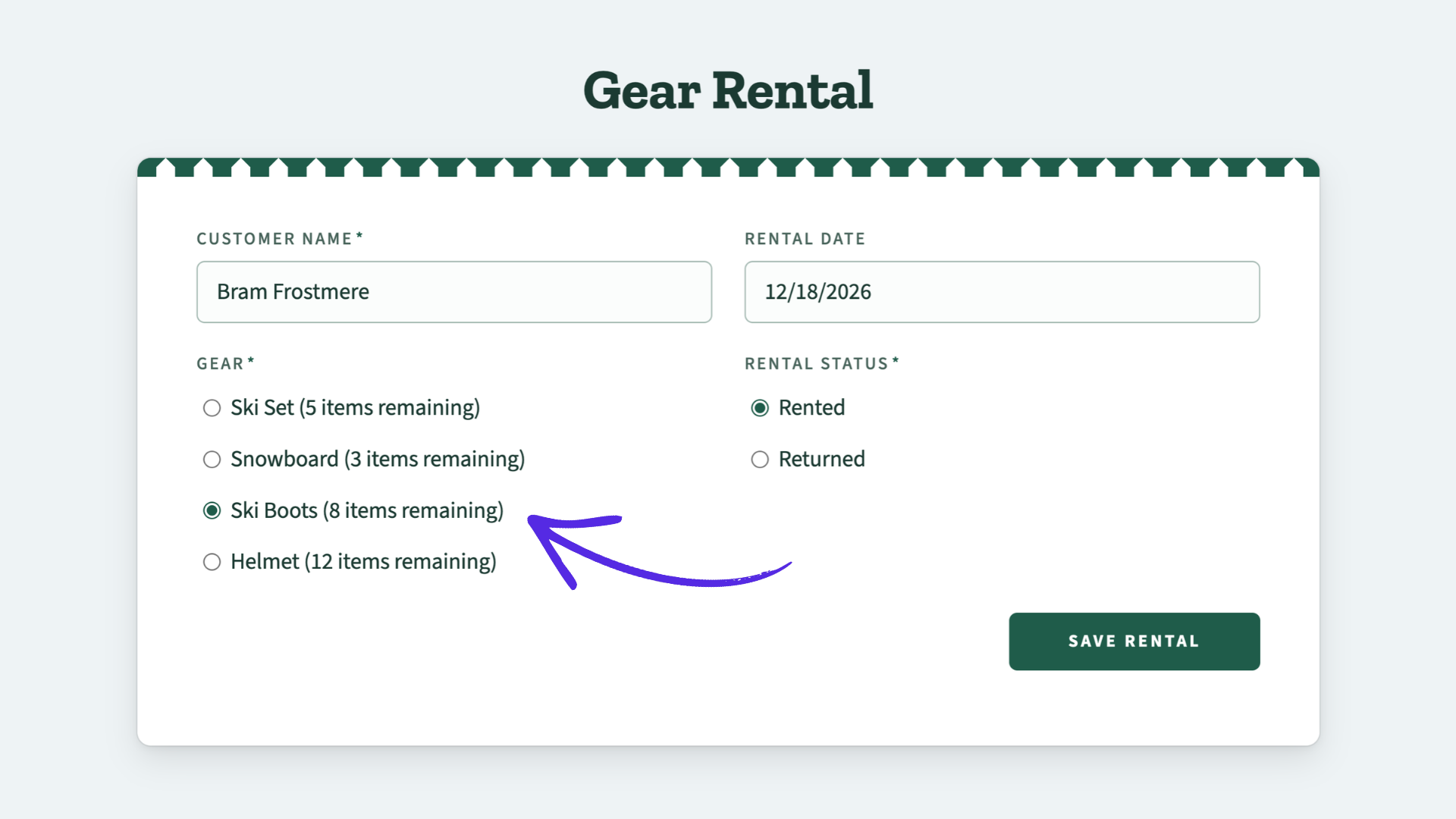
A ski and snowboard rental shop had already built most of its system: an inventory form, a rental form, and a nested form for adding items. The main missing piece was stock that drops when gear is rented and goes back up when it’s marked as returned.
What we suggested: a Radio or Dropdown field for the rental status, set to Rented by default and changed to Returned when the customer brings the gear back. Staff can update it by editing the entry or with GP Entry Blocks. An existing snippet then tells GP Inventory to count only the entries marked Rented, so returned gear goes back into stock automatically.
A voting contest with one vote per email per day
A 30-day “vote for your favorite” contest needed two rules: a valid email address for each voter, and one vote per day.
What we suggested: GP Email Validator to check that each email address is valid, and GP Limit Submissions to allow one vote per day per email address. Gravity Forms’ built-in form scheduling opens and closes the contest on set dates.
If you’d like to set up the daily vote limit yourself, we’ve got a step-by-step guide on limiting Gravity Forms submissions to one per day, per email.
Bookings in Gravity Forms: appointments, rentals and reservations
Bookings in Gravity Forms made up 14 of the 50 requests, and our Wizards suggested GP Bookings for all 14. The bookings ranged from simple time slots to multi-day rentals, staff schedules and memberships.
New to taking bookings? Our Wizard’s Guide to scheduling in Gravity Forms covers GP Bookings, plus a few lighter options for simpler setups.
Here are two of those 14 booking requests.
Salon appointments with a buffer and lead time for each stylist
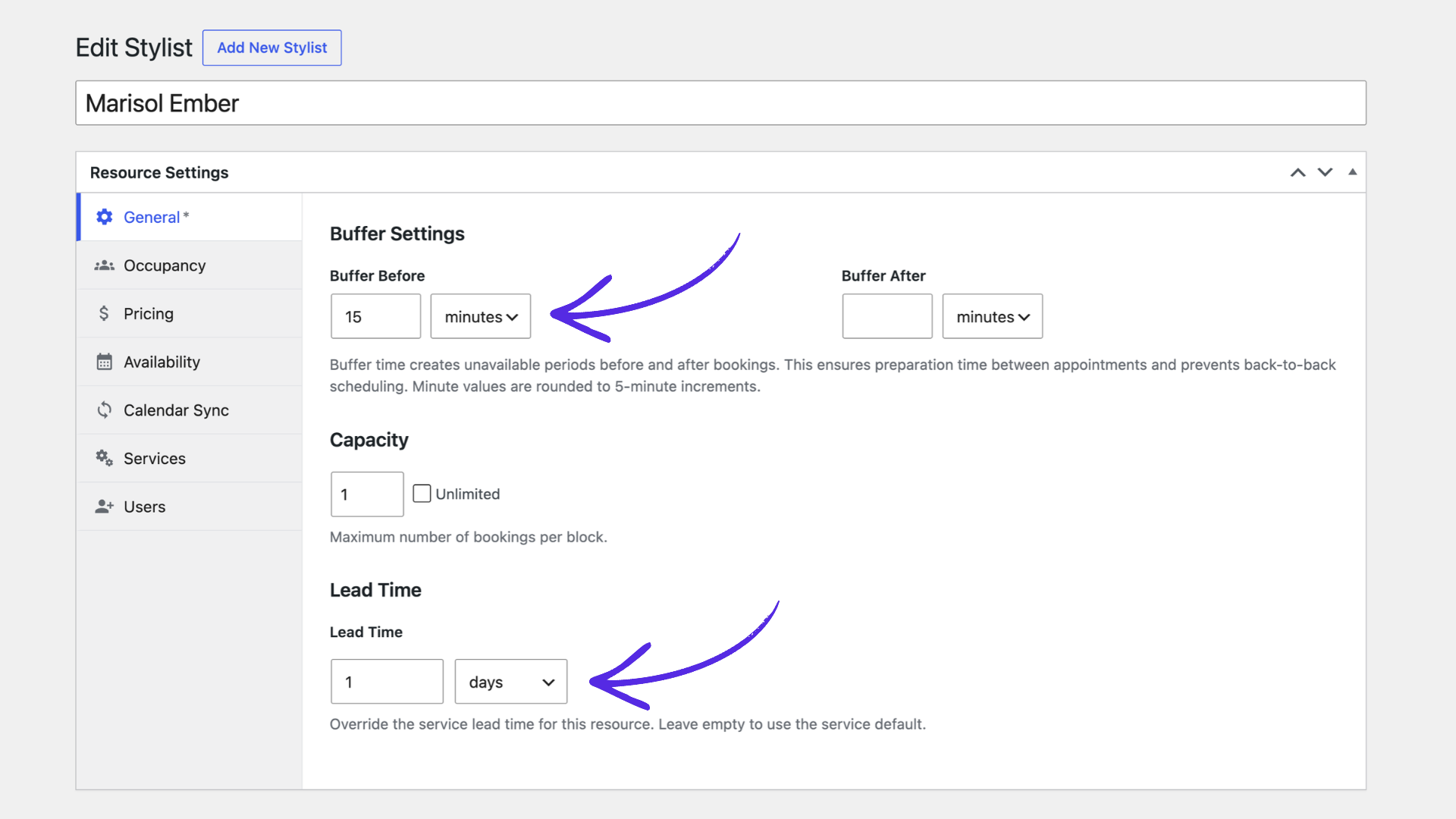
The salon in this request had five stylists, each offering their own services. Appointments needed a 15-minute break between them, some stylists didn’t want same-day bookings, and their personal calendars had to block time off. Clients also needed reminders, by text if possible.
What we suggested: GP Bookings, with each stylist set up as a Resource and each service as a Service. Each stylist gets their own buffer for the 15-minute break and their own Lead Time for same-day bookings. Personal calendars sync through ICS feeds to block time off, or in real time with GC Google Calendar. GP Bookings sends email reminders, and the official Twilio add-on can send them as texts with GP Notification Scheduler and a small snippet.
Worth knowing: letting a stylist double-book on purpose, like a quick trim while another client is under the dryer, may need some custom code.
Want the step-by-step? I walked through a whole salon build in our guide on setting up a salon booking platform with Gravity Forms.
A monthly membership with sessions to book later
Someone building a sauna booking site wanted members to pay a monthly fee for four sessions they could book whenever they liked. The sessions had to reset each month, and non-members still needed a way to pay for a single session.
What we suggested: a membership sign-up form that takes the monthly payment through the Stripe add-on, and a GP Bookings form for the sessions. GP Populate Anything pulls each member’s remaining sessions into the booking form, and GP Conditional Pricing drops the price to zero while the member has sessions left. A custom snippet takes one session off with each booking and resets them on each renewal.
Worth knowing: members need to be logged in so the booking form can find their membership. Anyone without a membership, or without sessions left, pays the regular price.
Approvals, reply threads and reminders in Gravity Forms
14 of the 50 requests needed the form to keep working after someone hits submit, like an admin approval, a reply thread or a reminder. Our Wizards suggested GP Entry Blocks most often, in 6 of the 14, to show entries on the front end where people can view or update them.
Here are two of those 14 requests, each with several moving parts.
Membership applications that need admin approval
A community group-texting site needed new members to apply with proof of address, then wait for an admin to approve them. Approved members could join or leave texting groups whenever they liked.
What we suggested: Gravity Flow to send each application to the admin, who approves or rejects it from WordPress or their inbox. On approval, the official User Registration add-on creates the member’s account, and GC API Alchemist signs them up with the texting service. Members manage their groups from a front-end dashboard built with GP Entry Blocks.
A support ticket system with threaded replies and follow-ups
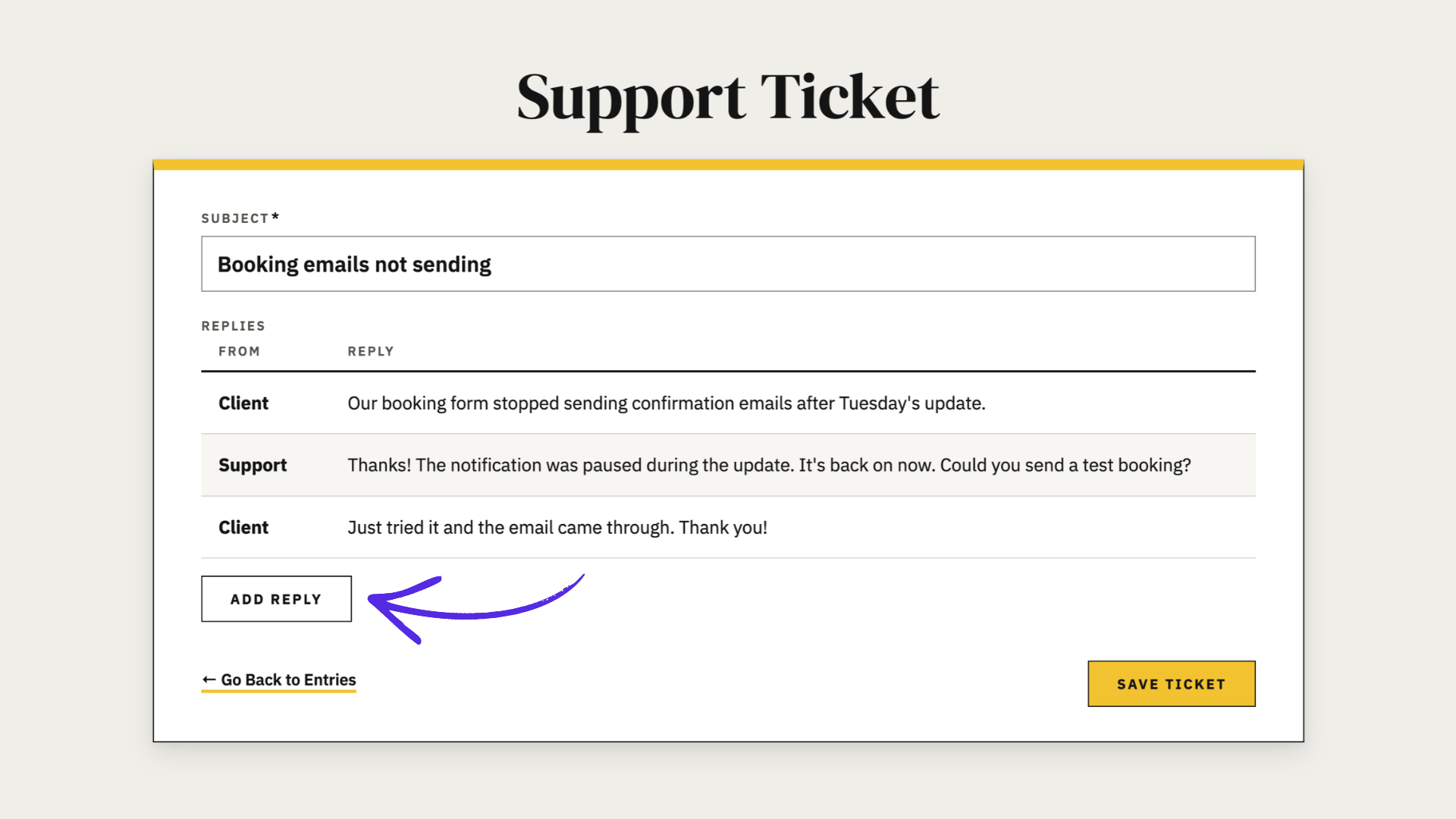
A web developer wanted a simple support ticket system for their clients, built with Gravity Forms and Gravity Perks. Clients would get a link to view and reply to their ticket without logging in, and every reply had to stay on the ticket. If a client went quiet, reminders had to go out automatically, and stop as soon as the client replied.
What we suggested: GP Unique ID for ticket numbers, and GP Nested Forms to save each reply as its own entry under the ticket. GP Entry Blocks gives each client a link to see the full thread and add a reply from the same page. GP Notification Scheduler sends reminders after a set number of days, and a small snippet makes it skip the reminder if the client has already replied.
Worth knowing: this is a bigger build, and changing the ticket’s status when the client replies may need some custom code.
Skipping a reminder once someone responds works for other forms too! Our guide on sending follow-up emails to people who didn’t finish a form uses the same approach with GP Notification Scheduler.
All 50 Gravity Forms build requests and what we suggested
All 50 are below, with what we suggested for each. Each request sits under the need that shaped it most, so these groups are smaller than the counts above.
| What they needed | What we suggested |
|---|---|
| Group event registration where each attendee pays a member or non-member price | GP Nested Forms to add each attendee and total their prices, plus the Stripe add-on. |
| Event tickets priced by a coupon code in the link, with optional guest tickets and some refundable tickets | GP Populate Anything to look up each code’s price from a separate form, and GP eCommerce Fields for guest discounts. Some payment gateways can handle refunds from the entry, like the Stripe add-on. |
| Gift vouchers sold as a PDF that staff can check with a QR code | GP Unique ID and GP QR Code for the codes, Gravity PDF for the voucher, and GP Populate Anything for the staff check. |
| Store credit for refunded service requests, without creating each code by hand | GP Unique ID as the credit code, and GP Populate Anything to check it against past requests. Automating the Coupons add-on itself would need custom work. |
| A QR code on a staff tablet so the customer can pay the job total on their own phone | GP Easy Passthrough to carry the total to a payment form, and GP QR Code to show its link. Syncing the payment back to the job needs small custom snippets. |
| A giveaway entry form with three donation levels | Gravity Forms’ Product fields and the Stripe or PayPal add-on. |
| A service plan builder with surcharges and add-ons, paid monthly through WooCommerce Subscriptions | GP Populate Anything, GP eCommerce Fields and GP Advanced Calculations for the pricing, and GS Product Configurator to check out with WooCommerce. |
| Camp registration with memberships, member discounts, class capacity and several children per family | GP Nested Forms for several children, GP Inventory for class capacity, and GP Conditional Pricing for member prices. It’s a bigger build that needs careful planning. |
| A donation progress meter that counts only paid donations | A hidden total field feeding GF Progress Meter. Counting only paid donations needs a custom snippet. |
| WooCommerce product options that block a production speed that can’t meet the customer’s date | GS Product Configurator to bring the options into a Gravity Form, and GP Advanced Conditional Logic to compare the date with each speed. We also pointed them to developers who could build it. |
| A parent membership with a subscription, child members, a members-only page and an account page | GP Nested Forms for child members, the User Registration add-on for accounts, and GP Populate Anything for the account page. An existing snippet and a custom one link child members to their parent. |
| A PDF of each person’s results, paid for through their existing WooCommerce checkout, plus a booking form for sessions | Gravity PDF for the PDF, a custom snippet that sends people to the WooCommerce checkout through a hidden placeholder product, and GP Bookings as an option for the session booking form. |
| What they needed | What we suggested |
|---|---|
| Rental stock that drops when gear goes out and comes back when it’s returned | A Rented/Returned status field, and an existing snippet so GP Inventory counts only the gear that’s still out. |
| A 30-day voting contest with one vote per email per day | GP Email Validator for valid emails, GP Limit Submissions for one vote per day, and Gravity Forms’ form scheduling for the contest dates. |
| Application caps of 15 per organization and per country | GP Inventory for fixed choice lists, or GP Populate Anything to count matching entries when people type the name. |
| Event check-in by QR code, with a running count and a warning when a code was already scanned | GP QR Code and GP Easy Passthrough to open each attendee’s check-in, GP Populate Anything for the running count, and GP Limit Submissions to block a second check-in. |
| Exhibition time slots, each with its own number of spots, showing spots left and “Sold Out” | GP Inventory with a limit per time slot and a Number field for quantity, plus an existing snippet to show “Sold Out.” |
| Weekly classes with a set number of spots, bookable from a main form or each class’s own form | Our Wizards confirmed it should be doable and asked a few questions to choose the right setup, like whether people book a whole course or single sessions. |
Our Wizards suggested GP Bookings for all 13 of these, so each row shows how they’d set it up.
| What they needed | What we suggested |
|---|---|
| Salon appointments for five stylists, with breaks between bookings, different same-day rules, calendar sync and text reminders | Each stylist as a Resource with their own buffer and Lead Time, plus calendar sync, and GP Notification Scheduler with the Twilio add-on for text reminders. Letting a stylist double-book on purpose may need custom code. |
| A monthly membership with four sessions to book later, resetting each month, plus paid single sessions | GP Populate Anything to track each member’s sessions left, and GP Conditional Pricing to make member bookings free. A custom snippet resets the sessions on each renewal. |
| An indoor kart track with group sessions, breaks left open for individual drivers, and up to 10 drivers per ride | Two Services sharing one Resource, so group and individual bookings can’t overlap, and a capacity of 10 with spots left shown. Linking the driving slots to group sessions needs custom code. |
| Delivery arrival slots every 15 minutes on two set days, with up to 5 per slot | 15-minute blocks, a capacity of 5, and spots left shown. |
| Mobile notary appointments with different lengths, buffers, and fees that change by time, signers and travel area | GP Bookings’ pricing rules for time and signer fees, GP Populate Anything for travel fees by city, and GP Advanced Select for the city list. The Stripe add-on takes payment. |
| Minivan hire, with a separate form for when the van comes back | Hourly or daily durations on the booking form, and a second form for return details like mileage. |
| Multi-day campervan and motorcycle rentals with optional extras | Each vehicle as a Resource, full-day blocks for multi-day rentals, and buffers for turnaround time. Extras can be charged per day using the booking duration merge tag. |
| A club where parents sign up and book activities for their children and siblings | The User Registration add-on and GP Unique ID for memberships, and GP Nested Forms to add siblings to a booking. |
| Restaurant and afternoon tea bookings sharing one venue capacity, with deposits and party-size rules | Two Services sharing one Resource, and Gravity Forms’ payment features for deposits. Counting guests across both, guest limits per slot and longer bookings for bigger parties may need custom code. |
| Stay requests where families pick three sets of dates and an admin confirms one | Three booking fields that create pending bookings for an admin to confirm, and half-day check-in and check-out days. Limiting stays to set weekday patterns needs a custom snippet. |
| Paid AI agent calls in three lengths, limited per time window, with reminders, edits and a late-reschedule fee | Three Services sharing one Resource with day-based pricing, GP Entry Blocks for edits, and GP Notification Scheduler with the Twilio add-on for text reminders. A few pieces, like blocking late edits, need small snippets. |
| Paid training bookings that sync with Microsoft 365 calendars, with text reminders and accounting | Calendar sync through ICS feeds, and Gravity Forms’ payment add-ons. Text messages and accounting could run through the Zapier add-on. |
| Registration for a three-day event with four sessions, sending each attendee a calendar file | A Service for each session on one registration form, and a snippet to attach a calendar file with every session to the notification email. |
| What they needed | What we suggested |
|---|---|
| Membership applications with proof of address, admin approval and sign-up to texting groups | Gravity Flow for the admin approval, the User Registration add-on and GC API Alchemist to set up each approved member, and GP Entry Blocks for a member dashboard. |
| A support ticket system with threaded replies and automatic follow-ups | GP Unique ID for ticket numbers, GP Nested Forms for replies, GP Entry Blocks for client access, and GP Notification Scheduler for reminders. The reminder logic may need some custom code. |
| Parents and teachers answering different questionnaires about the same child, combined into one report, with reminders | GP Nested Forms to add each contributor to a case, and Gravity PDF for the combined report. Reminders through Gravity Flow, or GP Notification Scheduler with a snippet. Linking contributors to a case may need custom code. |
| A document portal like a shared online drive, with version history, sharing and approvals | GP File Upload Pro, GP Unique ID and GP File Renamer for uploads, GP Entry Blocks to show each person’s documents, and Gravity Flow for approvals. Custom code would most likely be needed for permissions and the separate drive areas. |
| A membership renewal form where members log training activities, edit them later, submit a snapshot for approval, and archive past renewal periods | The {user} merge tag to fill in member details, GP Nested Forms for the activities, and GP Entry Blocks to duplicate each submission so earlier versions are kept. A custom snippet adds an archive link with GF Entry Archive. |
| What they needed | What we suggested |
|---|---|
| Email required before visitors can see the site, while logged-in customers skip it | GP Submit to Access to require the form, with a small snippet so logged-in customers skip it. Covering the whole site needs per-page setup or a snippet. |
| An NDA form that unlocks content and keeps a list of signers to email | GP Submit to Access to unlock the content once the form is submitted, with entries exported as the signer list. GP Email Users can email the signers. |
| A complaint form that people can only reach after verifying their email | GP Email Validator to check the email is real, GP Unique ID for a reference number sent to that email, and GP Populate Anything to confirm the reference before the form opens. |
| A study-abroad form where students pick a country, a school and up to 10 courses from thousands of records | GP Populate Anything for chained course dropdowns from a database table or GC Google Sheets, and GP Nested Forms for up to 10 courses. |
| An order form for franchise stores to request over 100 products from a factory | GP Nested Forms to add products one at a time, with GP Populate Anything pulling them from a database or GC Google Sheets. |
| Nomination forms that prefill the logged-in user’s details and each nominee’s contacts | GP Populate Anything for both the user’s own details and a lookup of each nominee’s contacts. An existing GP Advanced Select snippet lets people add a new organization from the dropdown. |
| One form’s questions reused inside another when someone picks that program | GP Nested Forms to bring in the existing form, with conditional logic to show it only for that program. |
| A total of the hours entered across up to 20 rows | GP Nested Forms instead of a List field, with its :sum merge tag modifier pointed at the hours field to total them. |
| A pre-arrival form for resort guests, with separate answers for each traveler | A section per traveler with conditional logic for small groups, or GP Nested Forms for larger ones, with GP Populate Anything’s Live Merge Tags to personalize questions by name. A couple of pieces need small snippets. |
| A multi-section onboarding form for a legal agreement, prefilled from an earlier inquiry | Tabbed sections with JetSloth’s Gravity Forms Tabs, and GP Populate Anything to reuse answers from the inquiry form. We also pointed them to developers who could build it. |
| A form where people write their personal principles, get AI coaching feedback right away, then revise and submit a final version | GC OpenAI’s Stream field for the feedback, GP Copy Cat to seed an editable final version from the draft, and GF Spam Hexer for spam. A snippet we wrote for this request limits how many times each visitor can generate feedback. |
| Registration and login with a magic link | We don’t have a ready solution for magic-link login. |
| An incident reporting system | GP Unique ID for incident numbers and GP File Upload Pro for photos, plus GP Entry Blocks to list and search past incidents. |
| A donation form where donors pick staff to honor from several schools, with each name in the form’s summary | GP Copy Cat to copy the chosen staff name into one field for the summary. GP Populate Anything with a separate staff list was the other option. |
So, can Gravity Forms handle what you want to build?
Going by these 50 requests, it’s almost always a yes. Our Wizards found a way forward for 49. Nearly all of those used our plugins, sometimes alongside other Gravity Forms add-ons and tools, and almost half also needed a snippet or some custom code for their most specific parts.
So if you’ve got a build in mind and you’re not sure Gravity Forms can handle it, send us a Blueprint request. Who knows, yours might be the next fun one we get. 🧙🏻♀️