

Extending Flowcrafter
Node Contracts
The PHP interfaces that tell Flowcrafter what your node can do — entry and form resolution, flow tag support, collections, scheduled triggers, and capability-gated REST enforcement.
Flowcrafter’s engine is deliberately generic. It doesn’t know what a “Send Email” node is or what a “Loop” node does — it just knows a node either implements a given interface or it doesn’t. Those interfaces are contracts, and they live in includes/nodes/_shared/contracts/.
Think of a contract as a capability flag. When your handler implements one, the engine and builder light up matching behavior for free — no node-type name-checking anywhere. Implement Is_Scheduled_Trigger and core will manage your node’s schedule. Implement Requires_Capability and every write endpoint starts enforcing your permission gate. You opt in by declaring an interface; the platform does the rest.
If you’re just getting started, read Extending Flowcrafter first for the registration seams, then Writing a Node for the handler basics. This page is the deep reference for the contracts themselves.
Quick reference
Section titled “Quick reference”| Want to… | Implement |
|---|---|
| Start a workflow | Is_Trigger |
| Provide a Gravity Forms entry | Provides_Entry |
| Require an upstream entry | Requires_Entry plus the Resolves_Entry trait |
| Require GF form context (marker) | Requires_Form — auto-injects a form_source field; Requires_Entry extends it |
| Provide form context | Provides_Form plus the Resolves_Form trait when needed |
Resolve {{ "Node name".path }} flow tags in settings |
Resolves_Flow_Tags plus the Resolves_Flow_Tags trait |
| Validate node settings at workflow-save time | Validates_Node_Settings |
| Output ports that depend on the node’s own settings | Has_Dynamic_Ports |
| Gate a node behind a WordPress capability | Requires_Capability |
| Behave differently in test mode | Has_Test_Mode_Override |
| Route inbound requests by URL token | Has_Inbound_Token |
| Own a GF feed’s firing | Manages_GF_Feed |
| Manage GF notifications | Manages_Notification |
| Validate and capture inbound REST payloads | Handles_Inbound_Request |
| Open and close external-event test listeners | Supports_Test_Listen |
| Fire on a schedule (interval, once, or cron) | Is_Scheduled_Trigger |
| Save query IDs for a loop | Provides_Collection |
| Consume saved query IDs | Consumes_Collection |
| Run a body once per saved item | Iterates_Collection |
| Leave the run waiting — on an outside event or on the clock | Pauses_Run |
Every contract lives in the Flowcrafter\Nodes\Contracts namespace; the runtime traits that back them live in Flowcrafter\Nodes\Traits.
Entry contracts
Section titled “Entry contracts”Provides_Entry means the node’s output identifies a Gravity Forms entry. Downstream nodes and the builder use this to resolve entry context. It’s a marker interface—no methods.
Requires_Entry means the node needs a current Gravity Forms entry. Use the Flowcrafter\Nodes\Traits\Resolves_Entry trait to resolve an entry ID from the node’s entry_source setting and reload it from Gravity Forms. Upstream output selects the entry; it is not a permanent snapshot of its fields. This matters when Action Scheduler runs the consuming node after the entry changes.
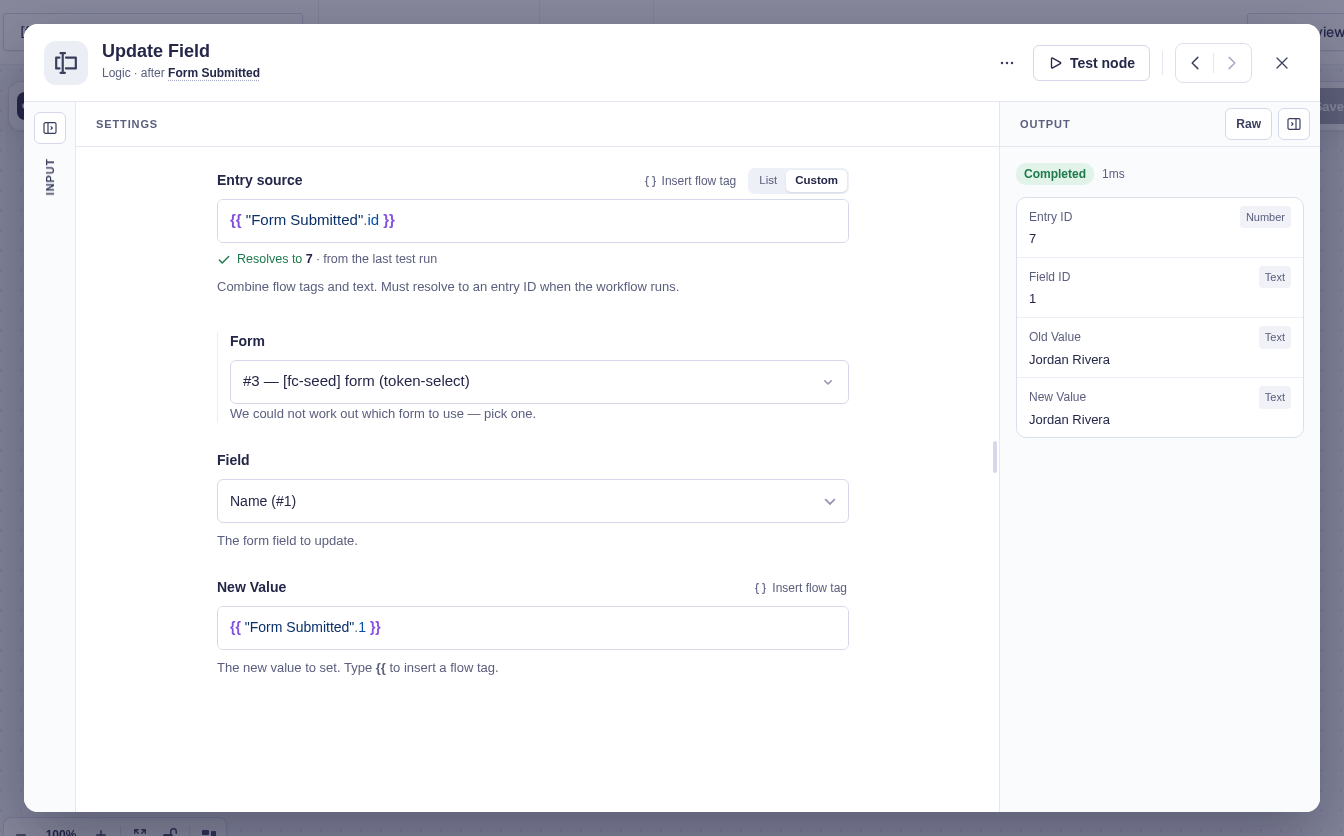
The default $input walks upstream (breadth-first) to the nearest node whose handler implements Provides_Entry. But entry_source can also name:
- a specific upstream node (that node’s output),
- a query-result selector —
some_node@items:first,@items:last, or@items:index:2, - a literal entry ID (
52), fetched straight from Gravity Forms viaGFAPI, - or a flow tag expression that resolves to an upstream entry object or a bare entry ID.
When a node needs settings, entry, and form together at the top of execute(), call resolve_entry_context( $node, $run, $form ) — it returns all three in one array (['settings' => …, 'entry' => …, 'form' => …]) and picks the correct form for cross-form entries automatically.
Resolution can legitimately come up empty—nothing upstream, a deleted entry, or a bad ID—in which case entry is []. A handler that needs a concrete entry must call require_resolved_entry( $entry ); it returns a no_entry WP_Error when there is nothing to act on, or null to continue. Core decision nodes also return a reload error when an upstream entry ID existed but Gravity Forms can no longer load it, rather than evaluating stale fields.
public function execute( array $node, Workflow_Run $run, array $form ): array|\WP_Error {    [ 'settings' => $settings, 'entry' => $entry, 'form' => $form ] =        $this->resolve_entry_context( $node, $run, $form );
    $error = $this->require_resolved_entry( $entry );    if ( $error !== null ) {        return $error;    }
// Safe to touch $entry['id'] from here.}The form and entry contracts provide these source controls without a node author rebuilding the picker. This tested example uses a custom flow tag for the entry ID.
Form source contracts
Section titled “Form source contracts”Requires_Form is a marker interface for nodes that need GF form context (conditional logic, merge tags, feed processing). When your handler implements it, Flowcrafter auto-injects a form_source settings field. At runtime, use the Resolves_Form_Source trait to turn that setting into a form ID or a loaded form:
use Flowcrafter\Nodes\Abstract_Node_Handler;use Flowcrafter\Nodes\Contracts\Requires_Form;use Flowcrafter\Nodes\Traits\Resolves_Form_Source;
class My_Node extends Abstract_Node_Handler implements Requires_Form {    use Resolves_Form_Source;
    public function execute( array $node, Workflow_Run $run, array $form ): array {        $form_id = $this->resolve_form_source_id( $node, $run, $form ); // ?int        $gf_form = $this->resolve_form_source( $node, $run, $form );    // array        // ...    }}
Requires_Entry extends Requires_Form, so every entry-consuming node is automatically form-requiring. When both apply, the injected form_source field comes before entry_source.
The field injection itself lives in Node_Settings_Fields::for_handler() — the one place that assembles a node’s real settings shape (declared fields, plus a collection “Results” section, plus these auto-injected source fields). Both the REST payload and the settings-schema deriver call it, so the builder and the server always see the exact same field list.
Flow tag resolution
Section titled “Flow tag resolution”Any node that interpolates flow tag-aware settings — or exposes flow tag resolution through a runtime API, the way the PHP Code node’s $context->token() does — must implement Resolves_Flow_Tags and use the trait of the same name:
use Flowcrafter\Nodes\Contracts\Resolves_Flow_Tags as Resolves_Flow_Tags_Contract;use Flowcrafter\Nodes\Traits\Resolves_Flow_Tags;
class My_Node extends Abstract_Node_Handler implements Resolves_Flow_Tags_Contract {    use Resolves_Flow_Tags;}
This isn’t optional book-keeping. The first time Node_Registry::get() instantiates a handler, it checks: if the handler declares any token-capable fields (supports_flow_tags: true) but does not implement Resolves_Flow_Tags, it throws an InvalidArgumentException. A node can’t advertise dynamic values it never resolves at runtime.
For the common case — resolving a setting against the current run — call resolve_run_flow_tags( $text, $form, $run ) instead of hand-deriving the run’s outputs and context for the lower-level resolve_flow_tags().
For a numeric setting with supports_flow_tags: true, call resolve_run_int( $value, $form, $run, $fallback = 0 ). The stored value can be a flow tag expression, and a raw (int) cast on that string quietly yields 0. This resolves the flow tag first and only trusts a numeric result — an unresolved flow tag, a blank, or a non-number falls back to $fallback, so a broken flow tag can’t masquerade as a deliberate zero.
Flow tag syntax is documented in the flow tag reference.
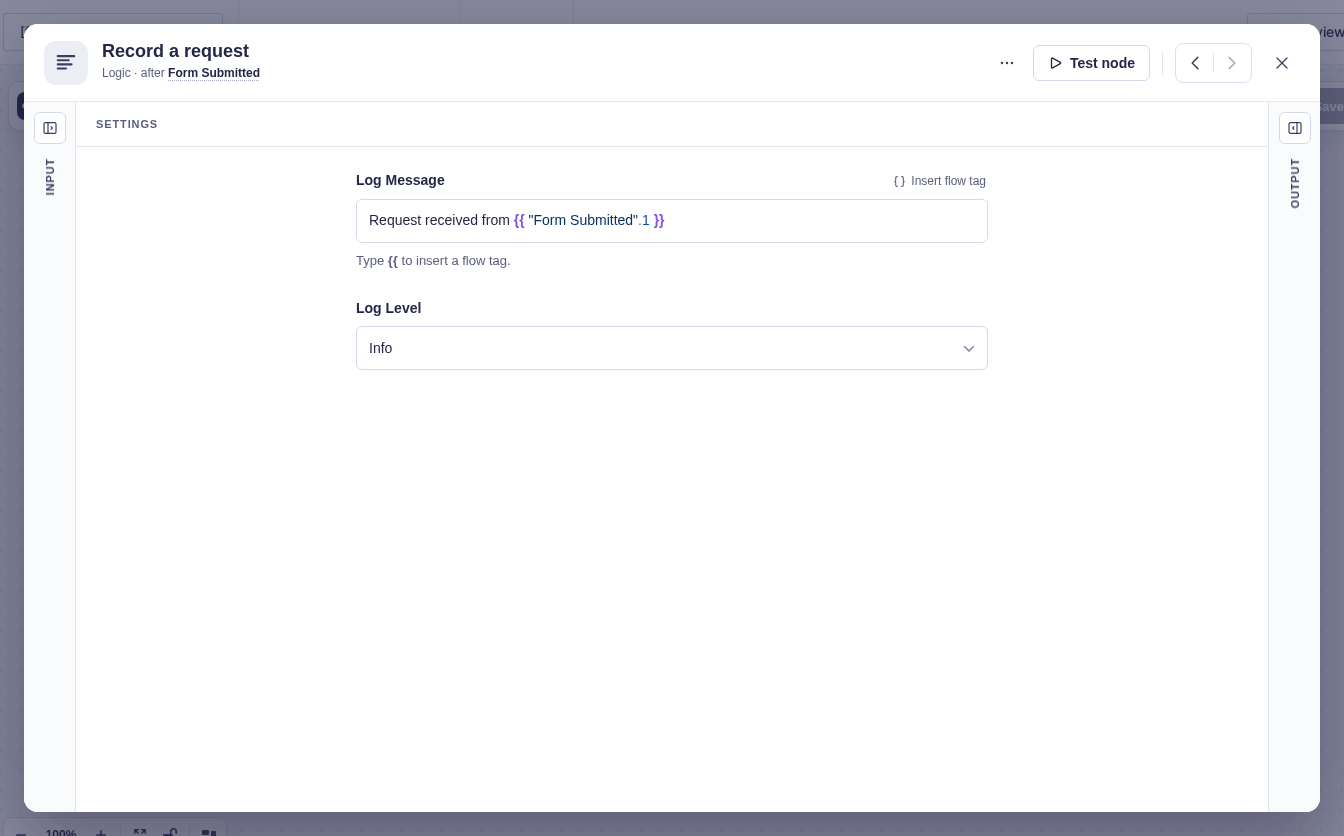
The reference sample node also opts into flow tags. Its Log Message setting uses the standard field UI rather than a separate custom editor. The sample lives under docs/examples/extension-samples/ and must be adapted in an integration plugin.
Collection contracts
Section titled “Collection contracts”Collections are how Flowcrafter loops over lots of rows without dragging every row through the workflow. A query node saves lightweight references; a loop reads them back one at a time. Three contracts model that:
Provides_Collection marks a query node that saves refs. Implement get_collection_item_name() so core can compose a source-specific “Results” label. Your output should always return count, and a complete items[] only when the node’s “Include Data” option is on.
Consumes_Collection marks a node — like Loop — that reads one upstream collection source. Builder and server expose these as the provides_collection and consumes_collection capabilities.
Iterates_Collection extends Consumes_Collection. The engine uses this narrower marker for resumable, one-item-at-a-time execution, so a plain consumer doesn’t accidentally inherit loop scheduling. Iterators may also accept a selected direct array; ordinary Consumes_Collection nodes still require a Provides_Collection node upstream.
Test mode
Section titled “Test mode”Has_Test_Mode_Override lets a node provide execute_in_test_mode( $node, $run, $form ).
Reach for it when production execution has side effects that should be skipped, mocked, snapshotted, or restored during builder tests. If test mode should exercise the real integration, don’t implement the override at all.
Return the same result contract as production execute(): include next_nodes, keep your output keys and shape consistent, and optionally add a test_note. A missing next_nodes becomes [] and stops the builder test from continuing downstream. Test output drives deep flow tag autocomplete, but Flowcrafter does not compare it against get_output_schema() or against production output.
The generic flowcrafter_node_output filter still runs after execute_in_test_mode(). So any output filter that performs production-only writes or external calls must check $run->is_test and skip those side effects during builder tests.
Inbound request contracts
Section titled “Inbound request contracts”Inbound triggers (webhooks and the like) route through contracts instead of controller-specific logic:
| Contract | What it does |
|---|---|
Has_Inbound_Token |
Exposes, backfills, and regenerates the routing token in node settings — get_token_from_node(), ensure_token(), regenerate_token(). Regenerated on duplicate so copies get their own. |
Handles_Inbound_Request |
validate_inbound_request() returns a strict `true |
Supports_Test_Listen |
prepare_test_listen() returns generic session metadata plus provider data; stop_test_listen() closes a specific listener generation. |
Providers own HTTP routing and may use the HTTP contracts above. Core’s External_Triggers::start() requires only a registered Is_Trigger node and an authenticated payload with a stable request key. Supports_Test_Listen is optional for production and works for non-HTTP providers too.
For token lifecycle, signatures, idempotency, and test listening in practice, see the Webhook Trigger node.
Scheduled triggers
Section titled “Scheduled triggers”Is_Scheduled_Trigger tells Flowcrafter to manage the node’s Action Scheduler action for it. Your node returns a Schedule_Plan from get_schedule_plan( $node ) and the manager schedules the matching primitive:
use Flowcrafter\Schedule_Plan;
public function get_schedule_plan( array $node ): Schedule_Plan {    // One-off at a timestamp:    return Schedule_Plan::once( $first_run_ts );
    // Or a fixed interval:    return Schedule_Plan::interval( $first_run_ts, $this->get_interval_seconds( $node ) );
    // Or a crontab expression:    return Schedule_Plan::cron( '0 9 * * 1', $first_run_ts );}
get_interval_seconds( $node ) and get_next_run_timestamp( $node ) are the building blocks for interval plans. The scheduled trigger manager owns reconciliation, launch, and run creation — your node just describes when it wants to fire, never how to schedule it.
The Schedule trigger node is the shipping reference.
Capability-gated nodes
Section titled “Capability-gated nodes”Requires_Capability gates a node behind a WordPress capability. It has three static methods:
required_capability(): string— the capability string. Make it filterable so integrators can adjust the bar.current_user_can_manage(): bool— whether the current user passes the check (including multisite super-admin enforcement).restricted_settings_changed( array $old_graph, array $new_graph ): bool— whether the restricted settings differ between two workflow snapshots. Used by the update and test-mode guards so a user without the capability can still resave a workflow as long as they didn’t touch the gated settings.
When a handler implements this contract, every REST write path enforces the gate automatically — no controller hardcodes any node type. Enforcement is centralized in Workflow_Write_Guard (create/update) and the test-mode controller, which walk the workflow for any handler implementing Requires_Capability:
REST path (flowcrafter/v1) |
What happens |
|---|---|
POST /workflows (create) |
403 if the user lacks the capability |
PUT/PATCH /workflows/{id} (update) |
403 on activation or a restricted-settings edit; 400 on invalid settings |
POST /workflows/{id}/test-create |
403 if restricted settings are injected or modified in the workflow override |
POST /runs/{id}/step, POST /runs/{id}/step-batch |
Same test-mode guard |
GET /node-types |
Real settings fields hidden (only the auto-injected source fields remain), available: false, and a requires label shown in the picker |
The reference implementation is the PHP Code node — see PHP Code node for the trust model.
Capabilities in REST
Section titled “Capabilities in REST”Node_Registry::get_capabilities( $type ) inspects a handler’s contracts and returns a list of capability strings on GET /flowcrafter/v1/node-types. The frontend reads them to make UI decisions — showing entry-source controls, test-listen buttons, collection affordances, and so on.
The strings it emits, one per matching contract: is_trigger, requires_form, requires_entry, provides_entry, provides_form, resolves_flow_tags, has_test_mode_override, has_inbound_token, handles_inbound_request, supports_test_listen, is_scheduled_trigger, validates_node_settings, provides_collection, consumes_collection, iterates_collection, and pauses_run.
Third-party nodes can append custom capability strings through the flowcrafter_node_capabilities filter:
add_filter( 'flowcrafter_node_capabilities', function ( array $caps, string $type, $handler ) { if ( $type === 'MyNodeType' ) { $caps[] = 'my_custom_capability'; } return $caps;}, 10, 3 );Requires_Capability is intentionally not in that list — it’s enforced server-side at every write path rather than exposed as a UI flag. The picker learns a node is locked from the available: false and requires fields on /node-types instead.
Runtime traits
Section titled “Runtime traits”Contracts declare what a node can do; the seven traits in Flowcrafter\Nodes\Traits hand you the how, so you don’t re-derive the same resolution logic in every handler. Four back a specific contract; three are standalone helpers a node reaches for when it needs one.
| Trait | Pairs with | What it gives you |
|---|---|---|
Resolves_Entry |
Requires_Entry |
Resolve an entry ID from entry_source—upstream walk, a specific node, a query selector, a literal ID, or a flow tag—then reload its current data from Gravity Forms. |
Resolves_Form |
Provides_Form |
Turn a node’s form context into a loaded GF form. |
Resolves_Form_Source |
Requires_Form |
Resolve the injected form_source field to a form ID or a loaded form. |
Resolves_Flow_Tags |
Resolves_Flow_Tags |
Interpolate {{ … }} flow tags against the current run — resolve_run_flow_tags() and resolve_run_int(). |
Resolves_Flow_Tag_Items |
— (also use Resolves_Flow_Tags) |
A per-item resolver for list-transform nodes like Filter, so {{ item.* }} resolves against the row under test while {{ run.* }} and other node outputs still work. |
Resolves_Site_Time |
— | Ergonomic $this-> access to the site-timezone date helpers in Site_Time — parse HH:MM, read wall-clock dates — so a scheduling node doesn’t re-derive the timezone. |
Normalizes_Key_Value_Settings |
— | Turn a key_value setting’s saved rows (or a plain map) into the [ key => value ] array a handler actually wants, skipping blank-key rows. |
Related reading
Section titled “Related reading”- Extending Flowcrafter — registration seams and the two registries.
- Writing a Node — the handler contract and
execute()basics. - Settings fields — the field types you declare in
get_settings_fields(). - Flow tag reference — the
{{ … }}expression syntax. - Hooks — every action and filter, including
flowcrafter_node_capabilitiesandflowcrafter_node_output. - REST API — the
flowcrafter/v1endpoints referenced above.