

Use Cases
Draft a reply with AI, then approve it
Let AI prepare a response from the submission, but keep a person in control before anything reaches the customer.
AI is useful for getting to a first draft quickly. It should not quietly invent a customer-facing answer and send it unchecked. This workflow drafts a reply, puts that exact draft in front of a reviewer, and sends it only after approval.
What you’ll build
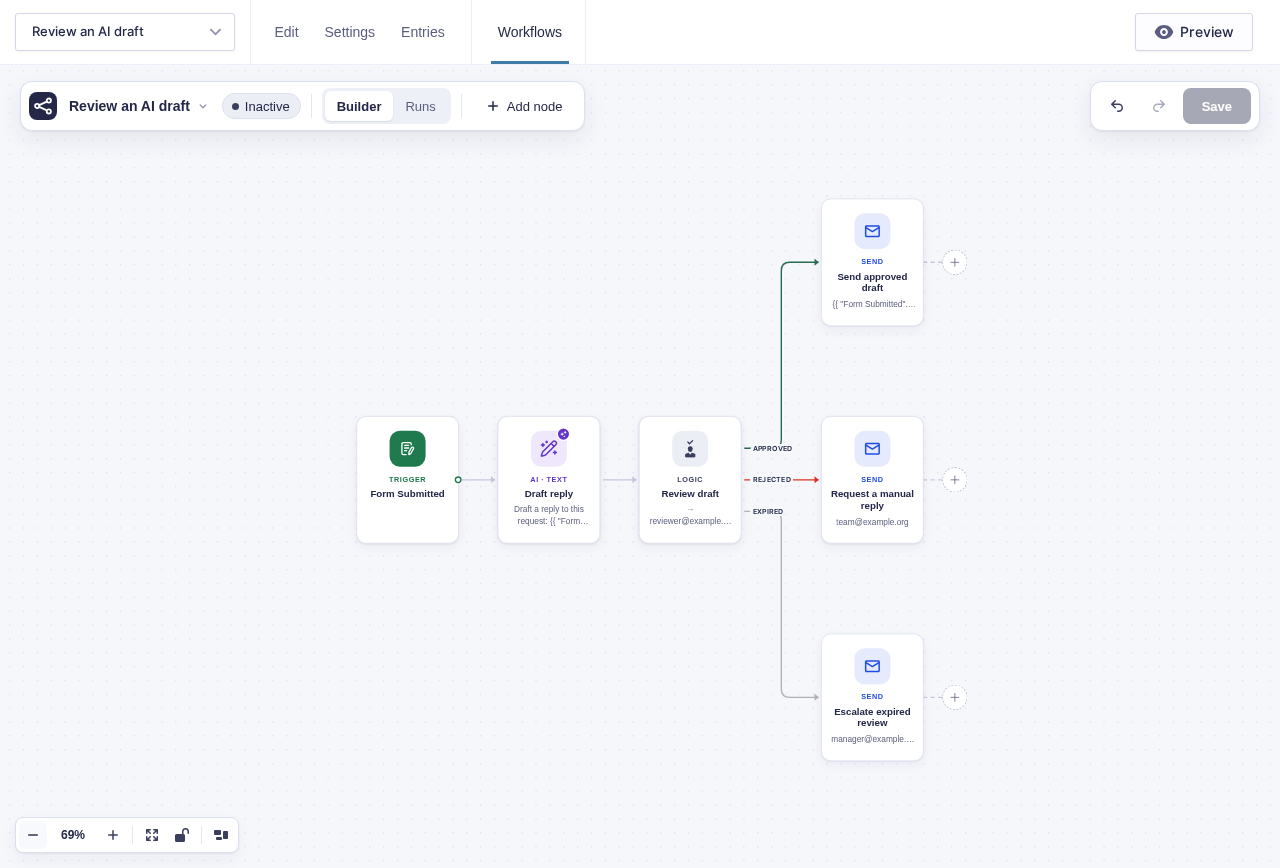
Section titled “What you’ll build”flowchart TD
A[Form Submitted] --> B[OpenAI Text: draft the reply]
B --> C[Wait for Approval]
C -->|Approved| D[Send Email to the submitter]
C -->|Rejected| E[Email the team for a manual reply]
C -->|Expired| F[Escalate to a manager]
Before you build
Section titled “Before you build”- Configure GC OpenAI under Forms → Settings → OpenAI and review its data-processing terms.
- Confirm the form has an email field for the submitter.
- Choose a reviewer inbox and a manager inbox for expired requests.
- Make sure WordPress can send mail reliably.
Build it step by step
Section titled “Build it step by step”-
Configure GC OpenAI under Forms → Settings → OpenAI. Open your form and click Workflows in the form toolbar. Click New Workflow, then Add Trigger and choose Form Submitted.
-
Activate GC OpenAI and add OpenAI Text named Draft reply. Tell it what tone to use and what it must not promise. Include only the submitted fields the draft actually needs rather than sending
{all_fields}by default. -
Add Wait for Approval named Review draft. Set Approver emails to the reviewer inbox, Approval policy to
First response decides, Expiry (hours) to72, and Reminder (hours) to24. In Email Body, include{{ "Draft reply".response_text }}above{{approval.approve_url}}and{{approval.reject_url}}. Turn on Require a note when rejecting.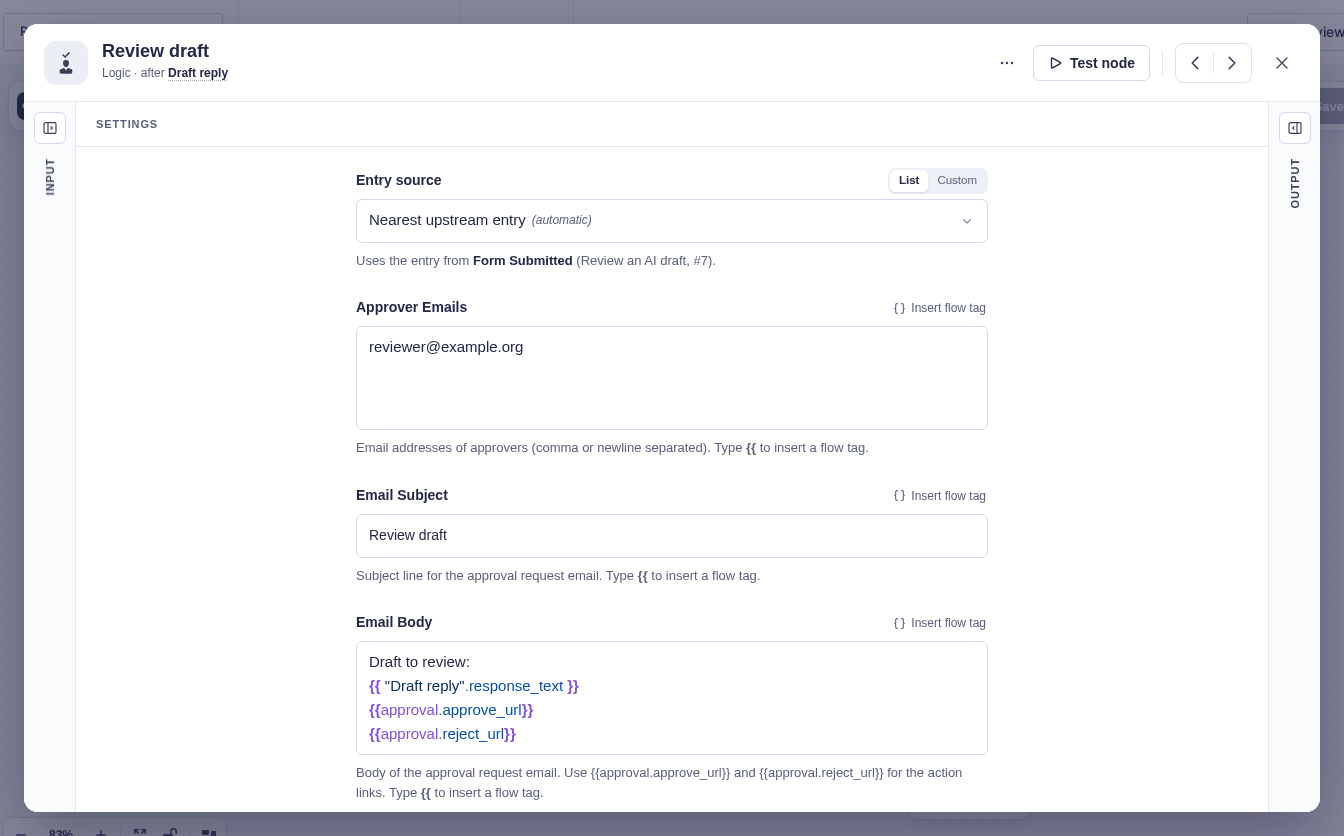
-
On Approved, add Send Email. Address it to the submitted email field and use the same AI response as the body.
-
On Rejected, email the support team with the draft and
{{ "Review draft".note }}. Use Expired for an escalation so the request cannot sit unnoticed.
Data passed between nodes
Section titled “Data passed between nodes”| From | Data used later | Where it goes |
|---|---|---|
| Form Submitted | Selected answers and submitter email | OpenAI Text prompt and Send Email recipient |
| Draft reply | response_text |
Approval email and approved customer email |
| Review draft | action, note, resolved_by, resolved_at |
Rejection handoff and run history |
Test and activate safely
Section titled “Test and activate safely”New workflows start Inactive. Keep this one inactive while you run a builder test for both Approved and Rejected; test mode simulates the decision and does not email real approvers. Then temporarily activate on staging, or use a controlled live run with a non-sensitive entry and temporary reviewer addresses. Let a short deadline pass to verify the Expired branch. Restore the production expiry, review every recipient and prompt, activate the workflow, and watch its first runs.
The Expired branch is scheduled when a new approval parks. Approval nodes that were already waiting before expiry scheduling was installed do not gain a timer retroactively.
What Flowcrafter adds
Section titled “What Flowcrafter adds”The useful part is not AI by itself. It is the handoff: generated text becomes input to a human decision, and that decision controls whether the customer email runs. The draft, reviewer, decision, and final send all stay visible in one run.
Related resources
Section titled “Related resources”- OpenAI Text — generate the first draft
- Wait for Approval — review it before continuing
- Send Email — send the approved result
- Passing Data Between Nodes — place the draft in both later nodes