

Extending Flowcrafter
Registering Templates
Contribute a ready-made workflow — including a Fixer that runs over a form's existing entries — through the flowcrafter_templates filter.
A template (we call them recipes internally) is a pre-wired workflow the builder offers in its gallery. It’s a starting point a user drops on the canvas, not a single node. Your plugin contributes one with a single add_filter( 'flowcrafter_templates', … ) — no build step, no React.
A Fixer is one flavor of template: a manual-run recipe that walks a form’s existing entries (Manual Trigger → Get Entries → For Each → your action). GP Media Library ships one to backfill files into the WordPress Media Library.
Every record is normalized on the way out. An id and a graph are required; the rest is defaulted, and a malformed record is dropped rather than served half-formed.
Node, extension, or template?
Section titled “Node, extension, or template?”A template is orthogonal to nodes — it wires together core nodes, your own nodes, or both. A Connect product with no Flowcrafter node of its own can still ship a template built on the GF Feed node.
| You want to ship… | Use | Guide |
|---|---|---|
| A new workflow step | a node | Writing a Node Type |
| A ready-made workflow users drop on the canvas | a template | this guide |
For the full map of extension seams, start at the Extending Flowcrafter overview.
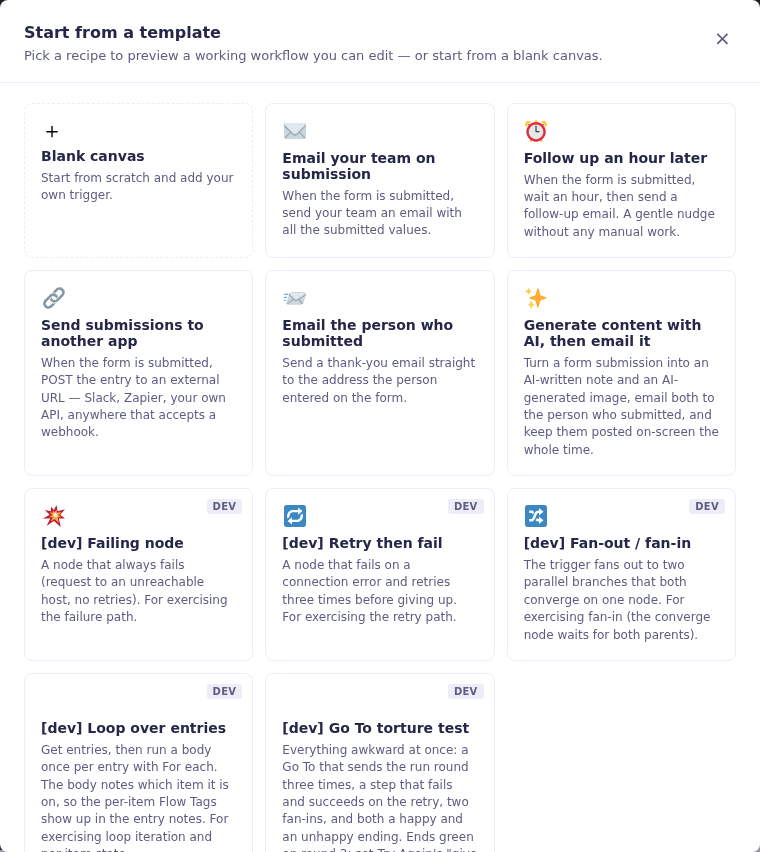
This is the gallery a registered template joins. The screenshot comes from a development sandbox, so development-only recipes also carry a DEV badge.
Register the filter
Section titled “Register the filter”Append your record to the flowcrafter_templates filter. Keeping the workflow in a JSON file (rather than inline PHP) lets a non-engineer read or tweak it.
// In your plugin, at file scope.add_filter( 'flowcrafter_templates', function ( array $templates ): array { $templates[] = array( 'id' => 'my-plugin-backfill', 'name' => 'Backfill something', 'graph' => json_decode( file_get_contents( __DIR__ . '/templates/backfill.json' ), true ), // Everything else is optional — see the record table below. ); return $templates;} );The record shape
Section titled “The record shape”| Field | Required | Default | Notes |
|---|---|---|---|
id |
✓ | — | Unique slug. |
graph |
✓ | — | { nodes, edges, viewport } — see below. |
name |
the id |
Shown on the gallery card. | |
description |
'' |
Card subtitle. | |
category |
General |
Groups the card. Use Fixers for backfills. |
|
icon |
'' |
An emoji or inline SVG string. | |
scope |
any |
form = the recipe references form fields, so the gallery offers it only on a form-bound workflow; any = works either way. Any other value falls back to any. |
|
dev_only |
false |
Hidden unless the site is in dev mode (FLOWCRAFTER_DEV or SCRIPT_DEBUG). |
|
field_slots |
[] |
Abstract field references — placeholders the apply step maps to real form fields, for form-scoped recipes. |
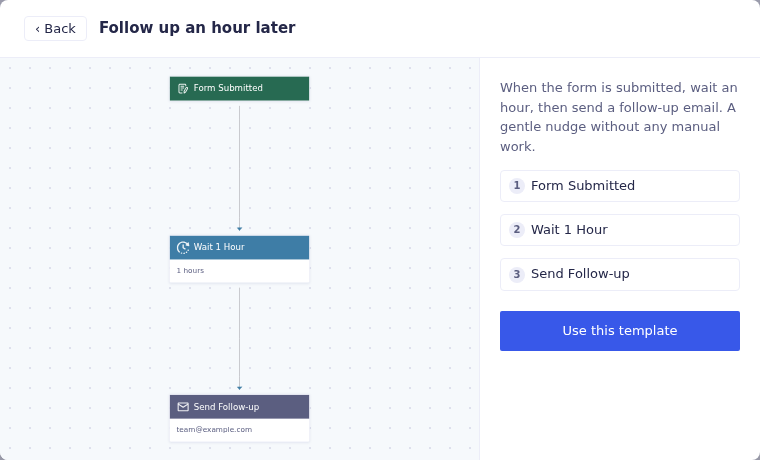
Choosing a card opens a preview before insertion. This built-in follow-up template shows the node list and layout a contributed template should make understandable.
The workflow
Section titled “The workflow”The graph is the same { nodes, edges, viewport } shape the builder saves.
| Key | Shape | Notes |
|---|---|---|
nodes[] |
{ id, type, position:{x,y}, data:{ type, label, settings } } |
type must be a registered node type — a core one (GetEntriesNode, ForEachNode, ManualTrigger, …) or one your plugin registers. An unregistered type surfaces as a validation issue when the recipe loads. data.label has to be filled in and unique: it’s what a flow tag names a node by. Per-node execution settings sit on data too, next to label — data.max_retries (0–8) is the one worth knowing. |
edges[] |
{ id, source, target, sourceHandle, targetHandle } |
sourceHandle: 'output' / targetHandle: 'input' for the normal spine; branch handles for flow nodes — a For Each’s each/done or a Condition’s yes/no. The handle has to be a real output port on that node type, or the edge is refused. |
viewport |
{ x, y, zoom } |
{ "x": 0, "y": 0, "zoom": 1 } is fine. |
Fixers: run a template over existing entries
Section titled “Fixers: run a template over existing entries”A Fixer is a template whose workflow is Manual Trigger → Get Entries → Loop → (your action) — so a site owner can apply it, run it by hand against a whole form’s existing entries, then delete it. Give it category: 'Fixers'. GP Media Library’s “Backfill files to the Media Library” is the reference implementation.
| Do this | Why |
|---|---|
Raise Get Entries’ limit (it defaults to 25) |
Otherwise the Fixer silently processes only the first 25 entries, not the whole form. |
Leave include_item_data off (IDs-only) |
Keeps a large form memory-safe; the loop hydrates one entry at a time. |
Action node: implement Requires_Entry, leave entry_source at $input |
Inside the loop, $input resolves to the current entry — see Writing a Node Type for the contract interfaces. |
| Make the action idempotent | So the Fixer is safe to re-run (GPML’s import reuses attachments already in the library). |
⚙️ GP Media Library's backfill Fixer — recipe + registration
The recipe (includes/flowcrafter/templates/backfill-media.json, abbreviated):
{ "id": "gpml-backfill-media", "name": "Backfill files to the Media Library", "description": "Import uploaded files for entries that already exist…", "category": "Fixers", "icon": "🖼️", "scope": "form", "field_slots": [], "graph": { "nodes": [ { "id": "trigger", "type": "ManualTrigger", "position": { "x": 0, "y": 0 }, "data": { "type": "ManualTrigger", "label": "Run Manually", "settings": {} } }, { "id": "get_entries", "type": "GetEntriesNode", "position": { "x": 0, "y": 160 }, "data": { "type": "GetEntriesNode", "label": "Get Entries", "settings": { "status": "active", "limit": "100000" } } }, { "id": "loop", "type": "ForEachNode", "position": { "x": 0, "y": 320 }, "data": { "type": "ForEachNode", "label": "For Each Entry", "settings": { "on_error": "continue" } } }, { "id": "import", "type": "ImportToMediaLibraryNode", "position": { "x": 200, "y": 400 }, "data": { "type": "ImportToMediaLibraryNode", "label": "Import to Media Library", "settings": {} } } ], "edges": [ { "id": "trigger->get_entries", "source": "trigger", "target": "get_entries", "sourceHandle": "output", "targetHandle": "input" }, { "id": "get_entries->loop", "source": "get_entries", "target": "loop", "sourceHandle": "output", "targetHandle": "input" }, { "id": "loop->import", "source": "loop", "target": "import", "sourceHandle": "each", "targetHandle": "input" } ], "viewport": { "x": 0, "y": 0, "zoom": 1 } }}ImportToMediaLibraryNode is a node GP Media Library registers itself — your Fixer’s action node is whatever node type your plugin ships.
The registration (in the plugin’s Flowcrafter compat class):
add_filter( 'flowcrafter_templates', array( $this, 'register_templates' ) );
public function register_templates( $templates ) {  if ( ! is_array( $templates ) ) {    $templates = array();  }  $data = json_decode( (string) file_get_contents( __DIR__ . '/templates/backfill-media.json' ), true );  if ( is_array( $data ) && ! empty( $data['id'] ) && ! empty( $data['graph'] ) ) {    $templates[] = $data;  }  return $templates;}
Checklist
Section titled “Checklist”- Register the filter at plugin file scope; returns the array with your record appended.
id+graphpresent; every nodetypeis registered.- Edges have unique
ids and realsourceHandle/targetHandle. - Fixer:
category: 'Fixers', Get Entrieslimitraised, action idempotent and implementsRequires_Entry.
Related
Section titled “Related”- Extending Flowcrafter — the full map of extension seams.
- Writing a Node Type — build the action node your Fixer runs, including the
Requires_Entrycontract. - Hooks — the
flowcrafter_templatesfilter alongside every other developer hook.