

Getting Started
How Flowcrafter Extends Gravity Forms
Learn when normal Gravity Forms feeds are enough, and when a process benefits from a Flowcrafter workflow.
Gravity Forms feeds are a good fit when several actions can react independently to one submission. Flowcrafter is for a connected process: do this, wait, inspect the latest data, choose a path, and then do something else.
What Gravity Forms already handles
Section titled “What Gravity Forms already handles”A form can save an entry, show a confirmation, send notifications, collect payment, and pass data to add-ons. Feed conditional logic can decide whether each feed runs, and some add-ons can process feeds in the background or delay them until payment.
Keep using those tools when each action stands on its own. A basic autoresponder does not need a workflow.
Use Flowcrafter when later work depends on timing, updated data, or an earlier result.
What a workflow adds
Section titled “What a workflow adds”| What you want to control | Gravity Forms feeds | Flowcrafter |
|---|---|---|
| When it starts | When a form is submitted | When a form is submitted, on a schedule, from an incoming request, or when you start it manually |
| What happens next | Feeds generally react to the submission independently | You connect steps in the order they should happen |
| Which path it takes | Each feed independently decides whether it should run | The workflow can make decisions at any point and continue down different paths |
| When it continues | Payment add-ons can delay supported feeds until payment is received | The workflow can pause for a set time, an approval, a payment, or another form submission |
| Which entry values it uses | Values are generally read on submission or feed processing | A later step can read the most up-to-date version of the entry |
| How it handles multiple items | Feeds do not share a multi-step process for a group of entries or other items | The workflow can find a group, narrow it down, and perform steps for each item |
| How it uses another service’s response | Webhook feeds send data to another service | The workflow can send a request and use the returned data in later steps |
| How you review what happened | Check entry notes and logs | See the path taken and the result of each step in one place |
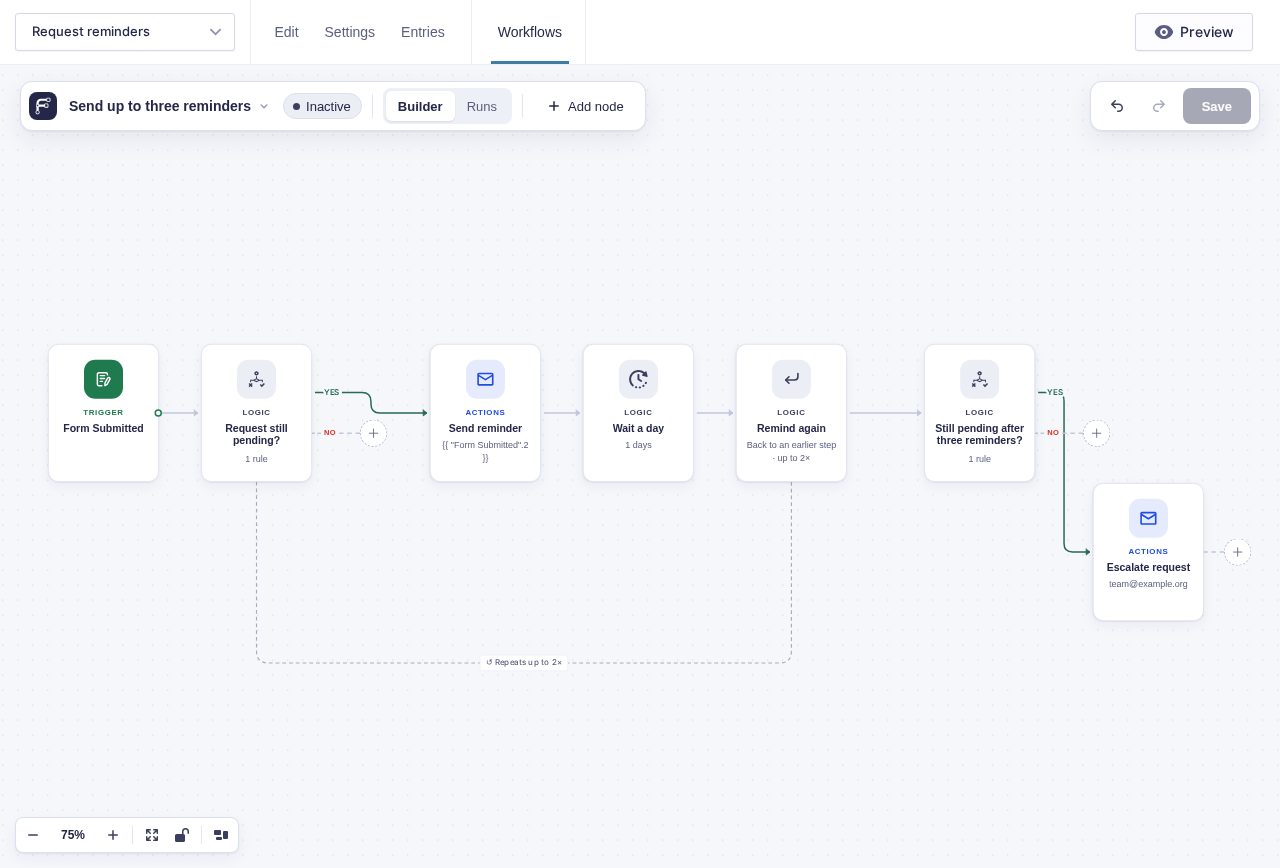
Here is an example of a reminder flow for requests. Flowcrafter checks if the request is still marked as “Pending”, sends a reminder, waits a day, then checks again. If it’s still “Pending”, Flowcrafter does the same thing up to three times. If it’s still “Pending” after the three reminders, it escalates the request.
Gravity Forms can run conditional logic on most feeds, but that is usually a one-time thing on submission. It also can’t do waits on its own.
Work across forms
Section titled “Work across forms”A workflow can have a primary form without being limited to that form. Nodes can find entries in other forms, wait for a different form’s submission, or create and update entries elsewhere.
Global workflows: coming soon.
Use existing feeds inside a workflow
Section titled “Use existing feeds inside a workflow”The GF Feed node runs a compatible feed at the point you choose. This lets an approval, condition, or earlier API request determine when the feed runs.
When an active workflow manages a feed or notification, Flowcrafter prevents that item from also running on submission. This avoids sending or processing the same thing twice.
Example: approve before sending to a CRM
Section titled “Example: approve before sending to a CRM”For example, a submission can look up a customer, request approval when needed, and run the existing CRM feed only on the approved path:
flowchart TD
    T([Form Submitted]) --> H[HTTP Request]
    H --> C{Needs approval?}
    C -->|No| F[GF Feed]
    C -->|Yes| A[Wait for Approval]
    A -->|Approved| F
    A -->|Rejected| X([Finish])
    A -->|Expired| N[Notify administrator]
    F --> E[Send Email]
The workflow does not replace the CRM feed. It controls when that feed is allowed to run and records the surrounding decisions.