

Flow
Go To
Send a run back to an earlier step, cap the number of returns, and take a Gave up branch when the limit is reached.
Go To sends the same run back to an earlier step. The workflow follows its connections again from that point; it does not create a new run or undo earlier actions.
The repeated section includes branches reached from the target, not just the direct path back to Go To. Steps after Go To’s Gave up output are outside that section. Normal branch decisions still determine which steps actually run on each visit.
When to use it
Section titled “When to use it”Use Go To for a bounded repeat, such as sending a reminder a limited number of times. Add a decision before Go To when the workflow should stop repeating after a condition is met.
Settings
Section titled “Settings”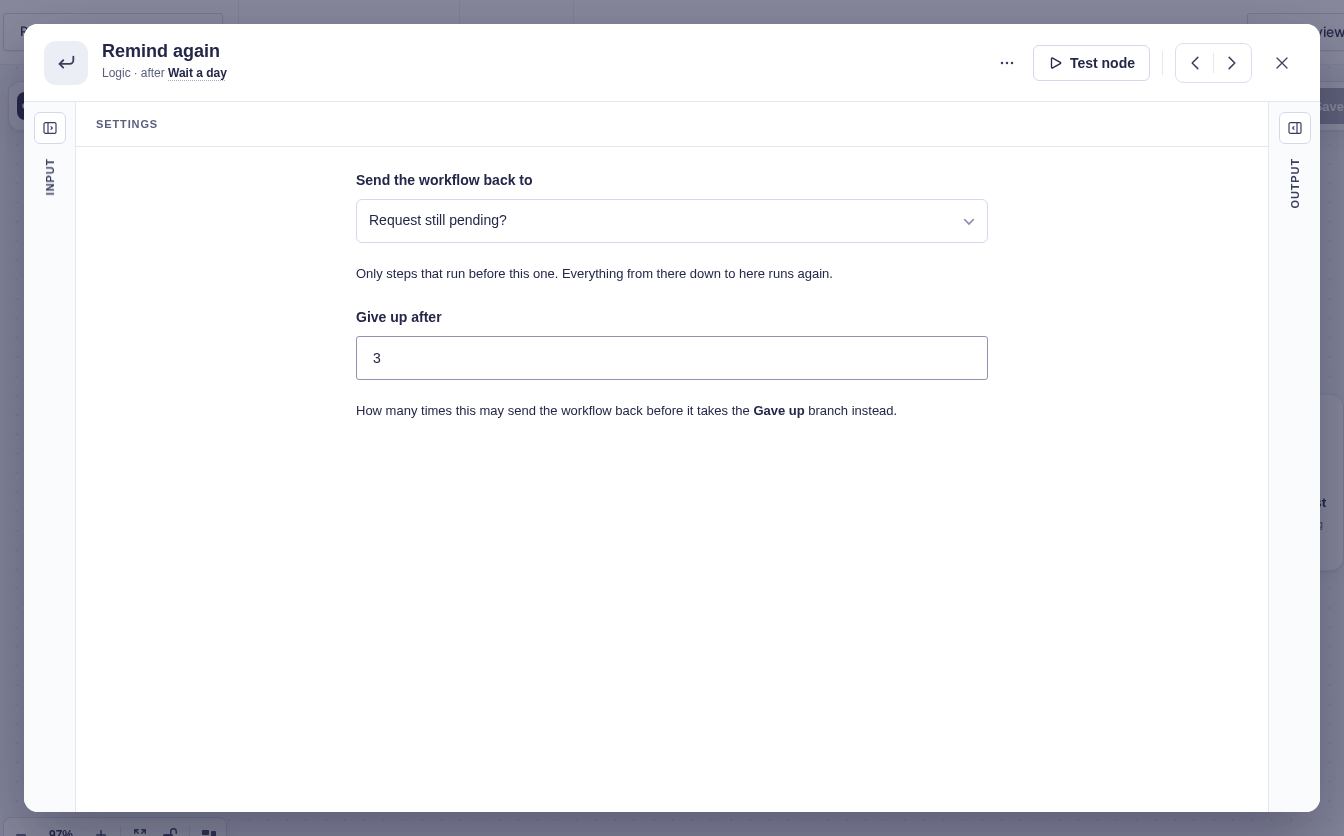
| Setting | What it does |
|---|---|
| Send the workflow back to | Required. Choose an earlier step connected to the path leading to this Go To. The picker excludes Go To itself and steps on unrelated paths. |
| Give up after | The number of backward jumps allowed before taking Gave up. Defaults to 10; use a whole number of at least 1. |
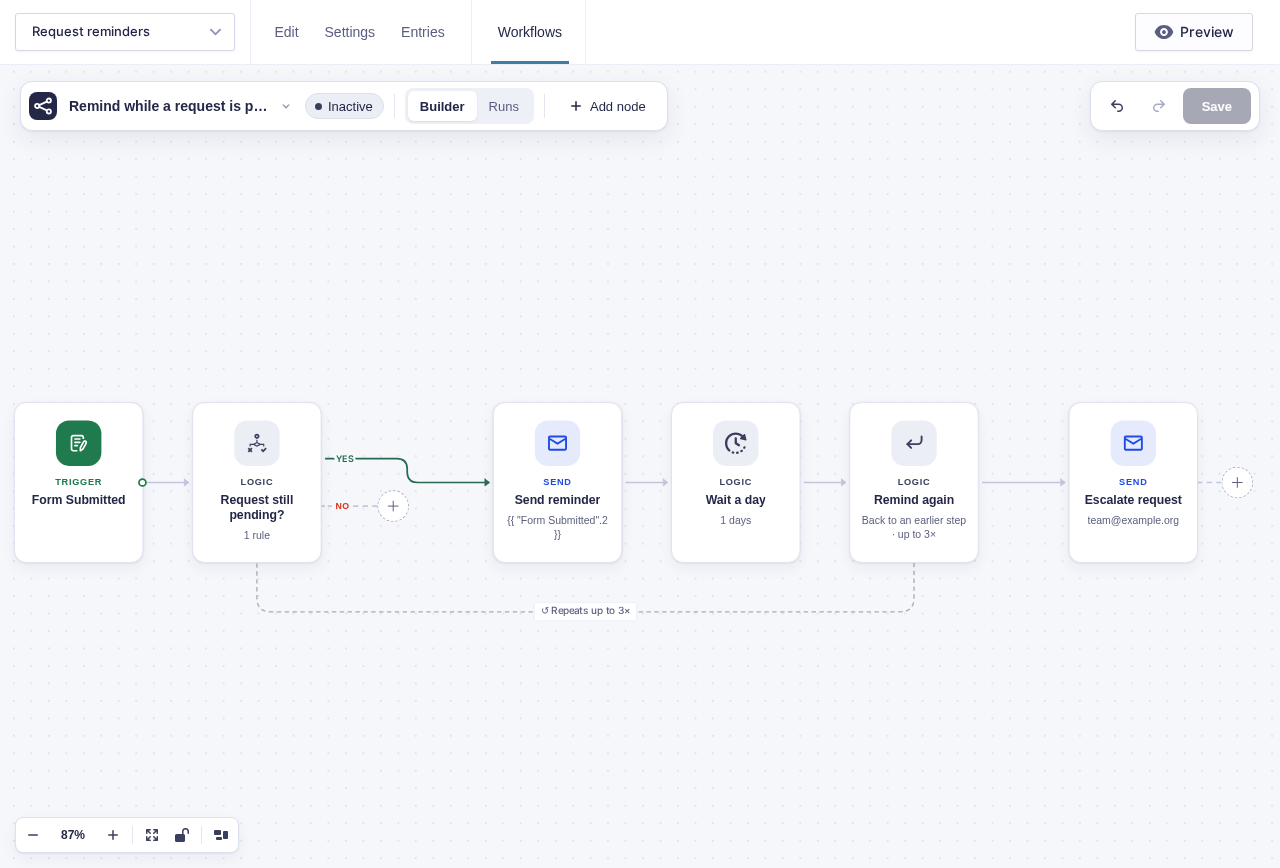
The builder draws a dashed return line to the selected step. Choose the target in settings rather than drawing a normal connection backward.
How the limit is counted
Section titled “How the limit is counted”The original trip through the workflow is not a backward jump. With Give up after set to 3, Go To can return to its target three times. If the path reaches Go To every time, the repeated section runs four times in total: once initially, then three repeats. On the last visit, Go To takes Gave up instead of returning again.
Each Go To node has its own return count for its selected target. Separate Go To nodes do not consume one another’s allowances.
Branches and output
Section titled “Branches and output”| Outcome | What happens |
|---|---|
| More returns allowed | The run goes back to the selected target. The Gave up connection does not run yet. |
| Limit reached | The run follows Gave up. If nothing is connected, that path ends without making the run fail just because the limit was reached. |
Go To exposes these values as flow tags:
| Value | Meaning |
|---|---|
gave_up |
Whether this visit reached the limit and took Gave up. |
passes |
This Go To node’s backward-jump count for its selected target, including the jump this visit requests when it is not giving up. |
max_passes |
The configured limit, or 10 when the default is used. |
target |
The internal ID of the selected target step. |
For a node named Remind again, {{ "Remind again".gave_up }} reads its Gave up value.
Example: bounded daily reminders
Section titled “Example: bounded daily reminders”Send daily reminders while a request is pending, then alert the team if the reminder limit is reached. The condition decides whether another reminder is needed; Go To brings the run back to check again.
- Add a Request status dropdown to the form with
Pendingselected by default andResolvedas the other choice. Set its visibility to Administrative so your team, not the submitter, updates this saved entry field when the request is handled. - Start with Form Submitted, then add Condition (entry) named Request still pending?. Set its rule to Request status is Pending.
- Connect Yes to Send Email named Send reminder and configure its recipient and message. Leave No unconnected so that path ends when the request is no longer pending.
- After Send reminder, add Delay named Wait a day and set it to one day.
- After Wait a day, add Go To named Remind again. Choose Request still pending? as its target and set Give up after to
3. - Connect Gave up to another Send Email named Escalate request for the team.
Each return checks the entry’s current saved status, not its original submission value. Changing it to Resolved during a delay stops reminders at the next condition check. A reply alone does not change the field; your team or another automation must update the entry.
If the request stays pending, the workflow sends four reminders in total: one initially and one for each of the three returns. Each reminder is followed by a one-day delay. After the final delay, Go To takes Gave up and sends one escalation email; it does not check the condition again on that path.
Go-to-knows
Section titled “Go-to-knows”- The target must have a connected path to Go To. A missing or unreachable target blocks validation and cannot be used for a return.
- A For Each node cannot sit in the repeated section. Keep list processing outside that section.
- Go To sections cannot contain another Go To. Give each Go To its own separate section.
- Separate Go To nodes keep independent return counts. An earlier Go To’s returns do not make a later Go To reach Gave up sooner.