

Use Cases
Route each request to the right team
Make one routing decision, record the owner, and give every request a clear fallback.
A shared request form serves sales, billing, and support. Each submission needs one owner, and anything unexpected needs a safe place to land.
What you’ll build
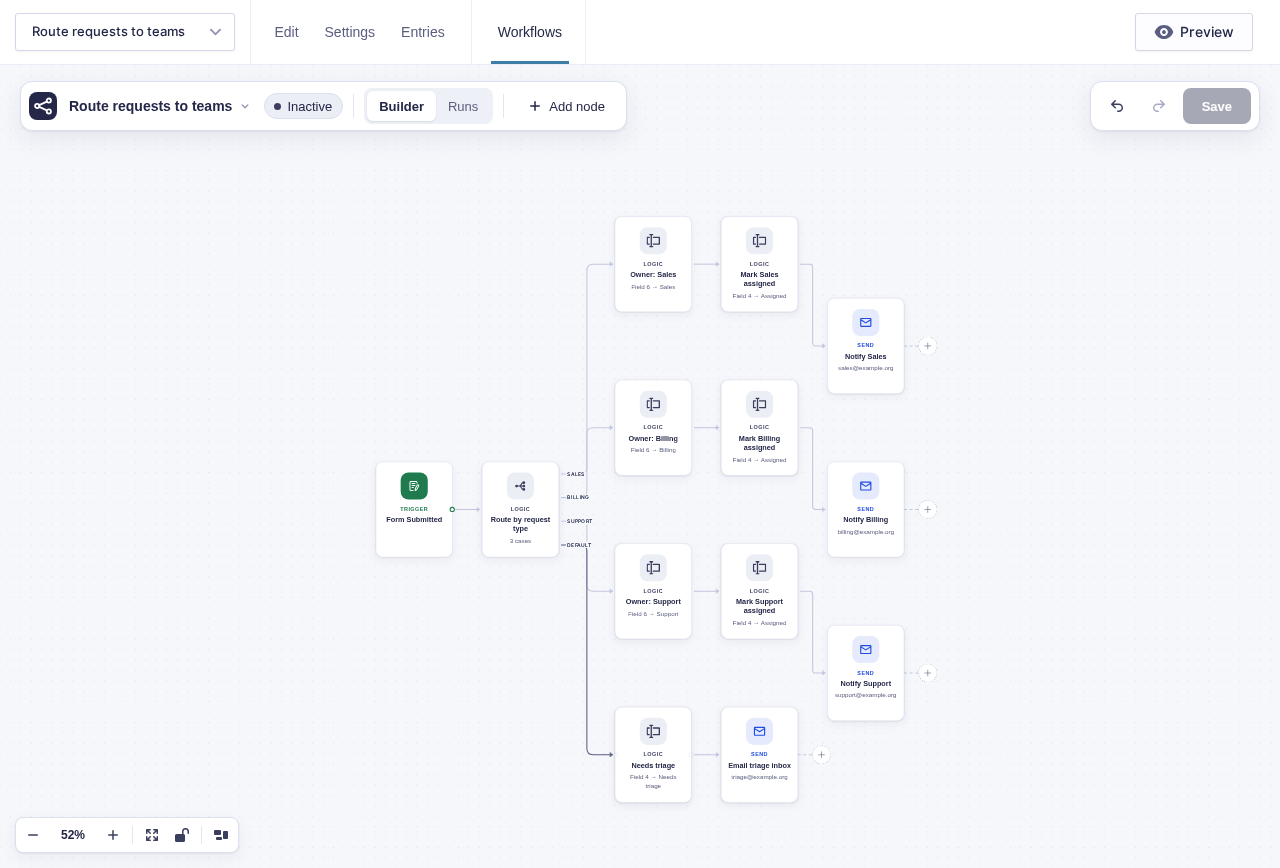
Section titled “What you’ll build”A Switch reads the request type and takes the first matching branch. Each branch records its owner on the entry before sending that team’s notification. The Default branch marks the request for triage instead of losing it.
flowchart TD
    A[Form Submitted] --> B{Route by request type}
    B -->|Sales| C[Set owner: Sales]
    B -->|Billing| D[Set owner: Billing]
    B -->|Support| E[Set owner: Support]
    B -->|Default| F[Set status: Needs triage]
    C --> G[Send sales notification]
    D --> H[Send billing notification]
    E --> I[Send support notification]
    F --> J[Email the triage inbox]
Before you build
Section titled “Before you build”- Add a visible Request type field with the exact values used by the routing cases.
- Add administrative Owner and Routing status fields so submitters cannot choose their owner or mark routing complete.
- Create one Gravity Forms notification per team, or collect the team inboxes for Send Email nodes.
- Choose a monitored triage inbox for unmatched values.
Build it step by step
Section titled “Build it step by step”-
Open your intake form and add a visible Request type field.
-
Add Owner and Routing status fields with Administrative visibility. Submitters choose the request type; only staff and trusted automation should control ownership and status.
-
Navigate to Workflows in the form toolbar. Click New Workflow, then Add Trigger, and choose Form Submitted.
-
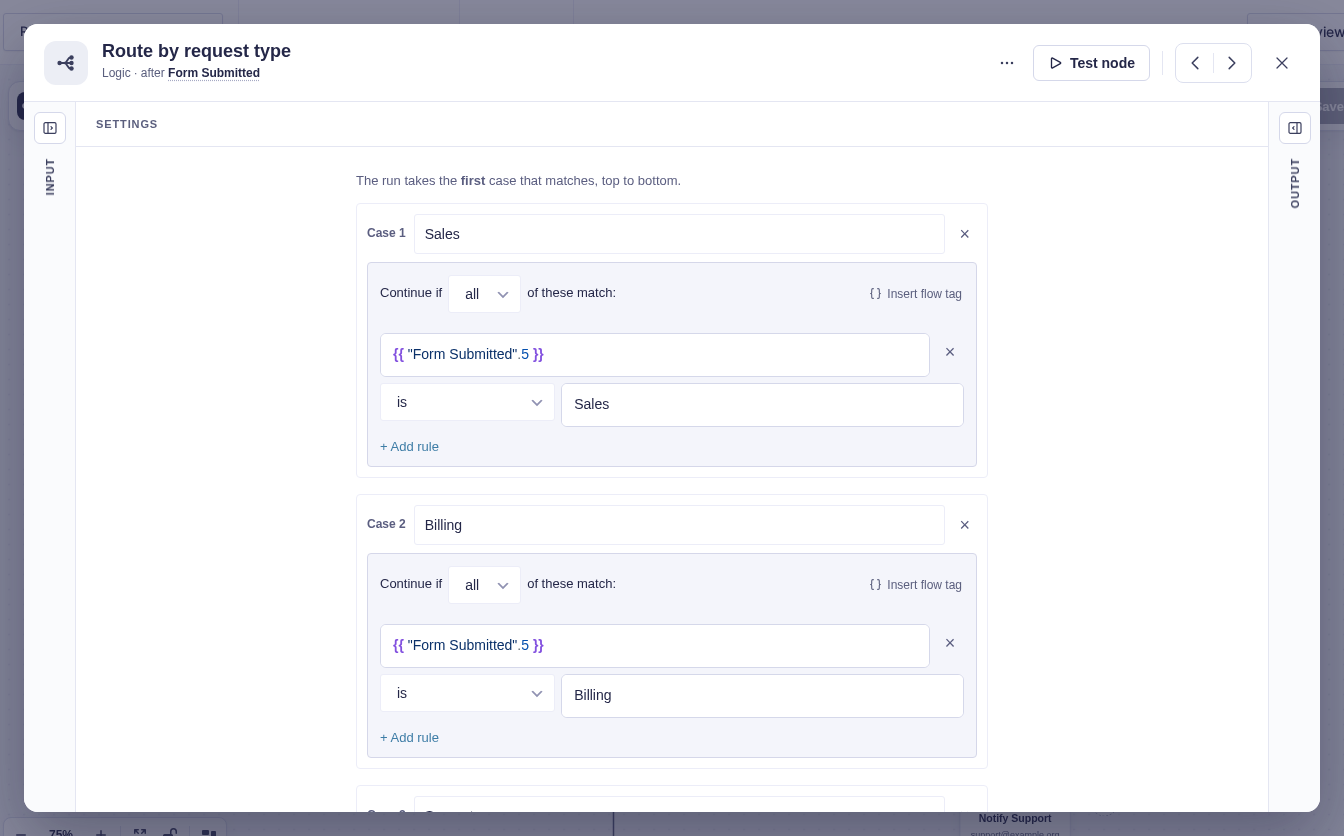
Add a Switch node named Route by request type. Add cases for Sales, Billing, and Support using the submitted field. Switch nodes check cases from top to bottom and take only the first match.
-
On each named branch, add Update Entry Field named for that team. Set Field to Owner and New value to
Sales,Billing, orSupport. Add a second Update Entry Field setting Routing status toAssigned, then follow it with that team’s Send Notification or Send Email. -
On Default, set the routing status to
Needs triageand email a shared inbox with{{ "Form Submitted".mergeTag('{all_fields}') }}.
Data passed between nodes
Section titled “Data passed between nodes”| From | Data used later | Where it goes |
|---|---|---|
| Form Submitted | Request type, full entry, and entry identity | Switch, owner update, and messages |
| Switch | First matching output label | Exactly one team path |
| Update Entry Field | Updated entry entry_id |
Later entry-aware nodes or feeds added to that path |
Edge cases
Section titled “Edge cases”- Case comparisons must match the field’s saved values, not just its display labels.
- Cases run top to bottom and stop at the first match. Put narrow rules before broad ones.
- Default is required operationally even though the builder allows a branch with nothing connected.
- If routing only sends conditional notifications, native Gravity Forms conditional logic is simpler; use this workflow when you also need one-winner routing, status, or later steps.
Test and activate safely
Section titled “Test and activate safely”New workflows start Inactive. Use builder tests for every case plus one unknown value, or temporarily activate with test inboxes for controlled live submissions. Confirm each entry records one owner, sends one team message, and sends the unknown value to triage. Replace test inboxes, activate for production, and watch the first run through Default as closely as the named paths.
What Flowcrafter adds
Section titled “What Flowcrafter adds”Gravity Forms notification conditional logic is usually enough when each department only needs its own email. Flowcrafter becomes useful when routing is a process: exactly one branch wins, the decision is written back to the entry, every branch can grow independently, and Default provides a visible fallback.
Related resources
Section titled “Related resources”- Switch — first-match routing with a Default branch
- Update Entry Field — keep the owner visible on the entry
- Send Notification — send an existing Gravity Forms notification at this point
- Branching & Conditional Logic — build and test the paths